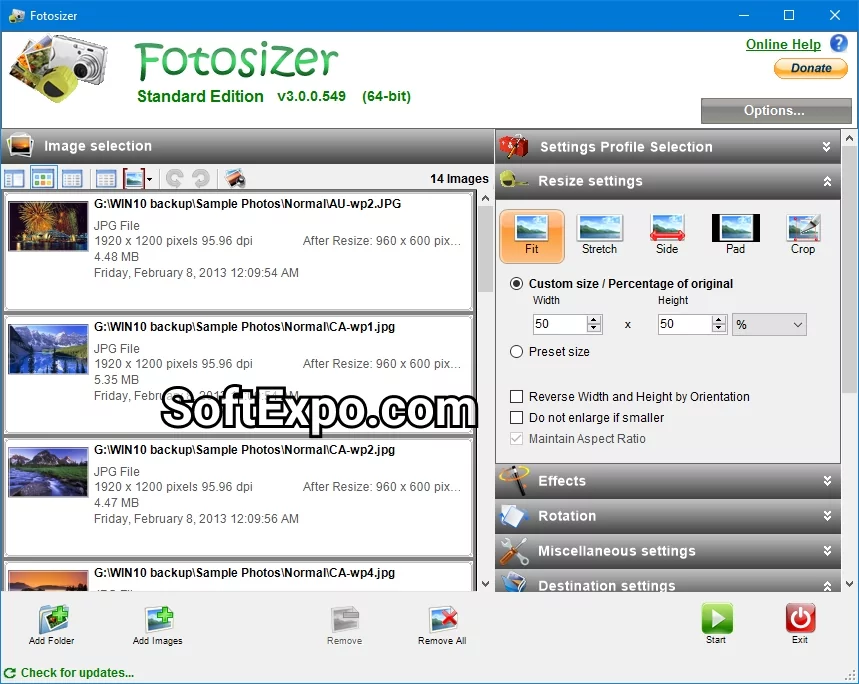
Fotosizer is a freeware image resizer tool designed as a photo batch processing tool for Windows users. As an image resizing software, it simplifies the task of resizing or compressing hundreds of photos in mere minutes. It’s ideal for anyone who needs to resize multiple photos, whether for email, social media, or web uploads.
Key Features of This Freeware Image Resizer
Batch image resizer: Resize, rotate, rename your photos in large groups with just 3 intuitive steps — select photos, choose resizing settings, and process. Maintain aspect ratio: Keep consistent image proportions or disable it for custom dimensions. Resize by percentage or pixels, or even pad one side while keeping uniform size across all photos. Batch rotation and orientation: Perform flips, 90° rotations, 180° turns, or auto‑rotate based on EXIF data. Apply visual effects in bulk, like Black & White, Sepia, Vintage, Vignette, Lomo, and more. Watermark photos in batch with either text or image watermarks—customizable in terms of font, size, opacity, rotation, tiling, shadows, and transparency(Pro edition). Live preview feature: Instantly view how the resized photo will look, including size and dimensions, before processing.
Why It Stands Out
Freeware image resizer for personal and even some commercial use, with a Pro edition unlocking watermarking, colour adjustments, rounded corners, and more. Clean, user‑friendly interface — minimal menus, clear step‑by‑step approach. Supports over 35 languages, including English, Dutch, Chinese, Russian, Spanish and more. Free and efficient — over 10 million downloads attest to its popularity as a bulk photo resizer.
If you are exploring tools beyond resizing, check out our photo editing software collection where you’ll find programs for color correction, retouching, filters, and more advanced editing needs.