Description
For professionals, outdoor enthusiasts, and researchers, the need to access high-resolution maps offline is a common challenge. Standard online map services rely on an active internet connection, leaving users stranded in remote areas or unable to save large-scale imagery for projects. Two Windows-based tools, Google Maps Downloader and SAS.Planet, offer powerful solutions to this problem by allowing users to save map data locally. This comparison explores their capabilities to help you decide which tool fits your workflow.
Google Maps Downloader
Developed by AllMapSoft, Google Maps Downloader is a specialized shareware utility designed with a singular focus: acquiring map tiles from Google's servers. It is intended for users who need a straightforward method to download specific map areas without navigating complex GIS interfaces. The software is frequently updated, with recent versions (such as the 8.8x series in late 2025) ensuring compatibility with Google's changing server protocols.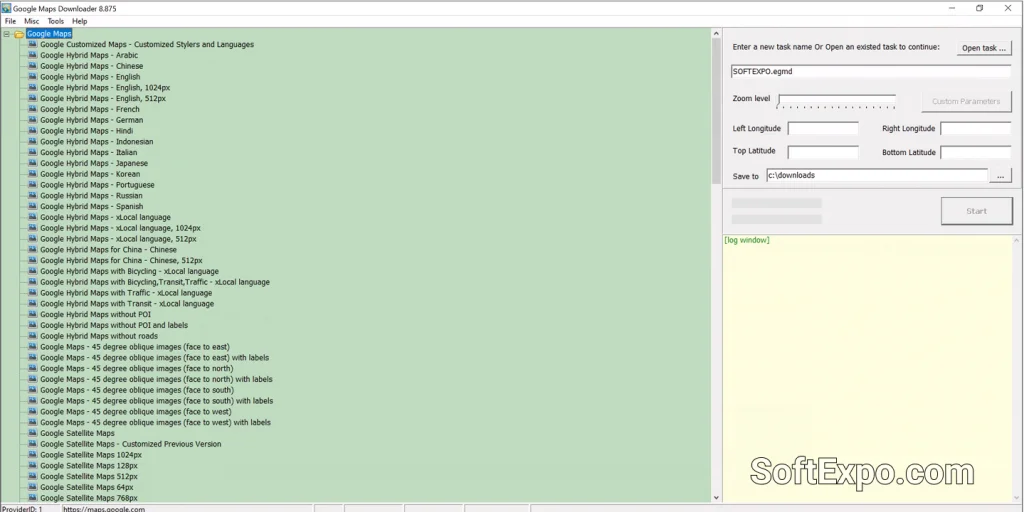
- Automated Stitching: Automatically combines thousands of small downloaded tiles into a single, seamless large image (BMP, JPG, TIFF).
- Simplicity: Offers a wizard-like interface where you simply input coordinates and zoom levels to begin.
- Specific Focus: Optimized specifically for Google Maps layers, including satellite, street, terrain, and hybrid views.
- MBTiles Support: Exports data to MBTiles format, making it compatible with mobile navigation apps like Locus Map or OruxMaps.
Pricing Model: This is commercial software. Users can download a trial version limited to lower zoom levels (usually up to zoom 13). The full license costs approximately $39 to $59 USD depending on the specific edition (e.g., Satellite vs. Hybrid versions) and grants lifetime upgrades.
Best Suited For: Users who specifically need Google Maps imagery and prefer a simple, set-and-forget tool that handles the downloading and image stitching process automatically.
SAS.Planet – Which to choose for working with maps
SAS.Planet is a comprehensive, open-source navigation and mapping program that has gained a massive following in the GIS and outdoor communities. Unlike simple downloaders, it functions as a complete offline browser for dozens of different map services. It requires no installation, running directly as a portable application on Windows 10 or Windows 11, making it a favorite for field laptops.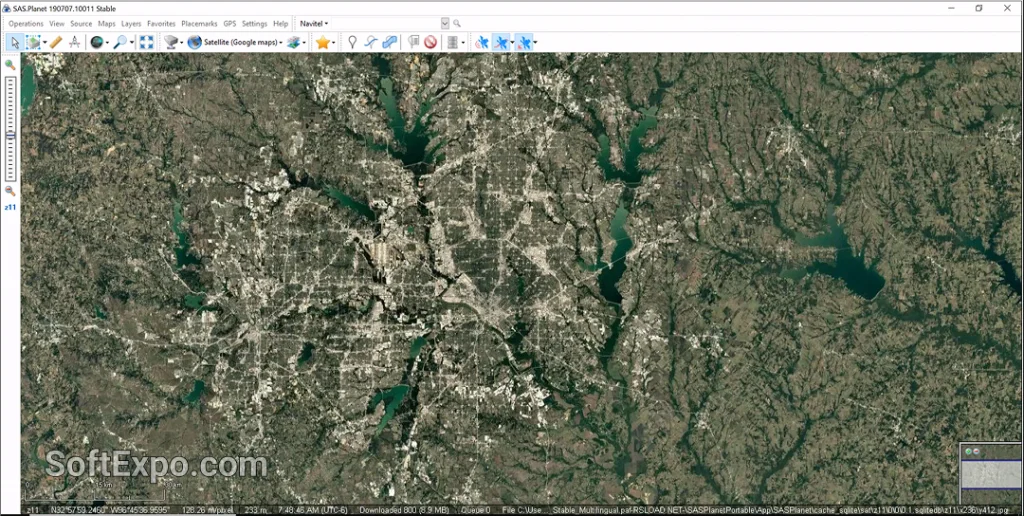
- Multi-Source Capability: Accesses not just Google, but also Bing, Yandex, OpenStreetMap, ESRI, Navionics, and historical imagery.
- Advanced Cache Management: Caches everything viewed on screen for offline use, allowing users to browse naturally rather than just defining coordinates.
- GIS Tools: Includes features to measure distances, work with KML/GPX files, and connect to a GPS receiver for real-time tracking.
- Format Flexibility: Exports maps to a wide variety of formats including ECW, GeoTIFF, and JPEG with georeferencing files (.map, .tab).
Pricing Model: SAS.Planet is completely free and open-source (GPL). There are no subscription fees or trial limitations.
Best Suited For: Power users, GIS analysts, and outdoor adventurers who need access to multiple map providers and advanced tools for route planning or georeferenced data export.
Key Differences
Map Source Variety
The most significant difference lies in versatility. Google Maps Downloader is restricted primarily to Google's servers. If you need data from Bing Satellite or a specific topographic source like OpenTopoMap, you would need a different tool. SAS.Planet comes pre-configured with dozens of map sources and allows users to add custom scripts for even more, making it a universal map tool.
User Interface and Workflow
AllMapSoft's product uses a "downloader" paradigm: you define coordinates, click start, and wait for files. It is utilitarian and efficient for grabbing a square of land. SAS.Planet uses a "browser" paradigm: you pan and zoom around the Earth like you would in a web browser. This visual approach is often more intuitive for exploring an area before deciding what to download, though the interface is denser with menus and options.
Offline Navigation
SAS.Planet can function as a real-time navigation system when a GPS receiver is connected to your laptop. It displays your position on the downloaded map cache. Google Maps Downloader is strictly a utility for fetching images; it does not offer real-time GPS tracking or navigation features within the software itself.
Which Should You Choose?
Choose Google Maps Downloader if you... need a simple, no-nonsense tool to grab a high-resolution satellite image of a specific property or city. It is ideal if you are willing to pay for a streamlined experience that handles the stitching of images into a single file without requiring you to learn complex software.
Choose SAS.Planet – Which to choose for working with maps if you... require a versatile professional tool. If you need to compare imagery from different providers (e.g., seeing if Bing has a clearer view than Google), need georeferenced files for GIS work, or have zero budget, this is the superior option. Its ability to run without installation and manage vast offline caches makes it the standard for serious map enthusiasts.