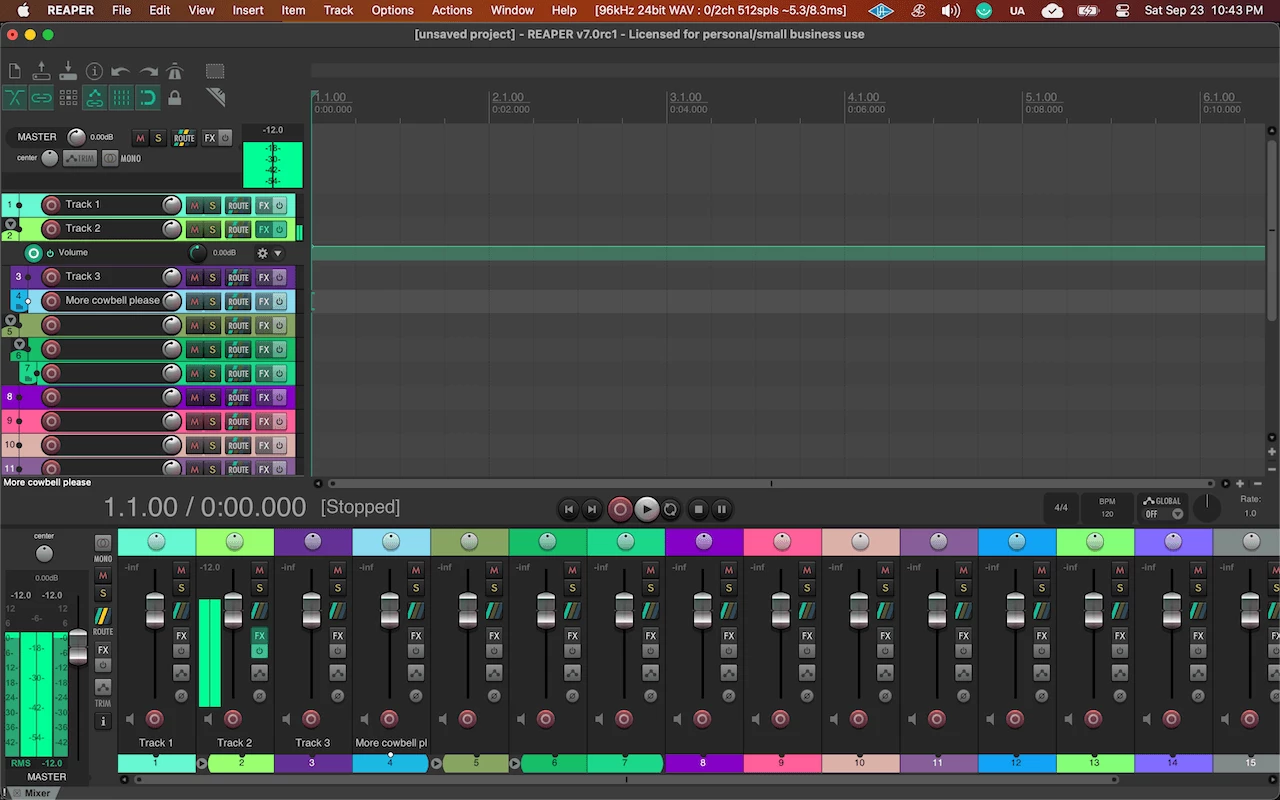
Cockos REAPER operates as a highly efficient digital audio workstation built for recording, arranging, editing, mixing, and mastering audio and MIDI data. Designed for recording engineers, independent musicians, podcast editors, and sound designers, the software replaces basic audio clippers and standalone sequencers with a complete multitrack environment. Users rely on this application to handle complex studio tasks, such as tracking live drum kits with multiple microphones, editing hours of dialogue for video projects, scoring orchestral mockups with large sample libraries, and designing interactive sound effects for video games. Rather than forcing a specific workflow, the interface allows heavy customization, letting users build bespoke toolbars, create custom macro actions, and redesign the visual layout to fit their specific daily tasks.
In practical terms, the software acts as the central hub of an audio production studio. Engineers connect their microphones, instruments, and hardware synthesizers to their computer via an audio interface, and the application routes these physical inputs into digital tracks. From there, users cut, crossfade, pitch-shift, and time-stretch the recorded media directly on the timeline. The architecture prioritizes low CPU consumption and fast load times, allowing users to run projects with hundreds of individual tracks and heavy processing chains without straining average desktop computers. Using a unified track system, there is no distinction between audio, MIDI, or video tracks; any track can process any media type and host any effect.
Choosing a dedicated Windows desktop application over browser-based editors ensures direct access to local system resources. Browser audio tools frequently struggle with latency, input delays, and file storage constraints. A native workstation interfaces directly with ASIO drivers on Windows, ensuring low-latency recording so musicians hear themselves without distracting echoes. A local installation also permits offline rendering and unrestricted access to local storage drives, which is critical when managing massive high-resolution WAV files and sprawling virtual instrument libraries.
Key Features
- Track Lanes and Swipe Comping: When recording multiple takes of a vocal performance or guitar solo, the application stacks each pass into parallel lanes within a single parent track. Audio engineers can listen through the takes, highlight the best phrases with their mouse, and the timeline automatically slices and crossfades the selections. This creates a single, continuous composite track without requiring the user to manually move items between separate tracks or manage destructive edits.
- Advanced Multichannel Routing: Every individual track within the project supports up to 64 discrete channels of audio. Users can route signals anywhere within the environment via a dedicated visual routing matrix. This allows for complex sidechain compression setups, parallel processing chains, and multi-channel surround sound or spatial audio mixing templates, utilizing send and receive controls with pre-fader, post-fader, or pre-effects options.
- FX Containers and Parameter Modulation: Audio engineers can group multiple third-party plugins into a single block within the effects chain. These containers allow users to build custom parallel effects, split specific frequency bands for targeted processing, and save the entire routing structure as a single preset. Additionally, users can link plugin parameters to internal LFOs (Low Frequency Oscillators) or an incoming audio signal, causing an equalizer band to dynamically react to the volume of a kick drum.
- Retroactive MIDI Recording: The application continually caches incoming MIDI data in the background, even when the transport is stopped or playing back without the record button engaged. If a keyboard player improvises a successful chord progression during playback, they can trigger an action to insert those recently played notes directly onto the timeline, preventing the loss of unrecorded ideas.
- Broad Plugin Compatibility and Bridging: The software hosts a wide variety of third-party plugin formats, including VST, VST3, CLAP, and DX. It features a dedicated bridging architecture that allows older 32-bit plugins to run securely within a modern 64-bit environment in a separate firewall process. If a third-party plugin crashes, the bridging process prevents the main workstation application from closing, protecting unsaved progress.
- ReaPlugs Native Processing Suite: The installation includes a proprietary suite of utility audio effects, including an infinite-band equalizer, a multi-band compressor, a gate, and a pitch-shifter. These native plugins consume minimal processing power, load instantly, and feature purely functional interfaces without analog-style graphics, prioritizing numerical entry for precise audio correction.
- ReaScript and Custom Actions: For users requiring specific timeline behaviors, the application supports creating custom macros that chain multiple commands into a single keystroke. Furthermore, programmers can write custom scripts in Python, EEL2, or Lua directly within the integrated development environment (IDE) to automate repetitive tasks, such as batch renaming hundreds of audio items or exporting selected regions to specific file formats simultaneously.
How to Install Cockos REAPER on Windows
- Download the executable installer archive from our website and save it to your local hard drive, such as your Downloads folder or Desktop.
- Extract the contents of the downloaded archive into a new, temporary folder on your system using your preferred file extraction utility.
- Open the
readme.txtfile located inside the extracted directory to review any last-minute configuration notes, hardware recommendations, or specific installation warnings. - Run the main setup executable file directly from the extracted folder to launch the Windows installation wizard.
- Read and agree to the End User License Agreement, then proceed to select your destination directory, which defaults to
C:Program FilesREAPER (x64). - Choose whether to enable the "Portable install" checkbox; selecting this option forces the software to save all preferences, themes, and configuration files directly inside the application folder rather than the Windows AppData directory, making it ideal for running from a USB flash drive.
- Select the optional components you wish to include from the checklist, such as ReaMote network processing, desktop shortcuts, and file association registries, then click Install.
- Once the progress bar completes, launch the program from the Start menu, at which point a prompt will immediately appear requesting you to open the Preferences menu and select your ASIO audio device for playback and recording.
Cockos REAPER Free vs. Paid
The business model relies entirely on a fully functional, un-crippled 60-day evaluation period followed by a strict honor system for purchasing a license. Users can download and evaluate the software without creating an account, entering credit card information, or connecting to an external licensing server. During this 60-day period, there are no artificial track limits, no disabled save functions, and no restrictions on exporting audio files. Once the evaluation period expires, the software continues to function normally but introduces a brief nag screen upon startup reminding the user to purchase a license.
Purchasing a license involves a one-time payment rather than a recurring subscription. The software offers two distinct pricing tiers: the Discounted License available for $60, and the Commercial License available for $225. Both licenses unlock the exact same digital audio workstation with zero differences in capability, plugin support, or performance. The distinction is based entirely on the user's financial status and use case.
The $60 Discounted License applies to personal use, businesses with gross yearly audio revenue under $20,000, and educational organizations. Users exceeding this revenue threshold must purchase the $225 Commercial License. A single license purchase includes free updates through two major software iterations, providing years of bug fixes and feature additions before an upgrade fee is required.
Cockos REAPER vs. Ableton Live vs. Pro Tools
Ableton Live focuses on electronic music production, live performance, and loop-based composition. Its Session View allows musicians to trigger audio and MIDI clips non-linearly, making it the standard environment for DJs and electronic artists who build tracks organically on the fly. It also includes a vast library of native software synthesizers and drum machines. Users focused on electronic beat-making or live looping should choose Ableton Live over traditional linear editors. However, Ableton Live consumes significantly more system resources and lacks the granular timeline customization required for massive orchestral tracking.
Pro Tools serves as the historical standard in commercial recording studios, specifically for tracking live bands, mixing major label records, and editing post-production audio for film and television. It enforces a strict, specialized workflow that recording industry professionals expect, utilizing the proprietary AAX plugin format and integrating deeply with high-end Avid DSP hardware. The downside includes a mandatory subscription model, restricted track counts on lower tiers, and a rigid interface that resists user customization.
Cockos REAPER remains the better fit for users who want complete control over their hardware resources, interface layout, and custom macros without paying a monthly subscription fee. While it lacks the built-in virtual instruments and clip-launching workflow of Ableton Live, and the deeply entrenched commercial studio presence of Pro Tools, its fast load times, flexible routing matrix, and hardware-agnostic design make it a top choice. Sound designers, podcasters, independent producers, and audio programmers working on Windows consistently choose it to build highly specific workflows that the strict architectures of other workstations do not allow.
Common Issues and Fixes
- Third-party plugins are not showing up in the FX browser. This occurs when external VST or CLAP plugins are installed in custom Windows directories that the workstation is not currently monitoring. To fix this, open Options, navigate to Preferences, select Plug-ins > VST, click the "Edit path list" button to add your exact folder directory, and click "Re-scan."
- No sound during playback and the transport bar will not move. The hardware is not configured correctly, or Windows has locked the sample rate of the current audio device. Navigate to Options > Preferences > Audio > Device, set the Audio system to ASIO, select your specific interface from the ASIO Driver dropdown menu, and ensure the inputs and outputs are enabled.
- Connected MIDI keyboard does not trigger virtual instruments. The external MIDI controller is recognized by the operating system but has not been activated within the software environment. Go to Preferences > Audio > MIDI Devices, locate your connected keyboard in the input list, right-click its name, select "Enable input," and check "Enable input for control messages" if you intend to map physical knobs to plugin parameters.
- Media offline messages appear on items in the timeline. This happens when the original source audio files are moved, renamed, or deleted using the Windows Explorer file manager outside of the application. Open the project, and when the missing files dialog appears, click "Browse for file" to manually locate the moved audio file, allowing the software to automatically find other missing files in that directory.
- Audio playback crackles, pops, or drops out during heavy mixing. The audio buffer size is set too low for the current CPU load, causing the processor to fail at rendering the audio buffer in time for playback. Open the ASIO configuration panel located within the Audio Device preferences and increase the buffer size from its current setting (for example, moving from 128 samples to 512 or 1024 samples) to relieve stress on the processor.
Version 7.56 — 2025
- Added a new "infoblock" control to track panels, allowing users to display and toggle contextual track information via the Theme Adjuster.
- Improved rendering functionality with a new option to show file length in samples within the render peaks display.
- Added support for parallel post-processing during renders and the ability to render stereo or multichannel files to per-channel mono files.
- Improved video performance with sample-accurate seeking for the QuickTime decoder and better peak display for compressed audio at high zoom levels.
- Fixed an issue where filenames would not auto-increment correctly when rendering to both primary and secondary formats.
- Resolved a potential one-sample discrepancy in file length when rendering media items across multiple tracks.