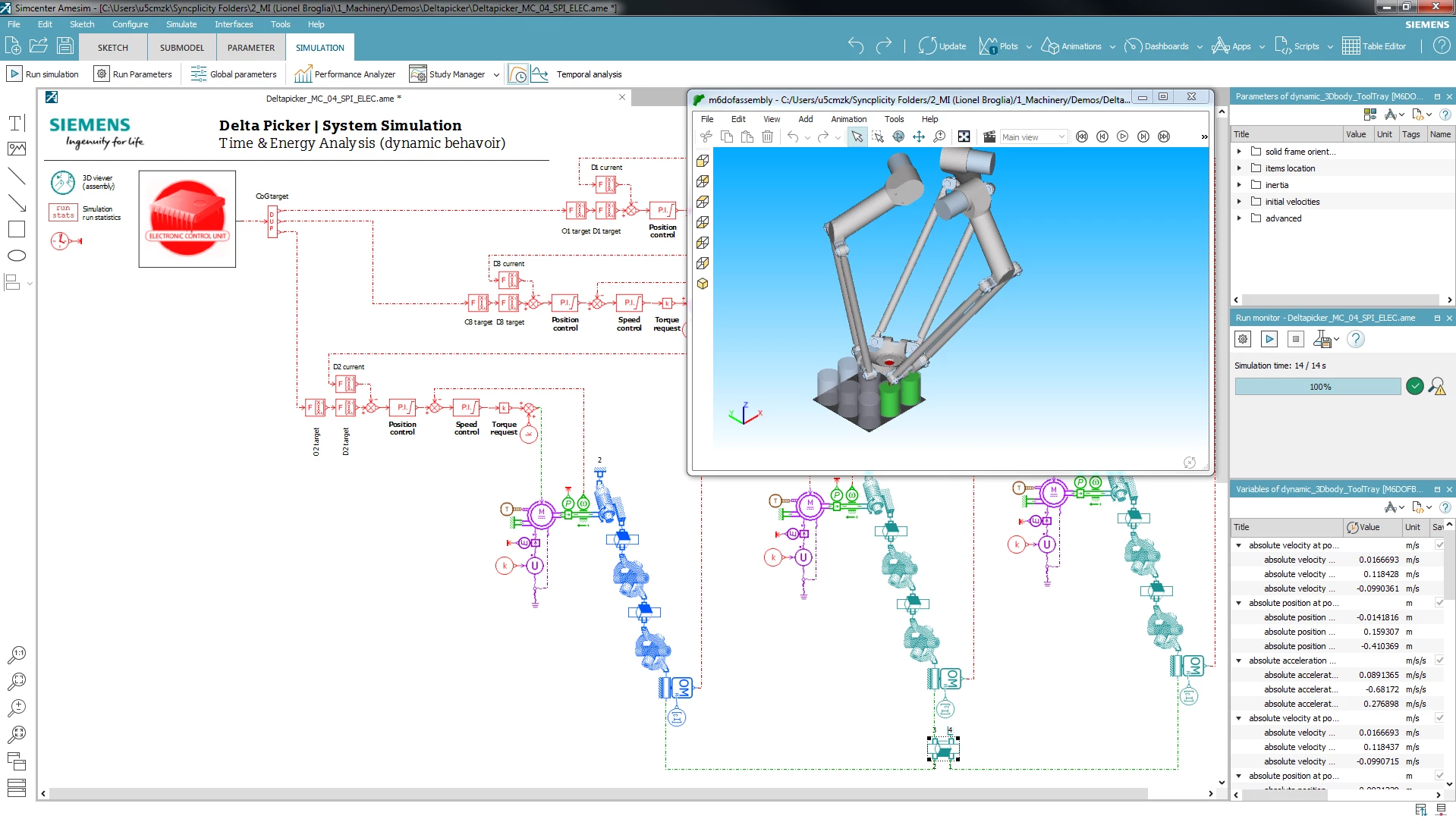
Siemens Simcenter Amesim operates as an advanced 1D mechatronic system simulation platform built to help engineering teams model, analyze, and optimize multidomain physical systems. Rather than relying on rigid 3D geometries that take weeks to draft, engineers use this software to build mathematical models of dynamic systems—such as hydraulic circuits, electrical powertrains, thermal management systems, and mechanical drivetrains—long before the physical prototyping phase. By dragging and dropping pre-validated component blocks onto a blank sketch canvas and connecting them with functional lines, users establish the physical boundaries and interactions of an entire machine. The software calculates the transient behavior of these interconnected systems over time, showing exactly how a pressure drop in a pneumatic valve affects the heat dissipation of an adjacent electrical motor.
This tool specifically targets automotive, aerospace, and heavy machinery engineers who need to perform critical system sizing and energy consumption studies. Instead of writing custom differential equations in an open mathematics environment, operators construct their subsystems using libraries representing exact real-world components like pumps, gearboxes, batteries, and heat exchangers. This practical approach allows engineering departments to validate control strategies against a realistic virtual plant, ensuring that hardware components will function together safely and efficiently under various load conditions.
Executing thousands of simultaneous differential equations requires significant local processing capability and direct access to local memory structures, making a native desktop application highly necessary. The desktop environment provides the solver with the raw CPU resources needed to step through complex multi-physics calculations without the latency or connection drops associated with browser-only tools. Furthermore, the local installation allows the software to interact directly with installed system compilers to generate executable code for Hardware-in-the-Loop testing, and it maintains secure local storage for proprietary model architectures that cannot be uploaded to external servers.
Key Features
- Feature Name: Multi-Physics Component Libraries Users access vast, categorized libraries containing pre-built, mathematically validated blocks for fluid, thermal, mechanical, and electrical domains. By pulling these components into the sketch interface, operators construct complete vehicle or machine architectures without manually entering the underlying differential equations. The parameters of each block, such as mass, friction coefficients, and thermal conductivity, can be edited in the properties pane to match real-world supplier data.
- Feature Name: Reduced Order Model (ROM) Builder This dedicated internal utility applies machine learning techniques to simplify massive 3D simulation data into highly efficient 1D equivalent models. Engineers import their heavy external computational fluid dynamics results, and the tool generates a mathematical approximation that runs in a fraction of a second. This allows the system-level simulation to account for complex 3D behaviors without dragging down the main solver's calculation speed.
- Feature Name: Functional Mock-up Interface (FMI) Export The platform acts as an integration hub by wrapping completed plant models into standard Functional Mock-up Units via the export assistant menu. Operators can define physical ports and multidimensional variables before generating the file. This exported package can then be loaded into external control design environments or test benches to facilitate standardized co-simulation.
- Feature Name: Automation Connect for PLCs The software links the simulated mechatronic plant directly to virtual programmable logic controllers through the Automation Connect interface. Utilizing standard communication protocols like OPC-UA or Modbus TCP, the solver exchanges sensor and actuator data with the logic controller in real time. This allows controls engineers to perform rigorous Software-in-the-Loop testing against a responsive virtual machine before actual factory hardware is assembled.
- Feature Name: Native Version Control Integration The graphical interface includes a dedicated client for tracking model revisions and managing project history directly within the authoring environment. Operators navigate a visual tree view to commit changes, branch model architectures to test different component sizings, and revert local modifications without opening external command-line tools. This internal tracking prevents data loss when multiple team members iterate on the same complex assembly.
- Feature Name: Discontinuity Handling for Co-Simulation When running simultaneous solvers alongside external motion analysis or fluid dynamics software, the application applies an optimized discontinuity management mechanism. The solvers synchronize at defined time steps, accurately sharing boundary conditions like heat flux and mechanical torque across the interface walls. This prevents mathematical instability and ensures that fast-transient events, like a sudden valve closure, are captured correctly by both the master and slave simulation tools.
How to Install Siemens Simcenter Amesim on Windows
- Navigate to the official Siemens Support Portal and log in with an authorized customer account to access the software download center.
- Download the primary installation package and the separate documentation or demo packages, then mount the primary disk image to a virtual drive on your Windows 10 or Windows 11 machine.
- Launch the setup executable found in the root directory of the mounted image to initialize the guided installation wizard.
- Provide your specific composite ID or point the installer toward your organization's network license server when prompted by the setup dialogue to verify your authorization status.
- Select the specific modules, libraries, and sub-components required for your engineering tasks, ensuring that the primary authoring application and any necessary runtime environments are checked.
- Define the default file associations in the subsequent menu, ensuring that the proprietary model file extensions are set to open directly with the main authoring interface rather than the background calculation runner.
- Finish the wizard, then open your Windows environment variables to verify that the server variable is correctly configured with your specific port and hostname to guarantee uninterrupted communication with the license manager.
Siemens Simcenter Amesim Free vs. Paid
Siemens Simcenter Amesim is a commercial enterprise engineering platform, and its pricing scales heavily based on the specific multi-physics libraries, specialized modules, and export capabilities required by the purchasing organization. Commercial licenses are generally structured as perpetual seats with ongoing maintenance contracts or through annual subscription terms, starting at thousands of dollars for a base configuration. Specialized add-ons, such as dedicated aerospace fluid packs or automotive internal combustion engine libraries, increase the total deployment cost significantly. Because the exact modular configuration varies drastically between companies, exact retail numbers are not publicly listed on a standard storefront, and organizations must negotiate directly with vendor sales representatives.
While there is no permanent free tier for commercial or industrial use, the vendor does provide a Simcenter Amesim Student Edition. This academic package is available at no cost to verified, active students enrolled at recognized academic institutions. The Student Edition lacks an expiration date and includes all the core features necessary to model dynamic mechatronic systems for university team projects and homework assignments. However, it explicitly restricts commercial application, removes access to advanced co-simulation exports, and limits the ability to interface with external industrial control hardware.
For professional engineering teams looking to evaluate the platform before committing to a large enterprise contract, the vendor occasionally offers structured, time-limited trial access. Organizations must contact the sales department to request this evaluation period, during which they can test the software's capabilities against their specific workflow requirements. The trial operates as a fully functional environment but requires a temporary network authorization that expires at the end of the agreed testing window.
Siemens Simcenter Amesim vs. MATLAB/Simulink vs. Dymola
MATLAB/Simulink operates primarily as a causal, signal-based modeling environment that is deeply integrated into the larger MATLAB ecosystem. Engineering departments typically select Simulink when their main objective is developing complex control logic, state machines, and embedded software for electronic control units. While MathWorks provides the Simscape add-on for physical modeling, operators frequently note that Simscape's component libraries do not reach the same depth of highly specific, pre-validated physical domain details found in Siemens' native multi-physics libraries. Simulink excels at controls and math-heavy data processing, but building a highly detailed thermal-hydraulic system from scratch takes more manual effort than using pre-configured physical blocks.
Dymola utilizes the open-source Modelica language to construct acausal models and is highly recognized in the industry for its exceptional calculation speed. Organizations frequently deploy Dymola when they need to run exceptionally long-term transient studies, such as battery degradation over a ten-year simulated lifespan, as its solver can process these specific time-scales significantly faster than competing software. Dymola also attracts operators who prefer to write entirely custom physical equations using standard Modelica text syntax rather than relying on proprietary, closed-source vendor components. However, its interface can present a steeper learning curve for users who just want to quickly assemble standard parts.
Siemens Simcenter Amesim proves to be the superior choice when an engineering department requires immediate access to a vast, highly validated library of pre-built physical components without spending engineering hours coding custom mathematical models. It provides a highly visual, user-friendly sketch canvas that allows mechanical and fluid engineers to quickly drag, drop, and parameterize complex sub-systems. It is the better fit for rapid conceptual sizing of complete multidomain architectures, offering excellent built-in documentation and specialized tools like the internal ROM Builder that do not require deep programming expertise or external scripting environments to operate effectively.
Common Issues and Fixes
- Problem description. License server communication failure on startup. Operators often encounter a startup block indicating the software cannot find a valid authorization seat. This is usually resolved by opening the Windows Advanced System Settings, checking the Environment Variables, and ensuring the server variable exactly matches the port and hostname configured by the network administrator.
- Problem description. Missing C-code compiler for hardware export. When attempting to compile a model for hardware-in-the-loop export, the calculation run may fail with a compiler error. This occurs because the application requires an external compiler to generate the code; users must install a compatible version of GCC or the Intel C++ Compiler and link it in the application's compiler preferences menu.
- Problem description. FMI co-simulation synchronization errors. Exporting a model to another environment can sometimes result in jagged or failed transient responses during the simulation run. To fix this, engineers must adjust the discontinuity handling settings in the export assistant and verify that the master simulation tool utilizes a variable-step solver that correctly synchronizes with the exported model's internal time steps.
- Problem description. Old models opening in the wrong background runner. Double-clicking a proprietary model file in the operating system might launch the read-only background application instead of the full authoring interface. Operators can correct this by right-clicking the file, selecting the open-with dialogue, and permanently associating the file extension with the primary authoring executable.
- Problem description. Incompatible variable names during ROM generation. Attempting to build a reduced order model from external fluid dynamics data may fail if the imported variables do not map correctly to the internal 1D framework. Users must carefully review their CSV or data import files to ensure that the header naming conventions and unit scales strictly match the input requirements of the internal builder utility before initiating the training sequence.
Version 2404 — April 2024
Added:
- Embedded CFD data exchange with Simcenter STAR-CCM+
- 1D-3D Drivers for electric vehicle modeling
- Spherical mesh contact component in 3D Mechanical library
- P2D electrochemical battery model with lithium plating detection
- Installation-free FMU export capability
Improved:
- Graph digitizer with automatic curve detection and color-based extraction
- CAD import tool with mechanism geometry extraction
- SPMe battery model with degradation analysis
- Solver performance for larger system models
Fixed:
- Enhanced plot viewing and management interface
- Optimized simulation performance for complex systems