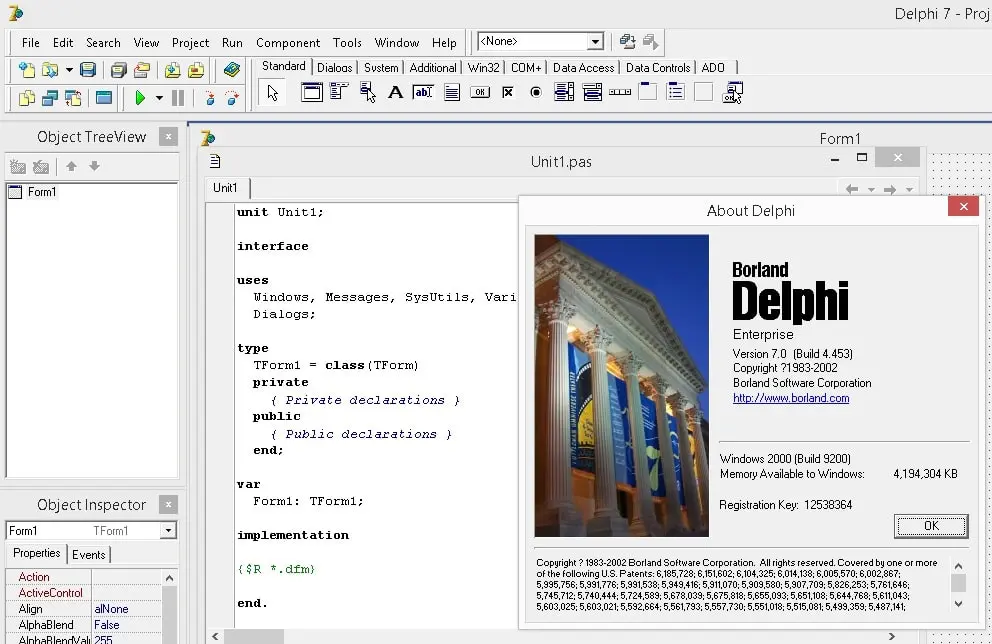
Delphi provides an Integrated Development Environment (IDE) built around Object Pascal, specifically used for Rapid Application Development. It helps software engineers build native applications using visual designers and an optimized compiler. By emphasizing a drag-and-drop approach for building user interfaces, the software reduces the boilerplate code typically required to construct complex data-entry forms or enterprise dashboards. Programmers write custom business logic in the code editor, and the compiler processes everything into a standalone executable.
Developers choose this desktop environment instead of generic category tools or web-based alternatives because it grants direct hardware access without relying on managed runtime environments or browser engines. The Visual Component Library binds directly to the Windows API, drawing standard controls with strict native fidelity. This approach solves practical problems for engineers maintaining large legacy enterprise software or building client applications that require exact hardware control, offline capability, and low-latency database connectivity. The underlying architecture prioritizes predictable memory management and execution speed, making it highly relevant for industrial control systems, point-of-sale terminals, and data analysis software where resource overhead must remain strictly limited.
In a typical workflow, users interact with the visual form designer to place UI controls, map them to local or remote data sources, and establish event handlers. Desktop applications built this way deploy as single binary files, avoiding the deployment friction of requiring specific framework versions on target machines. This simplifies distribution across enterprise networks running Windows 10 and Windows 11, ensuring the compiled code executes consistently on every workstation.
Key Features
- Feature Name: Visual Component Library (VCL). The VCL provides an object-oriented wrapper over the native Windows API, allowing developers to build graphical user interfaces using standard buttons, grids, and dialogs. Instead of writing UI layout code manually, developers arrange components visually in the Form Designer, and the IDE handles the underlying message-loop and control rendering. It wraps complex functions like graphical device interface drawing, window message handling, and system dialogs into accessible properties.
- Feature Name: FireDAC Data Access. This data access framework connects applications to enterprise databases such as SQL Server, Oracle, InterBase, and PostgreSQL. It abstracts the underlying drivers, allowing developers to query datasets using a unified component interface, manage local caching, and handle offline data synchronization directly within the client binary.
- Feature Name: GetIt Package Manager. Accessible directly from the Tools menu, this system provides a centralized repository for third-party components, IDE plugins, and sample code. Developers browse the catalog to download and install libraries, such as the Skia graphics engine or REST API wrappers, without manually modifying search paths or compiling source packages.
- Feature Name: Delphi Code Insight (LSP). The IDE relies on a Language Server Protocol implementation to provide real-time code completion, error highlighting, and parameter hints. When developers type a class name or press Ctrl+Space, the LSP engine parses the background syntax tree to suggest valid members and methods based on the current unit context and interface declarations.
- Feature Name: Native Win32 and Win64 Compilers. The internal compiler translates Object Pascal source code directly into machine code for x86 and x64 processor architectures. This direct compilation model bypasses the heavy memory overhead often associated with garbage-collected languages, granting developers explicit control over object lifecycle management through interfaces and reference counting.
- Feature Name: Advanced Debugging and Profiling. The integrated debugger allows developers to set conditional breakpoints, inspect CPU registers, and evaluate variables at runtime. Users can step through code execution line by line, trace into core framework units, and utilize the Event Log to monitor background thread behavior. This level of inspection is critical for identifying memory leaks and optimizing performance bottlenecks.
How to Install Borland Delphi on Windows
- Download the web installer executable from the official vendor portal after registering an account and claiming either a commercial license or the community edition.
- Launch the setup file, review the End User License Agreement and Privacy Policy on the initial screen, and check the box to agree to the terms.
- Enter your assigned registration code and vendor developer network credentials when prompted by the registration dialog to validate the software license.
- Select the target platforms in the Feature Installer screen. For standard desktop application building, ensure that the 32-bit and 64-bit Windows compilation options are checked.
- Expand the "Additional Options" menu to include supplementary packages such as sample projects, help files, or the optional Windows 10 SDK, which provides specific API headers.
- Choose the destination folder path; the default routing places the main application binaries and libraries in the C:Program Files (x86)EmbarcaderoStudio directory.
- Click "Install" to begin the download of selected modules. The installer retrieves the payloads from the server, extracts the binaries, configures the environment variables, and registers the component paths in the system registry automatically.
- Finish the setup and launch the IDE. On the first run, the Welcome dialog appears, allowing you to configure the default visual theme, editor fonts, and optional version control integrations.
Borland Delphi Free vs. Paid
The vendor offers a layered pricing model that separates hobbyists from enterprise teams. The Community Edition is fully free but imposes strict commercial restrictions. It includes a complete IDE, the VCL framework, and native compilers, making it suitable for students and independent developers learning the language. However, the Community Edition is legally restricted to individuals or organizations with fewer than five developers and annual revenue strictly under $5,000. Once a project or company exceeds this financial threshold, purchasing a commercial license becomes mandatory.
For professional environments, the software requires a paid perpetual license paired with a yearly update subscription. The Professional edition targets developers building standalone applications and local database clients. It removes the revenue cap of the free tier and provides full commercial deployment rights. For teams requiring client-server connectivity, the Enterprise edition adds DataSnap multi-tier architecture, complete FireDAC database drivers for remote enterprise SQL servers, and integrated REST application services for building backend APIs.
At the top end, the Architect edition includes everything in the Enterprise tier, plus specialized data modeling tools like ER/Studio Developer Edition, Aqua Data Studio for advanced database management, and expanded web deployment licenses. Upgrading from Professional to Enterprise or Architect increases the initial cost significantly. Unlike the Community Edition, these commercial tiers permit full corporate deployment without usage limitations as long as the base perpetual license remains valid, and they provide access to premium technical support channels.
Borland Delphi vs. Microsoft Visual Studio vs. Lazarus
Microsoft Visual Studio, specifically when used with C# and the .NET framework, heavily dominates the enterprise application landscape. It relies on a managed runtime environment, meaning the target machine must have the correct .NET framework or Core runtime installed to execute compiled binaries. Visual Studio offers extensive tooling for web development, alongside UI frameworks like Windows Presentation Foundation. Developers generally choose Visual Studio when integrating deeply into the Microsoft ecosystem, relying on the NuGet package repository, and deploying cloud-first architectures where managed memory is preferred over native execution.
Lazarus serves as a direct, open-source alternative to commercial Object Pascal environments. It pairs with the Free Pascal compiler to provide a highly compatible visual designer and object-oriented syntax. Because Lazarus is entirely free and open-source, it appeals to budget-conscious developers, hobbyists, and legacy maintainers who want to compile their Pascal code without navigating commercial licensing tiers. While Lazarus supports a vast array of target hardware natively, its IDE interface feels older, and it lacks the proprietary enterprise database drivers, premium package managers, and official commercial technical support found in paid offerings.
Borland Delphi remains the better fit for organizations that require strict native execution without dependency on .NET runtimes, combined with enterprise-grade technical support. It outpaces Visual Studio in generating standalone, single-file executables that interact directly with the Windows API, which simplifies deployment on locked-down corporate networks. Compared to Lazarus, Delphi provides a much more refined IDE experience, advanced FireDAC database connectivity, and a modernized Language Server Protocol that handles large-scale codebases efficiently, justifying the commercial investment for professional software engineering teams.
Common Issues and Fixes
- Problem description. LSP Code Insight freezing or failing to resolve symbols on large codebases. The background parser sometimes stops working on large projects, graying out code completion features. To fix this, press Alt+T, then E to trigger the "Reload LSP Server" command from the Tools menu. This terminates and restarts the background process without requiring a full IDE restart.
- Problem description. Missing subdirectories or failed paths during offline installation. When using the offline ISO installer, the system may occasionally fail to copy specific library paths required for compilation. The fix involves manually opening the GetIt Package Manager and forcing a reinstall of the missing components, or switching to the web-based installer which verifies downloaded payloads automatically.
- Problem description. GetIt Package Manager network timeouts or connection failures. Corporate firewalls or proxy servers often block the package manager from connecting to the external catalog servers. To resolve this, open the IDE network options and manually enter your corporate proxy credentials, or download the required third-party component directly from the vendor's website and add the source paths via the Environment Options menu.
- Problem description. File not found errors for DCU or PAS files during compilation. The compiler will halt if it cannot locate compiled unit files referenced in the project uses clause. Correct this by opening Project Options, navigating to the Delphi Compiler section, and adding the directory containing the missing unit files into the "Search path" input field so the compiler can resolve the dependencies.
Version 12.2 — September 2024
Added:
- Smart CodeInsight with AI-powered coding assistance
- WebStencils template engine for web development
- 64-bit versions of Delphi Win32 and Win64 compilers
- Support for Android 35 APIs and latest billing APIs
- Enhanced C++ Win64 Clang compiler with runtime packages
Improved:
- IDE support for High-DPI and 4K screens
- Debugger handling of repeated inline variables
- VCL styles with design-time support
- FireMonkey cross-platform framework performance
Fixed:
- Debugger error handling improvements
- Remote debugger communication timeouts
- iOS simulator display issues resolved