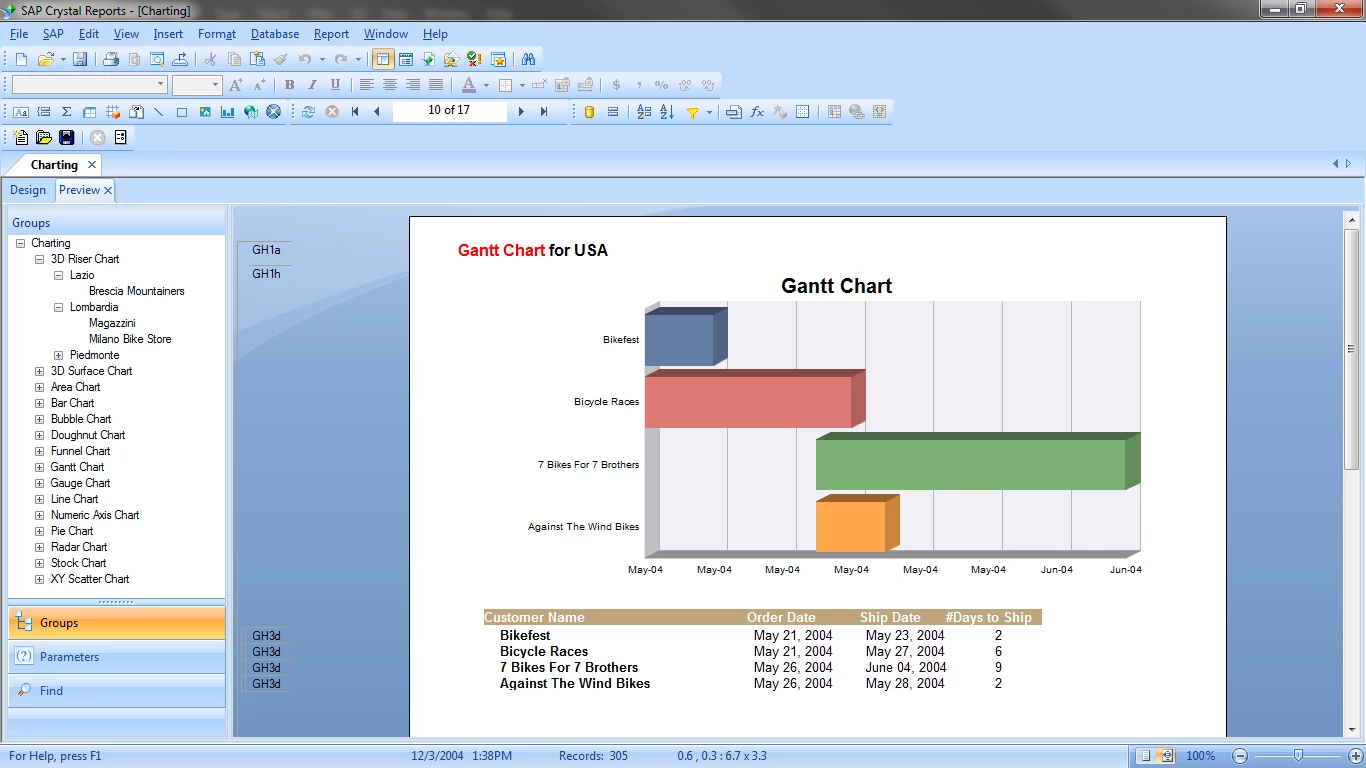
SAP Crystal Reports operates as a dedicated desktop application engineered for one highly specific task: transforming raw relational data into precisely formatted, pixel-perfect printable documents. For business intelligence developers, database administrators, and financial analysts, the software serves as the standard environment for designing invoices, inventory manifests, compliance statements, and operational summaries. Unlike modern web-based data visualization tools that prioritize fluid on-screen interaction, this environment anchors its design philosophy around physical pagination. It relies on a fixed-page layout canvas where report authors control margins, typography, and element positioning down to the exact millimeter. This rigid structure guarantees that when a multipage document is exported to PDF or sent directly to a physical printer, the structural integrity of the layout remains exactly identical every single time.
To build these documents, report authors connect the application directly to enterprise data architectures using native database client drivers, OLE DB, or ODBC connections. The software natively reads tables, views, and stored procedures from Microsoft SQL Server, Oracle, MySQL, and PostgreSQL, while also pulling from flat files like Excel worksheets or XML documents. Once the database connection is established, the designer uses an intuitive Field Explorer to drag database columns onto the canvas. The canvas itself is divided into specific structural bands: Report Header, Page Header, Details, Report Footer, and Page Footer. By placing data fields into the Details section, the application loops through the underlying dataset, generating repeating rows for each database record, while automatically handling complex page breaks and mathematical subtotals along the way.
While the primary interface heavily utilizes visual drag-and-drop mechanics, the true depth of the application lies in its formula editor and conditional logic capabilities. Authors write custom scripts using either the proprietary Crystal Syntax or standard Basic Syntax to manipulate strings, calculate complex financial logic, or declare global and shared variables. This scripting engine integrates directly with the Section Expert, a tool that dictates exactly when specific visual bands should be rendered or suppressed. For example, a developer can write a formula to suppress a secondary billing section unless the customer's account status flags an overdue balance. By combining exact physical formatting with deep conditional logic, developers output sophisticated, data-driven documents that generic spreadsheet software simply cannot replicate.
Key Features
- Feature Name: Pixel-Perfect Design Canvas. The central workspace relies on absolute positioning and snap-to-grid guidelines, giving developers strict control over element dimensions and coordinates. This rigid layout structure is critical for designing official forms, barcode labels, and legal contracts where floating elements or responsive design shifts are strictly prohibited.
- Feature Name: Extensive Data Connectivity. The software includes built-in driver support for a wide array of enterprise data sources, allowing authors to query SQL databases, flat files, and web services simultaneously. The Database Expert interface handles table joins visually, enabling users to enforce inner and outer joins across disparate systems before the data ever reaches the design canvas.
- Feature Name: Formula Workshop. Developers utilize a dedicated scripting environment to build custom functions, format raw text strings, and execute mathematical operations that the source database cannot perform. The workshop supports declaring local, global, and shared variables to pass calculated data across different functional sections of the document.
- Feature Name: Section Expert Logic. Every horizontal band on the design canvas can be controlled programmatically using conditional formatting rules. Report authors can force new page breaks before specific groups, conditionally suppress empty data rows, or dynamically change background colors based on predefined threshold values retrieved from the database.
- Feature Name: Cross-Tabs and Subreports. For data that does not fit into a standard vertical list, the software provides pivot-style cross-tab grids to summarize intersections of data categories. Additionally, developers can embed entirely independent report files as subreports within the main document, passing parameter values between them to display related master-detail records.
- Feature Name: Interactive Parameter Prompts. Before a query executes, the application can present dialogue boxes demanding user input, such as date ranges, geographical regions, or specific department codes. These parameters directly filter the database query, ensuring that end users only retrieve the exact subset of records they need for that specific session.
- Feature Name: Strict Export Fidelity. Once the data has been rendered on the canvas, the document can be compiled and exported to a variety of external file types. The rendering engine specializes in strict PDF generation and formatted Excel worksheet creation, ensuring that lines, text boxes, and mathematical totals translate accurately into the final destination file.
How to Install SAP Crystal Reports on Windows
- Download the official Windows installer package and extract the entire ZIP archive to a new folder on your local hard drive, as executing the setup executable directly from within the compressed archive often causes extraction failures.
- Navigate to the newly extracted folder, right-click the setup executable file, and select "Run as administrator" to ensure the installation wizard has the correct permissions to modify the Windows registry and register prerequisite drivers.
- Choose your preferred interface language from the initial dropdown menu and wait a few moments while the setup wizard unpacks the necessary deployment frameworks and visual runtime components.
- Review the destination folder path on your local storage drive; note that if your environment already contains other SAP BusinessObjects applications, this directory path will be locked to maintain shared component stability.
- Read the prerequisite checks, accept the end-user license agreement, and click Next to advance to the licensing screen.
- Enter either your 30-day evaluation keycode or your purchased permanent product keycode in the provided text field, then click Next to initiate the file copying process.
- Keep the installation window active and wait patiently while the progress bar completes, as the background sequence registers numerous database drivers, charting engines, and export libraries without visual feedback.
- Click Finish when the final success screen appears, then open the Start menu to launch the application and open the Database Expert to configure your first data source connection.
SAP Crystal Reports Free vs. Paid
SAP Crystal Reports operates on a strict commercial licensing model structured around named users, meaning the primary development application requires a paid purchase. Organizations must acquire a distinct software license for each individual developer, administrator, or data analyst who intends to open the desktop application to build, modify, or format report files. A standard new named user license costs approximately $495, while users migrating from an older deployment can purchase a discounted upgrade license for roughly $295. There are no mandatory ongoing subscription fees to keep using the desktop designer, but access to official technical support and future maintenance patches generally requires active support agreements.
For evaluation purposes, the vendor provides a full-featured 30-day free trial of the application. During this evaluation window, report authors have unrestricted access to all database connectivity options, formula workshops, and export capabilities. The trial does not stamp arbitrary watermarks on exported PDF documents or restrict the number of rows a user can process. Once the trial period concludes, the application locks the design canvas. Users who choose to buy the software do not have to uninstall the trial or rebuild their active projects; they simply navigate to the Help menu, open the License Manager, and replace the temporary evaluation keycode with their newly purchased permanent keycode.
While the core authoring environment is entirely paid, the broader distribution ecosystem does include free components. The SAP Crystal Reports Viewer is provided as a fully free standalone desktop utility. This viewer allows managers, executives, and external clients to open, read, print, and export pre-compiled report files without consuming a paid designer license. However, if an organization wants to host these files on an internal portal, automate scheduled email deliveries, or handle concurrent browser-based access, they must purchase a separate enterprise product called SAP Crystal Server, which offers both named user and concurrent access pricing tiers.
SAP Crystal Reports vs. Microsoft Power BI vs. Tableau
Microsoft Power BI focuses entirely on interactive data discovery and modern cloud-hosted dashboarding. It dominates when organizations need to distribute highly visual, drill-down charts to stakeholders through a web browser, a mobile app, or Microsoft Teams. Power BI relies on a centralized semantic model and utilizes a responsive canvas that adjusts dynamically to the user's screen size. It is the better choice for executive summaries, live metric tracking, and self-service analytics where the primary goal is allowing the end user to click, filter, and explore the data on a screen rather than printing a physical document.
Tableau excels at deep visual analytics and rendering complex graphical representations of massive datasets. Data scientists and business analysts use Tableau to drag and drop data dimensions to create intricate heat maps, scatter plots, and behavioral flowcharts. The software prioritizes visual exploration, allowing users to spot trends, anomalies, and correlations through beautiful, fluid interfaces. Tableau is the preferred platform when an organization's primary objective is advanced data visualization and exploratory analysis, rather than the generation of strict, multi-page tabular lists.
SAP Crystal Reports is the better fit when the output must be a rigid, paginated, and highly formatted document intended for printing or strict PDF distribution. While Power BI and Tableau struggle with exact physical page breaks, specialized barcode generation, and precise multi-page invoice layouts, this application is specifically engineered to render pixel-perfect billing statements, regulatory compliance forms, and detailed inventory manifests. Choose the modern dashboard tools for on-screen interactive analytics, but rely on this desktop designer when legal standards or business operations demand strict structural control over the final printed page.
Common Issues and Fixes
- Database connections fail with a driver architecture mismatch error. This occurs when the bit-level of the configured Windows ODBC data source does not match the bit architecture of the report designer application. To fix this, open the specific Windows ODBC Data Source Administrator tool that corresponds to the application's architecture and recreate the System DSN to ensure the drivers align correctly.
- Exporting a report to Microsoft Excel causes columns to shift or merge unexpectedly. Excel exports require strict adherence to physical layout grids to translate layout coordinates into worksheet cells accurately. Open the design canvas, remove any overlapping text objects, and use the application's snap-to-grid guidelines to ensure that all column headers align perfectly with the corresponding data fields below them.
- Report rendering is slow when pulling from large database tables. The document is likely pulling all raw records locally and applying filters within the desktop application rather than at the database server level. Open the Database menu, review the "Show SQL Query" window, and move your filtering logic into the Database Expert's selection criteria so the SQL server handles the processing workload before sending data over the network.
- Fields display errors or disappear after the underlying database schema changes. The internal document definition has lost synchronization with the live database tables due to renamed or dropped columns. Navigate to the Database menu and click "Verify Database", which prompts the software to check the current schema, highlight broken table links, and allow you to remap the old field references to the new database structure.
Version 2025 (14.4.x) — March 2025
Added:
- New SAP BW (DSL) driver for managed BW OLAP connections
- Quick start options for Universe (Unx) and SAP BW (DSL) drivers on start page
- Crystal Reports 2025 Desktop Viewer with same report engine as Designer for improved performance
- Improved UNX support with better parameter prompting and enhanced hierarchies
Improved:
- Database sorting and ranking delegation to underlying databases for better performance tuning
- Enhanced alignment with Web Intelligence behaviors for easier CR4E migration
- New platform versions and data source versions certification
Fixed:
- Various security updates including third party and open-source component updates
Security:
- Third party and open-source component security updates