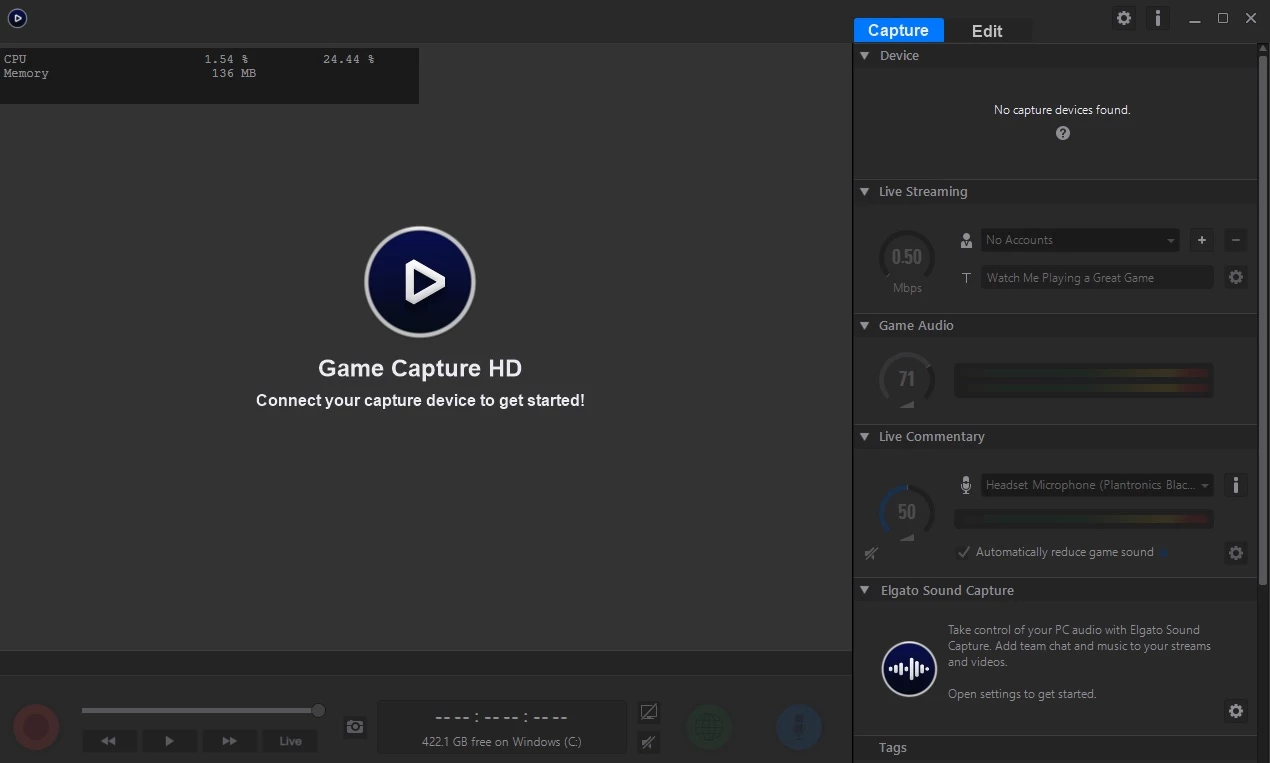
Elgato Game Capture HD serves as the central control software for content creators relying on classic Elgato recording hardware, such as the HD60, HD60 S, and the original capture cards. While the company provides different utilities for its newer 4K lineup, this specific desktop application remains the primary hub for recording, managing, and broadcasting 1080p gameplay feeds from consoles or secondary computers. It bridges the gap between raw hardware input and a finished MP4 file, providing an interface where users can preview the video stream, adjust bitrates, and apply audio mixing. The software acts as a specialized driver interface and visual dashboard, ensuring the computer correctly interprets the video data passing through the physical HDMI connection.
The application targets gaming creators, livestreamers, and video editors who need a direct way to pull an HDMI video signal into a Windows environment. Instead of relying on generic camera utilities that might struggle with frame pacing or audio sync, users depend on this dedicated client because it directly communicates with the internal firmware of Elgato devices. It handles the heavy lifting of decoding the video stream, allowing the user to focus on the content. The tool eliminates the need for separate audio recording software by integrating microphone inputs directly into the primary timeline, allowing a solo creator to manage game volume and voiceover tracks simultaneously from a single screen.
Operating as a desktop application is necessary because handling high-definition video capture requires direct access to local system resources, hardware drivers, and graphics processors. Browser-based tools or lightweight cloud recorders cannot interface with physical PCIe or USB capture cards at the driver level. By keeping the processing local, the software reduces latency in the preview window and allows for background caching of video data directly to the local storage drive. This ensures that creators retain pristine copy quality without relying on internet bandwidth or cloud storage limitations. It also means that users can completely disconnect from the internet and still utilize the full recording toolset in an offline environment, capturing long local sessions without worrying about network stability.
Key Features
- Flashback Recording: The software continuously buffers the incoming video signal in the background even when the main record toggle is inactive, utilizing temporary local storage to keep a rolling cache. If an unexpected gameplay moment occurs, users can slide backward along the timeline interface and initiate capturing retroactively. This saves the cached footage as a permanent file without recording hours of dead space.
- Stream Command: This scene-building module allows creators to customize their broadcast layout before pushing the feed to a server. Users can add a local webcam feed, import static graphics, overlay a customized transparent logo, or link text files to display live subscriber counts. All of these elements sit directly over the main gameplay source within the same window.
- Live Commentary Mixing: The application includes a dedicated audio management panel that merges external microphone input with the game audio track. A built-in auto-ducking toggle automatically lowers the game volume by a specific decibel amount whenever it detects voice activity. This ensures the creator's voice remains clear over loud in-game sounds without requiring manual volume fader adjustments.
- Hardware Accelerated Encoding: Instead of relying entirely on the host processor to compress the video, the program can offload encoding tasks to supported dedicated graphics units from Intel, NVIDIA, or AMD. This reduces system strain during live broadcasts and prevents dropped frames during high-motion scenes. It also accelerates the final export time when saving local MP4 files to the disk.
- Built-in Timeline Editor: Creators can trim unwanted footage using the native editing interface without needing to export the raw file into a separate video production suite. The timeline allows users to slice dead space and cut clips into smaller manageable segments. You can then export specific highlights directly to local storage for immediate uploading.
- Direct Streaming Integration: The interface features built-in API connections for popular broadcasting destinations like Twitch and YouTube. Users enter their account credentials once within the settings panel, and the software handles the stream key negotiation, title updates, and privacy settings automatically. This bypasses the need to copy and paste URL strings from external browser tabs.
How to Install Elgato Game Capture HD on Windows
- Connect the physical capture hardware to the computer using the provided USB cable or by seating it securely in an available PCIe slot, and attach the HDMI cables from the gaming console and out to the television monitor.
- Download the Windows installer package to the local drive and launch the executable file to begin the setup wizard.
- Review and accept the end-user license agreement, then confirm the default installation directory on the primary storage drive.
- Wait for the setup routine to copy the application binaries and install the necessary proprietary hardware drivers required to read the video signal.
- Restart the computer if prompted by the installer to ensure the newly installed drivers initialize correctly within the operating system registry.
- Launch the application from the desktop shortcut or start menu and verify the physical USB connection if the preview window displays a missing device error.
- Configure the initial capture settings by clicking the gear icon, selecting the target console from the Input Device dropdown menu, and defining the desired target bitrate on the video quality slider.
Elgato Game Capture HD Free vs. Paid
Elgato Game Capture HD is provided entirely free of charge to anyone who downloads it, with no hidden premium tiers, subscription requirements, or trial limitations. The application functions as a necessary companion to the physical hardware. Because the business model revolves around the sale of the physical capture cards, the software itself acts as a value-add utility rather than a separate revenue stream. The vendor provides updates and compatibility fixes for free as part of the hardware ownership experience.
Users will not encounter any watermarks, arbitrary recording time limits, or paywalled features within the interface. All functionality, including Stream Command overlays, Flashback Recording caching, and hardware-accelerated encoding toggles, is available immediately upon installation. There are no software licenses to purchase, and the application does not restrict the number of external webcams, images, or audio sources you can add to a broadcast scene. It exports video at the maximum resolution supported by the attached hardware without artificially capping the frame rate.
While the software is free to download and install, it requires compatible Elgato capture hardware to function correctly. Without a recognized device connected to the machine, the interface remains blank and cannot be used as a generic screen recorder or broadcasting tool for competing capture cards. The application operates entirely offline for local recording tasks, though an internet connection is naturally required to utilize the direct streaming API integrations for external broadcast platforms or to download initial driver updates.
Elgato Game Capture HD vs. OBS Studio vs. XSplit Broadcaster
OBS Studio is an open-source broadcasting environment designed for advanced scene composition and complex video routing. It offers total freedom in configuring custom stream layouts, supports a massive library of community-developed plugins, and allows users to capture nearly any hardware or software window on the computer simultaneously. However, configuring specific external capture cards within OBS can occasionally require manual audio delay adjustments to sync the game sound with the video feed, and the dense interface presents a steeper learning curve for users who have no prior video production experience.
XSplit Broadcaster operates as a premium streaming application aimed at users who want professional support and an intuitive layout. It handles hardware capture cards with minimal configuration, automatically detecting frame rates and syncing audio signals correctly out of the box. XSplit also includes built-in quality-of-life features like automatic background removal for webcams without needing a physical green screen. Accessing the full toolset and removing output restrictions requires purchasing a monthly subscription or a lifetime license.
Elgato Game Capture HD is the better fit for users who simply want to plug in their specific Elgato hardware and start recording immediately without building digital scenes from scratch. It offers a much narrower focus than the other two applications, prioritizing built-in tools like Flashback Recording and an integrated timeline editor that OBS and XSplit lack natively. Creators who strictly want to capture console gameplay to a local MP4 file with minimal technical friction will find this dedicated utility far easier to navigate and maintain than a fully featured live production suite.
Common Issues and Fixes
- The software displays a "No capture device found" message or a blank screen. This usually indicates a communication failure between the hardware and the host machine. Ensure the device is connected directly to a motherboard USB port rather than an external unpowered hub. You must also verify that the correct input connection type is selected in the capture settings menu.
- Live commentary audio slowly drifts out of sync with the gameplay video. This occurs when the system struggles to process the microphone input alongside the heavy video capture stream. Open the application preferences and enable the internal audio frame compensation setting. Alternatively, adjust the manual audio delay slider to force the tracks back into strict alignment with the visual feed.
- Enabling Stream Command causes the application to stutter or drop frames. The overlay system requires significant local rendering resources to composite webcams and graphics over raw video. Open the capture settings and verify that hardware accelerated encoding is enabled to shift the load to the graphics card. If the host machine lacks a dedicated GPU, disable Stream Command entirely.
- The installation fails midway with an "Object Already Exists" error prompt. This happens when leftover registry keys or temporary files from a previous installation conflict with the new setup routine. Manually navigate to the local application data folders to delete the old Elgato directories. Afterward, restart the machine and run the new installer executable as an administrator.
- The exported MP4 file plays video correctly but lacks the live commentary audio track. This happens if the audio mix settings are configured to separate tracks but the media player only reads track one. Open the sharing preferences and uncheck the option to export audio to separate files. This forces the software to mix the game volume and microphone audio into a single stereo track during the final render.
Version 3.70.56 — December 2023
Added:
- Elgato Facecam support as webcam source in Stream Command scenes
- Nonprofit & Activism category for YouTube live streaming and uploads
- Updated Facebook Live integration for streaming re-enablement
Improved:
- Updated Twitch API integration for uninterrupted streaming
- Enhanced YouTube streaming integration to latest version
- Better device detection for unsupported Elgato capture devices
Fixed:
- Resolved signal capture issues with new HD60 S hardware revision
- Fixed wrong firmware update application for HD60 S devices
- Corrected Stream Deck crash issues during operation