Bliss OS replaces standard desktop environments with a native mobile operating system built specifically for x86 and x64 hardware. Traditional methods for running mobile applications on a desktop computer rely on virtual machines and emulators. These virtualization layers consume high amounts of processing power because they must translate hardware calls through the host operating system, which often results in input lag, audio stuttering, and excessive memory consumption. By installing directly onto the physical drive, this open-source environment bypasses the virtual machine entirely. It communicates directly with the computer processor, graphics card, and memory, ensuring that demanding mobile games, media editors, and productivity apps run at native hardware speeds.
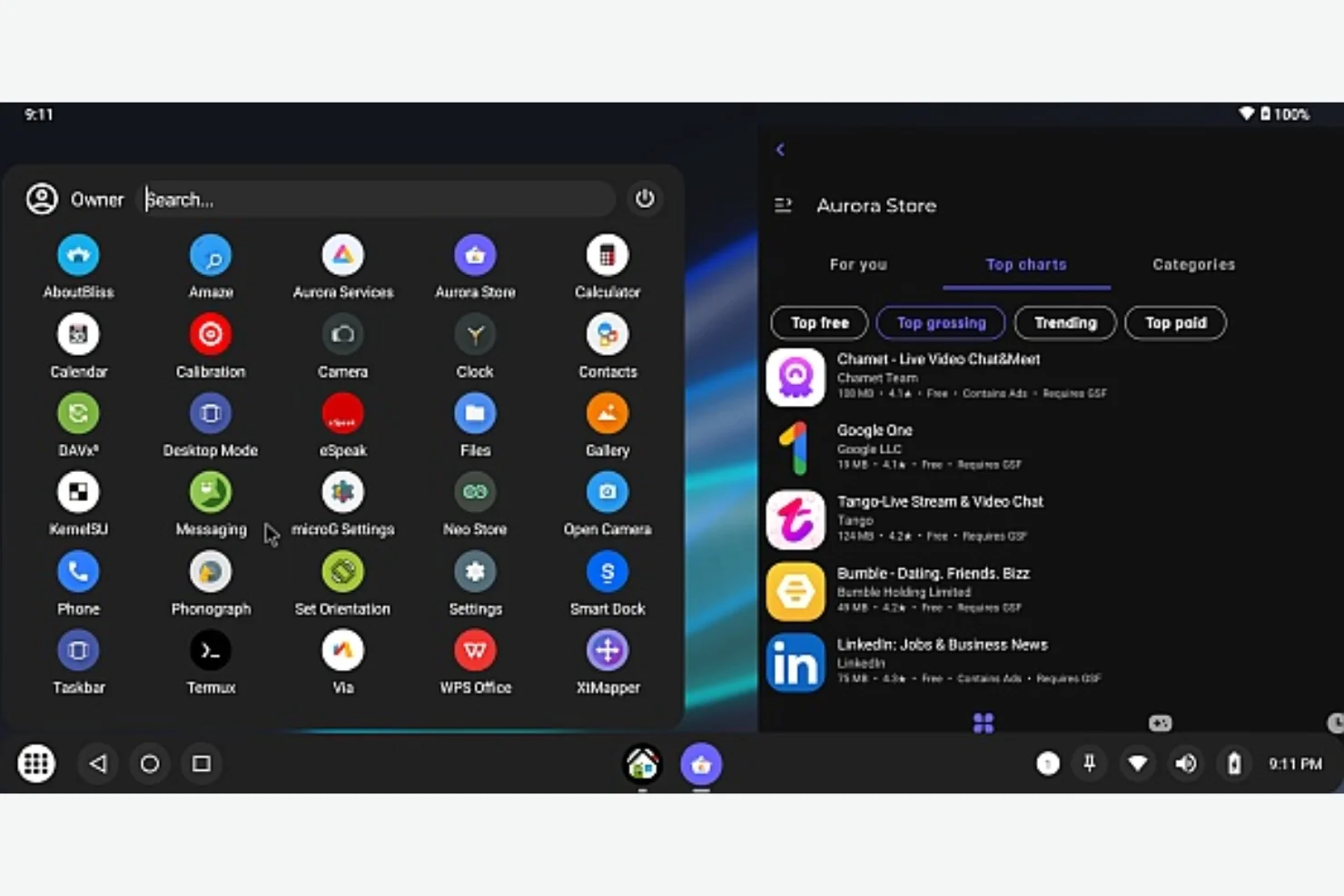
This software targets developers testing applications, gamers seeking higher framerates in mobile titles, and tech enthusiasts looking to repurpose older laptops. Older machines that struggle with modern desktop environments often excel when running a lightweight mobile architecture. The interface does not force users into a vertical, touch-only layout. Instead, it applies a desktop-style graphical user interface over the base system. Users navigate using a traditional taskbar, a start menu-style app launcher, and a system tray, while opening mobile applications in floating, resizable windows just like standard PC software.
Users do not need to erase their primary setup to use this environment. The installer supports a dual-boot configuration alongside Windows 10 and Windows 11. By carving out a separate partition on the storage drive, the system installs a bootloader that prompts the user to choose their preferred environment each time the machine powers on. This allows a single physical computer to act as a standard workstation during the day and a dedicated, high-performance mobile ecosystem machine when needed.
Key Features
- Desktop Interface Configuration: The environment forces a traditional PC layout upon the mobile base code. Users manage open applications via a bottom taskbar, access system settings through a standard notification panel, and organize shortcuts on a traditional desktop space. Applications that normally launch in full-screen mode can be contained within floating, resizable windows for standard multitasking.
- ARM Architecture Compatibility: Mobile applications are typically compiled for ARM processors, which differ from desktop x86 processors. This system integrates specialized translation libraries, such as Houdini, which convert ARM instructions into x86 instructions in real time. This ensures that users can download and execute heavily coded 3D games and commercial applications without facing architecture mismatch errors.
- Custom Input Mapping: Touch-based controls translate to physical peripherals through the included XTmapper utility. Users activate an overlay on top of any game or application, allowing them to draw digital analog sticks, assign swipe gestures, and map specific screen taps to keyboard keys and mouse clicks. The overlay configuration saves independently for each installed application.
- Root Privilege Management: Advanced system modifications require elevated permissions, which are strictly locked in standard mobile environments. This system includes a built-in root access manager within the developer settings. Users can toggle root permissions on or off globally, or grant administrative access to specific file managers, ad blockers, and performance monitoring utilities on a case-by-case basis.
- Peripheral and Gamepad Detection: The operating system includes kernel-level drivers for standard USB peripherals and Bluetooth controllers. Users can connect standard Xbox or third-party gamepads, and the system automatically routes the input to the native mobile controller APIs. This allows controller-supported mobile games to function immediately without requiring additional third-party mapping software.
- Display Scaling and Resolution Forcing: Mobile applications often struggle with ultra-wide monitors or high-resolution desktop displays. The display settings menu provides explicit controls for adjusting the global dots-per-inch scaling value and forcing specific aspect ratios. This prevents applications from stretching unnaturally or displaying micro-sized text on high-definition screens.
- Direct Storage Access: Unlike emulators that isolate files inside a virtual disk container, the native file manager can mount and read existing storage partitions. Users can navigate to their standard NTFS drives, copy downloaded media files, and transfer documents directly into the mobile environment without setting up complicated shared network folders or using cloud storage.
How to Install Bliss OS on Windows
- Download the official operating system image file and a bootable media creation tool, such as Rufus, to prepare the installation media.
- Insert a USB flash drive with at least 8 GB of capacity into the computer, launch Rufus, select the downloaded system image, set the partition scheme to GPT, and execute the write process to create the bootable drive.
- Open the native Windows Disk Management utility, locate your primary storage drive, right-click the main volume, and choose the Shrink Volume option to allocate at least 20 GB of unallocated space for the new system partition.
- Restart the computer and repeatedly press your motherboard specific BIOS access key, frequently F2, F10, F12, or Delete, to enter the system configuration menu.
- Navigate to the security tab within the BIOS interface, disable the Secure Boot feature, and adjust the boot priority sequence so the USB flash drive is listed as the primary boot device.
- Save the BIOS configuration, allow the machine to restart, and select the hard disk installation option when the graphical setup menu appears on the screen.
- Select the newly created 20 GB partition from the disk list, format it using the EXT4 file system, and confirm the prompt to install the GRUB bootloader, which manages the dual-boot process.
- Once the installer finishes writing the system files, remove the USB drive and restart the computer; the GRUB menu will appear, allowing you to select the new environment and complete the first-run network and account setup.
Bliss OS Free vs. Paid
The core operating system is fully free and built entirely on open-source code. Users can download the system image, flash it to a drive, and run it on as many devices as they choose without entering payment details or dealing with trial expirations. There are no artificial software limits restricting frame rates, resolution scaling, or peripheral support in the public releases. The development team sustains the public project through community donations via platforms like OpenCollective.
For commercial use cases, the development group maintains a parallel project known as Bass OS. This variant targets enterprise clients who need to build embedded systems, point-of-sale kiosks, or digital signage running a custom mobile interface on x86 hardware. Commercial deployments often require the removal of consumer-oriented services, the addition of proprietary hardware drivers, or specific long-term support contracts.
Companies integrating the base code into hardware products sold for profit must negotiate a commercial licensing agreement. This ensures compliance with proprietary components and covers dedicated technical support. Individual users, gamers, and hobbyists building personal machines remain entirely exempt from these commercial licensing requirements.
Bliss OS vs. PrimeOS vs. LDPlayer
PrimeOS is another native desktop environment built on mobile architecture, heavily marketed toward competitive gamers. It features custom macro tools and pre-configured controller profiles for popular battle royale titles, making it quick to set up for specific games. However, PrimeOS frequently relies on older base system code and receives slower system-level updates. Bliss OS maintains a more aggressive update schedule based on newer open-source branches, resulting in better compatibility with newly released hardware and recent app store requirements.
LDPlayer operates as a standard desktop application running on top of Windows, acting as an emulator rather than a native operating system. It allows users to launch mobile games in a window while keeping their primary desktop applications, such as video editors or chat clients, open in the background. Because LDPlayer relies on virtualization, it demands significant RAM and CPU overhead, leading to lower frame rates on older hardware compared to a native boot environment.
Choose LDPlayer if you have high-end hardware and require the convenience of running mobile apps without leaving your primary desktop environment. Choose PrimeOS if your sole objective is playing specific mobile games with pre-mapped keyboard controls. Bliss OS is the better choice for users who want maximum raw hardware performance, a highly updated open-source foundation, and the ability to repurpose older laptops into dedicated mobile-app workstations.
Common Issues and Fixes
- System boots to a black screen after the initial installation completes. This usually indicates a graphics driver conflict preventing the display server from starting. Restart the computer, highlight the new entry in the GRUB boot menu, press the 'e' key to edit the boot parameters, and type "nomodeset" into the command line to force the system to load basic display drivers.
- Keyboard and mouse inputs stutter or freeze during heavy gameplay. The built-in XTmapper service can consume excessive background CPU cycles if left running continuously. Disable the keymapper service temporarily using the drop-down notification panel, load into the game menu, and reactivate the service only when you are ready to play.
- Applications crash immediately upon launch or display architecture errors. The ARM compatibility layer may have failed to translate the application code to x86 instructions. Open the system settings menu, navigate to the specialized compatibility tab, ensure the Houdini translation engine is toggled on, and clear the local cache for the crashing application.
- Wi-Fi networks do not appear in the connection list during setup. Certain proprietary wireless network cards lack open-source kernel drivers in the base installation. Connect a standard USB Wi-Fi dongle or tether a mobile phone via a USB cable to establish a temporary internet connection, then navigate to the community forums to locate specific firmware patches for your internal card.
Version 16.9 — December 2025
Added:
- Updated Android base to Android 13 QPR2
- Enhanced hardware compatibility for newer devices and chipsets
- Added support for newer GPUs and Vulkan API updates
Improved:
- ARM and x86 app compatibility for better cross-platform support
- Multi-window and desktop mode functionality
- Enhanced input support for keyboards, mice, and game controllers
- Updated Bliss launcher with performance tweaks and bug fixes
- Improved OTA update process for smoother upgrades
Fixed:
- Various issues with graphics rendering and display drivers
- Bluetooth and Wi-Fi connectivity bugs
- General system optimizations to reduce crashes and freezing
Security:
- Updated kernel and security patches for improved protection
- Optimized battery management and power-saving features