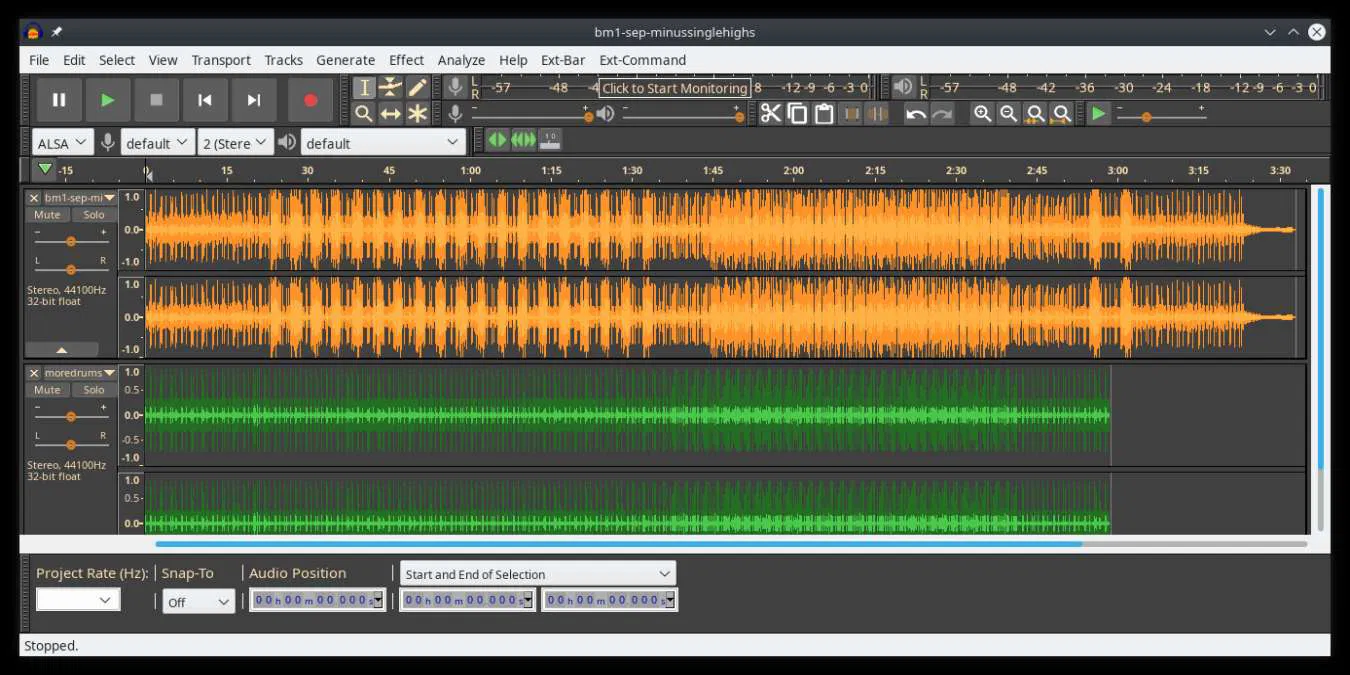
Audacity operates as a dedicated multi-track audio editor that handles the direct recording, mixing, and digital manipulation of sound files. Unlike generic media suites or cloud-based audio tools that rely on constant server connections, this desktop application processes audio data entirely on local hardware. It utilizes a 32-bit float internal audio architecture, allowing it to calculate high-resolution audio changes without introducing digital clipping or degrading the original waveform quality during heavy processing. The software provides a structured timeline where users can stack multiple audio inputs, visually inspect waveforms to identify volume spikes, and apply technical corrections such as equalization, compression, and hard limiting.
The primary audience includes podcast producers editing multi-mic conversation tracks, musicians recording independent demo stems, and audio archivists transferring analog tape or vinyl media into digital formats. These users choose this specific desktop editor because it avoids the steep technical overhead associated with traditional Digital Audio Workstations. Instead of forcing users into a complex MIDI sequencing environment designed for composing electronic music, the interface focuses strictly on waveform editing. This direct approach solves practical tasks like isolating a vocal track, silencing background room tone, or merging multiple audio takes into a single cohesive file for final distribution.
By maintaining a destructive and non-destructive hybrid workflow, the editor adapts to different project requirements. For rapid adjustments, users can highlight a section of the waveform and apply a permanent noise reduction filter, committing the change immediately to save processing overhead. For more complex mixing scenarios, the software utilizes real-time effects stacks where equalization parameters and compression thresholds remain adjustable during active playback. This combination of straightforward destructive editing for quick cleanups and non-destructive routing for final mixing allows audio engineers to finalize projects efficiently while retaining precise control over the final export formats, including standard WAV, FLAC, and Ogg Vorbis files.
Key Features
- Feature Name: Real-Time Effects Stack. Users can apply VST3, LV2, AU, and LADSPA plugins directly to an individual track's effects panel without permanently altering the underlying waveform data. The interface allows toggling these effects on and off or tweaking parameter dials during active playback, replacing the older workflow of waiting for a progress bar to render audio before hearing the result.
- Feature Name: Non-Destructive Clip Editing. Audio segments dragged onto the timeline retain their full underlying data even after they are trimmed or split. By dragging the edge of a cut clip outward, users can restore the original audio that was previously hidden, preventing the accidental loss of important takes during aggressive timeline slicing.
- Feature Name: Intel OpenVINO AI Tools. Through dedicated local plugins, the editor accesses hardware-accelerated processing for audio stem separation and noise suppression. Users can isolate vocal tracks from mixed instrumental recordings or automatically filter out persistent background room hum without sending sensitive audio files to external cloud servers.
- Feature Name: Audio Setup Interface. A dedicated toolbar button consolidates hardware configuration, allowing rapid switching between host APIs such as MME, Windows DirectSound, and Windows WASAPI. This eliminates the need to navigate deep into the preference menus when changing input devices, such as switching from a built-in laptop microphone to an external USB audio interface.
- Feature Name: Advanced Spectrogram View. Editors can switch from the standard amplitude waveform to a visual frequency map to pinpoint specific audio anomalies like clicks, pops, or electrical hums. By utilizing the Spectral Selection tool, users can highlight a precise frequency range and apply the Spectral Delete process to remove isolated background noises without affecting the primary dialogue.
- Feature Name: Multi-Track Export Flow. The export dialog supports rendering individual timeline tracks as separate audio files in a single batch process. This workflow speeds up the delivery of isolated stems to mixing engineers, allowing users to select WAV, FLAC, or MP3 formats and export all active tracks simultaneously into a designated target folder.
- Feature Name: Cloud Audio Publishing. For users collaborating on projects or distributing podcasts, a native export option connects directly to the audio.com hosting platform. Clicking the share button initiates a mixdown process, uploads the finalized file, and generates a direct link for client review, bypassing the need to export locally and manually upload through a web browser.
How to Install Audacity on Windows
- Download the zipped installation archive containing the main setup files from our website to your preferred local storage drive.
- Right-click the downloaded archive in Windows File Explorer and select "Extract All" to unpack the contents into a new, accessible folder.
- Open the newly extracted directory and double-click the readme.txt file to review necessary pre-installation notes and system configuration details.
- Double-click the primary setup executable located within the extracted folder to initiate the installation wizard.
- Read the end-user license agreement, click next, and select the target installation directory, which defaults to the standard C:Program Files path on 64-bit Windows environments.
- Choose whether to create a desktop shortcut and decide if you want to reset preferences to default settings, a helpful step if you are reinstalling to clear corrupt plugin registries.
- Click "Install" to begin copying the core application files, default Nyquist generators, and interface assets to the specified local drive.
- Once the progress indicator finishes, click the final button to exit the wizard and launch the program, which opens directly to an empty multi-track timeline without requiring any user account sign-in.
Audacity Free vs. Paid
The software operates under a completely free, open-source model licensed under the GNU General Public License (GPL). There are no paid tiers, subscription plans, trial periods, or premium features locked behind a paywall. Every functional tool, from the real-time effects stack to the multi-track export features, is available in the standard installation at zero cost.
The ongoing development, code maintenance, and interface modernization are financially supported by Muse Group, the corporate entity that acquired the project. This corporate backing provides necessary resources to pay full-time developers and interface designers without altering the core freeware distribution model or introducing digital rights management restrictions into the desktop application.
While the desktop application itself remains entirely free, users have the option to interact with external services that employ different business models. For example, publishing projects directly to the integrated cloud service provides free hosting up to a certain storage limit, but the core desktop editing, local rendering processes, and local saving mechanisms function entirely offline without any required transactions or account creations.
Audacity vs. Ocenaudio vs. Adobe Audition
Ocenaudio serves as a highly efficient, single-track editor optimized for the rapid manipulation of large files. Users should choose Ocenaudio when they need to quickly trim a two-hour field recording, apply a simple fade out, or normalize a single file without the overhead of setting up a multi-track project environment. It lacks advanced mixing capabilities but loads massive audio files noticeably faster than most editors by utilizing a specialized memory management system.
Adobe Audition operates as a commercial workstation aimed at broadcast professionals and video post-production studios. It offers superior spectral repair tools, native integration with Premiere Pro video timelines, and advanced multi-channel routing capabilities. Users select Audition when their daily tasks involve automated batch processing for broadcast compliance standards, or mixing post-production audio that requires direct links to a video editing environment.
Audacity remains the better fit for users who need a practical middle ground: true multi-track mixing and non-destructive editing without the steep financial cost or dense learning curve of a commercial broadcast workstation. It excels in standard podcast production workflows where users need to align multiple vocal tracks, apply standard equalization, correct phase issues, and export a final stereo mixdown efficiently.
Common Issues and Fixes
- Problem description: VST plugins fail to appear in the effects menu after installation. Open the application, navigate to the Effect menu, and select Plugin Manager. Click the "Rescan" button to force the software to search the standard Windows VST directories and register the newly added third-party tools.
- Problem description: Noticeable delay or echo when recording an overdub track alongside existing audio. This latency occurs because the system hardware requires milliseconds to process the audio buffer. Go to Audio Setup, switch the Audio Host to Windows WASAPI, and ensure "Software Playthrough" is unchecked in the Transport Options menu to prevent hearing the delayed monitoring signal.
- Problem description: No sound plays through headphones despite seeing the playback meters moving on the screen. The software frequently defaults to the wrong output device when a new USB microphone or display monitor is connected. Click the Audio Setup button on the main toolbar, select Playback Device, and manually choose your specific headphones or audio interface rather than relying on the system default assignment.
- Problem description: Error message appears when trying to export to M4A or import proprietary video formats. The standard installation does not include the FFmpeg library due to software licensing distribution rules. Navigate to Edit > Preferences > Libraries and click the download button next to the FFmpeg library option to install the external encoders required for handling those specific formats.
Version Latest — 2025
- Resolved a critical interface issue where waveform scrolling and selection could become unresponsive.
- Implemented full support for the FFmpeg 8 multimedia framework to enhance codec compatibility.
- Introduced a new Spectrogram Wavelet analysis mode for more detailed time-frequency visualization.
- Added a workflow improvement allowing users to pan across the track panel by dragging with the middle mouse button.
- Enabled direct importing of audio files from audio.com through a dedicated dialog window.
- Expanded export capabilities to include OGG/Opus formats when using the FFmpeg library.
- Fixed stability issues affecting cloud audio uploads and corrected errors when importing 16-bit FLAC files.
- Added checksum verification to WavPack exports to ensure file integrity.