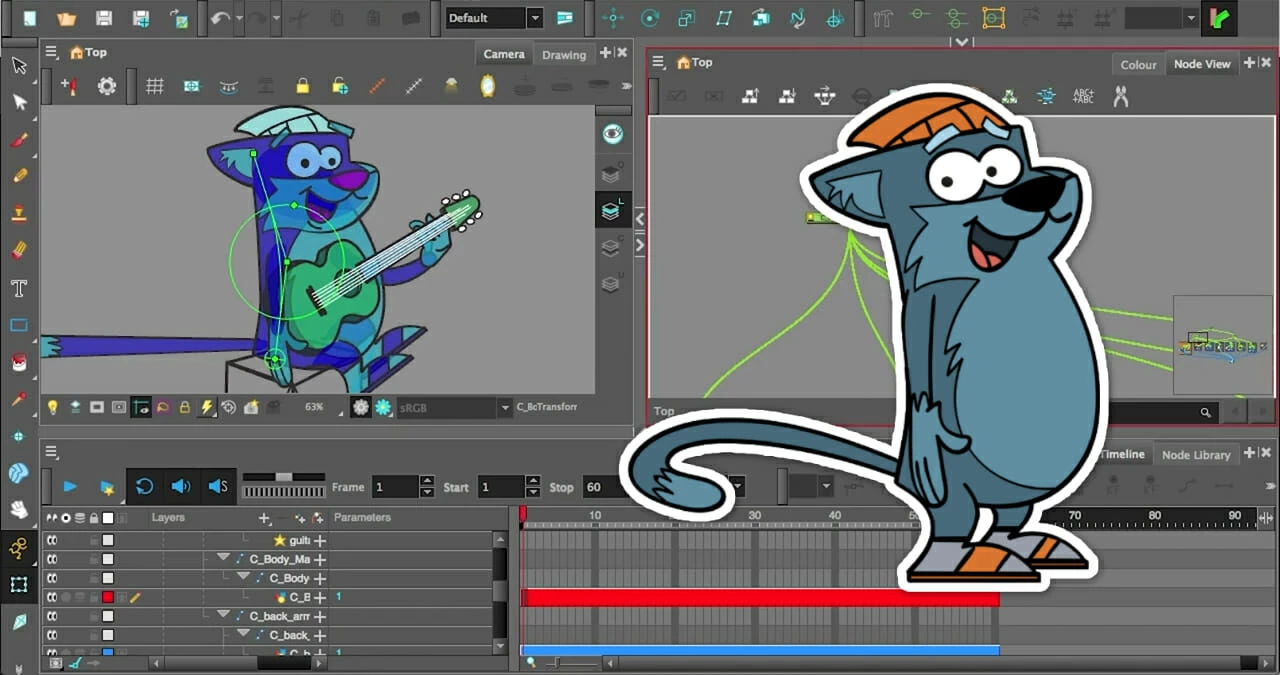
Toon Boom Harmony is a professional desktop animation environment built for studios and independent creators who need to handle the entire production pipeline in one place. While it occupies a unique space in the 3D animation software category by blending flat illustration with true spatial integration, its primary foundation is high-end 2D animation. Artists use this application to draw rough sketches, ink and paint, build complex character rigs, and execute final node-based compositing without ever exporting files to a secondary post-production program. The desktop client provides the hardware access necessary to process massive multi-layered scenes, manage raw audio files for lip-syncing, and render complex visual effects directly from the local machine.
The software targets a wide spectrum of users, from solo animators drawing frame-by-frame shorts to massive studio teams collaborating on episodic television series, feature films, and interactive media assets. By relying on a node-based architecture alongside the traditional Xsheet and Timeline views, the program allows riggers to build characters with isolated joints, dynamic deformations, and automated lighting effects that respond to environmental changes. Desktop-bound execution is necessary here; web-based or lighter alternative apps simply cannot calculate the math required for shape-aware deformations, nor can they handle multi-plane camera moves involving imported 3D models in real time without severe latency. Animators choose this environment to consolidate their workflow, ensuring that vector lines, bitmap textures, lip-sync data, and composited camera movements all live inside a single, unified project file. The interface is highly modular, allowing technical directors to dock and undock specific toolbars, such as the Advanced Animation and Deformation toolbars, depending on the current task or the specific phase of the production pipeline.
Unlike consumer-grade drawing tools that force users to export image sequences into separate video editing software to add blurs, glows, or camera shakes, this application handles all final rendering internally. The built-in compositing engine calculates visual effects based on the network of nodes connected to each drawing layer. This means an artist can draw a character, apply an automatic drop shadow, set up a virtual light source, and export the final broadcast-ready video file directly from the desktop client. This self-contained approach significantly reduces file management overhead and prevents quality loss caused by rendering and re-rendering files across multiple programs.
Key Features
- Advanced Brush Engine: Animators can draw using both vector and bitmap lines on the same layer, allowing for clean scalable paths with textured, natural-media edges. The Tool Properties panel lets users adjust minimum and maximum brush sizes to map perfectly to drawing tablet pressure, while the 'B' and 'E' keyboard shortcuts quickly toggle between the active brush and eraser.
- Shape Aware Deformers: Riggers can apply envelope deformers to character assets, allowing a flat vector drawing to bend, stretch, and warp as if it had volume. This tool calculates the mathematical boundaries of the drawn shape, meaning an animator can twist a character's arm and the texture mapping will follow the curve without breaking the exterior line art.
- True 3D Integration: Users can import 3D objects directly into the 2D workspace, manipulating them along the X, Y, and Z axes alongside flat drawings. The Node View allows artists to connect these 3D models to the same multi-plane camera and lighting rigs used for the 2D elements, locking their movements together during complex panning shots.
- Optimized Scene Management: The interface divides scene organization into Timeline, Xsheet, and Node View panels, giving technical directors different ways to manage the same data. The Node View visualizes every layer, peg, and effect as an interconnected web, making it easier to troubleshoot which effect is applied to which drawing when a scene contains hundreds of individual elements.
- Symmetry Guides and Rulers: The workspace includes perspective guides and a symmetry tool for strict structural drawing and background layout. Animators can lock their drawing tools to the vanishing points of a multi-point perspective grid, ensuring that architectural lines remain consistent as the virtual camera moves through the scene.
- Onion Skinning Controls: The Onion Skin feature, toggled by pressing the 'O' key, displays previous and subsequent frames in customizable colors beneath the active drawing. The advanced menu allows animators to specify exactly how many frames are visible and adjust their opacity drop-off, making it easier to track character arcs and timing.
How to Install Toon Boom Harmony on Windows
- Download the installer archive from our website to your local storage drive.
- Extract the downloaded archive into a new, easily accessible folder on your desktop.
- Open the extracted folder and locate the readme.txt file; read it carefully to review any specific pre-installation steps or required visual dependencies.
- Run the primary setup executable from the extracted directory to launch the installation wizard.
- Accept the End User License Agreement and choose the destination folder, which defaults to C:Program FilesToon Boom AnimationToon Boom Harmony.
- Click install and wait for the wizard to unpack the core application files, node libraries, and required background services onto your machine.
- Launch the software from your Start menu; upon the first initialization, a prompt will require you to sign in with your Toon Boom account to validate your active subscription or trial status.
Toon Boom Harmony Free vs. Paid
The software operates entirely on a subscription or perpetual license model and does not offer a free tier. Users who want to test the environment can access a 21-day trial, which unlocks the full toolset for evaluation purposes but requires an account registration. Once the trial expires, the software locks saving and exporting functions until a paid plan is activated.
The paid tiers are divided into three distinct editions: Essentials, Advanced, and Premium. The Essentials tier costs approximately $30 per month and targets hobbyists and students, providing fundamental vector drawing, painting, and basic animation tools. It strips out the more complex node-based compositing and advanced rigging systems, focusing strictly on standard frame-by-frame and simple paperless pipelines.
The Advanced tier, priced around $77 per month, introduces bitmap painting tools and broader support for traditional hand-drawn workflows, including high-speed scanning and ink-and-paint management. The Premium tier, which costs roughly $139 per month, is the studio standard. It unlocks the Node View, advanced visual effects, complete 3D integration, and the Master Controller system for highly sophisticated puppet rigging.
Studios often negotiate volume licensing or perpetual licenses for long-term productions, which can cost significantly more upfront but reduce recurring overhead. Educational discounts are widely available, allowing students to access the Premium features at a fraction of the commercial cost while they learn the standard studio pipeline.
Toon Boom Harmony vs. Adobe Animate vs. Moho
Adobe Animate originated as Flash and remains heavily optimized for vector-based web animation, interactive media, and lightweight broadcast cartoons. It relies on a layer-based timeline and symbols, making it very accessible for basic character movement and quick asset reuse. However, Animate lacks a dedicated node-based compositing environment, true spatial 3D integration, and advanced deformers. Users should choose Animate if they are already entrenched in the Adobe ecosystem, need to produce interactive HTML5 canvas content, or are working on simpler vector projects that do not require complex visual effects or deep rigging hierarchies.
Moho focuses aggressively on rigged-puppet animation and skeletal bone systems, highlighted by its Smart Bones feature which automates joint corrections and muscle deformations. It is significantly cheaper than Harmony's Premium tier and offers a much faster learning curve for independent creators who want high-quality character animation without drawing every single frame. Moho struggles with traditional, hand-drawn frame-by-frame animation, as its freehand drawing tools are less refined than its competitors. Users should select Moho if they are solo animators or small teams focusing purely on 2D skeletal rigging on a tight budget.
Toon Boom Harmony is the better fit when a production requires an uncompromised blend of both traditional frame-by-frame drawing and highly advanced cut-out rigging. Its Node View allows technical directors to build complex character setups and composite heavy visual effects directly inside the scene, a capability neither Animate nor Moho can match. If the project demands a multi-plane camera moving through 3D space with hand-drawn 2D characters interacting with volumetric lighting, Harmony provides the necessary architecture to execute the shot within a single program.
Common Issues and Fixes
- Pen pressure sensitivity stops working on drawing tablets. This frequently happens on Windows when the software's tablet API conflicts with the device driver. To fix it, navigate to Edit > Preferences > Advanced, uncheck "Use Qt Wintab Tablet Support", click OK, and completely restart the application. Additionally, ensure the minimum size in the Brush Tool Properties is set lower than the maximum size.
- Playback lags or drops frames on complex scenes. Heavy scenes with multiple rigged characters and active deformers will overwhelm the CPU during real-time playback. To improve performance, switch the view mode to OpenGL instead of Render View, and use the Node View to temporarily disable heavy compositing effects like blurs or glows while checking rough animation timing.
- Custom keyboard shortcuts fail to execute. This usually occurs if the workspace focus is on the wrong panel, as shortcuts are often context-sensitive. Click directly on the tab of the Camera or Drawing view to set the focus, then press the shortcut again. Users can verify or remap their bindings by going to Edit > Keyboard Shortcuts.
- The interface looks too small on 4K or High-DPI monitors. The software occasionally fails to read the native Windows display scaling correctly, resulting in microscopic icons and menus. Right-click the application executable, select Properties, go to the Compatibility tab, click "Change high DPI settings", and check "Override high DPI scaling behavior" set to "System" to force standard scaling.
Version 25 — June 2025
- Introduced Breakdown Pose Assistant for refining rigged character animations and keyframed objects with improved efficiency
- Added support for importing Photoshop ABR brushes directly into Harmony Advanced and Premium editions, enabling consistency between concept art and animation workflows
- Implemented Pencil Line Retouch Tool allowing artists to adjust opacity and thickness of existing pencil lines by drawing over them
- Introduced Universal Scene Description (USD/USDZ) format compatibility for importing 3D models and exchanging animation data with CGI pipelines in Premium edition
- Added Lock Timeline Ruler command to prevent accidental timing modifications during project playback
- Optimized project file structure resulting in significantly reduced file sizes and faster scene loading times
- Added Store Recovery Textures in Vector Files preference option to dramatically reduce TVG file sizes by excluding embedded texture copies
- Enhanced 3D compositing algorithms with 32-bit floating point rendering support
- Implemented DWAA compression option for EXR file exports
- Added unique file extensions for presets: .tbr for brushes, .tpr for tools, and .tbx for tips and textures
- Improved caching efficiency for multiple Colour Override and Art-Selector nodes with similar content
- Updated Anti-Flicker node to support 32-bit float rendering
- Enhanced B and Shift-B navigation shortcuts to work with 3D bone hierarchies
- Added Timeline::layerEnabled function to scripting API for querying layer enabled status
- Updated TB_MayaToXml.py script for Python 3 compatibility with Maya 2022 and later versions
- Added All RenderBatch Nodes option in Cache Manager for viewing all cache entries simultaneously
- Resolved issue causing significant delays when switching back to Harmony from other applications on Windows
- Fixed Tool Preset import functionality
- Corrected PSD file import issues with single top-level groups
- Resolved Photoshop compatibility issue with alpha mode in exported PSD files
- Fixed crash occurring when dragging and dropping templates on M4 Mac computers
- Addressed rendering cache issues that caused unnecessary frame re-rendering
- Resolved render thread deadlocks on M4 Mac systems