Description
When optimizing a Windows PC, users often confuse tools that manage active system resources with those that clean up storage and software clutter. In this comparison, we examine RAM Saver Professional vs Wise Program Uninstaller—two distinct utilities that solve completely different problems. While RAM Saver Professional focuses on real-time memory management to boost immediate system responsiveness, Wise Program Uninstaller is dedicated to the complete removal of unwanted software and residual files. This guide clarifies which tool fits your specific maintenance needs in 2026.
RAM Saver Professional
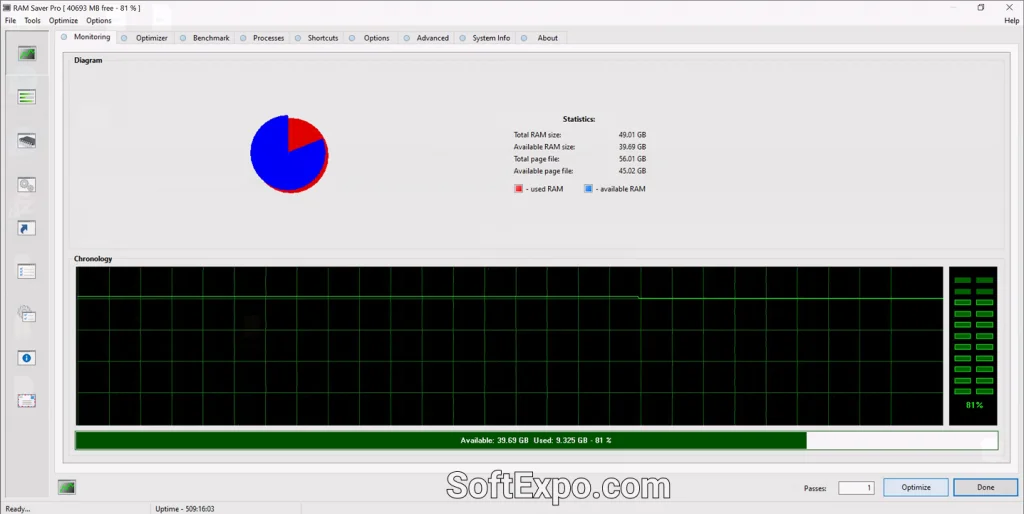
Developed by WinTools Software Engineering, RAM Saver Professional is a specialized utility designed to manage and optimize your computer's Random Access Memory (RAM). Unlike general cleaning tools, it works actively in the background to free up memory for demanding applications. It is particularly valuable for users on older hardware or those running memory-intensive tasks like video editing or gaming on systems with limited resources (e.g., 8GB or 16GB of RAM).
- Real-time Memory Optimization: actively monitors and defragments system memory to ensure immediate availability for foreground applications.
- Benchmark & Monitoring: Includes built-in tools to test RAM speed and a desktop monitor to track CPU and RAM usage live.
- Specialized Shortcuts: Allows creation of "boosted" shortcuts that automatically clear RAM before launching specific heavy programs.
- Clipboard Cleaning: Automatically clears the Windows clipboard to prevent unnecessary memory usage.
Pricing Model: This is commercial shareware. A free trial is available, but continued use requires purchasing a license, typically priced around $29.99.
Best Suited For: Gamers, users with older PCs (Windows 10/11) struggling with multitasking, and power users who want granular control over how their system allocates memory.
Wise Program Uninstaller
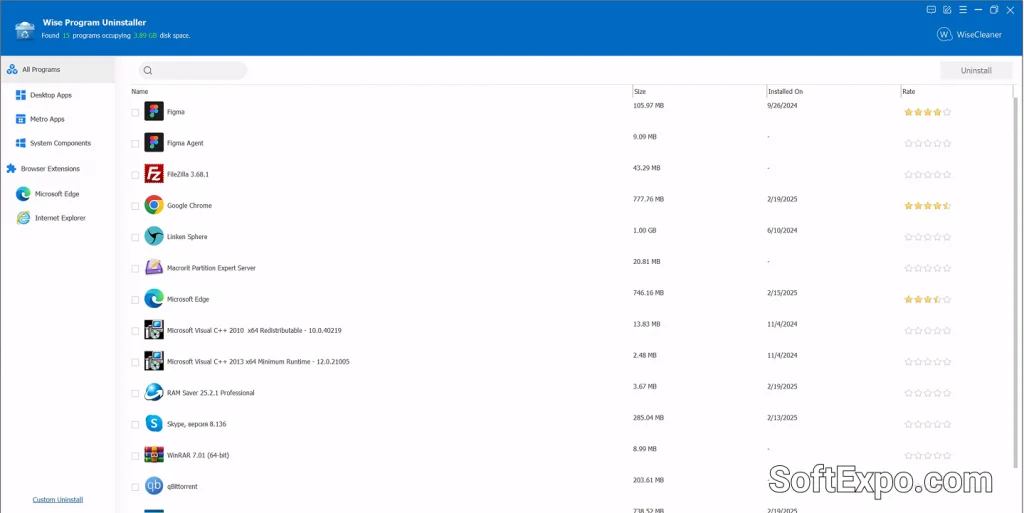
Wise Program Uninstaller, created by WiseCleaner, is a lightweight utility focused on disk hygiene and software management. Its primary goal is to replace the standard Windows uninstaller, which often leaves behind "ghost" files and registry entries. By scanning for these leftovers, it ensures that uninstalling a program truly removes every trace of it from your hard drive. It does not manage active RAM but clears space and prevents registry bloat that can eventually slow down a system.
- Force Uninstall: specifically designed to remove stubborn software that has a broken uninstaller or refuses to leave via standard methods.
- Custom Uninstall: Allows you to browse to a program's folder and remove it even if it is not listed in the Windows Control Panel.
- Leftover Scanning: Automatically scans the registry and file system after a standard uninstall to delete residual junk files.
- Browser Extension Removal: Supports batch removal of unwanted plugins and extensions from Edge, Chrome, and Firefox.
Pricing Model: primarily Freemium. The core uninstaller features are free for personal use. A "Pro" version exists (approx. $29.95) which adds specific "Software Health" maintenance features, but the free version is fully functional for standard uninstall tasks.
Best Suited For: General users who install and test many programs, and anyone needing to remove bloatware or broken software that the standard Windows tools cannot handle.
Key Differences
Since these tools serve different functions, their differences lie in their operational focus rather than a direct feature overlap.
- Resource vs. Storage: RAM Saver Professional optimizes the volatile memory your PC uses to run active tasks. Wise Program Uninstaller cleans the permanent storage (hard drive/SSD) by removing static files and registry keys.
- Active vs. Passive Operation: RAM Saver runs continuously in the background (System Tray) to manage resources on the fly. Wise Program Uninstaller is typically launched only when you need to remove a specific application.
- Performance Impact: RAM Saver attempts to improve speed by making RAM available instantly. Wise Program Uninstaller contributes to long-term system health by preventing registry errors and disk clutter, which indirectly helps stability over time.
- Solving Crashes: If your PC freezes due to running out of memory, RAM Saver is the correct tool. If your PC has errors because of a corrupted program installation, Wise Program Uninstaller is the better choice.
Which Should You Choose?
Because they address separate issues, many users may find value in having both installed. However, if you must prioritize one based on your current symptoms:
Choose RAM Saver Professional if you... suffer from system lag while multitasking, have a PC with limited RAM (8GB or less), or need to squeeze extra performance out of heavy applications without upgrading your hardware.
Choose Wise Program Uninstaller if you... frequently install and remove new software, need to clear disk space, or are stuck with a stubborn program that refuses to uninstall via the Windows settings menu.

Best Tools For 3D Animation

Best Backup Solutions For Small Business