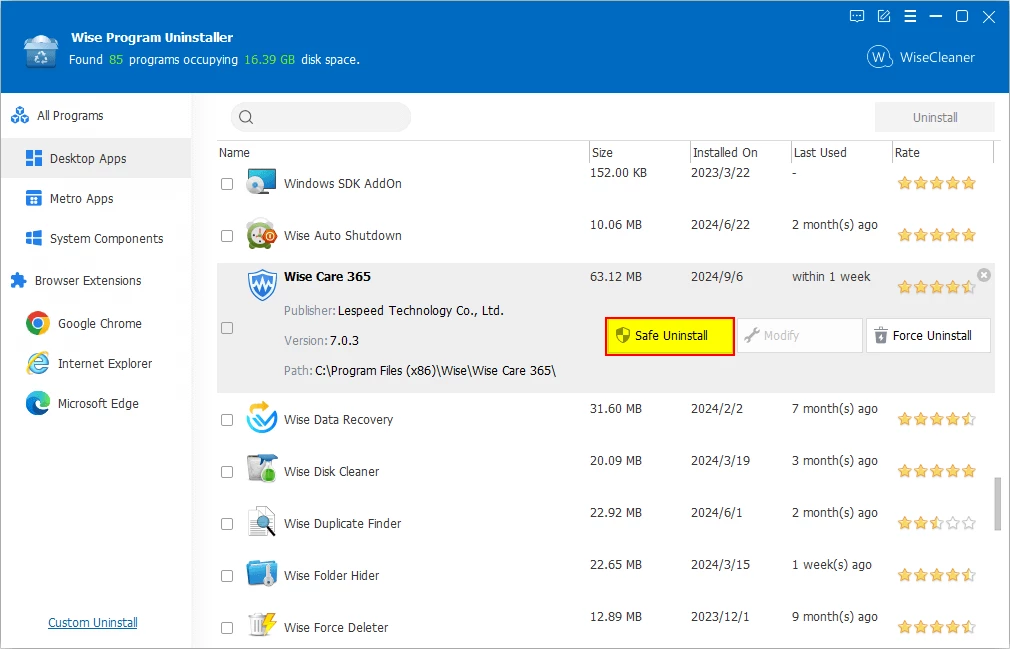
When standard software removal methods fail and leave behind orphaned folders, broken shortcuts, and obsolete registry keys, Wise Program Uninstaller steps in as a dedicated cleanup utility. Designed for desktop users who need more control over their local environment, this application bypasses the default Windows control panel to forcibly eradicate stubborn applications. Instead of relying on web-based diagnostic tools or generic system optimizers that only clear temporary internet files, users rely on this specialized local client to hunt down exact file paths and registry strings tied to uncooperative programs. Whether managing a heavily utilized workstation or reviving an older machine bogged down by unused utilities, having a targeted uninstallation tool prevents system decay over time.
The core problem it solves is software rot caused by degraded or malicious installers that refuse to run their own uninstallation scripts. Desktop applications frequently embed background services, context menu entries, and hidden application data folders that outlive the main executable. By utilizing an independent scanning engine, this uninstaller identifies these exact remnants and deletes them from the storage drive. It addresses the practical reality of maintaining a Windows machine: standard uninstall processes rarely clean up everything, and manually searching the registry editor for leftover application strings is both tedious and dangerous for the operating system. A dedicated tool automates this deep cleaning without requiring technical registry knowledge.
Because it operates as a localized, standalone desktop program rather than a heavy background service, it does not monopolize processing power while sitting idle. Users choose it over broader PC maintenance suites because it focuses strictly on application removal, browser extension management, and post-uninstallation cleanup without adding unnecessary bloat. Whether dealing with pre-installed hardware vendor software, hidden universal applications, or a corrupted video game installation that blocks subsequent updates, the utility provides an immediate workflow to clear the digital blockage. The interface remains intentionally simple, avoiding confusing diagnostic dials in favor of a straightforward list of installed software and direct action buttons.
Key Features
- Safe Uninstall: This primary function triggers the target software's official uninstallation routine before initiating a secondary diagnostic scan. Once the default removal finishes its standard procedure, the internal scanning engine searches the hard drive and system registry for any leftover temporary files, empty directories, or orphaned keys, presenting a detailed list of items for final deletion.
- Force Uninstall: Built specifically for broken, corrupted, or stubborn applications that refuse to execute their standard removal scripts. The tool bypasses the native uninstaller entirely, directly scanning the file system and registry paths to locate all associated program files so you can eradicate the software manually without needing the original setup files.
- Custom Uninstall: Designed for portable applications, standalone executables, or poorly coded software that never registered in the default Installed Apps list. Users browse directly to the specific installation folder on their local drive, and the utility analyzes the folder contents to track down and eliminate all connected system entries and background files.
- Universal App Removal: Cleans up the native desktop environment by targeting built-in applications and Universal Windows Platform packages downloaded from the digital storefront. This allows users to strip away pre-installed vendor bloatware or default system utilities that the standard control panel grays out or explicitly protects from user modification.
- Browser Extension Manager: Evaluates and removes third-party add-ons, toolbars, and search plugins across major web browsers including Chrome, Firefox, and Edge. It supports batch processing, allowing you to check multiple extensions at once and execute a bulk removal to improve browser startup times and eliminate hidden background trackers.
- Context Menu Integration: Adds a direct removal command to the desktop right-click menu for faster workflow execution. By right-clicking any desktop shortcut or executable file, users can instantly launch the uninstallation process without needing to manually open the main utility interface or search through long alphabetical lists of installed software.
- Software Health Scanner: Evaluates the overall state of installed programs and scans for leftover data from past removals. It identifies obsolete registry entries from previously deleted software, manages startup app permissions to improve boot times, and detects hidden applications that generate unwanted desktop pop-ups or run unauthorized background processes.
How to Install Wise Program Uninstaller on Windows
- Navigate to the official vendor website to obtain the primary Windows installer executable package, ensuring you avoid third-party mirror sites that might bundle unwanted toolbars.
- Double-click the downloaded setup file to launch the installation wizard, which will prompt you for basic administrator permissions to proceed with system-level modifications.
- Review and accept the End User License Agreement to move forward to the destination folder selection screen, where the utility will calculate the required disk space.
- Verify the default installation path, which usually defaults to the main system drive, and adjust the directory if you prefer to keep system management utilities grouped on a separate local partition.
- Look for optional checkboxes during the setup phase, such as the option to create a desktop shortcut or add the tool to your right-click context menu, and check or uncheck them according to your specific workflow preferences.
- Click the install button to copy the localized files to your machine; this process writes the core executable and uninstallation engine to your drive and typically finishes in under a minute without requiring additional background resource downloads.
- Finish the setup process and launch the application directly from the final wizard screen; note that the program will trigger a User Account Control prompt every time it runs because it explicitly requires administrative privileges to modify registry entries and delete protected system files safely.
Wise Program Uninstaller Free vs. Paid
Wise Program Uninstaller operates primarily as a freeware utility, providing the vast majority of its core removal capabilities at no cost. Users can download the tool and immediately utilize the Safe Uninstall, Force Uninstall, Custom Uninstall, and browser extension management tools without hitting a paywall. The free tier does not restrict the number of programs you can remove, nor does it enforce an artificial waiting period or batch-processing limit during standard uninstallation workflows. This makes the base version fully capable of handling routine system cleanup and stubborn program removal.
For users seeking automated optimization and deeper system maintenance, the developer offers a paid PRO tier. Upgrading to the PRO version requires purchasing a license key, which unlocks the specialized Software Health feature. This premium module goes beyond basic uninstallation by actively scanning for leftover privacy traces, managing background application permissions, and identifying hidden programs responsible for pushing intrusive pop-ups to the desktop environment. The PRO tier also includes prioritized technical support for troubleshooting complex registry issues.
The payment model for the PRO upgrade typically involves a defined subscription period or a perpetual license, depending on the specific bundle chosen through the vendor's digital storefront. However, home users focused purely on deleting stubborn software and clearing out broken registry keys can rely entirely on the free tier, as the fundamental uninstallation engine remains unrestricted. The distinction lies entirely in whether you want proactive system monitoring or if you prefer a reactive, on-demand removal tool.
Wise Program Uninstaller vs. Revo Uninstaller vs. IObit Uninstaller
Revo Uninstaller is a widely recognized alternative that excels at deep registry scanning and offers a unique Hunter Mode, which allows users to drag a crosshair over an open application window to immediately identify and remove the program. Revo provides an exceptionally granular view of the local registry and creates mandatory system restore points before every action, making it a favorite for advanced users who want strict safety nets. However, its free version is more restricted than competitors, reserving vital features like forced uninstallation and multiple-program batch removal exclusively for its paid tier.
IObit Uninstaller focuses on bundleware detection, automatically flagging secondary programs, hidden tracking tools, and unwanted toolbars that install silently alongside other software. It features an aggressive deep-clean engine and integrates an automatic updater for installed third-party apps, making it a broader PC maintenance tool rather than just a remover. While effective at catching hidden bloatware, IObit includes more prominent promotional pop-ups for other company products, which can distract users who simply want a quiet, dedicated removal utility without constant cross-selling.
Wise Program Uninstaller is the better fit for users who want an entirely straightforward, lightweight tool without the constant upselling found in IObit or the paywalled batch removal features of Revo. It strikes a practical balance by offering forced removal, custom folder uninstallation, and batch processing completely for free. When you need a fast, portable-friendly interface that prioritizes getting broken software off your drive with minimal friction and zero confusing menus, this utility delivers the most direct and localized workflow.
Common Issues and Fixes
- Problem: The target program is missing from the installed applications list. If the software you want to remove does not appear in the main interface, it likely lacks proper registry entries or was installed as a portable application. To fix this, use the Custom Uninstall feature, browse directly to the folder where the program is stored on your drive, and allow the utility to analyze and delete the directory contents along with any linked background files.
- Problem: The standard removal process hangs or freezes indefinitely. Corrupted vendor uninstallers or missing setup files can stall the Safe Uninstall process, leaving the progress bar stuck. If the operation stops moving, cancel the current task and select Force Uninstall instead; this action bypasses the broken vendor script entirely and directly erases the target files from the hard drive and registry.
- Problem: The context menu shortcut does not appear when right-clicking a desktop icon. The right-click integration is sometimes disabled during the initial installation or blocked by local Windows Explorer settings. Open the application's top menu, navigate to the internal settings panel, and manually toggle the option to add the tool to your context menu to restore the right-click removal command.
- Problem: Browser extensions reappear automatically after uninstallation. Cloud-synced browser profiles can automatically redownload and reinstall removed extensions as soon as you open the browser. To resolve this, log out of your browser profile, run the extension removal tool again to clear the local add-on files, and clear your browser cache before logging back in to prevent the cloud sync from restoring the deleted items.
Version 3.2.7 — October 2025
- Introduced a new "Software Health" module to assist users in maintaining and managing installed applications more effectively.
- Implemented subtle enhancements to the Graphical User Interface (GUI) for a cleaner and more intuitive user experience.
- Resolved various minor bugs and stability issues identified in the previous release to ensure smoother operation.