Description
In the world of 3D texturing, two primary approaches dominate: procedural generation and layer-based mixing. Adobe Substance 3D Designer and Quixel Mixer represent the pinnacle of these respective workflows, though they currently sit at very different stages of their lifecycles. This comparison targets texture artists and environment designers deciding between an industry-standard subscription tool and a free, accessible alternative.
Adobe Substance 3D Designer
Developed by Adobe as part of the Substance 3D Collection, Designer is the industry standard for creating custom materials from scratch. Unlike painting tools, it uses a node-based workflow where users build complex networks of data to generate textures mathematically. As of January 2026, it remains under active development with frequent updates, including version 15.x releases that introduced a unified path-tracing render engine.
- Node-Based Procedural Creation: Allows for infinite iterations and non-destructive editing by altering parameters rather than pixels.
- Technical Precision: Offers granular control over every aspect of a material, making it ideal for creating versatile .sbsar files used in game engines.
- Ecosystem Integration: Works natively with other Adobe tools like Painter and Sampler, and supports widely used formats like USD and MaterialX.
Pricing Model: Paid subscription. The "Substance 3D Texturing" plan costs approximately $25/month, while the full Collection is around $60/month. Perpetual licenses are available via Steam (approx. $199) but are valid only for that calendar year's updates.
Best Suited For: Technical artists, material specialists, and professionals who need to build dynamic, scalable texture libraries for game production or VFX.
Quixel Mixer
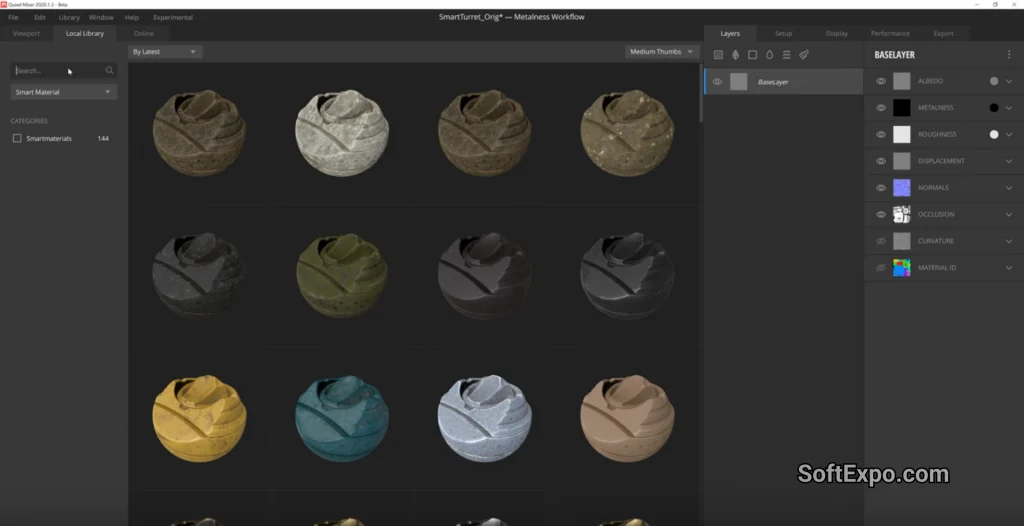
Quixel Mixer was designed to be an intuitive, easy-to-use tool for blending scan-based assets. Originally created to utilize the massive Megascans library, it focuses on a layer-based workflow similar to image editing software. However, since Epic Games acquired Quixel and subsequently launched Fab (the unified marketplace), Mixer has effectively entered maintenance mode with no major feature updates in recent years.
- Layer-Based Workflow: Uses a stack system familiar to artists, allowing users to paint, mask, and blend surfaces without learning complex nodes.
- Megascans Integration: specialized in blending photo-scanned data, making it quick to achieve photorealism by combining existing surface scans.
- Smart Materials: Includes a library of pre-made material setups that react to mesh curvature and occlusion for instant weathering effects.
Pricing Model: Free. Mixer remains free to use, though the surrounding ecosystem has changed with the transition to Fab, altering how assets are acquired.
Best Suited For: Hobbyists, indie developers, and artists who need quick, realistic results without the steep learning curve or monthly cost of Adobe's suite.
Key Differences
Workflow Philosophy: The most distinct difference lies in how you create. Substance 3D Designer requires a technical mindset, asking you to construct logic networks to generate a result. Quixel Mixer is artistic and destructive; you drag, drop, and paint layers to compose a result. Designer creates the ingredients; Mixer cooks with them.
Development Status: This is a crucial distinction in 2026. Adobe Substance 3D Designer is actively maintained, receiving support for the latest rendering standards and OS updates. Quixel Mixer is largely stagnant. While still functional, it lacks the new features, format support, and integrations found in modern pipelines, as Epic Games has shifted focus to other tools within the Fab and Unreal Engine ecosystem.
versatility vs. Speed: Designer creates dynamic materials that can change resolution or appearance dynamically inside a game engine. Mixer outputs static bitmaps. If you need a brick wall where the amount of mortar can be adjusted by the level designer, only Substance 3D Designer can achieve that.
Which Should You Choose?
Choose Adobe Substance 3D Designer if you are pursuing a professional career in technical art or environment design. Its dominance in studio pipelines means learning it is an essential investment. The ability to create procedural, flexible assets makes it indispensable for large-scale production, despite the monthly cost.
Choose Quixel Mixer if you are a hobbyist, a student on a strict budget, or an artist who needs to texture a single static prop quickly. It remains a capable tool for personal projects and quick blends, but be aware that learning it will not prepare you for the technical demands of a professional node-based workflow.

Best Tools For 3D Animation
Best Adobe After Effects Alternatives for Video Editing



