Ableton Live functions as a digital audio workstation designed for both studio composition and stage performance. Unlike traditional linear audio software that forces producers to start at measure one and record straight through, this workstation offers a dual-window approach to track building. Musicians use it to loop audio clips, sequence MIDI, manipulate tempo in real time, and mix multitrack recording sessions. The software targets electronic music producers, live performers, and sound designers who need to improvise arrangements on the fly before committing to a final timeline.
Building tracks often requires heavy lifting from the local hardware, which makes a dedicated desktop application necessary rather than a browser-based alternative. Recording multiple simultaneous audio inputs, triggering gigabytes of multi-sampled instruments, and processing audio through low-latency ASIO drivers demand direct access to the computer's processor and memory. Browser tools cannot handle the microsecond latency requirements of live MIDI drumming or the intense CPU load of running dozens of third-party VST synthesisers at once. By running natively on Windows 10 and Windows 11, the software allows producers to minimize audio buffer sizes and utilize multithreading to keep playback smooth.
In practice, the software bridges the gap between a recording studio tool and a live instrument. Users rely on its real-time audio stretching algorithms to tempo-sync imported vocal stems and drum breaks without manually calculating pitch and time equations. A producer can drag a 120 BPM drum loop into a 135 BPM project, and the audio engine automatically aligns the transients to the project grid. This workflow encourages fast experimentation, letting users trigger different combinations of basslines, chords, and drum patterns using a MIDI controller. Instead of plotting out a song structure in advance, an electronic artist can perform the arrangement live in the studio, recording the results directly into the linear arrangement timeline. Once the structural recording is finished, the producer switches views to draw volume fades, apply mastering equalizers, and finalize the mixdown for exporting to WAV or FLAC formats.
Key Features
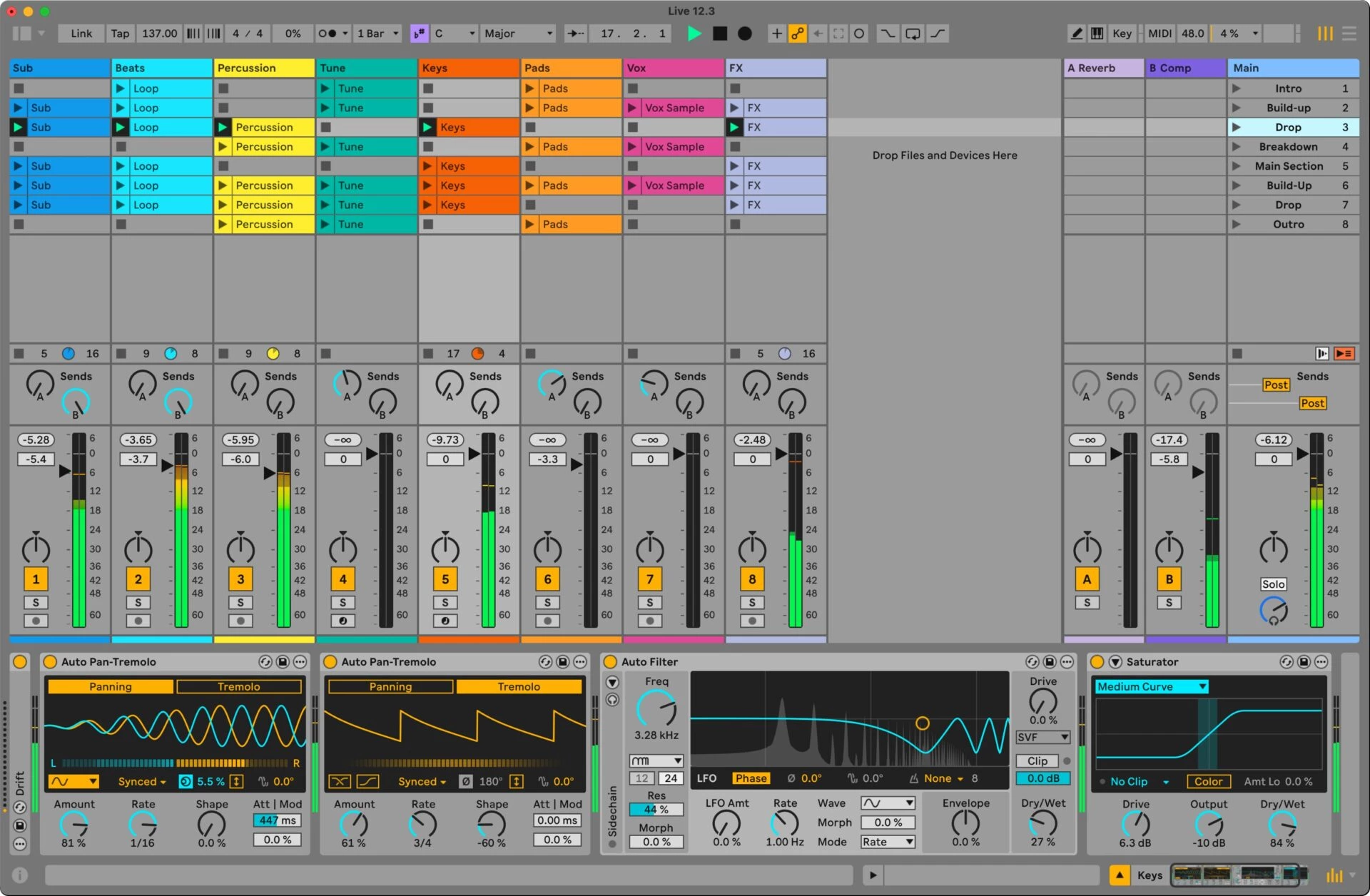
- Session View: This non-linear grid allows producers to trigger independent audio and MIDI loops without stopping playback. Users drag clips into columns assigned to specific tracks, then click the play buttons on individual slots or launch entire horizontal scenes using the enter key. This interface acts as a blank canvas for testing structural ideas before recording a strict song arrangement.
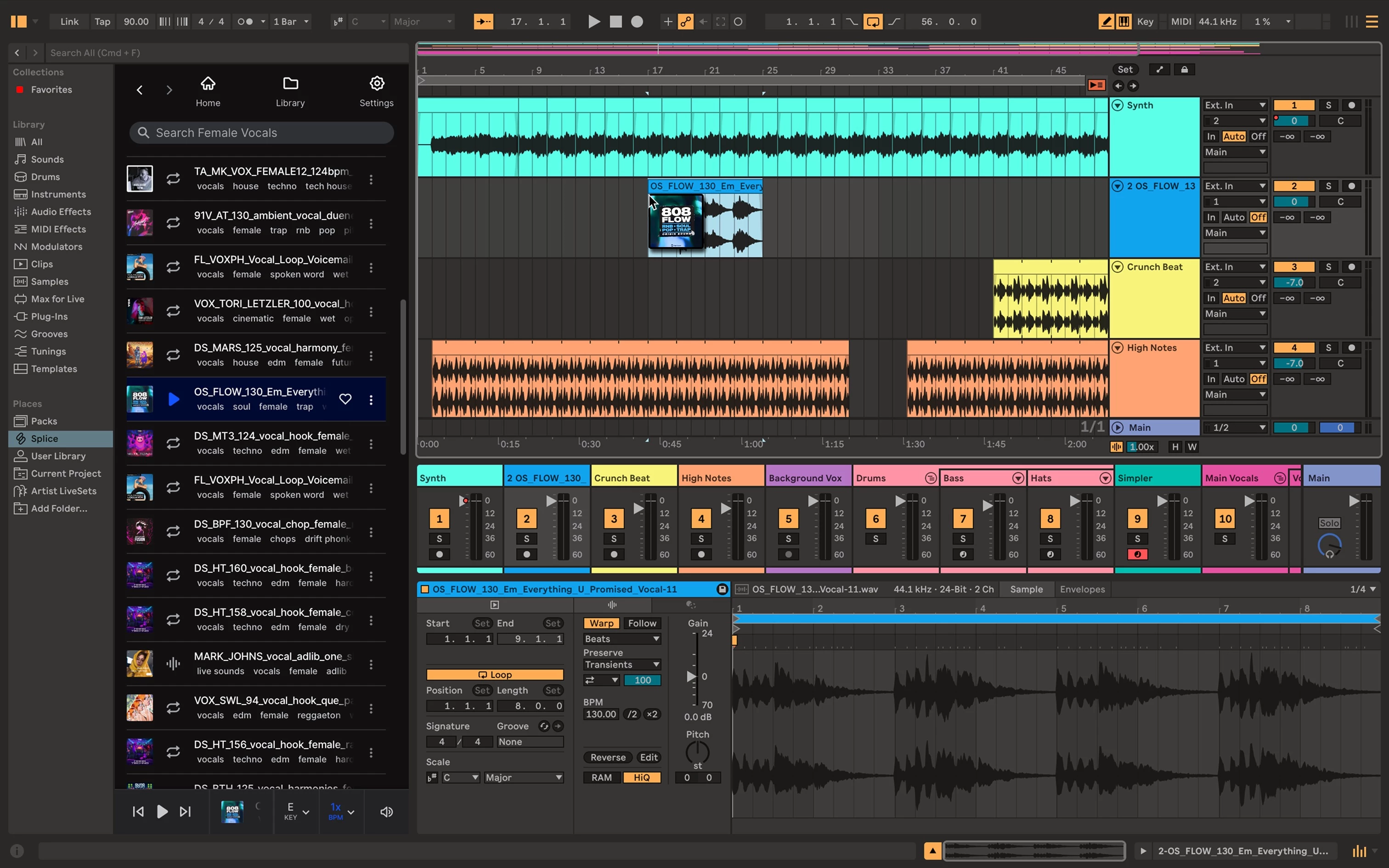
- Arrangement View: Pressing the Tab key flips the interface to a traditional horizontal timeline for final song structuring and automation drawing. Here, producers edit recorded performances, trim audio regions, draw volume fade curves, and arrange the exact start and end points of the track before exporting the final mixdown.
- Audio Warping: The engine automatically analyzes imported audio files and aligns their rhythmic markers to the master tempo. Users can choose from multiple warp modes in the clip detail view, such as Beats for drum loops, Complex Pro for full vocal acapellas, or Tones for sustained synth notes, ensuring the pitch and timing remain accurate when the project tempo changes.
- Instrument and Drum Racks: Producers group multiple synthesizers, samplers, and audio effects into a single rack device to build layered sounds. By opening the Macro panel, users map parameters like filter cutoff, reverb decay, and delay feedback to eight assignable knobs, which they can control via an external hardware controller for expressive stage performances.
- Capture MIDI: If a user plays a melody on a MIDI keyboard but forgets to press the record button, the software temporarily stores the incoming notes in the background. Clicking the Capture MIDI button retrieves the most recently played phrase, analyzes its tempo, and creates a new clip on the active track, preventing the loss of spontaneous musical ideas.
- Max for Live Modularity: Built directly into the highest-tier edition, this visual programming environment lets users build their own custom instruments, MIDI effects, and interface modifications. Producers access an online library of thousands of community-built devices, including advanced generative sequencers, granular synthesizers, and tools for routing control voltages to external modular hardware. It changes the workstation from a fixed-feature program into an expandable platform where sound designers dictate exactly how signal chains operate.
- Advanced MIDI Tools: The piano roll editor provides precise control over note length, velocity, and probability rules. Users apply generative algorithms to automatically create chord inversions, add rhythmic strumming variations, and define the percentage chance that a specific hi-hat or snare hit will trigger during playback, keeping repetitive loops sounding unpredictable and human.
How to Install Ableton Live on Windows
- Download the official installer package from the vendor website, which arrives as a compressed ZIP file containing the setup executable and associated data cabinets.
- Right-click the downloaded ZIP file and select Extract All to unpack the contents into a temporary local directory, ensuring all installation files sit in the same unzipped folder.
- Locate the extracted Installer executable file and double-click it to launch the setup wizard, granting Windows administrator permissions if prompted by the User Account Control dialogue.
- Follow the setup prompts and leave the destination path set to the default C:ProgramDataAbleton directory, as changing this path can sometimes cause issues with core library indexing or subsequent updates.
- Wait for the installation to finish, then delete the extracted installation folder and the original ZIP archive to free up local disk space.
- Launch the application from the Windows Start menu, which will open an authorization dialogue asking to connect to the vendor's website via your default web browser.
- Log into your user account in the browser to authorize the machine; the browser will pass a security token back to the desktop application to unlock saving and exporting functions.
- Open the preferences menu by pressing Ctrl and comma simultaneously, navigate to the Audio tab, and select your ASIO interface driver to configure the correct buffer size and sample rate for low-latency playback.
Ableton Live Free vs. Paid
The software relies on a perpetual licensing model with no mandatory monthly subscription fees, offering a range of tiers based on track counts and included instruments. The entry-level Lite edition is entirely free but is exclusively bundled with third-party hardware, such as MIDI keyboards, audio interfaces, and synthesizers. This tier caps projects at eight audio or MIDI tracks, making it a restrictive but functional starting point for recording small sketches and learning the basic workflow layout.
The standalone paid tiers begin with the Intro edition, which costs around $99 and raises the limit to 16 tracks. It provides the core workflow, including both Session and Arrangement views, but lacks advanced synthesizers and complex mixing tools like the multiband dynamics processor. The Standard edition, priced near $449, removes all track and scene limits while adding audio-to-MIDI conversion tools and a larger library of factory effects. Standard fits the majority of home studio producers who plan to use their own third-party VST plugins rather than relying solely on the vendor stock instruments.
The top-tier Suite edition costs approximately $749 and unlocks the complete ecosystem, including the Max for Live visual programming environment, orchestral sample packs, and advanced modeling synthesizers like Wavetable and Operator. Suite provides every factory effect, sound library, and modulation tool the vendor creates for that specific product cycle. All paid editions represent one-time purchases that grant lifetime access to that specific product generation, alongside minor point updates that fix bugs or add small refinements before the next major development cycle.
For users unsure which tier fits their studio, the vendor offers a fully functional 30-day trial of the Suite edition. The trial requires no credit card and allows full saving and exporting of projects. Once the 30 days expire, the software reverts to a read-only state, meaning users can still open their older projects to listen to them or practice using the interface, but the ability to save new changes or render audio files is completely disabled until a valid license is purchased.
Ableton Live vs. FL Studio vs. Cubase
FL Studio revolves entirely around a step-sequencer and pattern-based workflow, making it heavily favored by hip-hop, trap, and electronic beatmakers. Its piano roll is highly detailed, allowing producers to draw complex drum rolls, note slides, and automation curves with minimal clicks. The biggest financial advantage of FL Studio is its lifetime free updates policy; users buy it once and receive every future iteration at no extra cost. However, recording multi-take live audio bands, such as a drummer, bassist, and vocalist tracking simultaneously, requires navigating a chaotic routing system that feels clunky compared to a traditional linear timeline.
Cubase operates as a strict, linear digital audio workstation that excels in film scoring, orchestral composition, and massive multitrack recording sessions. Its MIDI editing tools are deeply analytical, and it includes a dedicated score editor for printing sheet music, which is crucial for composers working with live orchestras. The software handles vast projects with hundreds of tracks efficiently, offering detailed vocal comping and pitch correction built directly into the timeline. The drawback is its steep learning curve; the dense menus, heavy interface, and strict structural rules can stifle the creativity of producers who prefer spontaneous, loop-based experimentation.
Ableton Live serves as the better fit for producers who view the software as a playable instrument rather than just a recording tape machine. The non-linear Session View gives electronic musicians the freedom to trigger audio clips out of order, test different arrangement structures on the fly, and map hundreds of parameters to hardware controllers for live stage performances. While Cubase handles standard audio recording better and FL Studio offers faster step-sequencing for drum beats, Ableton Live provides a highly specialized workflow for tempo-stretching audio, remixing tracks, and building custom modular devices through Max for Live.
Common Issues and Fixes
- Audio dropouts and crackling during playback. High CPU load or an improper audio buffer size causes playback stuttering. Press Ctrl and comma to open Preferences, go to the Audio tab, and increase the Buffer Size to a higher power of two, such as 512 or 1024 samples, which gives the processor more time to render the audio.
- The folder you are trying to use already exists error. When reinstalling, Windows may block the setup wizard if remnants of a previous installation remain in the target directory. Navigate to C:ProgramDataAbleton using Windows Explorer, manually delete the old folder, and then run the installer again.
- Third-party VST plugins missing from the browser. The application does not scan all computer directories for third-party instruments by default. Open Preferences, navigate to the Plug-Ins tab, enable the option for custom VST3 folders, point it directly to C:Program FilesCommon FilesVST3, and click the Rescan button.
- Software hangs or freezes on the startup splash screen. A corrupt third-party plugin or an outdated MIDI driver often stalls the initialization process. Force close the application via the Windows Task Manager, then hold the Alt key while launching the software to bypass the VST scan entirely, allowing you to isolate and remove the problematic plugin.
- Sustain pedal sends reversed or continuous data. Some MIDI keyboards send continuous expression data instead of basic on/off commands, confusing the software MIDI mapping. Check the keyboard internal hardware settings to ensure the port is designated as a standard sustain pedal, which should only send binary values of 0 and 127.
Version 12.3.2 — 2025
- Added native Stem Separation capabilities, allowing users to split audio into distinct Vocals, Drums, Bass, and Other parts directly within the browser or timeline.
- Introduced "Bounce to New Track" and "Bounce Track in Place" commands to streamline the process of rendering audio and freezing edits.
- Updated the Auto Pan device (now named "Auto Pan-Tremolo") with dedicated Panning and Tremolo modes, expanded LFO options, and a real-time visualizer.
- Improved the stability and latency compensation when Live is acting as a follower to an external MIDI clock source.
- Fixed a performance regression where calls to the Max for Live API could cause the application to hang or lag.
- Fixed a specific crash that occurred when performing undo actions after loading Soundtoys plug-ins.