Veadotube Mini is a dedicated desktop application designed to transform static 2D images into animated, talking avatars. Built specifically for streamers, video creators, and VTubers, it serves as the digital puppeteering engine behind "PNGTubers"—creators who represent themselves online using flat artwork rather than processor-heavy 3D models or webcam feeds. By analyzing your microphone input locally, the software automatically swaps between different image files to create the illusion of speech and movement. You do not need a camera, facial tracking hardware, or expensive rigging files to operate this application; you simply need a microphone and a few image files of your character.
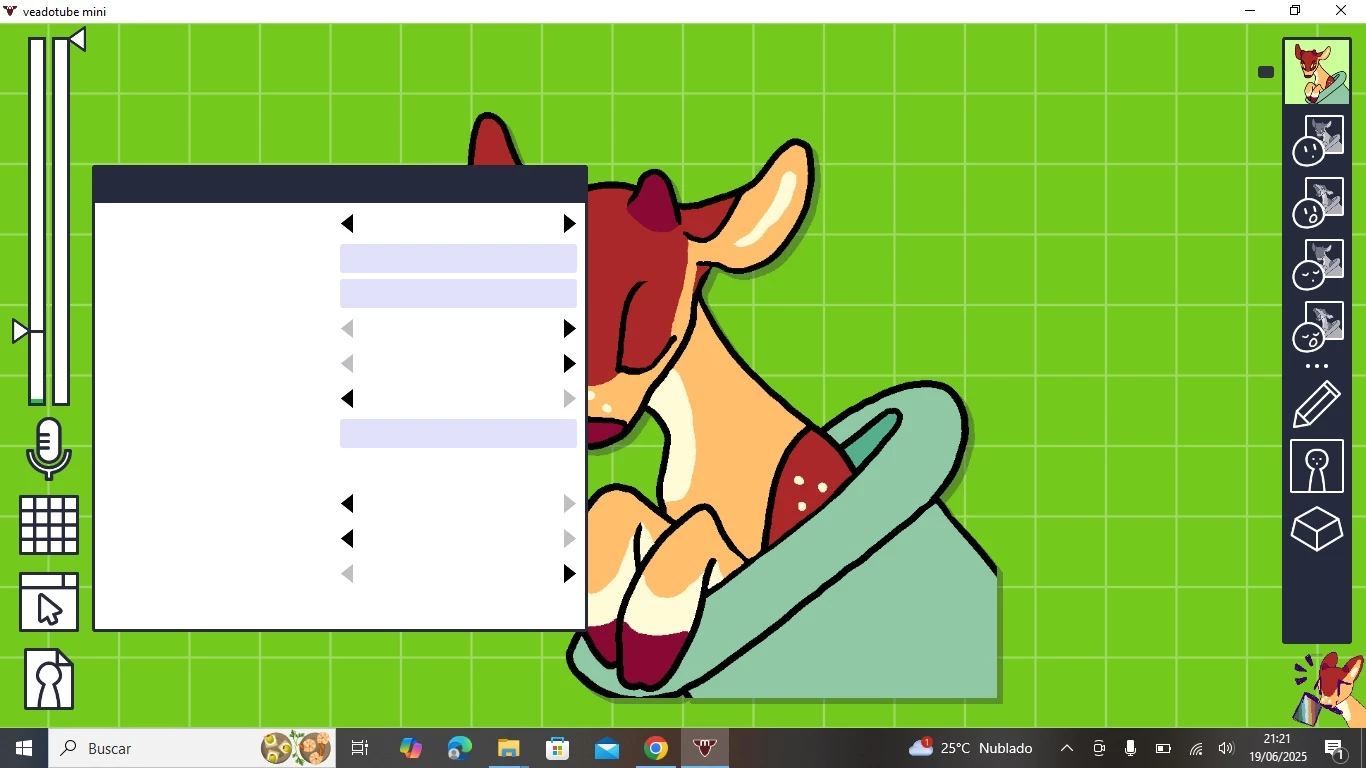
The application interface is intentionally stripped down to keep the focus on rapid character creation. On the left side of the workspace, users manage their system settings, including microphone sensitivity, input volume, and save file management. The center of the screen acts as the main canvas, displaying a live preview of the avatar as it reacts to incoming audio. On the right side, the interface handles the state machine, allowing users to upload specific expression files and assign them to distinct interface slots. This logical layout prevents users from getting lost in nested menus, ensuring that a new avatar can be configured and ready for broadcasting in just a few minutes.
For many content creators, running a heavy facial-tracking suite alongside modern PC games causes unacceptable frame rate drops. Veadotube Mini solves this hardware friction by operating as an extremely lightweight desktop tool on Windows 10 and Windows 11. It sits quietly in the background, consuming minimal CPU and RAM resources, while outputting a transparent capture window directly to broadcasting software like OBS Studio or Streamlabs. This local execution matters. Instead of relying on browser-based tools tied to active voice calls, you retain complete offline control over your avatar’s behavior, audio sensitivity, and emotional states. Whether you are hosting a podcast, recording a software tutorial, or streaming gameplay, the application provides an immediate visual identity without the privacy concerns of a live camera or the technical overhead of traditional VTubing rigs.
Key Features
- Four-Frame State System: The core interface allows you to map up to four specific images per emotional state to create a natural speaking cadence. You can assign individual files for an open mouth, a closed mouth, an open mouth while blinking, and a closed mouth while blinking. The application automatically handles the timing of the blinks and the audio-triggered mouth movements, creating a convincing talking loop from minimal artwork without needing a timeline editor.
- Expression Hotkeys: You can configure unlimited emotional states—such as happy, sad, angry, or shocked—and bind them to specific keyboard inputs. By assigning these states to your function keys, a Numpad, or specific macro combinations, you can instantly change your avatar's visual expression mid-sentence. This means you do not have to click through menus or break your recording flow just to show a different emotion on screen.
- Motion and Bounce Effects: Beyond static image swapping, the software includes a dedicated effect panel to add physical movement to the avatar. You can apply specific animations like jumping, shaking, or wobbling whenever the microphone detects audio. The interface provides granular sliders to adjust the speed and intensity of these movements, allowing a quiet whisper to trigger a subtle sway, while a loud shout triggers an aggressive screen shake.
- Animated File Support: While the category implies static artwork, the application fully supports animated file formats including GIFs, APNGs, and WebP files. This means your "idle" state can feature a character with floating hair, glowing eyes, or ambient particle effects, which then transitions into a separate animated sequence when you begin speaking. The software loops these formats automatically, adding continuous life to the broadcast.
- Stream Deck and WebSocket API: For hardware enthusiasts, the software hosts a local WebSocket server operating on port 8001. This allows external macro devices, like an Elgato Stream Deck, Touch Portal, or custom chat bots, to send background commands directly to the application. You can switch avatars, trigger specific states, or mute the virtual microphone using physical buttons, ensuring your game window never loses focus during a live broadcast.
- Direct OBS Integration: The application is built with broadcasting in mind, offering a native transparent background toggle in its display settings. When captured in OBS Studio via standard Game Capture or the low-latency Spout2 plugin, the avatar appears with perfectly clean edges over your gameplay. This eliminates the need for harsh chroma-key filters that often degrade the colors of your artwork and leave ugly green halos around your character.
How to Install Veadotube Mini on Windows
- Download the official software archive from our website directly to your local storage drive, ensuring you select the correct package for your desktop environment.
- Navigate to your designated downloads folder, right-click the compressed ZIP archive, and select "Extract All..." from the context menu to begin unpacking the files.
- Choose a permanent destination for the extracted files, such as a dedicated folder in your Documents directory or a secondary drive, to ensure you do not accidentally delete the software later while clearing out temporary downloads.
- Open the newly extracted folder and locate the readme.txt file. Open this text file to review any immediate setup notes, hardware recommendations, or dependency requirements provided by the developers.
- Within the same folder, locate the primary executable application file named veadotube mini.exe. You may want to right-click this file and select "Pin to Taskbar" for faster access in the future.
- Double-click the executable to launch the software. Because this is a portable application, there is no traditional setup wizard, and it will not add registry entries or background services to your operating system.
- If Windows Defender or your local antivirus displays a SmartScreen warning due to the indie nature of the executable, click "More info" and select "Run anyway" to allow the application to proceed.
- Upon the first launch, the program will open immediately to the main canvas displaying a placeholder avatar. From here, you can navigate to the left-side panel, select your active microphone from the dropdown list, and begin building your persona.
Veadotube Mini Free vs. Paid
Veadotube Mini is distributed as a completely free application. There are no trial periods, no restricted features, and no forced watermarks on your final broadcasting output. The developers do not lock hotkey configurations, WebSocket API access, or animated file support behind a premium tier. This makes it an ideal starting point for new streamers working with strict budgets, as professional VTubing software often requires expensive licenses or ongoing subscriptions.
Instead of a traditional licensing model, the project relies on voluntary financial support from the community. Users have the option to donate to the development team if they find the tool useful for their content creation workflow. This pay-what-you-want philosophy keeps the barrier to entry non-existent for hobbyists, while allowing successful creators to fund future updates, bug fixes, and new application features voluntarily.
Because the software is fully independent, it also avoids any enterprise bloatware or mandatory account registrations. You are never asked to sign into a cloud service, create a developer account, or verify a digital key to access your own local avatar files. The tool remains entirely yours to use on your machine without ongoing financial obligations, ensuring your broadcasting setup remains operational regardless of internet connectivity or external server outages.
Veadotube Mini vs. PNGTuber Plus vs. Discord Reactive Images
PNGTuber Plus appeals to creators who want Live2D-style jiggle physics and highly kinetic avatars. It requires users to separate their character artwork into multiple transparent layers—drawing the head, hair, body, and accessories as distinct files—to configure independent bounce and gravity parameters for each piece. While the visual results are highly dynamic, the setup process involves a much steeper learning curve, strict folder structures, and complex layer management. Veadotube Mini is the better choice for creators who want to use standard, unified, flat illustrations without spending hours rigging physics nodes.
Discord Reactive Images (often configured via FugiTech) provides a fast, browser-based alternative that highlights a single image when you speak in a Discord voice channel. It is a popular entry point because it requires almost no software installation, but it is heavily reliant on active server communication and limits creators to basic talking and idle states. Veadotube Mini outperforms this method by running entirely offline as a dedicated desktop environment. This removes the dependency on an active voice call and adds critical features like custom emotional hotkeys, GIF support, and integrated jump animations that the Discord API simply cannot support natively.
Ultimately, Veadotube Mini strikes the ideal middle ground for desktop broadcasters. It avoids the tedious layer separation of complex physics engines while offering far more depth than browser-based voice integrations. Streamers choose it when they want quick, reliable avatar puppeteering that relies strictly on their local microphone input and keyboard commands, ensuring maximum stability during live gaming sessions.
Common Issues and Fixes
- OBS shows a solid gray background instead of transparency. When adding a Game Capture source in OBS Studio to record the avatar, you must manually check the box labeled "Allow Transparency" in the source properties window. If the background remains visible, try switching your capture method to the Spout2 plugin, or verify that the transparent background toggle is actively enabled in Veadotube's own left-side display settings.
- Microphone audio does not trigger the avatar mouth. The software may default to an inactive or virtual audio channel. Click the microphone icon on the left side of the interface and explicitly select your exact physical microphone from the dropdown list. Additionally, check your Windows Privacy settings to ensure desktop applications are explicitly granted permission to read your microphone input.
- Keyboard hotkeys stop working while playing games. Full-screen PC games often capture all keyboard inputs locally, preventing background applications from recognizing state-change commands. To fix this, right-click the application executable and select "Run as Administrator," which typically restores global hotkey detection across your operating system.
- Imported artwork appears blurry or heavily compressed. By default, the software applies an anti-aliasing filter to smooth out drawn edges. If you are using pixel art, navigate to the avatar state settings on the right panel and enable the "Pixelated" option. This removes the smoothing filter and forces strict nearest-neighbor rendering, keeping your pixel borders sharp.
- Avatar animations lag or consume too much CPU. Loading too many high-resolution GIFs or APNGs simultaneously can spike processor usage. To fix this, resize your source images to match the actual display resolution you need in OBS (typically under 1000 pixels) before importing them. You can also hide the user interface while broadcasting, which suspends unnecessary background rendering and frees up system resources.
Version 2.1c — June 2025
- Restored microphone selection functionality at startup, eliminating the need to manually reselect audio input devices each time the application launches
- Resolved Windows shortcut creation issues that previously triggered SDL3 missing library errors
- Eliminated memory leaks on macOS and corrected microphone and hotkey permission problems, restoring full functionality to the Mac version
- Separated macOS distribution into distinct Silicon and Intel versions for optimal performance on respective hardware architectures
- Enhanced Linux library detection system to prevent missing text rendering issues
- Updated SDL framework to version 3.2.14 for improved overall stability across all platforms