Adobe Character Animator shifts the traditional 2D animation process from manual frame-by-frame drawing to real-time performance capture. By interpreting data from a standard webcam and microphone, the application translates human facial expressions, voice inputs, and body movements directly onto a digital puppet. When a user smiles, blinks, or waves at their monitor, the illustrated character mirrors the exact action on the canvas. This approach removes the heavy burden of plotting keyframes on a timeline, allowing creators to act out their scenes physically. The software handles the underlying layer-swapping and mesh-deformation automatically, treating the digital asset like an interactive digital mask.
The primary audience for this workflow includes video content creators, educators, twitch streamers, and studio animators who need fast-turnaround productions. Historically, producing a five-minute animated segment required weeks of dedicated drawing and timing adjustments. By adopting a performance-based workflow, teams can generate broadcast-ready clips in a matter of hours. The interface accommodates both pre-recorded voiceover tracks and live audio feeds, meaning a voice actor can sit at a desk, read a script, and generate the final visual performance simultaneously. The software processes these inputs with minimal latency, resulting in a responsive digital rig that mimics organic human timing.
Running this type of motion capture environment requires the structure of a dedicated desktop application. Processing high-resolution webcam video, analyzing audio frequencies for lip sync, and rendering complex vector files in real time demands significant local hardware resources. Operating on Windows 10 and Windows 11 machines, the software takes advantage of the local GPU to process heavy physics simulations like hair dangling in the wind or clothing reacting to gravity. Furthermore, the desktop architecture allows the program to read multi-layered Photoshop and Illustrator files directly from the local hard drive, ensuring that any modifications made to the source artwork appear instantly on the animation stage.
Key Features
- Face Tracking and Lip Sync: The application uses artificial intelligence to track facial landmarks through a standard webcam. It reads the position of the user's pupils, eyebrows, and jawline, applying those movements to the digital puppet. Concurrently, the microphone analyzes spoken words for distinct phonemes, automatically triggering the correct mouth shapes—such as 'Ah', 'M', or 'Oh'—without requiring the user to map out syllables manually on a timeline.
- Body Tracker: Moving beyond facial capture, the software maps human body mechanics in two-dimensional space. The camera identifies the user's shoulders, elbows, and wrists, translating arm and torso movements directly to the character. This allows a creator to make their puppet point, shrug, or wave naturally by simply performing the action in front of their desk, bypassing the need for expensive motion capture suits.
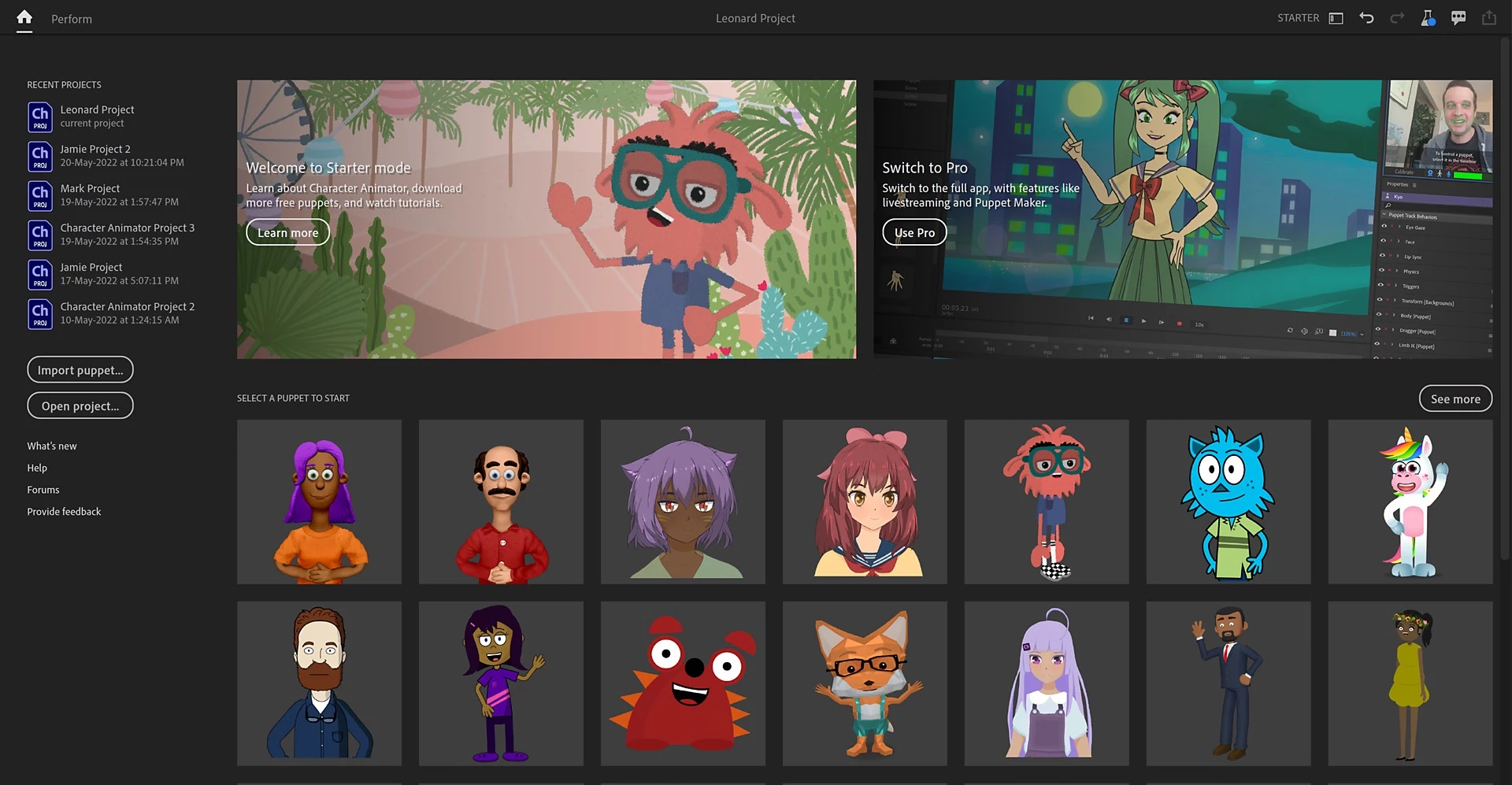
- Puppet Maker: For users who do not want to construct a character from scratch, the software includes a built-in character generation interface. Creators can select a base template and use adjustment sliders to modify hairstyles, skin tones, eye shapes, and clothing. The resulting asset is immediately ready for performance capture, complete with pre-configured physics and tagging.
- Starter Mode Workspace: The application offers a secondary interface designed entirely for beginners. By toggling into this workspace, the software hides the complex rigging panels, timeline tracks, and physics menus. Users are presented with a straightforward layout focusing only on selecting a character, clicking the record button, and using the Quick Export feature to generate an H.264 video file.
- Live Streaming Output: Creators can broadcast their animated characters directly to live audiences. By configuring the Mercury Transmit or NDI settings in the preferences menu, the software sends a real-time, transparent video feed to broadcasting applications like OBS Studio. This allows streamers to overlay their digital avatar onto live gameplay or host interactive Q&A sessions as a virtual character.
- Physics and Dangle Behaviors: The simulation engine adds secondary motion to artwork layers based on real-world physics rules. By adding a 'Dangle' tag to a specific part of the rig, such as a necklace or a ponytail, the software automatically calculates momentum and gravity. When the character turns its head, the hair swings and settles naturally, adding organic weight to the illustration.
- Adobe Illustrator and Photoshop Connectivity: The rigging engine relies on properly formatted PSD and AI files. Characters are constructed by grouping layers and naming them with specific tags like 'Right Eye' or 'Left Arm'. Whenever a user saves an update to the source file in their image editor, the animation application refreshes the artwork instantly while preserving all the motion constraints and bone structures.
How to Install Adobe Character Animator on Windows
- Download the installer archive from our website, saving the file to your local downloads folder or another easily accessible directory on your hard drive.
- Extract the downloaded archive using a standard file management utility, placing the extracted contents into a new, empty folder to ensure no temporary files are lost.
- Open the extracted folder and locate the readme.txt file, opening it in Notepad to read any specific pre-installation instructions or offline setup requirements.
- Double-click the setup.exe file to launch the installation interface and initialize the local setup process.
- Review the destination path when prompted, leaving it at the default Windows directory (typically C:Program FilesAdobe) to avoid future file path errors with linked applications.
- Proceed with the installation and wait for the files to copy over, which may take several minutes depending on your storage drive speed and system resources.
- Close the installer window once the success message appears, then locate the application shortcut in your Windows Start menu to launch the program for the first time.
- Sign in using your Adobe ID when the authentication window appears; logging in is required immediately to access the workspace and the library of online puppet templates.
Adobe Character Animator Free vs. Paid
The software is divided into two distinct licensing tiers, starting with a completely free option known as Starter Mode. Any user with a registered Adobe ID can download the application and use this basic layout without entering payment information. Starter Mode restricts the interface to pre-rigged templates and basic recording functions, disabling the timeline editor, custom rigging panels, and advanced export settings. Creators using this mode can perform simple actions, record their voice, and render the final clip as an MP4 file, making it highly suitable for quick social media clips or classroom projects.
To unlock the complete toolset, users must access Pro Mode, which operates exclusively under a paid subscription model. Pro Mode is not sold as a standalone purchase; rather, it is bundled into the Adobe Creative Cloud All Apps plan. The subscription costs approximately $59.99 per month when billed annually, granting access to this software alongside dozens of other desktop applications like Premiere Pro, After Effects, and Photoshop.
The subscription fee covers the heavy technical capabilities required for professional studio work. Pro Mode allows users to import custom PSD and AI files, build complex bone structures, apply advanced physics tags, and edit recorded performances frame-by-frame on a multi-track timeline. It also enables the Dynamic Link architecture, which allows creators to drop their active animation scenes directly into video editing sequences without rendering intermediate files.
Adobe Character Animator vs. Cartoon Animator vs. Moho Pro
Cartoon Animator focuses heavily on a massive marketplace of pre-made motions, 360-degree head turning mechanics, and library-driven assets. Users building explainer videos or commercial clips often choose this application because they can purchase fully rigged characters and apply pre-recorded walking or talking animations with a few clicks. It is highly effective for creators who want to assemble a scene from pre-existing parts rather than acting out the motions themselves through a camera.
Moho Pro sits at the opposite end of the methodology spectrum, serving as the industry standard for traditional 2D skeleton rigging and vector animation. It relies on a highly technical Smart Bone system that allows animators to manipulate joints and meshes with exact keyframe control. Animators choose Moho Pro when they need exact control over complex mechanical movements, multi-angled character turns, and precise timeline interpolation, rather than relying on live human motion capture.
Adobe Character Animator excels when speed, live performance, and voice acting are the primary requirements. It bypasses the tedious keyframing required by Moho Pro and the reliance on pre-made motion libraries found in Cartoon Animator. By capturing real-time human acting, it allows a creator to simply talk and move to generate an entire scene. It is the definitive choice for live streaming, fast-turnaround episodic content, and users who want to drive their character's personality using their own face and voice.
Common Issues and Fixes
- Problem description. Puppet limbs detach or float away from the body during movement. Open the Rigging workspace, select the affected limb layer, and check if the independent crown icon is enabled. You must also verify the Attach Style settings in the Properties panel; setting the limb to the hinge setting rather than free ensures the arm stays connected to the shoulder joint when dragged.
- Problem description. Imported scenes show a solid red tint when viewed in a Premiere Pro timeline. This rendering error occurs when the Dynamic Link connection fails due to mismatched application updates. You must either update both applications to the exact same update cycle via the Creative Cloud desktop app, or bypass the direct link entirely by rendering the scene as a transparent video file first.
- Problem description. Mouth shapes do not update when speaking into the microphone. The automatic lip sync engine relies on specific layer tags to function properly. Open your character in Rig Mode, expand the Lip Sync behavior, and verify that a numeric value of one appears next to all specific phoneme shapes.
- Problem description. An Entry Point Not Found error appears when sending a project to Adobe Media Encoder. This is a known sequencing conflict within the Windows environment regarding shared background processes. To prevent the error, you must always launch the animation software first and fully open your project before opening Adobe Media Encoder or After Effects.
Version 25.6 — November 2025
- Enhanced application stability through comprehensive bug fixes and performance optimizations
- Improved overall system reliability for smoother animation workflows
- Refined compatibility with Creative Cloud ecosystem applications
- General performance enhancements for real-time animation rendering