Aseprite operates as a dedicated 2D animated sprite editor built entirely around the constraints and requirements of pixel art. Instead of functioning as a general image manipulation program, its entire workspace focuses on manipulating individual pixels on a low-resolution canvas. Game developers and digital artists use this application to draft character sprites, construct repeating environmental tilemaps, and animate frame-by-frame sequences for interactive projects. By removing the complex brush engines and photographic filters found in standard digital painting software, the interface remains strictly focused on indexed color palettes, grid snapping, and frame timing.
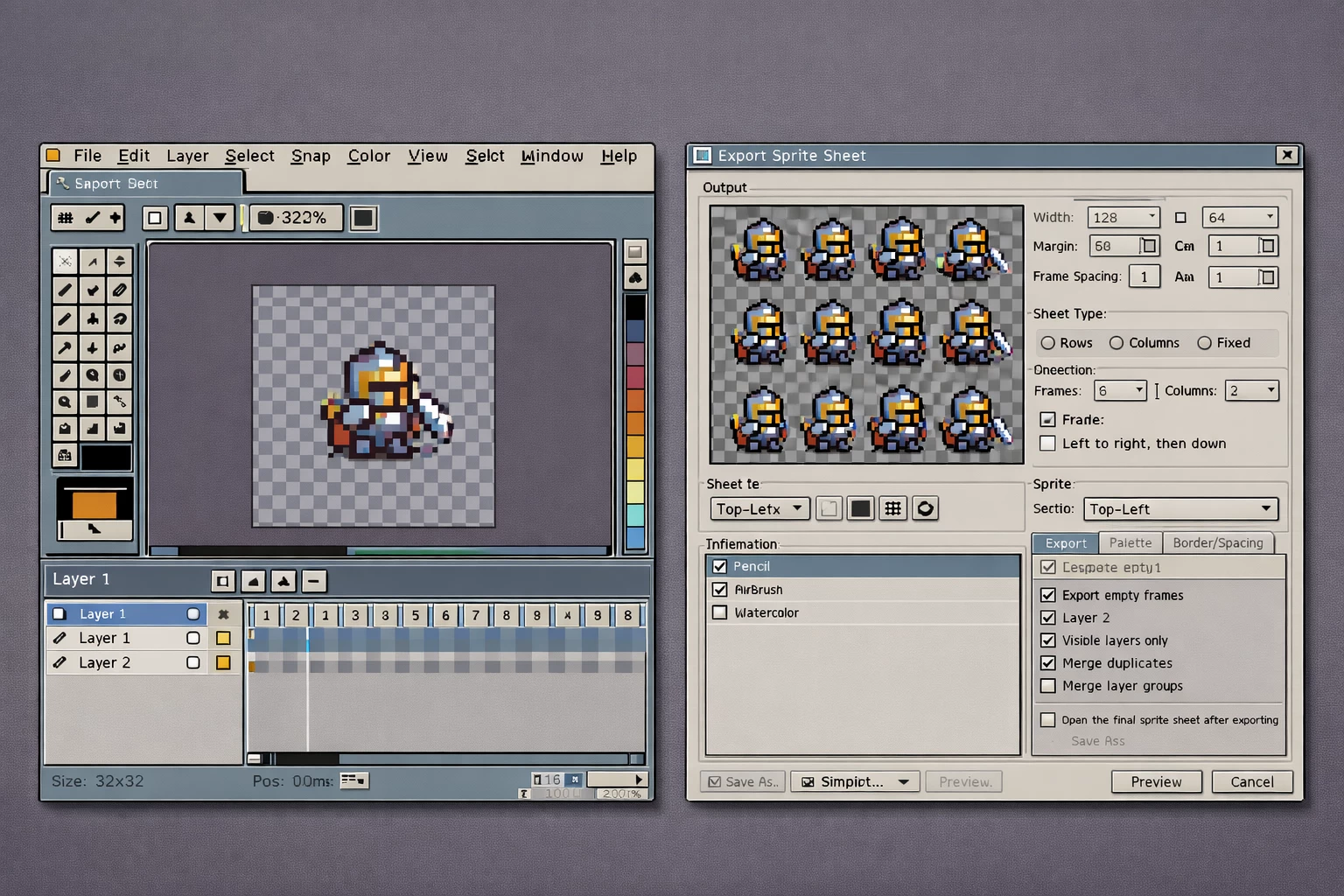
Working with pixel art requires specific tools that prevent color blurring and line distortion. The software addresses these physical workflow requirements by enforcing strict nearest-neighbor rendering and offering specialized algorithms that maintain pixel volume during rotation or scaling. When artists draw a curved line, the application actively monitors the stroke to prevent unwanted clustered pixels, ensuring clean outlines without requiring constant manual erasing. The interface also integrates an animation timeline directly below the canvas, allowing users to loop character movements like walking or jumping while organizing them with visual tags.
Modern game development requires assets to be packaged efficiently. Game engines do not accept a raw folder of scattered images; they require sprite sheets, which are single large image files containing every frame of an animation arranged in a grid. The application handles this packaging natively. Through dedicated export dialogs, users can take a heavily layered project file containing dozens of separated character parts and compile them instantly into a flattened, optimized sheet.
Running this software as a native Windows application provides direct benefits for asset pipelines. Rather than relying on browser-based tools that struggle with large multi-frame sprite sheets, the desktop client utilizes local hardware for rapid file operations and immediate rendering. It integrates with native file systems, meaning users can write command-line scripts to automate the export of specific animation tags into JSON data and PNG strips. This local execution ensures that developers can integrate the application directly into their build processes, regenerating assets for their game engines the moment a project file is saved to the disk.
Key Features
- Pixel-Perfect Drawing: When drawing freehand outlines, standard pixel brushes often leave L-shaped clusters that make lines look jagged and artificially thick. Activating the Pixel-Perfect algorithm on the pencil tool automatically monitors the direction of your stylus stroke and removes these adjacent pixels in real-time. This results in clean, one-pixel-wide lines that require far less manual cleanup before moving on to the coloring phase.
- Animation Timeline and Tagging: The timeline docked at the bottom of the interface handles multiple layers and frames simultaneously. Users can highlight specific frame ranges—such as frames 1 through 12—and assign a colored tag labeled "Walk Cycle". This grouping allows for isolated playback and targeted exporting of distinct character actions without splitting them into separate files.
- Shading Ink Tool: Instead of manually selecting lighter or darker colors from a palette for every shadow or highlight, the Shading Ink tool automates the process. By defining a specific color gradient progression in the palette window, users can paint directly over existing pixels to bump their values up or down the assigned ramp.
- RotSprite Rotation Algorithm: Standard nearest-neighbor rotation often destroys low-resolution art, causing straight lines to break and outlines to lose their structural integrity. The application includes the RotSprite algorithm, which analyzes the volume of the sprite before rotating it, preserving the original shape and minimizing the distortion typically caused by mathematical transformations.
- Tilemap and Tileset Support: For environmental artists, the application allows the creation of dedicated tilemap layers. When a user draws on a tilemap layer, the software automatically registers the unique block into an active tileset palette. Placing that same block again references the original tile, meaning modifications to one tile will instantly update every instance across the entire canvas.
- Command-Line Interface (CLI): The software includes a fully functional CLI that operates without opening the graphical interface. Developers can write batch scripts to locate specific project files, extract frames tagged "Attack", and export them as a cleanly formatted sprite sheet alongside a data file containing all necessary coordinate and timing data.
- Onion Skinning: To maintain fluid motion between frames, the application provides customizable onion skinning. Artists can adjust the opacity and color tinting of the preceding and succeeding frames, displaying them simultaneously as translucent overlays. This visual reference is critical when mapping out complex arcs of motion, ensuring that the volume and momentum of the sprite remain consistent across the timeline.
How to Install Aseprite on Windows
- Download the Aseprite installer archive directly from our website to your local storage drive.
- Locate the downloaded ZIP file in your operating system's file explorer, right-click the archive, and select "Extract All..." to unpack the contents into a newly created folder.
- Open the newly extracted folder and double-click the
readme.txtfile to review any immediate system instructions or local administrative requirements. - Launch the Windows installation wizard by double-clicking the
setup.exeexecutable located within the extracted directory. - Follow the on-screen setup prompts to select your destination folder; the default path behaves standardly, installing the application files into your primary
C:Program FilesAsepritedirectory. - During the shortcut creation step, check the options to associate native project files with the software, ensuring that your operating system automatically targets the application when you click specific sprite formats.
- Complete the setup process and launch the application directly from the final wizard screen. The software opens directly to the Home tab without requiring any account creation, user sign-in, or online activation, allowing you to immediately begin drawing or adjust your monitor UI scaling in the Edit menu.
Aseprite Free vs. Paid
Aseprite operates on a paid software model, with official pre-compiled binaries generally priced at $19.99 on retail storefronts. Purchasing this official release grants users immediate access to the executable application, automatic bug fixes, technical support channels, and integration with platform-specific features like cloud saving. There are no subscription fees, tiered licenses, or enterprise paywalls; the single purchase provides the complete feature set to every user.
Because the creators maintain the project with publicly available source code under an End-User License Agreement, there is an official method to obtain the software without financial cost. Users with technical knowledge can download the raw repository and compile the program themselves. This process requires installing third-party development environments, such as Visual Studio Community and CMake, and manually building the executable through a command-line interface. The compiled result operates identically to the commercial release.
This dual approach allows the creators to fund continuous development while ensuring the tool remains accessible to those who cannot afford it but are willing to invest the time to build it from source. The project does not lock tools behind special editions, meaning both paying customers and self-compiling users have identical access to the animation timeline, scripting engines, and export automation tools.
Aseprite vs. Pro Motion NG vs. Krita
Pro Motion NG targets a specific subset of the game development community focused on strict hardware emulation and authentic retro limitations. It excels at enforcing exact color palette restrictions and memory constraints matching vintage consoles like the Game Boy or Commodore Amiga. If a project requires absolute adherence to 8-bit hardware rules, Pro Motion NG provides the specialized indexing tools necessary. However, its interface relies heavily on older workflows that can feel rigid. Artists who want to create low-resolution art without enforcing 1980s memory limitations often find Aseprite much faster to navigate and more forgiving during the drafting phase.
Krita operates as a massive digital painting program that happens to include a highly capable animation timeline. It handles enormous canvas sizes, complex textural brush engines, and high-resolution rendering brilliantly. The drawback for pixel artists is that Krita is built for general illustration. Setting up a project requires manually disabling anti-aliasing on brushes, forcing the rendering engine into Nearest Neighbor scaling, and ignoring dozens of irrelevant tools like water-color blending. Aseprite is explicitly designed for the pixel format, meaning all native tools are already optimized for a low-resolution grid out of the box.
You should choose Aseprite when your primary goal is generating sprite sheets, constructing tilemaps, or animating characters for modern 2D games. It provides the exact tools needed for pixel manipulation without the overhead of a general digital painting suite, and without the restrictive hardware-emulation demands of specialized retro software. Its balance of modern interface conveniences—like timeline tags and command-line exporting—makes it the practical choice for independent studios.
Common Issues and Fixes
- Interface elements appear too small on high-resolution displays. By default, the application runs at a 100% scale, which can make menus and timeline frames difficult to read on 4K monitors. To fix this, navigate to Edit > Preferences > General and adjust both the Screen Scaling and UI Elements Scaling dropdowns to 200%.
- Importing a single numbered PNG file creates an unwanted animation. When you open an image file that ends with a sequential number, the software assumes it is part of an image sequence and attempts to load all adjacent files into the timeline. You can prevent this by unchecking the "Agree to load as a sequence" option in the prompt that appears immediately after selecting the file.
- Unity does not recognize native project files when dragged into the engine. Dropping native files directly into Unity will not generate a usable sprite asset by default. You must open Unity, navigate to Window > Package Manager, switch to the Unity Registry, and install the official "2D Aseprite Importer" package to correctly read the layers and animation tags.
- The "gui.xml was not found" error prevents the program from starting. This problem occasionally occurs if interface configuration files become misplaced during an application update. Resolve it by navigating to the installation folder, locating the
datadirectory, and verifying that the XML files are present in the top-level folder; if they are nested inside a second data folder, move them up one level. - Pen pressure does not register on graphic tablets. If your tablet stylus draws lines with a fixed size despite pressing harder, the hardware API might be conflicting with the software. Go to Edit > Preferences > Tablet and toggle the API from Wintab to Windows 8 Pointer, then restart the application to restore pressure sensitivity.
Version 1.3.16 — December 2025
- Added new "Run Command" window accessible via Ctrl+Space with command search functionality and support for mathematical expressions
- Introduced the ability to search commands by their assigned keyboard shortcuts
- Added bindable "Solo Layer" command for enhanced layer management
- Implemented support for Input Method Editor (IME) on text fields for Windows users
- Enhanced rounded rectangle drawing with new paint and selection options
- Improved selection movement functionality in Tiled Mode for proper operation
- Extended mouse button customization to include additional buttons (X1/X2) for commands, tools, and drag value operations
- Refined slice keyframe creation process to prevent confusing user experience
- Improved slice selection interface to reduce confusion
- Windows: Added new file association options to link any file type with the running Aseprite instance and customizable thumbnail display in File Explorer
- Fixed text field selection issues when using special fonts
- Fixed Hand cursor visibility - now properly restores arrow cursor after releasing Space bar in sprite editor
- Fixed menu responsiveness issues after using Keyboard Shortcuts dialog
- Fixed Ctrl+drag functionality for creating new selection copies
- Fixed Shift+special mouse button behavior for dragging values with Pencil tool selected
- Resolved sprite modification issue when clicking or selecting slices
- Multiple Lua scripting improvements including dialog scrollbar functionality, widget bounds handling, and crash fixes