Adobe Substance 3D Designer operates as the industry-standard node-based authoring application dedicated to procedural material creation and 3D environment logic. Unlike traditional digital painting software that relies on manual brushstrokes or photographic overlays, this software requires artists to construct complex mathematical graphs to generate textures from scratch. By linking individual nodes—such as noises, patterns, and mathematical operators—users output physically based rendering (PBR) maps, including Base Color, Normal, Roughness, Metallic, and Ambient Occlusion. Technical artists, material specialists, and environment creators in visual effects, architectural visualization, and video game development rely on this application to build dynamic, tileable assets. Because the logic is strictly procedural, adjusting a single root parameter instantly updates all connected output maps without requiring destructive edits.
The core workflow centers around manipulating data flow through visual connections. A user might start with a simple Tile Generator node to block out the underlying structure of a brick wall, pipe that data into a Distance node to bevel the edges, and then combine it with a Perlin Noise node using a Blend operator to simulate surface erosion. Because no static source bitmaps are required, these materials hold infinite resolution scaling; they remain mathematically sharp whether exported at a standard size or calculated at much higher dimensions. Studios utilize this exact workflow to build master material libraries. A single procedural file can expose specific parameters—such as "mortar thickness," "brick color," or "rust density"—allowing other artists in the production pipeline to generate thousands of unique texture variations from a unified source logic.
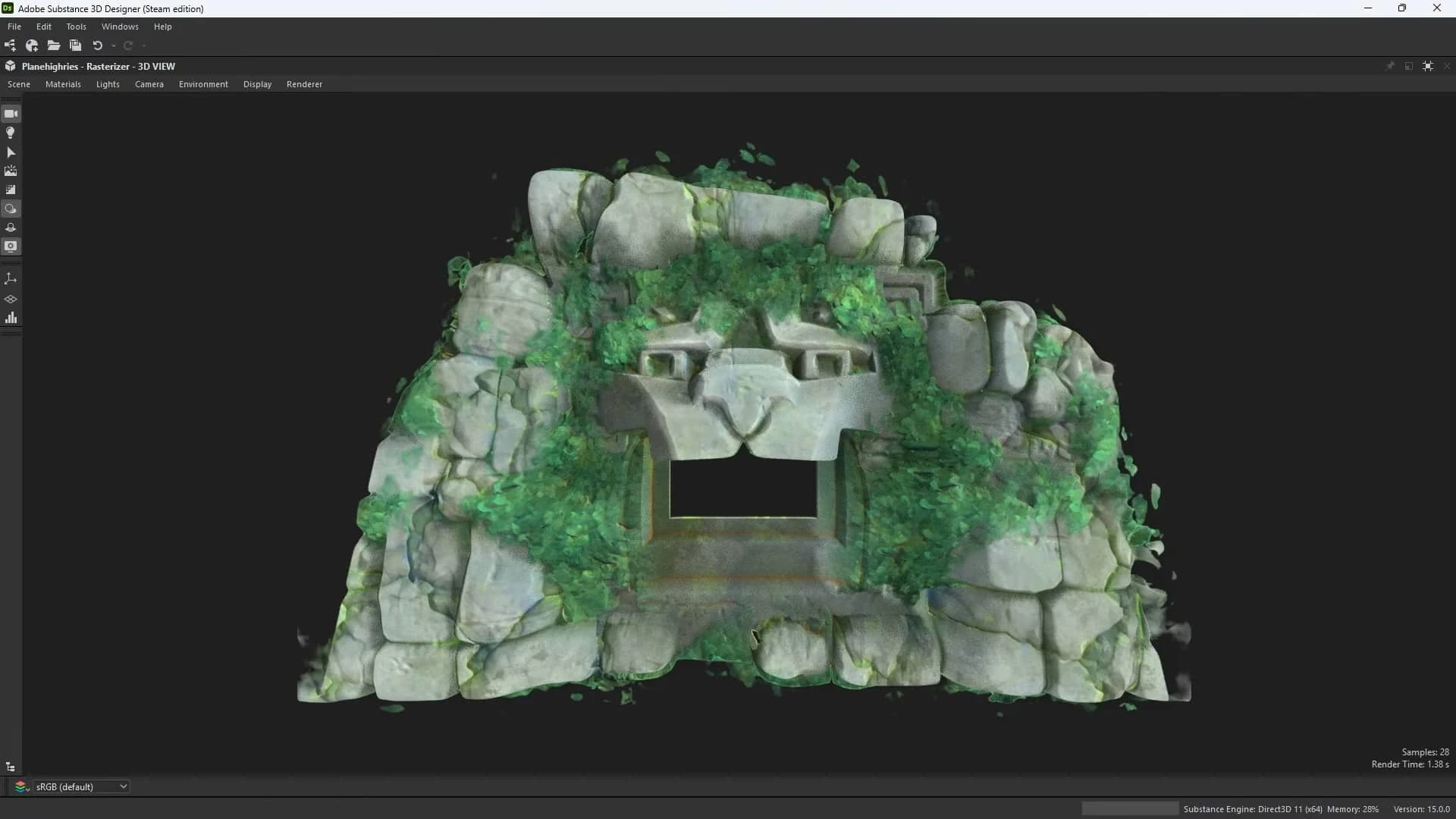
Working within a heavy node graph demands significant local computing power, which explains why this application exists as an optimized desktop program rather than a browser-based utility. The interface is divided into functional quadrants: the Explorer panel for file management, the primary Graph View for node linking, a 2D View for inspecting individual map outputs, and a 3D Viewport powered by an integrated path-traced renderer. This architecture allows the software to calculate complex graphical math on the local graphics processing unit in real-time. Cloud-based or lightweight alternatives typically experience memory crashes when attempting to parse trees containing hundreds of procedural nodes. By maintaining a native desktop environment, the application handles heavy multi-channel exports, direct integrations with studio pipelines via scripting, and local caching systems necessary to keep iteration speeds high during intense production schedules.
Key Features
- Procedural Node Graph: The central workspace allows artists to drag and drop atomic nodes into a visual scripting grid. Users wire outputs to inputs, constructing complex logical trees using mathematical operators like Transform 2D, Blend, Levels, and Histogram Scan. This non-destructive architecture means any node deep in the chain can be altered at any time, instantly recalculating the entire visual result without permanent pixel destruction.
- Unified 3D Renderer: The application incorporates a real-time 3D viewport that utilizes native path-tracing and OpenGL rendering methods. Artists load custom geometry into this viewport to preview their active material graphs under different lighting conditions. The renderer supports high-dynamic-range imaging (HDRI) environment maps, camera field-of-view adjustments, and native post-processing effects to ensure textures look physically accurate before export.
- Advanced Baking Tools: Built directly into the interface, the baking utility calculates physical data from high-polygon meshes and projects it onto low-polygon game assets. Users generate critical source maps—including Curvature, Ambient Occlusion, Thickness, and World Space Normals—which can then be fed directly into procedural masks to drive edge-wear or dirt accumulation automatically based on mesh topography.
- Scene-Based Context Editing: Beyond flat textures, the application includes a dedicated model graph for procedural geometry manipulation. Technical artists construct logical flows to assemble complex scenes, using nodes to handle instancing, spatial distribution, and hierarchy assembly. This allows users to scatter objects, deform shapes, and establish spatial relationships procedurally rather than placing items manually in a standard 3D modeling package.
- Application Interoperability: Material graphs compile into highly optimized SBSAR files for cross-application distribution. These archived files open natively inside external 3D modeling applications and game engines via official integration plugins. Any custom sliders or switches exposed by the original author remain active in the target engine, allowing environment artists to tweak material properties directly during scene assembly.
- Quantize Color and Stylization: Specialized filtering nodes cater directly to non-photorealistic rendering and stylized art directions. Tools like the Quantize node forcefully crush smooth gradients into stepped bands of color, while edge-detect and custom blur configurations simulate painted strokes or illustrative outlines. This allows users to generate pixel-art aesthetics or comic-book shading from standard mathematical noise inputs.
- Python Scripting API: A dedicated scripting interface allows pipeline engineers to automate tedious internal processes. Studio developers write Python scripts to batch-process texture exports, automatically enforce naming conventions on graph nodes, or sync local project files with internal proprietary asset management servers, heavily reducing manual file handling during large-scale productions.
How to Install Adobe Substance D Designer on Windows
- Download the software installer archive directly from our website and save it to a designated folder on your local storage drive.
- Extract the contents of the downloaded archive using standard Windows tools or a dedicated decompression utility into a new folder on your desktop.
- Open the extracted folder and read the included readme.txt file carefully, as it contains specific directory path instructions and prerequisites necessary for a successful local configuration.
- Locate and execute the main setup executable file from within the extracted directory to launch the installation wizard.
- Progress through the installer prompts and select your destination directory. The default path is typically C:Program FilesAdobeAdobe Substance 3D Designer, which requires sufficient storage space for the core binaries and default node libraries.
- When prompted by the wizard, verify that the options to associate .sbs and .sbsar file extensions are checked, ensuring that procedural project files open natively when double-clicked in Windows Explorer.
- Allow the wizard to unpack the core files and automatically install any required Microsoft Visual C++ Redistributable packages needed for local rendering calculations.
- Close the installation wizard upon completion and launch the application from your Start Menu. On the initial startup, allow the software a few moments to build its local cache and index the default library nodes before beginning a new project.
Adobe Substance D Designer Free vs. Paid
Adobe operates this application under a strictly subscription-based pricing model for commercial use, meaning there is no free tier available for professional studio work or freelance contracting. Users access the software through the Adobe Creative Cloud ecosystem, typically selecting either the specialized 3D Texturing plan or the broader 3D Collection plan. The Texturing plan generally targets individual artists and costs around $19.99 per month, providing access to the core material creation tools and a fixed allowance of monthly asset downloads from Adobe's official library. The Collection plan, priced at approximately $49.99 per month, expands access to include additional staging and modeling applications, catering to generalist workflows.
For independent developers and hobbyists operating below a strict annual revenue threshold, an alternative perpetual license is occasionally offered directly through the Steam storefront. This Steam build typically costs around $149.99 as a one-time purchase. While it grants indefinite access to that specific year's build, it does not include ongoing feature updates, access to the integrated cloud asset library, or major upgrades beyond minor technical patches for that specific release cycle.
Educational access provides the only legitimate zero-cost entry point. Students and faculty members enrolled at qualifying universities often receive complete access to the 3D application suite at no charge, provided their institution maintains an active Creative Cloud campus agreement. Individuals outside of the educational sector looking to evaluate the software's node logic and test compatibility with their local hardware can utilize a standard time-restricted trial before committing to a monthly or annual billing cycle.
Adobe Substance D Designer vs. Quixel Mixer vs. Foundry Mari
Quixel Mixer operates around a layer-based workflow heavily reliant on blending existing photogrammetry scans from the Megascans library. Instead of building patterns using complex mathematical nodes, users stack scanned materials, utilize paint brushes for targeted masking, and employ standard layer blending modes to achieve realistic surfaces quickly. It provides a highly accessible, visually familiar interface for artists accustomed to standard photo editors. Users choose Quixel Mixer when they need to rapidly concept realistic dirt, mud, or damaged concrete by combining actual photographic data without the steep learning curve of visual scripting.
Foundry Mari serves a completely different pipeline, targeting extreme-resolution digital painting for film and high-end visual effects. It is engineered specifically to handle massive 3D models utilizing dozens of UDIM texture tiles simultaneously. Artists paint exact, deliberate strokes directly onto complex geometries, such as hero character faces or highly detailed vehicle chassis, managing gigabytes of texture data in a single project. Studios implement Mari when a project requires exact, non-repeating detail applied precisely to specific coordinates on a production mesh, where procedural generation alone cannot achieve the necessary art direction.
Adobe Substance 3D Designer is the better fit when technical artists must author dynamic, tileable master materials that act as generators rather than static textures. If a studio requires a core brick wall texture that can be reused across a hundred different buildings, Designer provides the necessary node logic to expose sliders for dirt, damage, and color variation. It excels at purely procedural creation, ensuring that materials retain mathematical scaling and adaptability. It is the definitive choice for establishing foundational material libraries before those materials are ever applied or painted onto final production assets.
Common Issues and Fixes
- GPU timeout crashes during heavy baking or rendering. The Windows operating system enforces a Timeout Detection and Recovery limit that automatically restarts the display driver if a graphical calculation takes too long. Users prevent these crashes by opening the Windows Registry Editor, navigating to the GraphicsDrivers key, and modifying the TdrDelay and TdrDdiDelay DWORD values to increase the wait time threshold to 60 seconds.
- Missing resources or broken graph links when opening projects. Moving a project file without moving its associated dependencies, such as custom bitmap inputs or sub-graphs, breaks the relative file paths. Artists fix this by right-clicking the red, missing resource icon in the Explorer panel, selecting "Relocate," and manually pointing the application to the new directory location on their storage drive.
- UV seam artifacts appearing on baked curvature or normal maps. Overlapping UV islands or incorrect baking projection distances cause pixel distortion and black lines along the geometry edges. Users correct this by adjusting the Frontal and Rear Distance sliders in the Baker window to restrict the raycasting range, or by loading a custom cage mesh to explicitly define the projection volume.
- Node graph becomes sluggish or unresponsive during editing. Connecting multiple high-resolution nodes simultaneously saturates the available video memory. Users mitigate this lag by changing the graph's Output Size parameter from absolute values to "Relative to Parent" and working at a lower resolution multiplier, only increasing the output dimensions immediately prior to final map export.
- Normal maps display inverted or incorrect lighting in the 3D viewport. Importing an external normal map bitmap with incorrect color space settings causes the renderer to misinterpret the vector data. Users fix this by selecting the imported bitmap node and changing its color space property in the right-hand panel from sRGB to Linear or Raw, ensuring the engine reads the data as direct mathematical values rather than color information.
Version 15.1 — December 2025
- Redesigned the graph creation interface with visual thumbnail previews and detailed tooltips to streamline template selection and improve workflow efficiency
- Introduced categorized template organization, grouping options into materials, filters, and scan processing for better navigation
- Added built-in sample materials including fabrics, wood, metal, plastic, and ceramic with annotated graphs to help users learn node-based workflows
- Enhanced noise functionality with improved non-tiling support, allowing noise patterns to behave correctly when tiling is disabled
- Updated multiple noise nodes including Cells, Cloud, Dirt, and Directional noises with additional control parameters for fine-tuning output
- Removed the 16-bit depth restriction on noise nodes, providing greater flexibility to balance detail quality against performance
- Implemented a new Group attribute system for organizing nodes, making it easier to locate specific nodes through categorized search results
- Added hash functions and tonemapper utilities to the function library for expanded creative control
- Improved node menu hierarchy with better organization of search results into logical categories
- Addressed various performance and stability issues throughout the application