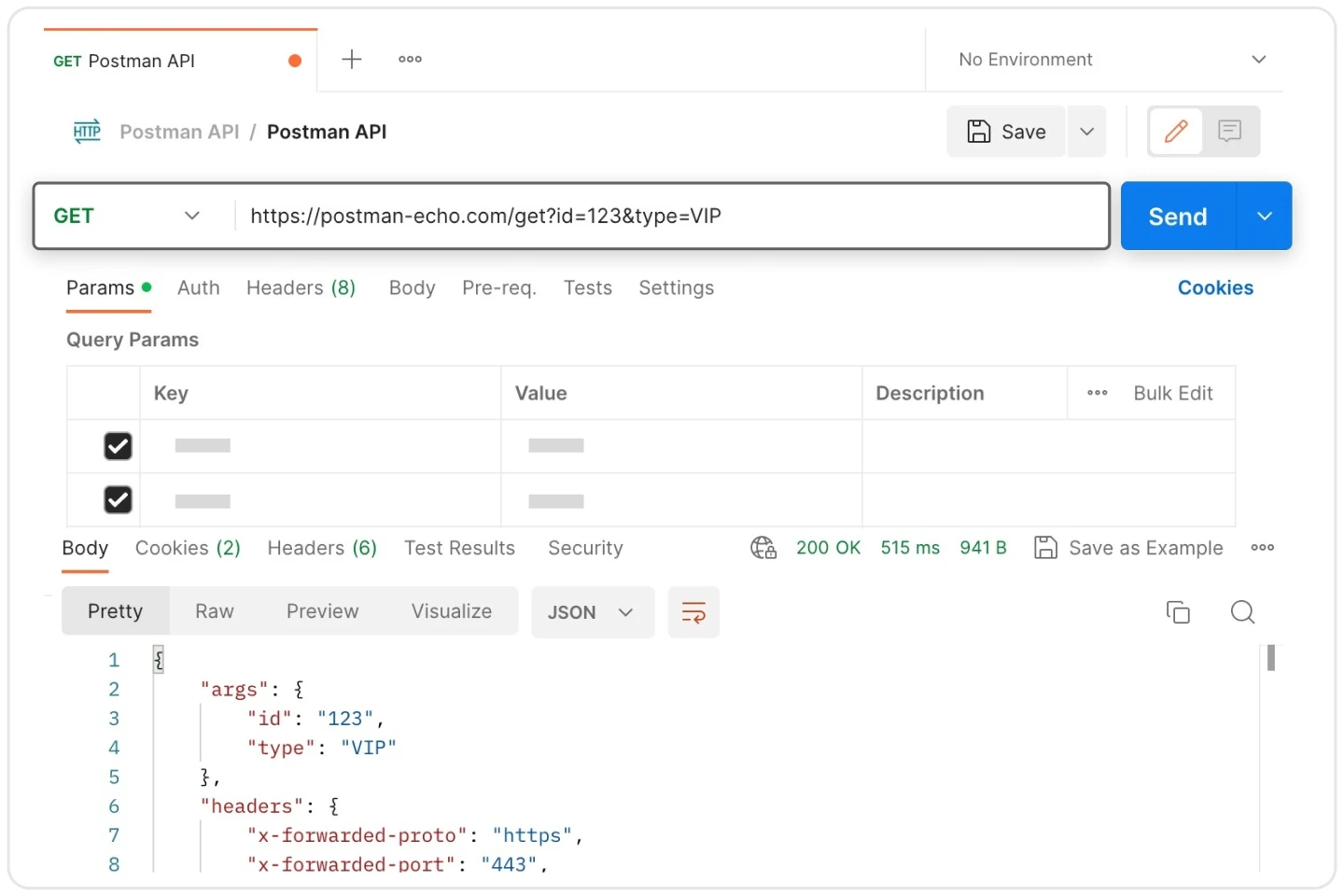
Postman is a dedicated API development environment that allows developers, quality assurance engineers, and system administrators to build, test, and document backend endpoints without writing raw command-line requests. By providing a structured graphical interface, it replaces manual terminal inputs with an organized workspace where teams can construct HTTP calls, attach authentication tokens, and inspect returned JSON, XML, or plain text payloads. Users rely on this client to simulate server behavior, validate data structures, and automate testing pipelines before deploying code to production servers. The environment supports multiple protocol standards, including traditional REST, SOAP, GraphQL, and modern gRPC, ensuring compatibility with virtually any backend architecture.
While browser-based alternatives exist for testing network endpoints, running the dedicated Windows desktop client offers distinct architectural benefits for backend engineering. The local application handles massive payload responses without crashing the active tab and cleanly bypasses strict web-based Cross-Origin Resource Sharing (CORS) restrictions that often block browser-initiated requests. It also grants direct read and write access to the local file system, which is necessary for testing file upload endpoints, streaming large binary assets, or exporting extensive testing reports directly to a local directory. These native capabilities provide a stable foundation for long-running processes that web browsers typically throttle or terminate to preserve system resources.
By maintaining collections of predefined requests, the software prevents the repetitive task of manually reconstructing complex authentication headers, environment variables, and request bodies for every test session. Individual endpoints are organized into nested folders, allowing developers to execute entire test suites with a single click and review automated pass or fail results. This visual workflow simplifies API debugging and maintains consistent testing standards across entire engineering departments. Developers can quickly duplicate existing requests, modify a single parameter to test an edge case, and immediately save the new configuration for future quality assurance runs, practically eliminating the syntax errors associated with typing terminal commands from memory.
Key Features
- Collections and Workspaces: Users can group related API requests into structured folders called Collections, which act as executable documentation for a backend system. These groups store exact endpoint URLs, parameters, and headers, ensuring that complicated setup requirements do not have to be typed manually for each testing session.
- Environment Variables: The client allows developers to define variable states for different deployment targets, such as local, staging, or production servers. Instead of rewriting the base URL or API keys for every request, users simply switch the active environment from a dropdown menu, and the application automatically injects the correct values.
- Automated Test Scripts: Developers can write custom JavaScript snippets in the Pre-request Script and Tests tabs to manipulate data and validate incoming responses before and after a request executes. These scripts automatically check HTTP status codes, parse complex JSON payload structures, and assert that returned data types match strict expected schema definitions.
- Mock Servers: When frontend developers need to build interfaces before the backend is fully complete, the application can generate simulated endpoints. These mock servers return predefined dummy data based on saved examples, allowing interface development to proceed without waiting for actual database implementation.
- Performance Testing: The built-in Collection Runner includes performance metrics that simulate multiple concurrent users hitting the targeted endpoints. It measures response times, tracks error rates under load, and outputs graphical charts to help identify slow database queries or server bottlenecks.
- Built-in Interceptor: By activating the proxy feature or installing the companion extension, the application captures and records outgoing HTTP traffic from external web browsers or mobile devices. This traffic logging helps engineers reverse-engineer undocumented APIs, capture active session cookies, or debug exactly what payloads a third-party client is sending.
- Automated Documentation: The software reads the saved descriptions, parameter keys, and response examples within a Collection to generate machine-readable documentation. This outputs structured formatting that developers can publish to a public URL or export as OpenAPI specifications for client integration.
How to Install Postman on Windows
- Download the official Windows installer executable directly to your local storage drive, ensuring you select the architecture designed for modern Windows 10 and Windows 11 systems.
- Double-click the downloaded setup file to initiate the installation process. The installer uses a streamlined background deployment system that skips traditional setup wizards.
- The installer runs automatically without prompting for a target directory, extracting the core application files directly into your Windows user profile at the
%LocalAppData%Postmanpath. - Because the application installs strictly to the local AppData directory rather than the system-wide Program Files folder, you do not need system administrator privileges to complete the setup or apply future updates.
- Once the extraction finishes, the application will launch automatically and present a mandatory initial sign-in screen overlaid on the main interface.
- Create a new account, sign in with existing credentials, or look for the subtle option to skip authentication and use the lightweight scratch pad if you intend to perform strictly local testing without cloud synchronization.
- Pin the newly created desktop or Start menu shortcut to your taskbar for quick access during future development sessions, as the installer does not always generate a desktop icon by default.
- Upon the first launch, navigate to the settings menu to configure your preferred interface theme, adjust the default request timeout limits, and specify whether the application should use your system proxy settings.
Postman Free vs. Paid
The software operates on a freemium model, offering a highly functional Free tier that focuses entirely on individual users rather than collaborative teams. Solo developers and testers using the free version receive access to unlimited manual API requests, basic mock servers, native Git integration, and a limited monthly allowance of AI assistance credits for generating test scripts. However, this tier no longer supports collaborative cloud workspaces, meaning that sharing collections with colleagues requires manual file exports and imports rather than automatic real-time synchronization.
For teams requiring shared access and centralized data management, the Basic plan starts at $14 to $19 per user per month depending on billing frequency. This tier removes the single-user restriction, allowing small development departments to share workspaces, synchronize environment variables across multiple machines, and significantly increase their monthly limits for mock server calls and automated monitor runs. It serves as the standard entry point for commercial software development teams that need basic access control and shared API documentation.
Scaling up to larger organizational needs, the Professional plan costs between $29 and $39 per user per month and introduces single sign-on (SSO), granular role-based access control, and dedicated partner workspaces for collaborating securely with external contractors. For strict compliance environments, the Enterprise tier requires a negotiated annual contract at approximately $49 per user per month. This top-tier package adds essential corporate governance features, including comprehensive audit logs, automated secret scanning to prevent leaked API keys, private API networks, and dedicated deployment support for massive engineering departments.
Postman vs. Insomnia vs. Hoppscotch
Insomnia targets developers who want a fast, desktop-native API client that focuses strictly on request and response workflows without the heavy ecosystem of a full lifecycle platform. It keeps the user interface minimal, stores data locally by default to satisfy strict privacy requirements, and natively supports modern protocols like GraphQL and gRPC alongside standard REST. Users choose Insomnia when they find Postman's interface too cluttered, when they prefer a faster launch time, or when enterprise security policies strictly prohibit cloud-synced workspaces. However, Insomnia lacks the extensive automated testing frameworks and advanced scripting capabilities found in heavier enterprise clients, making it less suitable for dedicated quality assurance engineers.
Hoppscotch serves as a lightweight, open-source alternative that runs entirely within a web browser, requiring absolutely no local installation or background update services. It features an extremely fast interface and handles basic REST and GraphQL requests effortlessly, making it ideal for quick debugging sessions on restricted corporate workstations where executable downloads are blocked by system administrators. Because it operates inside a browser, it often requires a companion browser extension or a local proxy daemon to bypass strict CORS restrictions. Furthermore, Hoppscotch cannot handle the massive file uploads or memory-intensive automated test suites that native desktop applications manage easily.
Postman remains the better fit for large-scale engineering projects that require deep test automation, complex request chaining, and automatically generated public documentation. While it consumes significantly more system memory and enforces stricter limits on free collaboration than its open-source competitors, its advanced JavaScript testing environment and built-in performance monitors make it the absolute standard for API quality assurance. Teams choose it when API development is a core business function requiring structured, verifiable test validations that integrate with continuous deployment pipelines, rather than just casual endpoint pinging during early development phases.
Common Issues and Fixes
- Problem description: The application fails to send requests and returns a "Self signed certificate in certificate chain" SSL error.
This happens when connecting to a local development server or a corporate environment that uses custom, self-signed SSL certificates rather than publicly verified ones. To fix this, navigate to the general settings menu, locate the "SSL certificate verification" toggle, and turn it off to allow the client to bypass standard security checks for that specific environment. - Problem description: Outgoing requests return a 407 Proxy Authentication Required status code.
The application is attempting to route traffic through a corporate network proxy but lacks the correct authentication credentials to pass through the firewall. Open the proxy settings tab, select the custom proxy configuration option, ensure the IP and port match your network requirements, and manually enter your required proxy username and password. - Problem description: The client crashes or freezes indefinitely when receiving a massive JSON payload.
Rendering enormous amounts of formatted text in the visual response tab can overwhelm system memory and cause the electron-based interface to lock up entirely. To prevent this when querying heavy database endpoints, click the "Send and Download" button instead of the standard "Send" button, which bypasses the interface rendering engine and saves the raw payload directly to your hard drive. - Problem description: Cannot access local environment variables during a test script execution, resulting in undefined values.
This occurs if the workspace is configured correctly but the specific testing environment has not been explicitly activated for the current session. Click the environment dropdown menu in the top right corner of the interface and select the correct target environment, which instantly maps the defined variable keys to the values required by your scripts. - Problem description: The request fails with an ECONNREFUSED error despite the target server being online.
This indicates that your operating system or local firewall is actively rejecting the outgoing connection before it even reaches the external network. Verify that your local antivirus software is not blocking the application executable, check that the correct port is specified in the URL, and ensure that your system proxy settings are not routing local traffic to a dead proxy address.
Version 12.0.4 — March 2026
- Implemented critical bug fixes to resolve application stability issues.
- Improved performance through various under-the-hood enhancements.
- Optimized functionality for recent v12 platform updates, such as Native Git integration and the Collection 3.0 format.