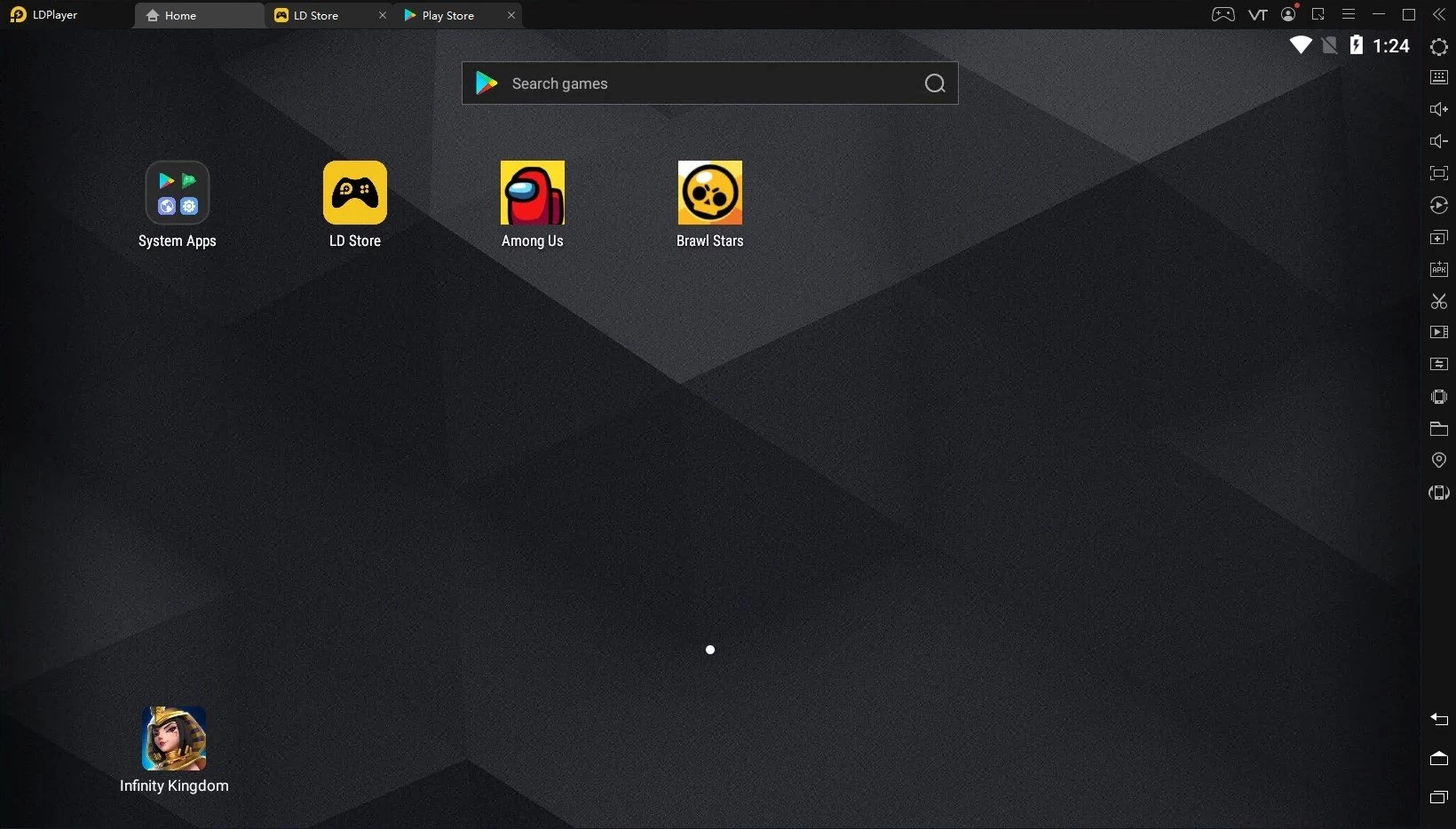
LDPlayer operates as a high-performance bridge that allows PC users to run mobile applications and smartphone games directly on a desktop environment. Rather than relying on a small touchscreen or draining a phone battery, players and app testers use this emulator to execute APK files natively on Windows. It utilizes a specialized mobile kernel to translate touch inputs into keyboard and mouse commands, turning a standard computer into a configurable virtual mobile device. This setup bypasses the thermal throttling and battery degradation issues inherent in extended mobile gaming sessions.
The software heavily targets mobile gamers who require higher framerates, larger displays, and precise aim mapping for competitive titles. It also serves app developers who need to test multiple instances of their software across different virtual device profiles without purchasing physical test phones. By isolating the mobile environment from the main Windows operating system, it provides a secure sandbox for running utility apps, automated farming scripts, and demanding mobile titles that would otherwise overheat a standard smartphone. Testers can simulate different network conditions, battery levels, and geographic locations right from their desk.
Desktop emulation offers significant advantages over browser-based cloud gaming or native mobile play by fully utilizing the local computer dedicated GPU and processor. Users can customize the exact amount of RAM and CPU threads allocated to the virtual device, tailoring the performance to match their hardware capabilities. This local processing approach ensures low-latency input response for fast-paced action games and allows players to capture gameplay footage using standard PC recording software like OBS Studio without experiencing the compression artifacts common in cloud streaming. Furthermore, it allows for offline play for titles that do not strictly require a constant server connection.
Key Features
- Multi-Instance Manager: This standalone utility allows users to create, clone, and run several virtual devices simultaneously on the same monitor. Players use it to play different games at once, manage multiple accounts in strategy games, or reroll characters efficiently. The manager includes a batch operation feature to launch, close, or align all active windows automatically across the desktop.
- Custom Control Mapping: The emulator translates touch-screen gestures into physical hardware inputs. Users can open the keyboard mapping tool to assign specific keys or mouse clicks to tap, swipe, pinch, or drag actions on the screen. It includes dedicated crosshair settings for shooters, allowing users to look around by moving the mouse just like a native PC first-person shooter.
- Macro and Script Recording: A built-in operation recorder captures specific sequences of mouse clicks, screen drags, and keyboard strokes. Users can replay these recorded scripts to automate repetitive tasks, such as resource farming, daily logins, or inventory management. The tool allows adjusting the execution speed and setting the script to loop continuously until manually stopped.
- Hardware Resource Allocation: The advanced settings panel provides direct control over how much PC hardware the emulator consumes. Users can manually adjust the assigned CPU cores, RAM limits, and display resolution to balance visual quality with overall system performance. It includes preset profiles for mobile devices, allowing the emulator to spoof its identity to bypass app-specific hardware blocks.
- Virtual Location Modification: A dedicated GPS simulation tool lets users change the geographical coordinates of the virtual device. This function helps test location-based applications, check regional weather apps, or access region-specific game servers without requiring complex proxy configurations or external network routing tools.
- Gamepad and Controller Support: In addition to keyboard and mouse inputs, the software detects standard PC gamepads connected via USB or Bluetooth. Users can map analog stick movements to virtual onscreen joysticks and assign face buttons to specific skill casts, making it easier to play mobile action RPGs and platformers with traditional console ergonomics.
- Video and Screenshot Capture: A built-in media tool allows users to record their gameplay sessions or take high-resolution screenshots directly from the emulator sidebar. The files are saved locally to a designated Windows folder, making it easy to share achievements or record bug reports without needing third-party screen capture software running in the background.
How to Install LDPlayer on Windows
- Navigate to the official developer website to download the standard executable setup package, ensuring you receive an unmodified file without unauthorized bundled extensions.
- Double-click the downloaded installer file and click Yes when the Windows User Account Control prompt asks for administrator permissions to write files to the system.
- Click the custom installation path button on the primary screen to select a specific directory, which is recommended if you want to store the emulator and its large virtual disk files on a secondary, high-capacity solid-state drive instead of the default operating system drive.
- Review the end-user license agreement and click the main install button to begin unpacking the core engine files and generating the necessary virtual machine directories.
- Wait while the installer extracts the background components, sets up the primary mobile instance, and creates the desktop shortcuts for both the main player and the multi-instance manager.
- Click the launch button to initiate the first boot sequence, keeping in mind that this initial startup takes slightly longer than subsequent launches as the engine builds the initial file system and configures the virtual graphics driver.
- Verify that hardware virtualization is enabled in your computer BIOS, as the emulator will display a prominent warning indicator on the home screen and suffer severe performance penalties if it detects this necessary motherboard feature is turned off.
- Sign in to your preferred mobile app store account upon reaching the virtual desktop to begin downloading applications, or use the drag-and-drop feature to install APK files directly from your Windows folders.
LDPlayer Free vs. Paid
LDPlayer is completely free to download, install, and use for all standard emulation tasks. The core software does not lock any performance settings, multi-instance management capabilities, custom key mapping profiles, or macro recording functions behind a paywall. The developers monetize this free version by displaying advertisements on the initial loading screen and showing promotional app banners on the emulator virtual desktop space. These advertisements generally do not interrupt active gameplay once an application is launched.
For users who want a strictly clean, uninterrupted visual experience, the developer offers an optional LD Premium subscription. Billed at approximately $2.99 per month, or offered at a reduced rate through a yearly billing plan, this membership completely removes all startup advertisements, sponsored app pop-ups, and desktop banner ads. The premium tier focuses entirely on visual cleanliness and quality of life, rather than restricting the functional capability of the emulator itself.
Users do not need to create an LDPlayer account to use the emulator, though signing into a standard mobile ecosystem account is necessary to download commercial games from official storefronts. However, purchasing the premium subscription requires registering a specific LDPlayer account. This account is used to process secure payments and tie the ad-free status to the user specific login, allowing them to carry their premium benefits across different desktop installations or physical computers.
LDPlayer vs. BlueStacks vs. NoxPlayer
BlueStacks serves as the most widely recognized emulator in the market, heavily targeting casual users with a polished, albeit heavy, interface. While BlueStacks offers a large library of pre-configured control schemes, an integrated macro community, and various cloud integrations, it generally consumes significantly more CPU and RAM resources out of the box. Users with high-end desktop hardware who want a guided, visually dense experience often prefer BlueStacks. However, those running older machines or attempting to run multiple instances simultaneously will quickly notice the heavy performance tax that BlueStacks places on the host system.
NoxPlayer targets a similar demographic but leans heavily into deep customization options and older hardware support. It performs adequately for basic 2D games and standard application testing, but benchmark tests consistently show NoxPlayer struggling with memory management during demanding 3D titles. It tends to use more system memory per instance than its competitors, and the interface can feel cluttered with aggressive promotional material. This makes it a difficult choice for heavy multi-instance farming, though it remains a viable alternative for users testing older application builds.
LDPlayer strikes a practical balance by maintaining a lightweight footprint while supporting modern mobile applications. It consistently requires less RAM and CPU allocation than BlueStacks while offering better 3D performance and frame stability than NoxPlayer. This resource efficiency makes it the superior option for running 5 to 10 instances simultaneously on mid-range hardware. Gamers who prioritize raw framerates, fast boot times, and clean multi-instance management over heavy interface features will find LDPlayer to be the more efficient and reliable tool for daily use.
Common Issues and Fixes
- Loading screen stuck at 94 percent. This usually indicates a failure in hardware virtualization, a corrupted virtual disk, or a conflict with a third-party antivirus program. Ensure virtualization is enabled in the motherboard BIOS, add the emulator executable to your antivirus exclusion list, or use the multi-instance manager to create a completely fresh virtual device.
- Noticeable input lag or stuttering during fast-paced 3D games. By default, the emulator might not assign enough system resources to handle heavy 3D rendering. Open the advanced settings menu, increase the allocated CPU cores to at least 4, and raise the RAM allocation to 4096 MB or higher to smooth out the framerate.
- Multiple instances crashing randomly after long sessions. Running several virtual devices simultaneously fills up the dedicated graphics memory on the host computer. Lower the internal resolution and DPI settings for each background instance to reduce the VRAM load, and ensure your dedicated graphics card drivers are updated to the latest stable release.
- Hyper-V conflicts preventing the emulator engine from booting. Legacy installations clash with Windows Hyper-V, Virtual Machine Platform, or Windows Sandbox features, causing the engine to fail. Either update to a Hyper-V compatible release of the emulator, or disable these specific Windows virtualization features in the Turn Windows features on or off control panel menu and restart the PC.
- App store authentication errors or failing to connect to servers. Network bridging issues can prevent the virtual device from reaching the internet. Restart the emulator, verify that the host computer firewall is not blocking the application, and clear the cache for the virtual device network services through the standard mobile settings menu.
Version 9.1.37.0 — November 2024
Added:
- Android 9 kernel with 64-bit meta-framework
- Unified 32-bit and 64-bit APK support
- Hyper-V compatibility technology
- Enhanced graphic rendering engine
Improved:
- Startup time reduced to 3-10 seconds
- CPU and GPU consumption optimization
- Frame rate stability for multi-instance usage
- Graphics quality with better game detail restoration
Fixed:
- Emulator crashes when Hyper-V enabled
- Graphics issues including blurred images and red dots
- Compatibility problems with demanding 64-bit games
- Memory usage optimization for better performance