MIDI files are fundamentally different from standard audio formats like MP3 or WAV. Instead of containing recorded sound waves, a MIDI sequence is a collection of digital instructions dictating which notes to strike, the velocity of the key press, and what instrument should execute the sound. Because of this structure, the audio quality depends entirely on the synthesizer reading the instructions. For decades, users have relied on the default Windows system synthesizer, a heavily compressed sound bank that often makes MIDI files sound thin and artificial. SynthFont2 operates as a dedicated replacement engine, allowing users to bypass the default operating system synthesizer and replace it with massive, high-fidelity sample libraries known as SoundFonts. By feeding raw MIDI data through these detailed acoustic samples, the software translates flat digital sequences into rich, realistic audio recordings.
This desktop application serves a highly specific audience. Musicians use it to practice along with custom backing tracks, swapping out a generic MIDI piano for a sampled grand piano or a full orchestral string section. Solo performers and vocalists rely on the interface to prepare high-quality instrumental arrangements for live gigs. Video game modders and retro audio enthusiasts use the software to remaster classic game soundtracks, assigning authentic vintage synthesizers or modern VST instruments to old MIDI dumps. Because it functions as a standalone program rather than a browser-based utility, it handles multi-gigabyte SoundFont files directly from the local hard drive without memory limitations. The desktop architecture also ensures direct communication with local hardware, allowing users to plug in a physical MIDI keyboard and experience minimal delay between pressing a key and hearing the resulting sound.
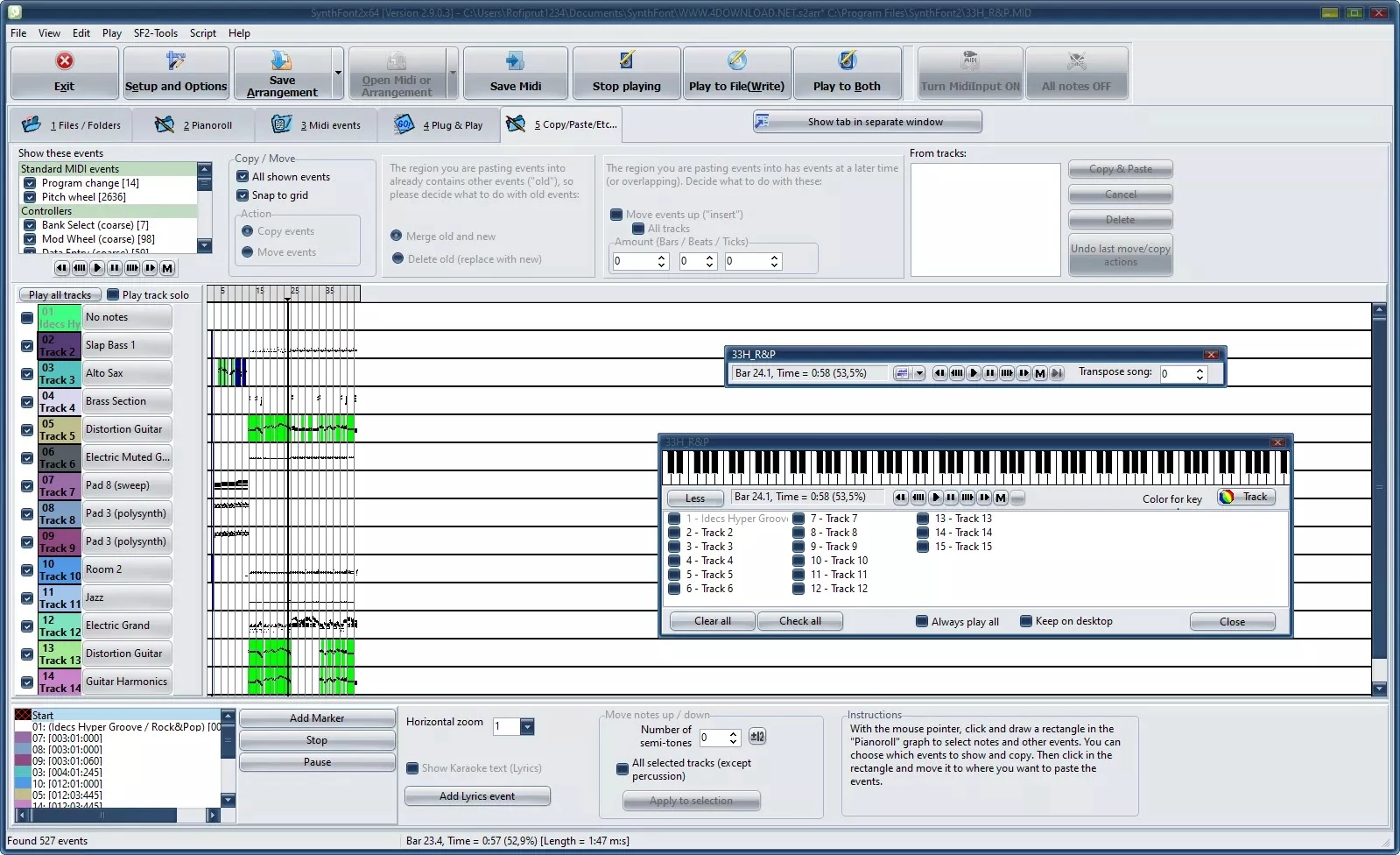
While many digital audio workstations can load MIDI files, they often treat the import process as a starting point for complex multitrack music production. Users simply looking to improve the sound of an existing file frequently find full production suites overwhelming, bogged down by routing matrices and heavy mixing consoles. SynthFont2 isolates the exact tools needed for MIDI enhancement: a clear track list, instant instrument swapping, basic note editing, and a straightforward export button. This focused approach means users spend less time learning a complex interface and more time auditioning different sound libraries to find the exact acoustic match for their arrangement.
Key Features
- Feature Name: SoundFont and VST Support. The core engine loads traditional SF2 and SFZ libraries, as well as DLS, GIGA, and the highly compressed proprietary SFKR format. Instead of forcing an entire song through a single sound bank, users can assign individual VST instrument plugins or specific SoundFont presets to each of the 16 available MIDI channels.
- Feature Name: Piano Roll and Event List Editing. For detailed note manipulation, the software provides a standard piano roll interface where users can drag note edges to change duration or draw new notes onto the grid. For microscopic adjustments, the MIDI event list exposes the raw data of the file, allowing users to manually delete stray pitch bend commands or fix incorrect program changes.
- Feature Name: Batch Audio Rendering. Users are not forced to play a file back in real time to capture the audio. The built-in rendering engine mathematically calculates the output and exports the result directly to WAV, MP3, OGG, M4A, or FLAC formats, while a batch processor allows for converting entire folders of sequences into finished tracks overnight.
- Feature Name: Channel Mixer and DSP Effects. A dedicated mixing console provides vertical channel strips for adjusting the volume, panning, chorus, and reverb send levels of every individual track. The application also hosts standard VST effect plugins, meaning users can insert an external graphic equalizer or a compressor onto the master bus to shape the final mix.
- Feature Name: Live MIDI Input Capabilities. The software functions as a live sound module when connected to an external MIDI controller. By reserving specific tracks for live input, keyboard players can trigger massive multi-gigabyte piano libraries or complex VST synthesizers with low latency for live performance or rehearsal.
- Feature Name: Non-Destructive Arrangement Files. Modifying instruments, adjusting tempo, and tweaking mixer levels does not permanently alter the original MIDI sequence. The application saves all user decisions into a proprietary arrangement file, keeping the source data pristine while allowing for multiple sonic interpretations of the same song.
How to Install SynthFont2 on Windows
- Download the official Windows installer package from the developer's website, choosing the architecture that matches the VST plugins you intend to load.
- Launch the executable file and follow the standard setup prompts to select your destination folder on your local drive.
- Complete the setup wizard, ensuring you create a desktop shortcut, and launch the application.
- Because the software bypasses the default Windows sounds, download a General MIDI SoundFont (such as GeneralUser GS or FluidR3) and extract the file to a permanent folder on your storage drive.
- Inside the application, open the File menu, select the option to set the default SoundFont file, and point it to your downloaded file to ensure all tracks produce sound.
- Open the "Setup and Options" menu, navigate to the IO Ports tab, and assign your primary audio playback device to route the audio correctly to your speakers.
- If you plan to use a live MIDI keyboard, install a low-latency driver like ASIO4ALL, select it within the IO Ports tab, and enable the correct MIDI input port for your connected hardware.
SynthFont2 Free vs. Paid
SynthFont2 operates under a commercial licensing model with a 30-day trial period. The trial allows users to test the MIDI playback engine, SoundFont loading mechanics, and audio rendering suite on their own hardware. During this window, users have access to the core editing features, making it easy to verify compatibility with specific VST plugins and external MIDI controllers before making a financial commitment.
The Standard license costs €19.90 and unlocks the application for permanent use, removing the trial time limit. This tier provides all the fundamental MIDI editing, VST hosting, and batch audio export functions required by most home users and retro audio enthusiasts. It is structured as a perpetual license for the exact build purchased, avoiding any mandatory recurring subscription fees.
For users needing specialized presentation tools, the Full version license is available for €29.90. This higher tier grants access to specific advanced features introduced in recent updates, most notably the complete suite of Karaoke text rendering and synchronization tools. Users who initially purchase the Standard license can pay an €11.90 upgrade fee later to unlock the Full version capabilities if their project requires lyric displays. A completely free legacy version, known as SynthFont1, remains available for those running older hardware who need basic SoundFont playback.
SynthFont2 vs. VirtualMIDISynth vs. FL Studio
VirtualMIDISynth is a system-level background utility rather than a standalone audio editor. Once installed, it runs silently in the system tray and provides a virtual MIDI output port that older Windows applications or retro games can use to route playback through a custom SoundFont. Users should choose VirtualMIDISynth if their only goal is to make old DOSBox games sound better automatically without manual editing. In contrast, SynthFont2 is an active workspace where users manually load files, swap instruments track by track, edit individual notes, and render the output to an audio file.
FL Studio is a massive, professional-grade digital audio workstation designed for complete music production. It handles MIDI and VST instruments but requires users to build their routing, assign mixer states, and configure channels entirely from scratch, which involves a steep learning curve. Users should choose FL Studio when they are composing original music and need multitrack recording and advanced automation. However, SynthFont2 provides a much faster workflow for simply opening a pre-existing MIDI file, assigning a high-quality SoundFont, and exporting the audio without dealing with DAW complexity.
When comparing these tools, SynthFont2 occupies a highly specific middle ground. It offers far more control and editing capability than a background port emulator like VirtualMIDISynth, while remaining focused strictly on MIDI file playback and SoundFont management. It avoids the heavy interface overhead of full workstations like FL Studio, making it the most efficient option for users who strictly want to convert, tweak, and modernize existing MIDI archives.
Common Issues and Fixes
- No sound during playback. This typically occurs if the software is attempting to route audio to an inactive or disconnected hardware output. Open the Setup and Options menu, navigate to the IO Ports tab, and manually assign the audio output drop-down to your active speakers or headphone jack instead of leaving it on the default setting.
- Missing or silent instruments on specific tracks. MIDI files rely on specific program change numbers, and if your loaded SoundFont does not contain a sample for that requested bank and preset, the track will remain silent. Click on the silent track in the mixer and manually assign a different instrument preset from your SoundFont to replace the missing sound.
- Audio crackling or stuttering during dense musical passages. This happens when the active polyphony (the number of simultaneous voices playing) exceeds your CPU's processing capability or audio buffer size. Go to your audio driver settings to increase the ASIO buffer size, or lower the maximum voice limit inside the software to reduce the processing load.
- VST plugins failing to appear in the instrument menu. The software requires you to point it directly to the folder where your external VST files are stored. Open the Setup menu, go to the VST effects tab, manually add the folder path containing your .dll plugin files, and ensure you are using plugins that match the bit-architecture of the application.
- Incorrect playback tempo when skipping through a song. Complex MIDI files often contain multiple tempo change events, and jumping arbitrarily across the timeline can confuse the playback engine's synchronization. Stop the playback entirely and restart the file from the beginning, or manually edit the event list to remove conflicting tempo markers.
Version 2.9.1.1 — September 2025
- Resolved an issue preventing the application from checking for new version availability
- Introduced a new "Replace MIDI file" function in the File menu to swap out MIDI files used by arrangements
- Corrected display problems in PianoRoll where note length selection buttons appeared truncated on certain displays
- Fixed the free size button functionality that previously failed to open the size configuration window
- Addressed multiple issues in the SoundFont Banks and Override feature, including file addition limitations and disabled button states
- Ensured track changes are properly applied when closing the SoundFont Banks window
- Fixed note pasting functionality in PianoRoll when position ticks were set to zero
- Various other minor bug fixes reported by users