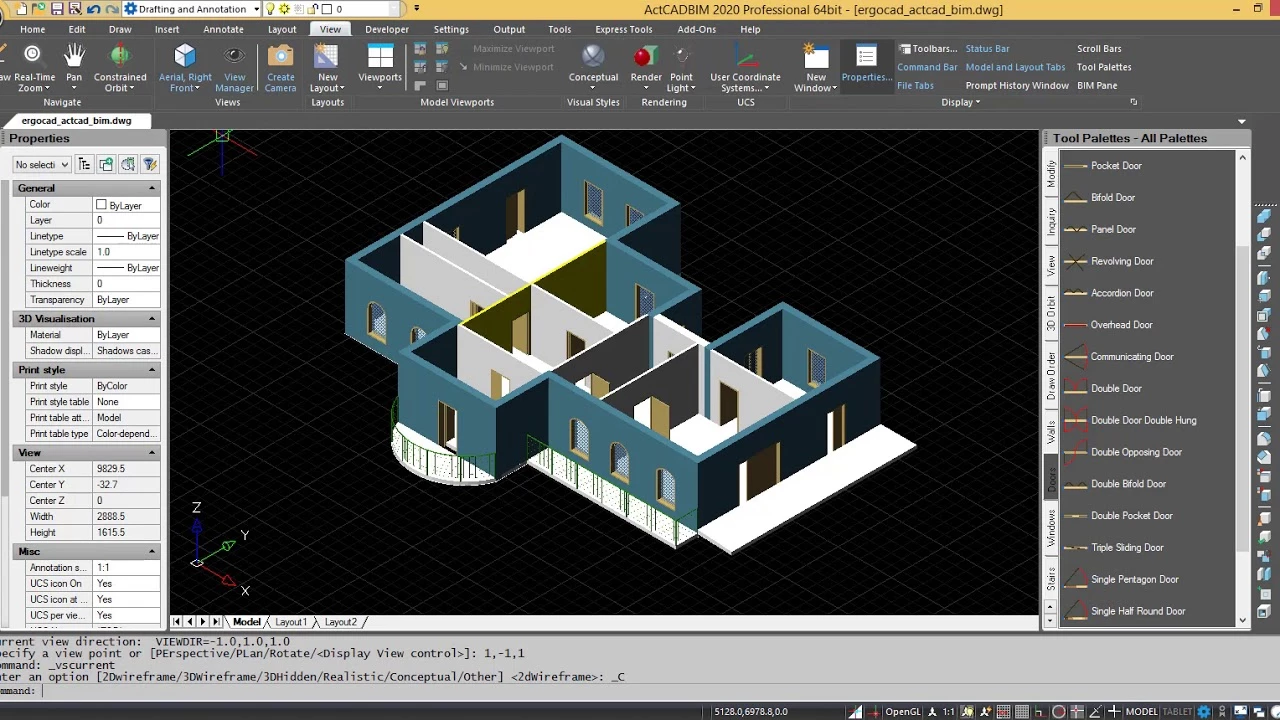
ActCAD operates as a professional-grade computer-aided design platform engineered for 2D drafting and 3D modeling tasks. Built on the IntelliCAD engine and utilizing Open Design Alliance libraries, this software directly reads and writes native DWG and DXF files without requiring external conversion utilities. Architects, civil engineers, structural designers, and independent technical consultants rely on it to produce highly accurate floor plans, mechanical schematics, and elevation drawings. By mimicking the layout, command line structure, and shortcut keys of industry-standard drafting tools, the application allows experienced professionals to migrate their existing workflows immediately without retraining or adjusting to a foreign workspace. The environment provides familiar tools such as layer managers, property palettes, and standard dimensioning controls.
Unlike browser-based drafting tools that struggle with large file sizes or require constant internet connectivity, this desktop application utilizes local processing power and multithreading to handle complex vector geometry and dense point cloud data. The reliance on local hardware ensures that large projects, such as civil survey maps, electrical grid layouts, or multi-story architectural models, render quickly and without graphical latency. The local installation model also guarantees that sensitive intellectual property remains on the user's hard drive, avoiding mandatory cloud synchronization protocols that violate client confidentiality agreements. Users can run custom automation scripts, manage block attributes, and execute batch operations directly from their workstation, making it a highly practical environment for daily engineering work.
While many modern design platforms force users into recurring billing models, this application targets independent professionals and small-to-medium firms looking for permanent ownership of their software. It bridges the gap between basic vector drawing programs and high-priced enterprise systems, providing essential features like an ACIS 3D modeling kernel, PDF-to-DWG converters, and photorealistic rendering engines in a single desktop environment. Whether plotting high-resolution architectural layouts, auditing legacy schematics for missing layers, or verifying mechanical part tolerances, engineers choose this tool to maintain full file compatibility across the supply chain while strictly controlling software overhead costs.
Key Features
- Native DWG and DXF Compatibility: The software reads and saves DWG and DXF files from legacy database formats up to the latest industry standards. Because it uses Open Design Alliance libraries, files created here open correctly in other major CAD programs without missing layers, broken line types, or distorted text formatting.
- Built-in PDF and Image Converters: Users can import vector PDFs directly into the workspace, converting lines and text into editable CAD geometry. The raster-to-vector engine also allows engineers to import JPEG or PNG images, such as scanned blueprints, and trace them into DXF files for further modification.
- Extensive Block Library: The installation includes a repository of over 5,000 standard symbols covering civil, mechanical, electrical, and architectural domains. Users can drag and drop doors, structural steel profiles, or electrical switches directly into their active drawing, or append their own custom blocks to the database for future projects.
- API and Custom Scripting Support: Advanced users and CAD administrators can automate repetitive drawing tasks by loading external scripts. The environment natively supports LISP, DCL, SDS, and .NET programming languages, allowing firms to migrate their existing custom commands and macros from other platforms without rewriting code.
- Self-License Transfer Protocol: Managing software licenses across multiple workstations is handled directly through the command line. By typing the LICENSETRANSFER command, a user can instantly deactivate the software on their current desktop and reactivate it on a different laptop, providing flexibility for engineers who split time between the office and the field.
- Batch File Converter and Auditor: A dedicated batch processing tool enables users to select entire directories of CAD files and convert them into different formats or older database types simultaneously. This module also includes an auditing function that scans multiple files for errors and repairs corrupted database structures without opening each drawing individually.
- Artisan 3D Rendering Engine: For projects requiring client presentations, the software includes an integrated rendering engine at no extra cost. Designers can apply customized materials, configure light sources, and generate photorealistic images of their 3D models directly within the workspace, bypassing the need for third-party visualization software.
How to Install ActCAD on Windows
- Download the executable Windows installer package from the official vendor website.
- Launch the setup wizard and accept the end-user license agreement to begin the installation process.
- Select the destination folder on your local storage drive, ensuring you have enough space for the application and the bundled block libraries.
- Wait for the installer to unpack the core engine, the Open Design Alliance components, and the ACIS 3D modeling kernel.
- Launch the application from the desktop shortcut created during the setup.
- Upon the first run, a prompt will appear requesting your unique license key; enter this code to activate the software over the internet.
- If the workstation is kept offline for security reasons, select the offline activation method to generate a request code, which can be verified from a different internet-connected device.
- Choose your preferred workspace layout, selecting between the Classic Drop-Down Menu style or the Modern Ribbon interface to match your previous drafting habits.
ActCAD Free vs. Paid
The developer does not offer a permanently free tier, but users can download a fully functional trial software that remains active for 14 or 30 days depending on the promotional period. During this trial window, engineers can test file compatibility, run batch converters, and verify 3D rendering performance without any disabled features or artificial export limitations. Once the trial expires, a paid license is required to continue saving and exporting drawing files.
The pricing structure is built entirely around perpetual licenses, meaning users pay a one-time fee to own the software indefinitely. The entry-level ActCAD Standard edition typically costs around $199 and provides all the necessary 2D drafting tools, LISP support, and file converters. This tier is strictly for 2D workflows and does not include advanced 3D modeling capabilities or Building Information Modeling (BIM) elements, making it highly practical for electrical schematics or basic floor plan design.
For users who require spatial design tools, ActCAD Premium or Prime editions introduce the ACIS 3D modeling kernel, AEC objects (such as parametric walls, doors, and roofs), and BIM file support. These advanced editions command a higher upfront cost but remain significantly less expensive than competing subscriptions. All paid tiers include free technical support via email or integrated ticketing, allowing users to get help without purchasing an annual maintenance contract. Upgrading to future major updates is entirely optional, allowing firms to stay on their purchased software edition for years if it meets their operational requirements.
ActCAD vs. AutoCAD vs. ZWCAD
AutoCAD serves as the dominant industry standard, offering deep cloud integration, web and mobile apps, and highly specialized toolsets for mechanical and architectural engineering. It is heavily utilized in large enterprise environments where proprietary plugins, vast external references, and collaborative cloud workflows are strictly required. However, it mandates a high-cost annual subscription, making it an expensive proposition for independent contractors or firms that only need basic drafting capabilities.
ZWCAD positions itself as a highly optimized, fast alternative that excels in memory management and large DWG file handling. It offers a perpetual licensing model and provides an interface that closely mirrors traditional CAD layouts. ZWCAD is frequently chosen by mid-sized firms that prioritize extreme performance for navigating massive 2D site layouts on standard hardware, offering a highly polished engine that rarely falters under heavy geometric loads.
ActCAD steps in as the most budget-friendly perpetual option among the three, heavily emphasizing its built-in converters, vast block libraries, and native IntelliCAD architecture. It is the better fit for independent consultants, surveyors, and small engineering shops that want maximum 2D and 3D functionality—including integrated rendering and PDF-to-DXF tools—for the lowest possible one-time cost. When users do not require AutoCAD's cloud ecosystem or ZWCAD's specialized memory optimization for massive files, ActCAD provides all the necessary drafting tools to complete standard professional projects.
Common Issues and Fixes
- Unwanted prompt boxes appear during entity selection. When clicking an object, a small context menu may pop up and block the view. To stop this interruption, navigate to Tools, select Options, open the Display tab, find the Menus group, and disable the "Display Prompt Boxes" setting.
- Toolbars fail to lock into their previous positions. Sometimes the workspace layout resets after closing the application. Open the Windows Run dialog, type %appdata%, delete the ACTCAD folder entirely, and restart the software to force the interface configuration to reconfigure itself correctly.
- The selection pickbox or snap aperture is too small. On high-resolution monitors, grabbing lines or snapping to intersections can be difficult. Go to Tools, select Drawing Settings, and open the Coordinate Input tab, where you will find sliders to increase the size of both the Entity Selection Pickbox and the Entity Snap Aperture.
- Activation fails when moving to a new computer. If you try to enter your license key on a fresh installation without properly deactivating it on the old machine, the server will reject it. Open the software on the original computer, type the command LICENSETRANSFER, and hit enter to instantly free up the license for the new workstation.