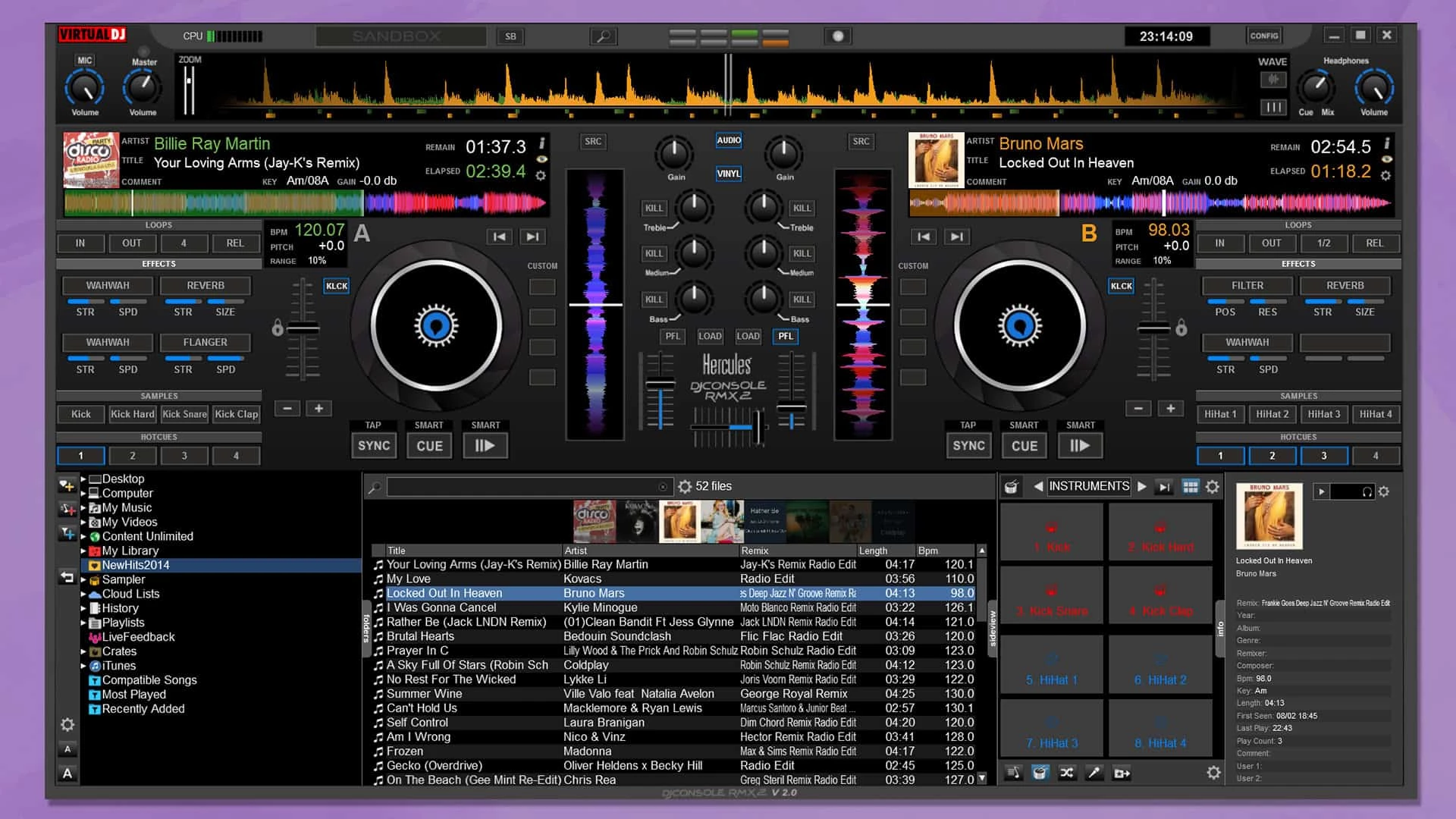
Virtual DJ functions as a complete digital mixing environment, designed to replace traditional turntables and CD players with a software-based interface. It allows users to organize massive audio libraries, cue tracks, beatmatch, and manipulate audio playback using either a computer keyboard or dedicated external hardware. By processing audio locally on a Windows machine, the application handles complex routing scenarios, including multi-channel soundcards, microphone inputs, and Digital Vinyl System (DVS) control, making it a primary tool for mobile entertainers, open-format club DJs, and bedroom hobbyists.
Unlike browser-based mixers or lightweight mobile applications, a native desktop setup ensures the lowest possible audio latency and immediate response when manipulating mixer dials or performance pads. The software reads local directories heavily populated with WAV, FLAC, and MP3 files, analyzing them upon import to map out the beats per minute (BPM) and harmonic key. Users choose a desktop application of this scale because it supports extensive plug-and-play mappings for hundreds of hardware mixers. The heavy processing demands of real-time audio separation and high-definition video rendering strictly require the thermal headroom and dedicated hardware resources available on standard Windows desktop or laptop environments.
For working DJs, the core job solved by this software is maintaining continuous, perfectly aligned audio playback across hours of performance while managing requests and dynamic crowd energy. It provides visual feedback through overlapping waveforms and detailed file browsers, eliminating the blind spots of searching through physical media crates. The workflow caters strictly to live execution, ensuring that transitions, vocal isolations, and effect chains happen instantaneously upon user command without buffering or rendering delays.
Key Features
- Stems Real-Time Separation: The audio engine applies local processing algorithms to instantly isolate distinct track components like vocals, instruments, bass, and drums. Performers manipulate these stems directly from their controller's performance pads or assign them to the equalizer knobs on the mixer. This allows for live mashups, such as dropping the acapella of one track over the instrumental of another, without requiring any prior studio preparation or third-party editing applications.
- Universal Hardware Integration: The application bypasses strict manufacturer lock-in by offering native, plug-and-play mapping files for almost every major DJ controller, media player, and digital mixer currently available. If a user plugs in a supported USB device, the software automatically detects the hardware layout, assigning transport controls, jog wheels, and pitch faders to their correct functions immediately upon connection.
- Sandbox Mixing Mode: This isolated preview function permits the DJ to jump ahead in the playing track and test an upcoming transition strictly within their headphones. While the live audience continues to hear the current song playing normally through the master output speakers, the DJ can find the exact cue point and test the beatmatch privately, significantly reducing the risk of a clashing mix during a live set.
- Integrated Video and Karaoke Engine: Beyond standard audio mixing, the software includes a secondary rendering engine dedicated to video playback and karaoke hosting. Performers can output music videos, visualizers, or on-screen lyrics to a secondary monitor or projector while mixing the audio simultaneously. The interface supports text overlays, custom logo watermarks, and automatic camera feeds directly from the main control screen.
- Online Catalog Streaming: For DJs who receive obscure crowd requests, the side browser includes direct API connections to professional DJ record pools and streaming catalogs. Assuming an active internet connection, performers can search a specific title, drag the result directly onto a virtual deck, and play it immediately. The system caches the file locally into a temporary buffer to prevent audio dropouts if the network connection fluctuates during playback.
- Automated Harmonic Matching: During the initial file analysis phase, the software calculates the exact musical key of every audio track and writes it into the database metadata. The browser interface then highlights compatible tracks, allowing DJs to mix harmonically and avoid clashing notes. It also includes an automatic key-shifting algorithm that can force an incoming track into a matching key with the press of a single interface button.
- Advanced Audio Routing: The configuration panel accommodates complex external soundcard setups, permitting precise assignment of master outputs, headphone cues, booth monitors, and line inputs. Users can route specific software decks into distinct physical channels on an external analog mixer or configure timecode control, enabling them to manipulate the digital audio files using physical vinyl records on standard analog turntables.
How to Install Virtual DJ on Windows
- Download the official Windows installer package from the vendor's website and save the executable file to your local drive.
- Double-click the downloaded setup file to launch the installation wizard and grant the necessary administrator permissions when prompted by Windows User Account Control.
- Read and accept the End User License Agreement to proceed to the destination folder selection screen.
- Choose the installation path, which defaults to the standard Program Files directory on your primary system drive, and confirm whether you want to generate a desktop shortcut.
- Click the install button and wait for the wizard to copy the core application files, default skins, and native mapping scripts to your local storage.
- Click finish to exit the installer and launch the application for the first time.
- Upon the initial launch, allow the software to scan your system for any connected USB audio interfaces, MIDI controllers, or external hard drives containing music libraries.
- Log into your user account through the prompt window to activate any purchased licenses, unlock streaming catalog access, or dismiss the window to proceed directly into the local file browsing interface.
Virtual DJ Free vs. Paid
The vendor structures its pricing model primarily around the type of hardware the user intends to connect. The software is available entirely free of charge for non-commercial, home use provided the user only controls the interface via a computer keyboard and mouse. This free tier contains the core mixing functionality and file management tools. However, if a user connects professional DJ hardware, such as a USB controller or external mixer, the free tier introduces a recurring audio watermark that interrupts playback, rendering it unusable for public performance until a license is purchased.
For hobbyists utilizing entry-level hardware, the Home Plus tier provides a one-time purchase option. The price for this tier fluctuates depending on the specific model of the controller being connected, generally acting as an affordable unlock specifically tied to that single piece of hardware. This restricts the user from upgrading their gear later without repurchasing a new license, but it avoids monthly subscription fees for casual users mixing in their bedrooms.
Professional users who play paid gigs or frequently swap between different hardware setups must upgrade to the Pro tier. The Pro license is available either as a recurring monthly subscription or as a one-time perpetual purchase known as Pro Infinity. This tier removes all audio watermarks, unlocks DVS timecode control, allows unlimited customization of interface skins, and permits the connection of any supported controller, media player, or mixer on the market. Additionally, a Business tier exists for commercial venues and event companies, offering multi-user licensing, priority technical support, and bespoke mapping services.
Virtual DJ vs. Serato DJ Pro vs. Rekordbox
Serato DJ Pro centers its workflow heavily around traditional scratch emulation, DVS stability, and hip-hop performance styles. It enforces a strict hardware certification model, meaning the software will only unlock and function if the user plugs in a specific, officially licensed mixer or controller. While this closed ecosystem guarantees tight integration and low latency, it forces DJs to purchase expensive expansion packs for features like video mixing or advanced effects, which are often included natively in other software packages.
Rekordbox acts as the official library management and performance software for Pioneer DJ hardware, making it the default choice for festival and club DJs preparing USB drives for standalone CDJs. Its track analysis, beat gridding, and export functions are strictly optimized for the Pioneer ecosystem. However, performing live directly from a laptop with Rekordbox requires navigating a complex subscription tier system for cloud library syncing, and the software offers virtually no support for hardware manufactured by rival brands.
Virtual DJ remains the better fit for mobile entertainers, wedding DJs, and open-format performers who prioritize flexibility over brand loyalty. Because it does not restrict users to a certified hardware list, a DJ can plug into almost any controller or mixer they encounter at a venue and start playing immediately. The inclusion of native karaoke hosting, video rendering, and highly efficient real-time stem separation without requiring additional paid add-ons gives it a distinct advantage for working event professionals who need maximum utility from a single interface.
Common Issues and Fixes
- Audio dropouts or stuttering during live playback. This occurs when the CPU cannot handle the real-time processing demands of the audio separation algorithms. To fix this, right-click the tracks in your browser pane before the gig and select the option to save prepared stems, offloading the heavy rendering to your hard drive in advance.
- The interface freezes or search functions lag heavily. This happens if the software attempts to query online streaming catalogs over a weak or unstable Wi-Fi connection. Open the configuration panel and disable the online catalog search function, restricting the browser to only search local files stored directly on your computer.
- Controller jog wheels or buttons trigger incorrect actions. This usually stems from a corrupted mapping file or conflicting custom scripts. Navigate to the Controllers tab in the settings menu, select your specific hardware model from the drop-down list, and click the option to reset the mapping to its factory default state.
- Music plays through the master speakers but the headphone cue is silent. This indicates an incorrect audio routing configuration. Open the Audio Setup menu and ensure the drop-down menus explicitly assign the master output to the main stereo channels of your soundcard, and route the headphone output to the secondary stereo pair.
Version 2026 Build 8962 — December 2025
- Introduced AI-powered lyrics integration within waveforms, enabling DJs to navigate tracks more easily and perform word-based mixing with enhanced precision
- Added AIPrompt folder functionality that uses language model technology to suggest tracks based on any occasion or theme, with results appearing directly in the browser for immediate use
- Implemented a professional-grade effects engine featuring over 122 effects, incorporating signature effects from leading hardware mixer manufacturers
- Included a visual lyrics display plugin for video output, allowing creative lyric visualization during performances
- Enhanced automatic karaoke capabilities that now function with any audio track without requiring specific karaoke files
- Added AI-powered duplicate detection folder to help organize and clean music libraries more efficiently