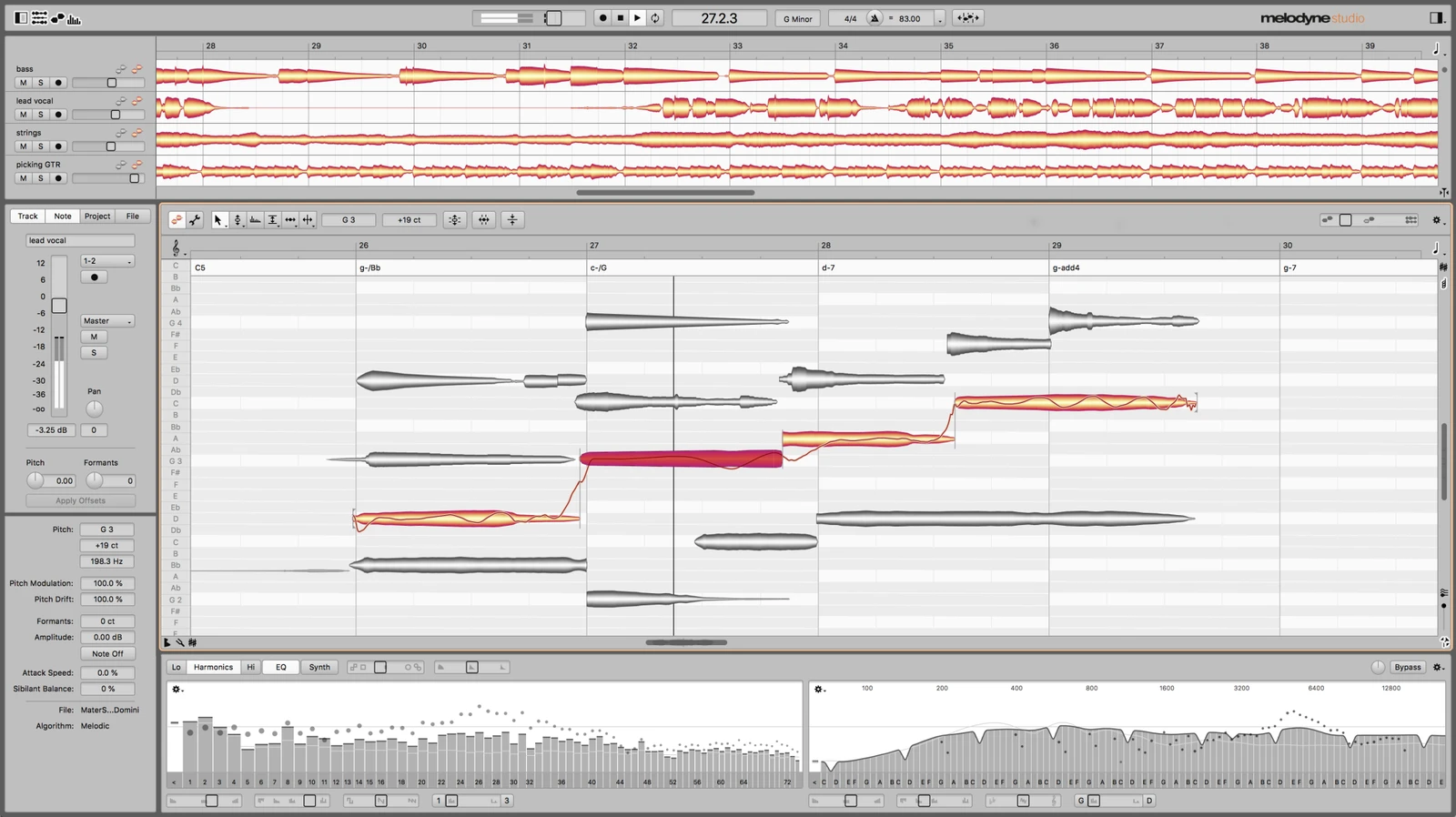
Celemony Melodyne Studio operates as the premier audio editing environment for pitch correction, timing adjustment, and polyphonic audio manipulation. While standard equalizer and compressor plugins treat an audio track as a single flattened waveform, this software analyzes the harmonic structure of a recording and maps it onto a visual piano roll. Audio is represented as individual "blobs" on a pitch grid, allowing producers and mix engineers to physically pick up a flat vocal note and move it to the correct pitch center. The software is utilized primarily for lead vocal comping, choir alignment, and instrument correction in professional studio environments where transparency is required over obvious vocal modulation effects.
The distinction between a dedicated desktop application and lighter browser-based tools becomes obvious when dealing with complex harmonic analysis. Extracting pitch data from a dense acoustic guitar chord or a multi-layered vocal stack requires significant local CPU resources, large amounts of RAM, and deep integration with host digital audio workstations. By utilizing the ARA2 (Audio Random Access) protocol, the software bypasses standard real-time playback restrictions, allowing the plugin to read the entire audio file from the hard drive instantly. This deep system access means users can edit audio clips visually without waiting for a lengthy real-time transfer process, making the desktop environment essential for long mixing sessions involving hundreds of overlapping audio regions.
Beyond basic monophonic vocal tuning, the software solves concrete studio problems that previously required entire session re-recordings. If a piano player hits a single wrong key during a complex jazz progression, the program can isolate that exact frequency and shift it to the correct note without altering the surrounding chord structure. If a vocalist delivers an emotionally perfect take but rushes the rhythm on a single phrase, the time-stretching tools can elongate specific syllables while preserving the natural vibrato and breath sounds. This level of granular control allows engineers to salvage imperfect recordings and assemble final mixes that sound entirely natural and acoustic to the listener.
Key Features
- DNA Direct Note Access: This algorithm analyzes polyphonic audio files and breaks them down into their constituent musical notes. If you record a dense acoustic guitar performance or a grand piano track, the software identifies individual string plucks and key strikes within the overlapping frequencies. You can select a single sour note buried inside a major chord, drag it to a minor interval, and leave the surrounding harmonics entirely unaffected. This eliminates the need to discard a great instrumental take just because of a minor fingering mistake during the tracking phase.
- Multitrack Note Editing: The interface permits the display and manipulation of multiple audio tracks simultaneously within a single visual window. When editing a lead vocal alongside several backing harmonies, you can view all the vocal blobs stacked on the same musical grid, color-coded for clarity. This allows you to visually align the timing of consonants across multiple microphones, ensuring that word endings and breaths happen at the exact same millisecond across the entire vocal arrangement.
- Melodic Algorithm with Sibilant Detection: Human vocals consist of pitched tones, such as vowels, and unpitched noise, such as breath sounds and harsh consonants like "S" or "T". The software automatically detects and separates these elements within a single note blob. When you drag a vocal note up an octave or apply heavy pitch quantization, the algorithm applies the pitch shift only to the vowel, leaving the sibilance at its original frequency. This prevents the unnatural lisping artifacts that plague basic pitch correctors.
- Chord Track and Grid: The environment includes an automatic chord recognition system that analyzes the harmonic content of your audio to determine the song's key and chord progression. The visual pitch grid can be linked directly to this chord track, changing the background lines to reflect only the safe notes for the current underlying chord. This allows editors to quickly snap errant audio blobs into a musically appropriate scale, or utilize macro controls to force an entire bass line to conform to a new harmonic structure without needing to reference external music theory charts.
- Sound Editor: Instead of relying on traditional band-pass equalizers, the interface provides structural control over the overtone series of an instrument. By accessing the spectral data of an audio file, you can isolate specific harmonics and boost or attenuate them directly from the visual workspace. This allows you to fundamentally alter the timbre of a synthesizer bass line, reduce the mechanical string noise of a bass guitar, or brighten a dull vocal recording by reshaping its internal frequency structure.
How to Install Celemony Melodyne Studio on Windows
- Download the installer archive from our website directly to your local Windows storage drive, ensuring you have enough temporary space for the extraction process.
- Extract the downloaded archive into a new, dedicated folder using the standard Windows extraction utility or your preferred third-party archive management tool.
- Open the
readme.txtfile located inside the extracted folder to review any required system dependencies, known host compatibility issues, or pre-installation directory instructions. - Run the main setup executable file from the extracted folder to initialize the installation wizard and accept the end-user license agreement.
- Select the plugin formats you need during the component selection screen, ensuring you check the boxes for VST3, AAX, or the standalone executable based on your specific host program requirements.
- Choose the destination folder for the core application files, or leave the default Windows directory paths, such as
C:Program FilesCommon FilesVST3, selected to ensure standard DAW scanning paths locate the plugin files correctly. - Finish the setup process, launch your audio workstation or the standalone application, and follow the prompt to sign in to your Celemony account to verify your license and activate the product on your machine.
Celemony Melodyne Studio Free vs. Paid
This software operates entirely on a commercial licensing model and does not offer a permanent free tier. The developer funds the ongoing research behind the Direct Note Access algorithms through paid user licenses. Users interested in testing the environment can utilize a temporary 30-day trial period, but long-term usage requires purchasing one of the available consumer or professional editions.
The product line is divided into four distinct tiers to accommodate different budget levels and technical requirements. The Essential tier provides the most basic toolset, limiting users to monophonic pitch and timing correction suitable for simple lead vocal tuning. The Assistant tier expands this with deeper vibrato control, formants adjustment, and timing macros, making it the standard choice for general vocal production and podcast editing.
The Editor tier introduces the polyphonic Direct Note Access technology, allowing users to manipulate chords and complex instrumental recordings, which changes the workflow for guitarists and keyboard players. Finally, the Studio tier represents the complete package, typically priced around $699. This top tier unlocks the Multitrack Note Editing window and the Sound Editor, making it the necessary choice for engineers handling massive vocal arrangements or complex orchestral sessions.
One structural benefit of this pricing model is the upgrade path. Users who purchase lower tiers can upgrade to the Studio version later by paying the price difference. While open-source and bundled DAW alternatives exist, they generally rely on basic time-stretching and monophonic tracking. The specific polyphonic separation algorithms and multitrack visual interfaces found in the paid tiers remain exclusive to this commercial ecosystem, ensuring its position as a standard requirement in commercial mixing facilities.
Celemony Melodyne Studio vs. Auto-Tune Pro vs. Revoice Pro
Auto-Tune Pro by Antares utilizes a real-time linear processing engine, meaning it corrects audio pitch live as the signal passes through the plugin. This makes it the preferred tool for live tracking, allowing vocalists to hear their pitch corrected in their headphones while singing. It is also responsible for the iconic, stylized vocal modulation effect prevalent in pop and hip-hop. However, its manual graphing mode is often considered less intuitive for surgical, microscopic editing compared to an offline visual environment.
Revoice Pro by Synchro Arts specializes in the automatic alignment of timing and pitch across multiple audio files using Audio Performance Transfer (APT). Its primary workflow involves taking a perfect guide track and mathematically forcing a stack of backing vocals or dialogue overdubs to match its exact cadence and inflection. This batch-processing approach saves engineers hours of manual labor when comping large choir sections. While it excels at mass alignment, its manual pitch detection tools are generally less precise when isolating delicate artifacts in a solo lead vocal.
Celemony Melodyne Studio remains the optimal choice when a project demands completely invisible audio correction, polyphonic instrument manipulation, or complex harmonic sound design. While it cannot provide the zero-latency real-time tracking benefits of Auto-Tune Pro, and it requires more manual interaction than the automated batch processing of Revoice Pro, its note-based visual interface offers the highest level of granular control. It is the tool engineers use when an imperfect acoustic recording must be salvaged without leaving any digital artifacts on the final master.
Common Issues and Fixes
- ARA2 extension loses connection to audio clips. This often occurs in complex session files when clips are moved, crossfaded, or split heavily while the plugin extension is active, resulting in silent playback or missing blobs. To resolve this, bounce or render the corrected audio clip to a new, solid WAV file before making further arrangement changes or saving the session.
- Sibilance sounds harsh or unnatural after tuning. If the automatic sibilant separation misses a harsh consonant or breath sound, the pitch shift can cause digital artifacts and audible phasing. To fix this, select the Amplitude Tool, isolate the unpitched noise portion of the note blob visually, and manually reduce its volume level to tame the harshness without affecting the vowel's pitch.
- Polyphonic detection misidentifies complex chords. Occasionally, the algorithm places waveform energy on the wrong pitch line when analyzing heavily distorted guitars or dense polyphonic synthesizer material. Click the wrench icon to open the Note Assignment Mode, where you can manually reassign the misidentified frequencies to the correct visual blobs to clean up the detection grid.
- Hard drive space fills up rapidly during large sessions. The software generates large temporary cache files to allow instant playback and visual rendering of the audio data without taxing the CPU continuously. To reclaim local storage space, regularly clear the ARA2 cache folder and utilize your host workstation's media cleanup function to delete unused render files.
Version 5.4.2 — 2025
- Added full compatibility with macOS Sequoia, resolving activation requirements triggered by the "Private Wi-Fi Address" feature.
- Improved scrolling behavior when using a trackpad on macOS for a smoother workflow.
- Fixed graphical artifacts that occasionally appeared when switching focus between Melodyne and other applications on macOS.
- Resolved stability issues that could cause the application to crash when opening the Melodyne ARA or plug-in interface.
- Optimized general performance and addressed minor bugs for improved reliability.