Antares Auto-Tune EFX operates as a dedicated vocal production tool that merges traditional pitch correction with a modular multi-effects architecture. Designed for producers, beatmakers, and mixing engineers, it targets modern pop, hip-hop, and electronic workflows where vocals require heavy stylization rather than just transparent tuning. Instead of forcing audio engineers to chain multiple equalizer, distortion, and modulation plugins across a mixer channel, this software consolidates the vocal processing chain into a single interface. Users route raw microphone input through the software to achieve everything from subtle intonation fixes to heavily synthesized, robotic vocal textures.
The primary audience includes home studio owners and professional technicians who need immediate, predictable results during vocal tracking and mixing. Live performers also rely on its low-latency processing to monitor tuned voices through stage wedges or in-ear monitors without distracting audio delays. By integrating a multi-effects rack directly alongside the core tuning algorithm, the software allows vocalists to experiment with rhythmic patterns, tube amplifier emulation, and vocoder effects during the writing process. This immediate feedback alters how artists approach vocal delivery, hearing the stylized sound while recording rather than waiting for post-production editing.
Running this processor as a desktop plugin rather than relying on browser-based editors provides necessary stability and integration with digital audio workstations on Windows. High-fidelity pitch tracking and real-time effects generation demand significant CPU resources and exact sample-accurate synchronization with the project tempo. A local VST3 or AAX installation ensures the algorithm interacts directly with the audio buffer of the host workstation, allowing for complex automation of parameters like retune speed, filter cutoffs, and effect mixes without relying on compressed browser audio engines.
Key Features
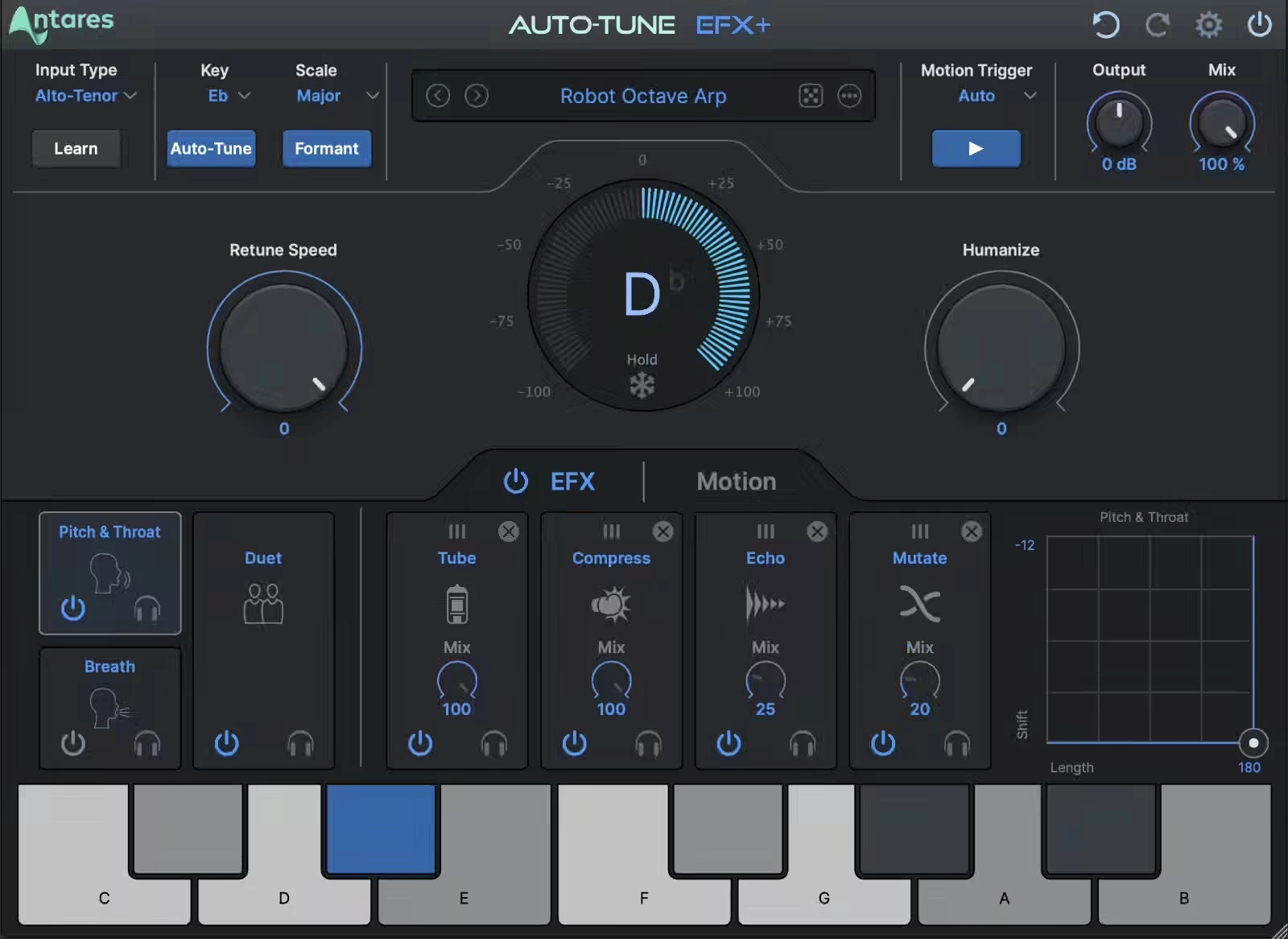
- Feature Name: Real-Time Pitch Correction. The core algorithm analyzes incoming monophonic audio and forces the pitch to the nearest note within a specified scale. Users manipulate the Retune Speed parameter to dictate how quickly the correction occurs. Setting the speed to zero produces the instantaneous hard-tune aesthetic, while slower settings preserve natural pitch variations for transparent corrections.
- Feature Name: Auto-EFX Modular Multi-Effects Rack. The software includes a dedicated rack system allowing users to chain processing modules after the pitch correction stage. The interface provides slots to load effects such as Vocode, Tube Amp, Mutate, Duet, and Pitch and Throat modeling. Each module includes adjustable parameters, enabling engineers to stack analog-style warmth or artificial doubling without opening secondary plugins.
- Feature Name: Auto-Motion Pattern Generator. This generative tool intercepts the corrected vocal signal and forces it into rhythmic arpeggios based on the project tempo. Users select from a library of preset patterns that mathematically shift the vocal pitch up and down in predefined sequences. The patterns trigger automatically when incoming audio is detected, creating complex vocal chops that adapt to the current key.
- Feature Name: Interactive XY Pad Control. To facilitate dynamic performances, the interface features a large XY pad that links to specific module parameters. A producer might assign the X-axis to control throat length modeling and the Y-axis to dictate the mix of a chorus effect. Moving the cursor alters both parameters simultaneously, and this movement records directly into the workstation as automation data.
- Feature Name: Auto-Key Scale Reception. Manually determining the key of a beat often disrupts the recording workflow. This plugin listens for data broadcast by the separate Auto-Key utility, which analyzes the instrumental track and calculates the root note. A single click maps that musical data directly into the pitch correction engine, ensuring the tuning algorithm never forces a vocal out of bounds.
- Feature Name: Optimized Low-Latency Mode. Studio tracking requires immediate audio feedback so the vocalist stays in rhythm. Activating the low-latency mode bypasses specific look-ahead processing buffers, slightly altering tracking accuracy but dramatically reducing round-trip delay. This allows vocalists to sing directly into their microphones and hear the fully tuned result in their headphones almost instantly.
- Feature Name: Custom Artist Presets. The interface includes a file management system populated with vocal chains designed by notable audio engineers. Users search the preset browser by effect type or artist name to instantly load complex combinations of pitch speed and modular rack assignments. The browser allows local saving of custom user presets for accurate recall across different studio projects.
How to Install Antares Auto-Tune EFX on Windows
- Download the provided installer archive from this page to a designated folder on your local storage drive.
- Extract the downloaded ZIP archive using the default Windows extraction tool or a third-party archive utility to reveal the hidden installation files.
- Open the included readme.txt document located in the extracted folder to verify the exact directory path requirements for VST3 and AAX compatibility.
- Execute the main setup file from the extracted folder to launch the official installation wizard for the plugin files.
- Select your required plugin formats during the prompt, ensuring you check the VST3 option for standard digital audio workstations or AAX for Pro Tools environments.
- Confirm the default destination directory on your primary system drive so the installer can write the necessary dynamic link libraries and preset folders.
- Complete the setup wizard, exit the installer, and open the iLok License Manager or Auto-Tune Central desktop application to authenticate your paid account.
- Launch your digital audio workstation, perform a complete background plugin scan, and load the newly registered processor onto an empty audio insert to verify the installation.
Antares Auto-Tune EFX Free vs. Paid
This vocal processor operates strictly as premium software and does not offer a free tier. Users must secure a valid, paid license to utilize the pitch correction algorithms and multi-effects rack. The business model splits into two distinct purchasing paths: a standalone perpetual license and a recurring subscription service. Both paths require background licensing management software to verify the purchase against the host machine.
The perpetual license model requires a single, upfront payment, generally priced at $229. Purchasing this license grants the user permanent access to the exact software iteration available at the time of transaction. Studio owners who operate offline machines often prefer this route. The perpetual license ensures the plugin will function indefinitely on compatible Windows hardware, though major future structural updates require an additional paid upgrade fee.
Alternatively, the software is accessible via the Auto-Tune Unlimited subscription model, costing approximately $24.99 per month or $175 annually. This tier unlocks the entire ecosystem of Antares products, including vocal harmonizers and extreme distortion plugins. The subscription guarantees immediate access to future updates, preset expansions, and new modular effects. This model suits active producers who require a vast array of tools.
A middle-tier subscription, Auto-Tune Producer, exists for roughly $99 annually, curating a smaller selection of essential tools that includes the core effects rack. Regardless of the chosen path, authorization relies on an active internet connection for the initial sync. Perpetual users can manage licenses via a physical USB dongle for offline setups, while subscription users must periodically connect to the internet to validate the active billing cycle.
Antares Auto-Tune EFX vs. Waves Tune Real-Time vs. Celemony Melodyne
Waves Tune Real-Time targets live performance and strict, latency-free pitch correction with a heavy emphasis on natural vocal transitions. It uses a highly analytical waveform interface that focuses on formant preservation, vibrato control, and specific note transitions based on user-drawn MIDI curves. However, Waves Tune Real-Time operates purely as a corrective utility. It completely lacks the modular multi-effects rack, vocoders, tube distortion elements, and generative melodic pattern features. A producer looking to heavily stylize a vocal or create chopped arpeggios will find the Waves interface insufficient for creative sound design.
Celemony Melodyne functions as an offline, forensic audio editing environment utilizing polyphonic Direct Note Access technology. Engineers use Melodyne to manually manipulate individual audio blobs on a detailed piano roll, allowing for surgical adjustments to pitch, timing, formants, and amplitude on a note-by-note basis. This granular approach produces incredibly realistic, invisible pitch correction. The trade-off is workflow speed and latency; Melodyne cannot be used to track live vocals through a microphone, and it does not generate rhythmic effects. It is a post-production editing suite rather than an active performance instrument.
Antares Auto-Tune EFX acts as the bridge between raw pitch correction utility and creative vocal sound design. It is the superior choice for producers in hip-hop, pop, and electronic genres who need the signature hard-tune aesthetic combined with immediate processing. By housing pitch correction, artificial doubling, analog tube emulation, and complex rhythmic generation in a single interface, it eliminates the need to route audio through complex mixer chains. Users select this software when they want the vocal processing to actively influence the recording process, prioritizing immediate, stylized results over offline forensic editing.
Common Issues and Fixes
- Problem description. The vocal output sounds garbled, extremely unnatural, or randomly shifts to incorrect notes during playback. This behavior occurs when the pitch correction engine is forced to adhere to the wrong musical scale. Open the primary interface and manually adjust the key and scale drop-down menus to match the instrumental beat, or utilize the separate Auto-Key utility to calculate and transmit the correct musical parameters automatically.
- Problem description. The digital audio workstation crashes or freezes entirely the moment the processor is loaded onto an empty mixer insert. Mixer crashes typically indicate a conflict with the VST3 application bridge or an outdated graphics card driver attempting to render the interface. Update your primary Windows display drivers, ensure you are not running the plugin through a third-party bridging tool, and verify that the host workstation is fully compatible with the specific VST3 architecture.
- Problem description. The recording artist complains of a distracting delay or echo in their headphones while singing into the microphone. Latency during live tracking happens when the workstation audio buffer size is too large or the algorithm is processing look-ahead data. Lower your hardware buffer size to 128 or 64 samples in the audio preferences menu, and ensure the Low Latency toggle is actively engaged on the plugin interface to minimize round-trip delay.
- Problem description. A licensing error appears on screen, preventing the graphical user interface from loading and silencing the audio track. Authorization failures generally stem from a stalled background licensing service or an expired subscription token. Open your Windows Services manager to manually restart the CodeMeter Runtime or iLok service, and log back into the license manager application to force a fresh sync with the remote server.
- Problem description. The graphical user interface drops frames, stutters, or becomes unresponsive when adjusting parameters on the XY Pad. Heavy processor loads from other virtual instruments operating simultaneously can starve the graphics engine of necessary resources. Freeze or render heavily processed MIDI tracks in your timeline to reduce the global CPU load, or switch the plugin interface to the alternative Light mode to simplify the graphical rendering demands.
Version Latest — 2025
- Added seven new modular effects including Breath, Reverb, Echo, Chorus, Compressor, Low-pass Filter, and EQ for expanded creative sound design.
- Introduced four reorderable effect slots, allowing users to build and customize their own signal chains via drag-and-drop.
- Implemented a refreshed, resizeable user interface with Light and Dark mode options for improved workflow visibility.
- Added a new "Random" preset generator to instantly create unique and experimental vocal effect combinations.
- Expanded the preset library with exclusive patches designed by top artists and producers (including Aaron Dessner, Bon Iver, and others).
- Improved integration with Auto-Key 2 for seamless key, scale, and tempo detection and transfer.
- Enhanced real-time processing capabilities for lower latency performance during tracking.