Steinberg Cubase Pro stands as a high-end digital audio workstation tailored for professional music production, film scoring, and advanced sound design on Windows computers. Rather than relying on cloud-based processing or basic loop-stacking interfaces, this desktop application provides a fully self-contained environment for tracking, editing, and mixing audio at studio-grade sample rates. Composers, tracking engineers, and electronic producers rely on its extensive MIDI manipulation tools and highly configurable routing matrix to build complex arrangements that lighter alternatives struggle to handle. Running natively on desktop hardware ensures latency-free monitoring and the ability to process hundreds of simultaneous audio and virtual instrument tracks without bottlenecking standard system resources. By processing audio locally on Windows 10 and Windows 11 machines, engineers maintain complete ownership of their project files and preserve offline functionality, which remains critical for security and stability during demanding recording sessions.
The workspace revolves around a linear timeline combined with a deeply customizable MixConsole, allowing engineers to mirror physical analog studio setups within a digital ecosystem. Users depend on the software to handle intricate orchestral templates, process dense multitrack drum recordings, and synthesize experimental sounds through internal modulation routing. For those working in commercial music, television, or game audio, the software bridges the gap between raw musical ideas and finalized, broadcast-ready exports. It includes sophisticated notation tools, precise pitch-correction modules, and automation curves that allow microscopic adjustments over volume, panning, and effect parameters. The Control Room feature provides an entirely separate routing matrix solely for monitoring, allowing the mixing engineer to send distinct headphone mixes with heavy reverb to a vocalist in the tracking room while listening to a dry, analytical mix at the main desk.
Choosing a heavy-duty workstation rather than a browser-based tool is necessary for professionals who require strict sample-accurate timing, offline processing, and support for massive third-party VST plugin libraries. The program integrates deeply with outboard hardware, sending and returning audio through external analog equalizers and compressors while automatically compensating for hardware delay. To speed up tedious editing tasks, the Logical Editor allows users to write custom mathematical scripts—such as selecting every MIDI note on an off-beat and reducing its velocity by twenty percent. Furthermore, the built-in VariAudio engine permits engineers to isolate vocal takes, detect individual sung pitches, and drag them onto the correct notes of a scale directly inside the audio event, bypassing the need for expensive third-party tuning plugins. Multitrack AudioWarp functions ensure that when a drummer plays out of time, the engineer can snap all drum microphones to a grid simultaneously without introducing phase cancellation.
Key Features
- AI Stem Separation: The software analyzes mixed stereo audio files and extracts distinct stems for vocals, drums, bass, and other instruments directly within the timeline. Engineers use this for remixing flat stereo tracks, sampling isolated elements, or applying targeted processing to an embedded vocal without altering the underlying instrumental bed.
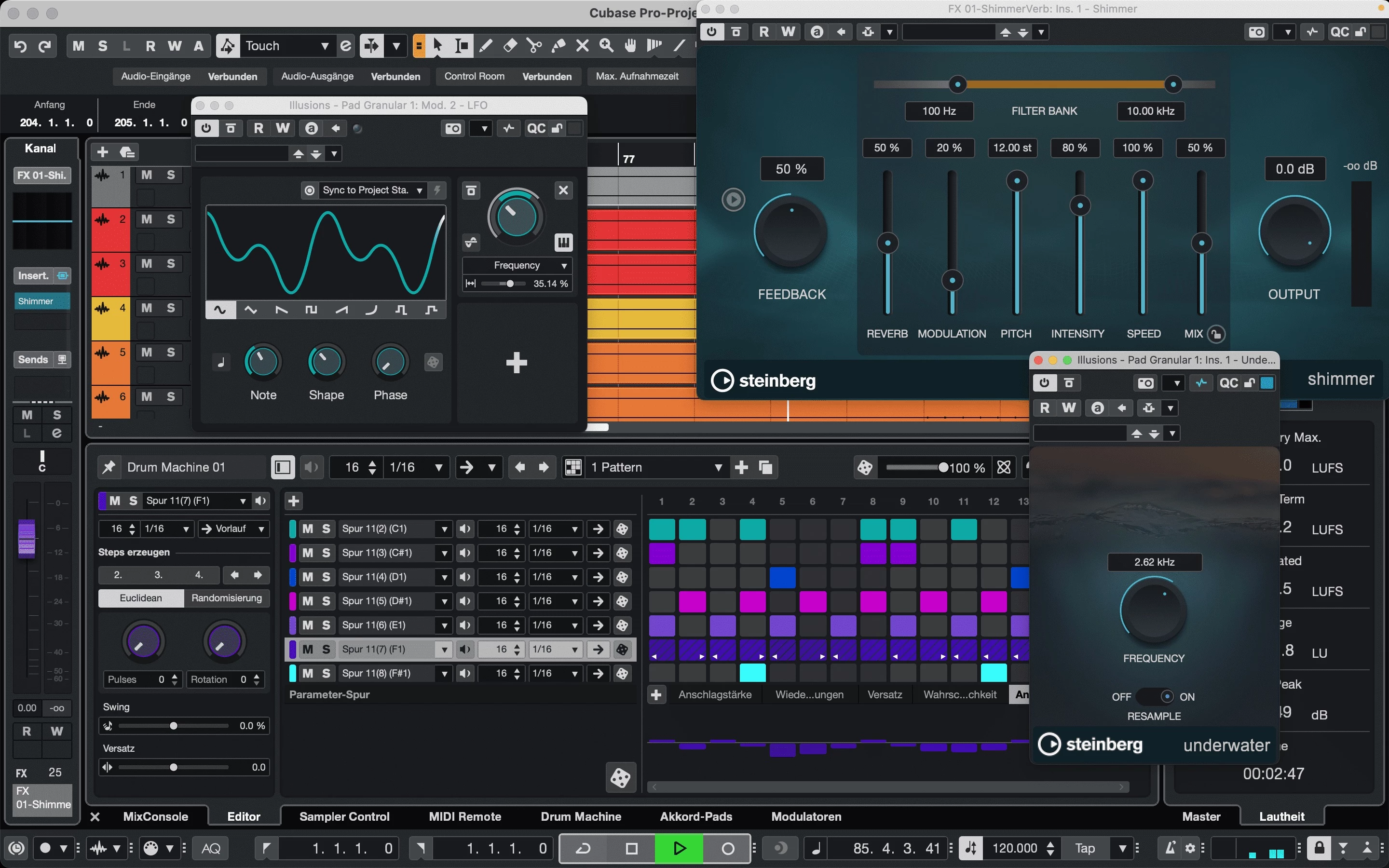
- Melodic Pattern Sequencer: Moving beyond standard drum programming, this sequencing matrix handles both monophonic and polyphonic generation with custom scale mapping. Producers utilize the algorithmic shape generators and deep randomizer to quickly draft basslines, arpeggios, and chord progressions, utilizing step input for rigid electronic timing.
- Revamped Expression Maps: Orchestral and film composers rely on these maps to control complex instrument articulations—such as switching a string section from legato to pizzicato—without cluttering the piano roll. The deep editor integration links notation marks directly to sample library switches, significantly reducing the time spent programming MIDI mockups.
- Advanced Modulator Modules: The environment includes a suite of modulation modules, including a Random Generator, Sample & Hold, and a Wavefold LFO. Users map these modulators to any parameter on a track that contains an audio signal, adding unpredictable movement or stepped filter changes to static sounds to push the workstation into heavy sound-design territory.
- Omnivocal Synthesis Engine: Integrated as a beta feature directly into the Key Editor, this Yamaha-powered vocal synthesis engine sings notes and lyrics entered by the user. Producers type phonetic text blocks over MIDI notes to generate synthetic choir backgrounds or robotic lead vocals without needing a session singer.
- UltraShaper Dynamics System: This internal dynamics processor functions as an auto-compensating compressor, transient shaper, and limiter combined into a single module. Mixing engineers apply it to drum busses to simultaneously squash the room sound and sharpen the initial stick attacks, controlling wild dynamic swings without routing through multiple separate plugins.
- Customizable MixConsole Workspace: The primary mixing environment mirrors a large-format analog console, complete with scalable channel strips, customizable EQ curves, and drag-and-drop routing. Users detach the mixer into separate windows or dock it in the lower zone, managing complex send-and-return paths for parallel compression or time-based effects.
How to Install Steinberg Cubase Pro on Windows
- Download the installer archive from our website directly to your Windows 10 or Windows 11 machine.
- Extract the contents of the downloaded archive to a temporary folder using standard Windows extraction tools or a third-party archiver.
- Open the extracted folder and locate the
readme.txtfile to review any specific pre-installation steps or dependency warnings. - Run the primary setup executable from the extracted folder to initiate the installation wizard.
- Follow the prompts and accept the default installation path, which typically places the core application files in
C:Program FilesSteinbergCubase. - Allow the installer to automatically configure the Steinberg Activation Manager and the necessary licensing software components required for verification.
- Upon launching the application for the first time, sign in with your Steinberg ID credentials when prompted by the Activation Manager to verify your product tier.
- Wait for the initial plugin scan to complete, after which the application will display the redesigned Hub where you can create an empty project or load a template.
Steinberg Cubase Pro Free vs. Paid
Steinberg does not offer a fully free tier of this software. The business model relies entirely on paid, perpetual licenses separated into three distinct tiers: Elements, Artist, and Pro. The entry-level Elements tier costs approximately $99.99 and provides basic recording tools, 40 drum machine kits, and a limited track count, making it suitable for simple home tracking and podcasting without heavy orchestration demands.
The Artist tier, priced around $329.99, expands the toolkit for serious producers by adding the VariAudio pitch correction engine, multitrack audio quantization, and the melodic pattern sequencer. This middle tier removes most track count restrictions and includes a wider array of virtual instruments, fitting the needs of independent musicians who do not require surround sound or advanced orchestral scoring tools but still need professional vocal editing.
The Pro tier represents the flagship product, typically retailing for $579.99. It unlocks the complete feature set, including Dolby Atmos support, the advanced Expression Maps for film composers, AI stem separation, and the Spectral Comparison EQ. Engineers working in commercial facilities or scoring for visual media rely on this top tier to access the full modulation matrix and unlimited routing options required for dense, professional-grade session files that span hundreds of tracks.
Steinberg Cubase Pro vs. PreSonus Studio One vs. Ableton Live
PreSonus Studio One prioritizes a highly streamlined, drag-and-drop workflow that appeals to recording engineers focused on tracking live bands and mixing audio quickly. Users often choose Studio One for its clean graphical interface and simplified macro controls, which make traditional linear tracking feel faster. However, Cubase Pro offers a more extensive MIDI manipulation environment, superior notation capabilities, and deeper logical editor scripts, making it the preferred choice for composers building massive orchestral templates or executing complex mathematical MIDI edits across long timelines.
Ableton Live dominates the electronic music space with its Session View, which allows producers to launch clips and experiment with non-linear song structures on the fly. Live is heavily favored by DJs and beatmakers who rely on real-time loop manipulation, heavily synthesized sound design, and live performance stability. Conversely, Cubase Pro caters to producers who need a traditional left-to-right timeline, broadcast-standard video synchronization, and advanced articulation switching for multi-gigabyte sample libraries, areas where Live is significantly less equipped.
Steinberg Cubase Pro proves to be the better fit for professionals who require an all-encompassing environment that bridges traditional audio engineering with advanced MIDI orchestration. When a project demands strict film scoring tools, automated stem separation, complex surround sound routing, and granular control over third-party string and brass libraries, its deep architecture outpaces the simpler tracking focus of Studio One and the live loop-based ecosystem of Ableton Live.
Common Issues and Fixes
- VST plugins crashing the software on startup. If a corrupt or incompatible third-party plugin prevents the software from booting, you can force the program to ignore them. Hold the Ctrl, Shift, and Alt keys simultaneously immediately after launching the application to open the Safe Mode dialog, then select the option to deactivate all third-party plugins.
- ASIO overloads and CPU spikes during playback. Certain third-party effects cause processing spikes when they start and stop their internal cycles. To fix this, navigate to Edit > Preferences, locate the VST > Plug-ins section, and disable the setting labeled "Suspend VST3 plug-in processing when no audio signal is received."
- No audio output or missing audio interface. This happens if the software loses the connection to your hardware's ASIO driver. Go to Studio > Studio Setup, select Audio System from the left pane, and use the ASIO Driver dropdown menu to reselect your specific audio interface driver instead of the generic Windows audio driver.
- Missing sound libraries in the MediaBay. After a large installation or moving files to an external drive, the internal browser may fail to display loops and samples. Open the MediaBay, right-click the folder path where your libraries are stored, and select "Rescan" to force the software to rebuild its internal database file and restore visibility.
- Vocal timing out of sync after tempo changes. When altering the master project tempo, audio tracks may not follow the new grid automatically. Highlight the vocal event, open the Info Line at the top of the project window, and change the "Musical Mode" toggle from off to on, which instructs the audio to stretch according to the master BPM.
Version 15.0.06 — 2025
- Improved stability and reliability when working with Dolby Atmos projects.
- Optimized graphical performance for zooming and scrolling operations on macOS Tahoe.
- Resolved stability issues that could occur when opening the Hub during startup.
- Fixed a problem where audio waveforms were unnecessarily recalculated.
- Corrected inconsistencies when applying Attack Compensation within Expression Maps.
- Restored proper loading functionality for MIDI Remote scripts on legacy Nektar controllers.
- Addressed stability issues when loading projects containing missing plug-ins.