Aberrant DSP Digitalis operates as a dedicated digital degradation multi-effect plugin built to inflict calculated damage on audio signals. While many modern saturation tools attempt to replicate the warmth of analog tape or vacuum tubes, this desktop application targets the harsh, chaotic textures of early digital media. Producers and sound designers use it to mimic the distinct artifacts of scratched compact discs, poor internet audio streams, low bitrate digital converters, and catastrophic system failures. By forcing audio through an interface heavily inspired by classic early desktop operating systems, the software turns technical errors into a controllable, musical instrument. This approach allows creators to deliberately break their pristine audio recordings to introduce synthetic grit and tension.
Running this plugin inside a local desktop digital audio workstation on Windows 10 or Windows 11 provides the processing headroom necessary to handle heavy real-time audio manipulation without buffer dropouts. Browser-based effects and lightweight mobile alternatives struggle with the intensive latency demands of drawing custom spectral filters or running multi-lane motion sequencers. Because the plugin processes audio locally, it allows for zero-latency tracking when recording synths, drum loops, or vocals that require immediate glitch processing. Modern electronic music production often demands extreme sound shaping, and a native desktop plugin ensures that these complex mathematical operations do not disrupt the overall project timing.
Users turn to this specific tool when they need synthetic edge, harsh data corruption, and rhythmic stutters rather than subtle analog warmth. Instead of masking digital harshness, the application leans into it, exposing the mathematical flaws of early computer audio algorithms. Whether a producer is trying to recreate the sound of a failing hard drive for a cinematic sound effect or sequence a stuttering beat for an experimental electronic track, the software provides a dedicated environment for these tasks. It transforms the act of audio degradation into a visual process, removing the reliance on complex routing chains to achieve a similar level of destruction.
Key Features
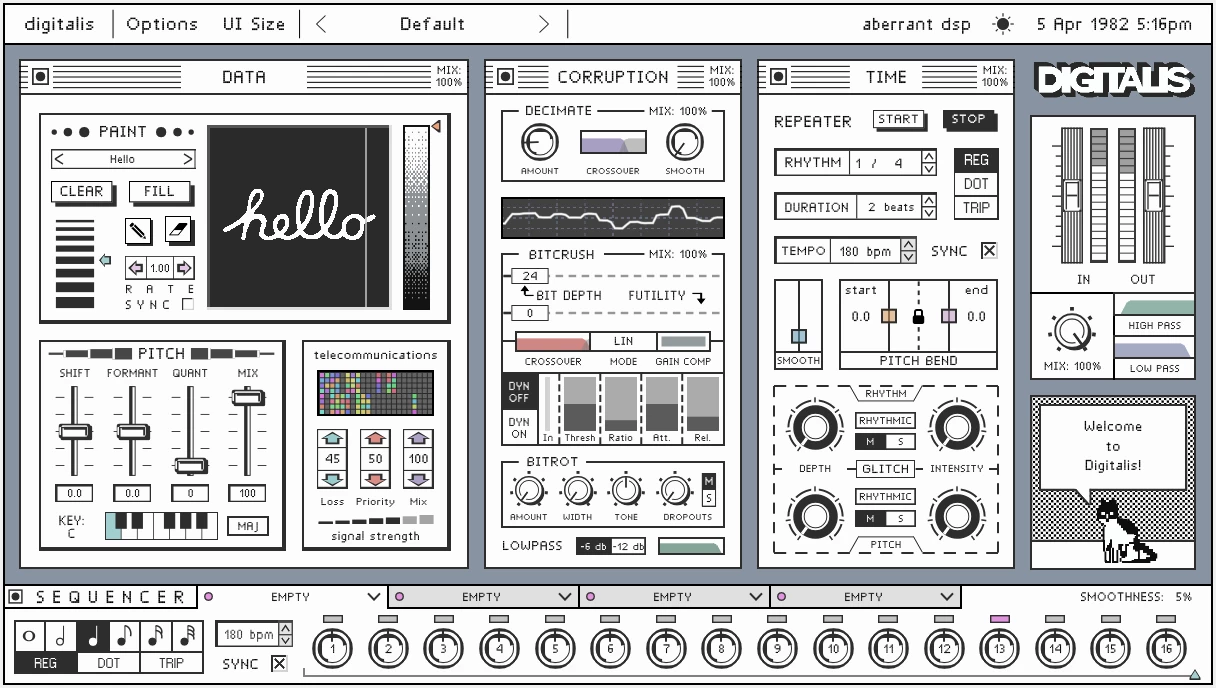
- Spectral Filtering PaintBox: This module allows you to draw custom filter shapes directly onto a virtual canvas using your mouse. The drawn patterns dictate exactly how specific frequencies are removed or exaggerated over time, making it possible to visually sculpt the audio spectrum instead of relying on traditional equalizer knobs. By painting shapes, you can create frequency cuts that sound distinctly unnatural, working well on dense synthesizer chords.
- Telecommunications Section: This feature applies lossy audio compression algorithms to simulate cellular network drops, dial-up modem tones, and low-bandwidth audio encoding. It forces the incoming signal through restricted frequency bands to recreate the distinct audio artifacts of early internet media. Adjust the intensity to mimic anything from a weak radio connection to a broken digital transmission, providing instant lo-fi character to clean vocal takes.
- Bitrot Engine: This tool replicates the data loss and file corruption typically found on degraded digital media formats. The controls allow you to introduce random audio dropouts, digital skips, and skipping disc effects that disrupt the audio flow in an unpredictable manner. Instead of steady distortion, this engine generates stuttering gaps and sudden bursts of noise, simulating a failing playback device directly on your timeline.
- Dynamic Bitcrushing and Decimation: This core module lowers the sample rate and bit depth of the signal using an aggressive downsampling algorithm. The interface provides specific, separate sliders for decimation and dynamic bitcrushing to create heavy synthetic clipping and wavefolding textures. Applied to percussion loops or drum busses, these controls remove high-end clarity and replace it with harsh, metallic ringing.
- Time Window Repeater: This section captures incoming audio into a temporary buffer to generate tempo-synced or free-floating beat repeats. You can trigger rhythmic stutters manually or tie them to the main project tempo, applying pitch shifts and bends specifically to the repeated audio slices. This makes it particularly useful for creating complex drum fills, vocal chops, and glitch effects without having to manually chop and arrange audio clips in your main timeline.
- 16-Step Modular Sequencer: This function animates parameter changes across a multi-lane motion sequencer containing four assignable effect slots. This capability allows the plugin to rhythmically alter filter shapes, pitch shifting values, and corruption amounts in strict time with the host application without requiring external automation lanes. By drawing sequences directly into the interface, you can turn a static sustained note into a complex, evolving rhythm that shifts tone on every beat.
- Customizable Signal Flow: This architectural design lets you physically change the processing order of the Data, Corruption, and Time windows. By dragging the visual window blocks into a different arrangement, you decide whether the audio gets downsampled before it gets stuttered, or pitch-shifted before it hits the bitcrusher. This level of routing flexibility drastically alters the final sonic output, giving you vast sound design possibilities from a single instance of the software.
How to Install Aberrant DSP Digitalis on Windows
- Navigate to the download section on our website and save the compressed installer archive directly to your local drive.
- Locate the downloaded archive in your system folders, right-click the file, and extract the contents to a new dedicated folder on your desktop.
- Open the newly extracted folder and carefully read the included
readme.txtfile to check for any specific directory requirements related to your primary host application. - Double-click the main setup executable file to initiate the standard installation process on Windows 10 or Windows 11.
- Follow the on-screen prompts provided by the installation wizard, ensuring you select the correct destination path for your VST3 format files, which defaults to
C:Program FilesCommon FilesVST3on most systems. - Allow the wizard to copy all necessary application files to your drive, then close the installer window and launch your primary digital audio workstation.
- If the new effect does not appear automatically in your effects list, navigate to your workstation preferences menu and trigger a manual plugin scan targeting your specific VST3 directory.
- Load the plugin onto an active audio track to verify the installation; the vintage operating system interface will load immediately without requiring any initial cloud sign-in or online account verification.
Aberrant DSP Digitalis Free vs. Paid
Aberrant DSP operates strictly on a traditional, single-purchase licensing model. There is no free tier, ad-supported version, or restricted trial edition available for long-term project use. To gain access to the software, users must purchase a perpetual license, which carries a standard retail price of 36 dollars. This upfront payment structure grants full access to all processing modules, avoiding recurring subscription fees or locked expansion packs.
Upon completing the purchase, users receive standard plugin formats suited for 64-bit environments. The developer does not employ complex external digital rights management clients or require persistent background internet connections to keep the plugin active. Once the license file is authorized locally on your machine, the effect remains fully functional entirely offline. This makes the financial and operational model straightforward for studio environments that prefer to keep their primary production computers disconnected from the web.
Occasionally, the developer participates in standard industry sales events where the price may drop closer to its original introductory rate. However, the core business model remains focused on providing a complete, functioning tool for a single fixed cost. You will not find in-app purchases or paywalled presets hidden inside the interface, ensuring that the initial investment covers the entire sound design toolkit available within the application.
Aberrant DSP Digitalis vs. XLN Audio RC-20 Retro Color vs. Unfiltered Audio LO-FI-AF
XLN Audio RC-20 Retro Color focuses heavily on analog imperfections, using modules that emulate vinyl crackle, tape flutter, tube distortion, and magnetic wear. Users choose RC-20 when they want to make digital recordings sound warmer, older, and more naturally organic. It operates primarily as a finishing tool to glue tracks together with a vintage, physical aesthetic, relying on classic hardware noise profiles rather than aggressive digital destruction.
Unfiltered Audio LO-FI-AF targets digital degradation but approaches the task through the lens of specific hardware convolutions. It includes impulse responses of cheap microphones, handheld walkie-talkies, and broken speakers, alongside an interface built around traditional rackmount hardware knobs. It excels when a producer wants to simulate a specific physical playback device or a broken hardware chain. Its interface feels like a traditional studio rack, making it a specialized tool for simulating physical environments.
Aberrant DSP Digitalis is the better choice when the final goal is overt, rhythmic digital mutilation. Its visual paintbox for filtering and its vintage computer interface encourage synthetic, unpredictable sound design that does not attempt to sound like physical analog gear. Because it includes a 16-step sequencer and a modular window system, it functions more as an active, playable instrument for creating glitch beats and heavy data corruption, whereas the others act mostly as static insert effects applied to a finished sound.
Common Issues and Fixes
- Negative formant shifts causing audio overloads. Pushing the formant shift parameters deeply into the negative range can occasionally cause sudden, severe volume spikes. To fix this, always place a dedicated limiter plugin directly after the effect in your track chain to catch unexpected peaks during heavy pitch manipulation.
- Brief maximum scan duration in the PaintBox module. Users often find the drawing duration in the spectral filter too short for processing long, evolving ambient textures. To bypass this timing restriction, rely on the 16-step internal sequencer to automate filter changes over a longer timeframe rather than drawing a single static pattern.
- Plugin fails to appear in Ableton Live or FL Studio. If the host application does not recognize the plugin after the initial installation, the installer likely placed the file outside of your monitored folders. Ensure the setup wizard placed the plugin file in the exact directory your host is currently scanning, then force a full, deep rescan of all installed plugins in the preferences menu.
- High CPU usage during intense timeline sequencing. Running the Time window repeater alongside aggressive dynamic bitcrushing on multiple tracks simultaneously can strain the audio buffer and cause playback crackling. Fix this by increasing your audio buffer size to 512 or 1024 samples during sound design, or temporarily freeze the track once the glitch pattern is finalized.
Version 1.1 — July 2022
Added:
- Saving of custom PaintBox patterns.
- JPG and PNG image import for PaintBox patterns (automatically converted to black and white).
- Longer rhythms (8 bars, 4 bars, 2 bars) for Tempo Synced PaintBox Rate control.
- Zero-latency operation mode (active when Data window is bypassed).
Fixed:
- UI desynchronization in DAWs like Ableton Live and Bitwig.
- Latency compensation issues when the plugin is bypassed.
- Visual update issues for automated controls.
- macOS installer issue preventing User preset saving.