VLC Media Player functions as a desktop-based multimedia framework and player designed to handle almost every audio and video format locally without requiring external DirectShow filters or third-party codec packs. Users rely on it to open obscure media files, play unencrypted optical discs, process network streams, and capture desktop hardware feeds. Unlike basic default operating system players that are tied to vendor ecosystems and strictly enforce licensing requirements, this application relies on built-in decoding libraries. This architecture ensures that if a media file exists on a local hard drive, it will generally open immediately upon dragging and dropping it into the main interface. The application reads the container formats, determines the internal video and audio streams, and maps them to the appropriate output device on the hardware.
The desktop environment provides specific technical advantages over browser-based media consumption or lighter built-in utility tools. Working offline with large local files—such as multi-gigabyte Matroska (MKV) containers holding high-definition video, multiple discrete audio tracks, and embedded bitmap subtitle streams—requires direct access to CPU threads and GPU hardware acceleration. The desktop interface grants users the ability to manipulate playback speed without altering audio pitch, adjust video geometry dynamically, and synchronize audio tracks precisely by milliseconds. These capabilities are necessary for offline video review workflows, digital transcription tasks, or managing large personal media archives where source files frequently arrive with encoding errors or mismatched audio layers.
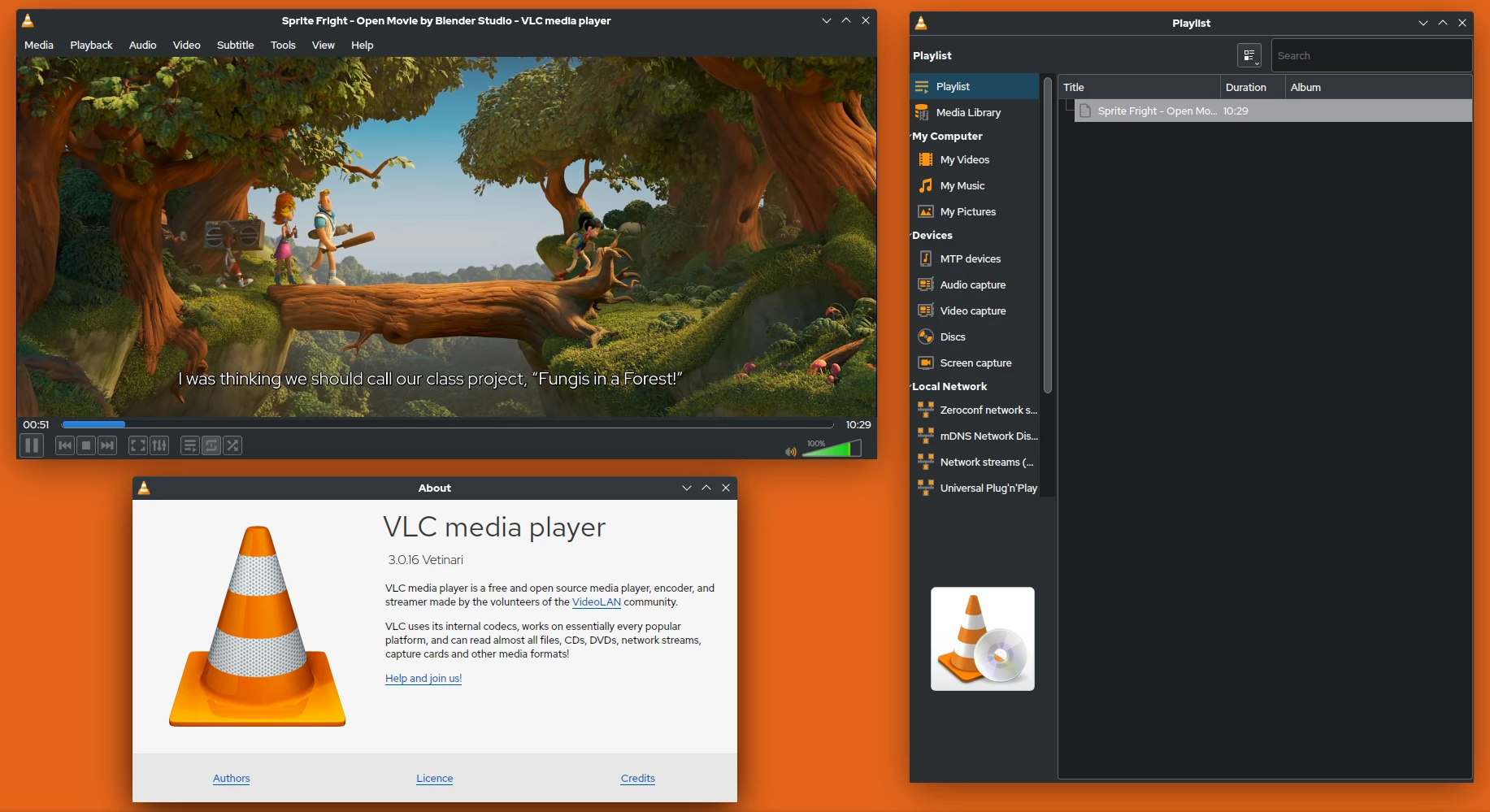
Beyond standard timeline navigation and playback control, the software includes advanced media conversion and local streaming tools embedded directly within its interface. Users can transcode local files into entirely different formats, record active desktop screen activity, capture raw webcam input, or configure a local unicast stream to broadcast media across a local area network to other client machines. The graphical user interface remains intentionally minimal and utilitarian, keeping complex processing tools strictly organized in the top menu bar under Media, Tools, and View. This structural design ensures that the primary application window remains focused entirely on video display, keeping distracting interface elements completely hidden until summoned by the user.
Key Features
- Broad Format Compatibility: The software contains internal demuxers and decoders for MPEG-2, MPEG-4, H.264, H.265, WebM, WMV, FLAC, and MP3. Users do not need to hunt down and install external registry-based codec packs to play specialized containers or high-efficiency video coding files. The player relies on its own internal library directory, which prevents conflicts with other video editors or media programs installed on the same machine.
- Hardware-Accelerated Decoding: The application routes intensive video decoding tasks directly to the GPU using DirectX Video Acceleration (DXVA) natively on Windows systems. This process reduces processor load significantly when rendering 4K resolution files or media encoded with high bitrates. Offloading this mathematical processing prevents system thermal throttling, keeps cooling fan noise low, and extends battery life on portable laptops and tablet devices.
- Real-Time Synchronization Controls: If a downloaded video features out-of-sync audio tracks or delayed subtitle text, users can adjust synchronization delays actively during playback using the 'j' and 'k' keyboard shortcuts for audio, or 'g' and 'h' for subtitles. The adjustments happen in real-time by 50-millisecond increments, allowing for exact timeline alignment without needing a dedicated video editor to shift the data permanently.
- Local Media Conversion: Through the "Convert / Save" dialogue located in the Media drop-down menu, the application can transcode files locally between various formats, such as repackaging an MKV container into a standard MP4. Users can build custom conversion profiles, specifying exact video bitrates, audio sample rates, and resolution scaling. The same menu handles live network streaming protocols like IPv4, IPv6, HTTP, and RTP.
- Advanced Video and Audio Filters: Under the "Effects and Filters" menu accessed via Ctrl+E, the player provides a full 10-band graphic audio equalizer, a spatializer, a dynamic range compressor, and multiple active video adjustment tools. Users can tweak visual contrast, apply a static logo overlay, rotate incorrectly oriented smartphone videos by 90 degrees, or crop out hardcoded black bars natively during the playback process.
- Optical Media and Device Playback: The application directly reads physical DVDs, Audio CDs, and VCDs, systematically bypassing regional software restrictions enforced by standard operating system media players. It natively handles standard DVD menu navigation, discrete title selection, and specific chapter skipping through the Playback menu. Furthermore, it captures input directly from DirectShow devices, allowing users to view feeds from connected webcams or dedicated capture cards.
How to Install VLC Media Player on Windows
- Navigate to the official VideoLAN project website to download the standard Windows executable installer package for your specific system architecture.
- Locate the downloaded executable file in your Downloads folder and double-click to launch the setup process.
- When the Windows User Account Control (UAC) security prompt appears asking for administrative privileges to modify the system, click Yes to proceed.
- Select your preferred installation language from the initial drop-down menu and click Next to review and accept the GNU General Public License terms.
- Choose the exact components to install from the checklist. The default selection safely includes the core media player executable, active web plugins, contextual menu extensions, and basic file type associations, which instructs the operating system to open standard video and audio files automatically.
- Specify the destination folder path. The installer defaults to the standard Program Files directory on the main Windows partition, which is recommended for most configurations.
- Click Install to begin extracting the core application files, writing the necessary libraries to the disk, and configuring the system registry entries for right-click context menu integration.
- Launch the application from the desktop shortcut or Start menu. On the first run, a "Privacy and Network Access Policy" dialog will appear, asking for permission to fetch metadata for audio files and check for routine software updates. Choose to accept or decline these two options to complete the initial setup and reach the main player interface.
VLC Media Player Free vs. Paid
VLC Media Player operates entirely as a free and open-source software (FOSS) project. The non-profit VideoLAN organization develops and distributes the application strictly under the GNU General Public License. Under this legal framework, there are no paid tiers, no premium versions, no enterprise licensing costs, and no recurring subscription requirements. Every feature, including advanced network streaming configuration, real-time file transcoding, direct hardware acceleration, and optical disc playback, is available immediately after installation without any financial transaction.
Because the software exists entirely outside of the commercial software ecosystem, the ongoing development relies entirely on voluntary user donations, corporate grants, and volunteer programming contributions. The user interface does not contain embedded banner advertisements, forced sponsor splash screens, promotional pop-ups, or built-in telemetry tracking. Users do not need to create a profile account, log into a cloud service, or input any activation string to unlock specific codec functionality or remove artificial viewing limits.
Unlike commercial software media players that lock standard DVD, Blu-ray, or Dolby digital audio playback behind paywalls due to patent licensing costs, this application relies entirely on open-source, reverse-engineered libraries like libdvdcss to handle encrypted disc reading. This specific architectural choice allows users to play their physical media locally without purchasing third-party codec extensions from the Windows application storefront or upgrading to a restricted commercial alternative. The software remains a completely unmonetized utility designed strictly for local playback efficiency.
VLC Media Player vs. MPC-HC vs. PotPlayer
MPC-HC (Media Player Classic - Home Cinema) provides a lightweight media alternative built specifically for the Windows environment. It functions well on legacy Windows 7 systems equipped with limited RAM and basic integrated graphics chips. Users select MPC-HC when they want a strict, minimalist interface that perfectly mimics legacy Windows utilities while integrating flawlessly with advanced third-party rendering plugins like MadVR and LAV Filters. However, it requires significant external configuration to handle advanced streaming protocols and completely lacks native support for cross-platform network broadcasting or built-in screen capture.
PotPlayer offers a highly customizable interface with granular control over rendering engines, complex video shaders, and direct audio output settings. It directly appeals to dedicated videophiles who want to adjust precise colorimetry, build complex keyboard shortcut profiles, and heavily skin the user interface to match specific desktop themes. However, PotPlayer is proprietary, closed-source software, has previously faced criticism for including bundled adware inside its official installer, and presents a steeper learning curve with dense, heavily nested settings menus that can easily overwhelm standard users attempting to watch a basic video file.
VLC Media Player is the better fit for users who prioritize immediate format compatibility, total open-source transparency, and zero configuration over deep visual customization. While PotPlayer offers slightly more granular video rendering controls out of the box, and MPC-HC uses marginally less system memory when sitting idle, VLC handles broken files, unindexed containers, HTTP network streams, and obscure legacy codecs far more reliably upon a fresh installation. Its strict standardization and lack of external dependencies make it the most predictable choice for regular video consumption, multi-track audio selection, and essential desktop media troubleshooting.
Common Issues and Fixes
- Green or heavily distorted video during playback. This visual glitch happens due to an architectural conflict with the specific graphics driver managing the hardware decoding. Navigate to the top Tools menu, select Preferences, go to the Input / Codecs tab, change the "Hardware-accelerated decoding" dropdown from Automatic to Disable, save the settings, and fully restart the application.
- Audio tracks and video actions are noticeably out of sync. Files encoded with a variable frame rate often drift out of alignment during long viewing sessions. Use the 'j' and 'k' keyboard shortcuts to manually shift the audio delay backward or forward in 50-millisecond increments while the video plays. Alternatively, open the Track Synchronization panel under the Tools menu to type in an exact numerical millisecond delay.
- High-definition 4K video heavily stutters or drops frames constantly. Large local files can overwhelm the default data reading limits. First, ensure hardware-accelerated decoding is set to DirectX Video Acceleration (DXVA) 2.0. If the stuttering persists, click on "All" under the "Show settings" radio button in Preferences, select Input / Codecs, scroll down to the Advanced section, and increase the File Caching value to 1000 or 2000 milliseconds to give the player a larger processing buffer.
- Subtitle text appears as random square blocks or question marks. The default text encoding is likely misinterpreting the specific character set used in the downloaded subtitle file. Open Preferences, navigate to the Subtitles / OSD section, change the Default Encoding drop-down menu from your local system language to Universal (UTF-8), save the configuration, and then completely reload the video file.
- Application interface size scales incorrectly on high-resolution displays. On 4K monitors, the playback buttons and text menus might appear far too small to read or click easily. Right-click the application executable file, select Properties, open the Compatibility tab, click "Change high DPI settings," check the box to override high DPI scaling behavior, and set it to be performed by the System rather than the Application.
Version 3.0.23 — December 2025
- Added detailed reporting for audio codecs, including explicit support for 24-bit FLAC.
- Improved the dark mode color scheme within the Qt user interface.
- Enhanced compatibility with external libraries, including TagLib 2.0, Qt 6, and FFmpeg 8.
- Fixed a rendering issue with D3D11 that affected image display on Windows.
- Resolved a positioning error affecting WebVTT subtitles.
- Corrected a behavior on Windows where the configuration directory was being created prematurely.
- Addressed multiple security vulnerabilities, including buffer overflows in PNG handling and integer overflows in the Daala codec.
- Fixed specific parsing issues with H.264 streams that could cause infinite loops.
- Resolved compilation and handling errors related to OpenGL modules and JPEG files with JFIF headers.