Video files often become corrupted when recording is interrupted before the camera can finalize the file header. This happens frequently during drone flights where a sudden crash cuts power, or when a digital camera battery dies in the middle of a long shoot. When the storage device loses power unexpectedly, the resulting media file contains the raw visual and audio streams but lacks the metadata required for a standard media player to read it. Video Repair Tool by Grau GmbH focuses entirely on rescuing these unplayable files by reconstructing the missing headers using raw data analysis.
Rather than relying on basic file conversion or container modifications, this utility approaches corruption through a reference-based recovery method. Users must provide a healthy video recorded with the exact same camera settings to serve as a blueprint. The software analyzes this reference file to understand the specific container structure, resolution, frame rate, and codec parameters, then applies that structural map to the damaged file. This approach allows the desktop application to salvage footage from custom camera setups, professional cinema rigs, and consumer drones that use proprietary or less common encoding methods.
Professionals handling bulk post-production work and independent videographers dealing with corrupted storage rely on this specialized desktop environment because it offers direct control over the reconstruction parameters. Browser-based repair services require uploading gigabytes of raw footage, which is impractical for heavy files on typical internet connections. Operating locally ensures heavy media files remain on the local disk, preserving confidentiality and eliminating upload wait times while allowing users to experiment with custom re-encoder strings and frame detection settings.
Key Features
- Reference-Based Reconstruction: The application rebuilds broken files by analyzing a healthy reference video shot on the same camera. By studying the working file's structural map, it accurately reconstructs missing metadata, ensuring the recovered footage retains its original resolution, frame rate, and color depth without requiring a standard container.
- Raw Stream Extraction: Instead of trying to fix a broken container format directly, the utility dives into the raw binary data to extract surviving visual and audio streams. This method bypasses severe structural damage that causes standard media players to reject the file, saving footage even when the file header is completely overwritten.
- Advanced Parameter Overrides: Users facing complex corruption can manually adjust the recovery engine through the Options menu. Settings like 'No CTTS repair' for specific camera models, 'Enable AVC1 single mode', or 'Enable AAC detection' provide granular control when default scans yield out-of-sync audio or dropping frames.
- Batch Processing Capability: For projects where a storage drive failure corrupted dozens of clips simultaneously, the software can process multiple files in sequence. Users can assign a single reference video to a folder of damaged clips, allowing the engine to work through the queue automatically without manual intervention for each file.
- Custom Re-encoding Scripts: If the reconstructed raw stream causes playback stuttering, the interface allows inputting custom ffmpeg parameters to re-encode the output. Users can specify custom codecs or force quality parameters by entering strings directly into the 'custom reencoder params' text box.
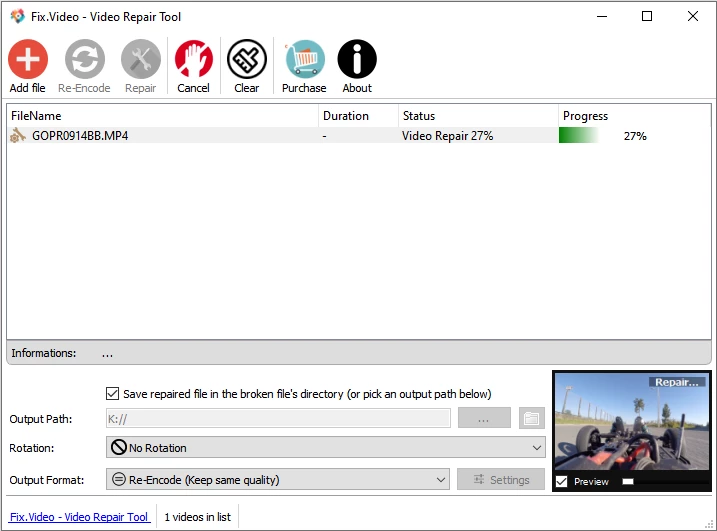
- Preview Assessment: Before committing to a full recovery or export, the interface provides a built-in preview function for the salvaged movie clips. This allows editors to verify if the audio streams align properly and if the visual quality meets their standards before moving the data into a non-linear editing suite.
How to Install Video Repair Tool on Windows
- Download the official Windows archive package directly from the vendor's site to a local storage drive.
- Right-click the downloaded ZIP archive and select the option to extract the contents to a new folder on the desktop or a dedicated software directory.
- Navigate into the newly extracted folder and locate the main executable file named 'gs.exe'.
- Launch 'gs.exe' to open the application, as the program operates as a portable utility and does not require a traditional setup wizard to write registry keys.
- Review the initial user license agreement presented on the first launch and accept the terms to proceed to the main interface.
- Locate the 4-digit request number displayed within the application window, which is necessary if purchasing and entering a premium registration code.
- Click 'Choose movie...' to load a broken sample file and confirm the software can read the target media directory successfully.
Video Repair Tool Free vs. Paid
The software utilizes a strict try-before-you-buy model, offering a free demo version designed specifically to test compatibility before purchase. When running the free tier, the engine performs the exact same scanning and reconstruction process as the paid tier, but it intentionally limits the final output. The demo will only save half the size of the repaired movie file. For example, if the software successfully reconstructs 100 MB of usable footage, the demo will only export a 50 MB clip. This allows users to confirm that the tool correctly identifies the codec and restores visual quality without giving away the complete recovery.
For users who confirm the repair is successful, Grau GmbH offers two paid perpetual license tiers based on the volume of corrupted files. The entry-level paid license costs €29 and allows the user to perform exactly 5 video repairs. This tier is intended for a hobbyist or freelancer who experienced a single camera crash or SD card failure and only needs to rescue a handful of specific clips.
Professionals, data recovery labs, or production houses dealing with frequent media corruption can opt for the unlimited single-user license, which costs €99. Both paid licenses are strictly bound to the hardware of the installation computer. During the purchase process, the user must input a unique 4-digit request number generated by the desktop application. The vendor then emails a registration code mathematically tied to that specific machine, meaning the software cannot be freely moved between different workstations once unlocked.
Video Repair Tool vs. Stellar Repair for Video vs. Wondershare Repairit
Stellar Repair for Video approaches media recovery with a polished, consumer-friendly graphical interface that guides users through a rigid step-by-step wizard. It handles a wide variety of minor to moderate corruption issues automatically and supports a broad list of formats out of the box without requiring manual parameter adjustments. Users who are intimidated by technical interfaces or who simply need to fix a generic downloaded MP4 file that won't open will find Stellar much more approachable, though it lacks the deep manual overrides needed for severe raw data reconstruction.
Wondershare Repairit similarly targets the mainstream market by offering both quick and advanced repair modes, alongside features to fix corrupted photos and documents within the same suite. It excels in broad format compatibility and offers batch processing with a visual file management system. For users looking for an all-in-one utility to handle various types of broken media files across multiple devices, Wondershare provides a more generalized utility compared to a single-purpose engineering tool.
Video Repair Tool by Grau GmbH strips away the polished graphics in favor of absolute technical control over the reconstruction process. While its interface looks dated and its licensing model is strict, it is the better fit when dealing with proprietary camera codecs, unfinalized drone footage, or severely damaged headers where consumer tools fail. When an editor needs to force AAC detection, disable CTTS repair for specific camera models, or inject custom ffmpeg re-encoding parameters to salvage irreplaceable footage, this tool provides the exact engineering parameters required to extract the raw data.
Common Issues and Fixes
- The repaired movie appears very choppy or drops frames during playback. This usually occurs when the reference movie does not perfectly match the broken file's internal structure. Fix this by clicking 'Choose reference movie' and selecting a different healthy video shot with the exact same resolution, frame rate, and camera body as the corrupted footage.
- The output video lacks audio despite the microphone being active during the shoot. The automatic stream reconstruction may fail to identify specific audio codecs used by certain camera manufacturers. Open the Options menu and manually check the box for 'Enable AAC detection' or 'Enable PCM detection' depending on your camera's native audio format, then run the scan again.
- Repaired footage from specific mirrorless cameras contains visual artifacts. Certain digital cameras store timing and frame sequence data differently than standard MP4 containers. To correct the visual glitching, navigate to the Options menu and select 'No CTTS repair', then re-scan the broken file.
- The application fails to recognize or scan .MDT files from digital cameras. The engine is specifically looking for standard container extensions like MOV or MP4 to initiate the raw data extraction. Rename the corrupted .MDT file extension to .MP4 in the Windows file explorer before loading it into the utility.
- The registration code does not unlock the software after purchase. The registration code is mathematically tied to the specific hardware footprint of the computer. Ensure that the 4-digit request number entered during checkout exactly matches the number displayed in the application on the machine where you intend to perform the repair.
Version 4.0.0.1 — May 2021
- Implemented minor stability improvements to the core repair engine.
- Enhanced compatibility with H.264 and HEVC codec detection for various camera models.
- Fixed small bugs reported in the previous version to ensure smoother file processing.