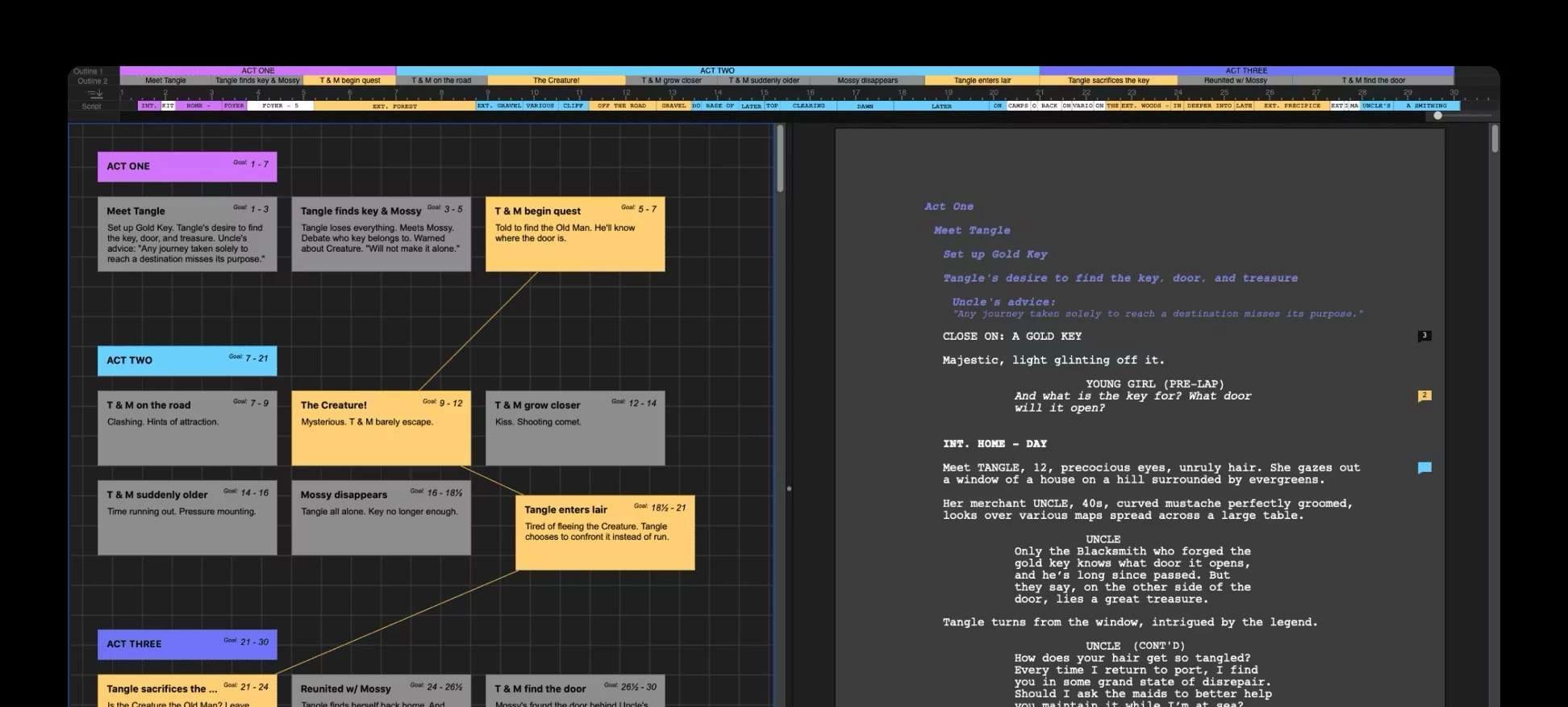
Final Draft is the dominant screenwriting application used by film and television professionals to write, format, and organize scripts. The software exists to solve a very specific problem: translating raw ideas into a rigidly structured document that meets the strict layout requirements of Hollywood studios, production companies, and talent agencies. The film industry relies on a strict standard where one page roughly equals one minute of screen time. Achieving this requires precise margins, exact spacing, and a mandatory 12-point Courier font. Rather than forcing writers to manually adjust margins and capitalization for every character name and line of dialogue in a standard word processor, the application automatically applies these formatting rules as the user types.
While many browser-based alternatives and lighter word processors exist, this desktop application remains the default choice for major productions. The standalone Windows program provides offline reliability, complex local file management, and deep tools that go beyond simple text entry. It provides a dedicated workspace where writers can break down acts, track character arcs, and manage revisions in an isolated environment without relying on a constant internet connection. The application saves files in a proprietary format that has become the universal language for production departments. These native files are explicitly required by budgeting and scheduling software used in later stages of pre-production, ensuring that location managers and casting directors can pull accurate data directly from the script.
Writing a feature film or a television pilot requires constant restructuring, and the software accommodates this by offering outlining tools directly alongside the page view. Writers can outline their beats, store alternative lines of dialogue, and track complex character interactions all within the same interface. This removes the need to juggle physical index cards or separate spreadsheet applications. By handling the tedious elements of script mechanics, the program allows the writer to focus entirely on narrative flow, pacing, and dialogue creation.
Key Features
- Automatic Formatting: The application automatically applies industry-standard spacing, margins, and pagination as the writer types. By using the tab and enter keys, users can rapidly switch between scene headings, action lines, character names, parentheticals, and dialogue. The software understands the context of the cursor, predicting the next required element and formatting it instantly without requiring manual margin adjustments.
- Beat Board: This visual planning workspace allows writers to organize their thoughts before drafting the actual script. Users can create digital index cards, drag them around a free-form canvas, color-code specific plot points, and connect them with structural lines to map out the narrative arc. These beats can then be dragged directly into the script as outline markers.
- SmartType: To speed up the drafting process, the software remembers recurring elements and autofills them dynamically. When a user types the first few letters of a character's name, a scene location, or a camera transition, a popup menu appears, allowing instant selection. This ensures consistent spelling across a massive document and reduces repetitive keystrokes for commonly used settings.
- ScriptNotes: Reviewers, editors, and co-writers can attach specific feedback directly to words or paragraphs without altering the main text. These pop-up markers can be color-coded by department or writer, allowing users to hide them during a clean read-through or print them as a separate feedback report. This keeps the actual script clean while preserving necessary margin notes.
- Format Assistant: Before finalizing a document for submission, this built-in proofreading tool scans the entire document for structural and formatting errors. It detects missing dialogue under character names, empty scene headings, extra blank spaces, and incorrect page breaks. The tool flags each issue individually, allowing the writer to correct or ignore it, ensuring the final exported file looks completely professional.
- Navigator: This sidebar tool provides a bird's-eye view of the entire script's data and structure. Writers can use it to filter specific scenes, track how many times a particular character speaks, monitor the exact page count of individual sequences, and jump directly to specific acts within a long document. It acts as an interactive table of contents for complex rewrites.
- Revision Tracking: Once a script enters the production phase, the software manages script alterations using the industry's standard colored revision system. When revision mode is activated, any new text is automatically marked with an asterisk in the margin and colored according to the current draft stage. This allows the production team to print only the modified pages, commonly known as A-pages or B-pages, rather than the entire script.
How to Install Final Draft on Windows
- Download the Windows installer package from your purchase email or the official vendor website, which will arrive as a compressed archive file in your standard downloads folder.
- Extract the downloaded archive using the built-in Windows File Explorer by right-clicking the file and selecting the extraction option, then locate the main setup executable inside the new folder.
- Double-click the setup file to launch the installation wizard, review the initial welcome screen, and click the next button to proceed.
- Read the End User License Agreement carefully, select the radio button to accept the legal terms, and proceed to the destination folder selection screen.
- Leave the default installation path set to your primary program files directory, or browse to a custom folder if you prefer to store your applications on a secondary local drive.
- Click the install button and grant permission when the Windows User Account Control prompt asks if you want to allow the application to make changes to your operating system.
- Once the progress bar completes the file transfer, check the optional box to launch the program immediately and click the finish button to close the installation wizard.
- On the first run, the software will require authentication; enter the registered email address and password associated with your purchase to verify the license, then choose whether to accept or decline anonymous data collection to complete the setup.
Final Draft Free vs. Paid
Final Draft is a premium, commercial software product with no permanent free tier. Users who want to test the formatting tools and interface can download a strict five-day trial, which provides full access to the application's features for a limited window. Once the trial expires, the software restricts functionality and requires a paid license to continue saving, exporting, or printing documents. The trial does not place watermarks on exported files, but the short testing period requires users to evaluate the software quickly.
The primary purchasing model for the desktop application is a one-time perpetual license. This payment grants permanent offline access to the current software edition, though future major upgrades usually require an additional paid upgrade fee. The vendor frequently offers discounted pricing for students and educators who can verify their academic status, dropping the cost significantly compared to the standard retail price. There is also specific volume licensing available for studios, production companies, and writing rooms that need to deploy the software across multiple workstations.
Recently, the developer introduced an optional subscription model called the Suite. This annual or monthly billing plan includes the traditional desktop application alongside access to a cloud-based writing interface and secure online storage. The cloud tools provide a minimalist browser-based editor and automatic synchronization between devices. However, this subscription model remains completely optional; writers who prefer a strict offline workflow and local file management can still purchase the standalone desktop license without committing to recurring fees.
Final Draft vs. Fade In vs. Celtx
Fade In is a focused, affordable alternative that relies on a single purchase price and minimal system resources. It strips away the heavy production tools and complex outlining boards found in larger suites, providing a distraction-free writing interface that rarely crashes on Windows. Solo writers on a strict budget often prefer Fade In because it handles standard formatting perfectly, imports and exports standard script files natively, and offers a permanent license with free updates without the steep initial cost. Choose Fade In if you need a lightweight, stable writing environment and do not need to integrate directly into a studio's pre-production pipeline.
Celtx operates on a completely different model, functioning primarily as a cloud-based platform rather than a traditional standalone desktop application. While it offers solid scriptwriting tools, its true focus is on pre-production, linking the written word directly to storyboards, shooting schedules, call sheets, and budget breakdowns. Independent filmmaking teams, commercial directors, and film students often choose Celtx because its collaborative online environment allows multiple departments to access and break down a script simultaneously. It is ideal for creators who manage their own physical productions from script to screen.
Final Draft remains the better fit for writers working directly with major studios, traditional production companies, or established literary agencies. Because it is the recognized industry standard, many showrunners and producers require writers to submit the proprietary application files natively, ensuring exact page counts, consistent margin measurements, and accurate revision tracking. If the goal is securing a job in a professional television writers' room, collaborating with union professionals, or delivering a studio feature, using the native application eliminates any file conversion risks and guarantees total compatibility with standard budgeting software.
Common Issues and Fixes
- Program fails to launch after a system update. High DPI monitor scaling on Windows can sometimes corrupt the user preferences during an update, preventing the application window from opening. To fix this, press the Windows key, type RegEdit, navigate to the current user software directory, and delete the application's specific registry folder to force the software to rebuild its interface preferences on the next launch.
- Activation server cannot be reached during setup. Strict local firewalls, public Wi-Fi networks, or active VPNs can block the application from verifying its license upon first launch. Disabling third-party security software temporarily or connecting to a standard home network usually allows the authentication process to complete. If the block persists, creating a new local Windows admin account temporarily can bypass user-specific network restrictions.
- Application crashes unexpectedly when exporting a PDF. A corrupted temporary file in the user directory or an outdated print spooler can cause the program to close when generating a final document. Navigate to the AppData Roaming directory on your main system drive and delete the software's folder; the program will generate a clean directory on the next launch. Alternatively, use a third-party virtual PDF printer driver instead of the built-in export function.
- Margin rulers display inaccurate measurements. Occasionally, pasting text from an external word processor alters the strict industry margins, making the page count completely inaccurate. Highlighting the affected text and applying the default Screenplay template via the format menu will reset the margins, strip out external formatting tags, and restore the standard indentation required for accurate timing.
- Text highlights appear blue when opening an older file. This happens because the software flags any unreviewed changes from a previous session, a different author, or an older file format using the track changes feature. To remove the blue highlights, open the revision menu and accept the changes globally, or clear the modified text formatting entirely to return the document to standard black text.
Version 13.2.5 — August 2025
Added:
- Autocorrect tool: Automatically fixes common spelling errors and capitalizes specific character names as you type.
- SmartType enhancements: Improved prediction for scene headings and character names to reduce keystrokes.
- Emoji support: Insert emojis directly into script dialogue, title pages, and ScriptNotes.
- Structure Lines: Visual guides in the script view to connect related scenes and sequences.
Improved:
- Navigator 2.0: Now allows full customization of columns and detailed filtering of ScriptNotes.
- Beat Board: Better drag-and-drop performance and visual organization options.
- Night Mode: Refined 'Midnight Mode' for higher contrast and reduced glare during late-night writing sessions.
Fixed:
- Resolved an issue where dual dialogue could become misaligned in specific export scenarios.
- Fixed a bug preventing certain custom report settings from saving correctly.
- General stability improvements for Windows 11 high-DPI displays.