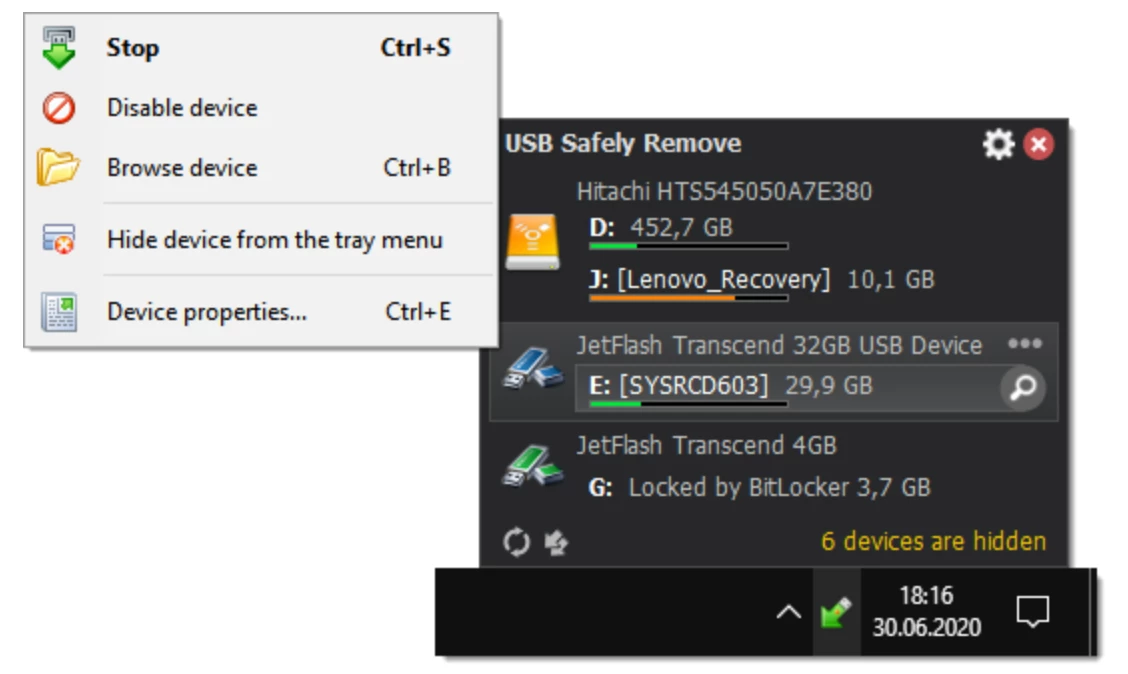
If you frequently transfer files using external hard drives, flash drives, or memory cards, you have likely encountered the standard Windows error stating that the device is in use and cannot be stopped right now. This generic warning provides zero details about which application is keeping the drive awake, leaving you to guess which document, background service, or explorer window is preventing safe extraction. USB Safely Remove is a dedicated system utility built specifically to solve this exact problem. It replaces the native Windows ejection icon with a highly functional interface that identifies the exact locking processes, allowing you to force-close them and safely unmount the hardware without risking file corruption or data loss.
Beyond just fixing ejection errors, the utility functions as a complete external device manager for IT administrators, photographers, and professionals who juggle multiple peripherals. When working with several external storage devices simultaneously, the default operating system behavior often lists them all under identical generic names. This creates a high risk of accidentally stopping the wrong hardware. This utility changes that behavior by reading the actual device names, allowing for custom renaming, and letting you assign specific icons to each drive. It gives you a clear, visual map of everything connected to your machine, ensuring that you only interact with the exact target disk.
Operating at the low system level is absolutely necessary for this type of hardware control. Because the utility needs to intercept USB hub commands, read open file handles across the entire operating system, and safely power down the physical ports after unmounting, a desktop installation is strictly required. It integrates deeply into the system tray and background services, managing drive letters dynamically and running automated scripts right before a connection is severed. This level of hardware interaction cannot be achieved with lighter portable scripts or generic file managers.
Key Features
- Locking Process Detection: When an external drive refuses to unmount gracefully, the software generates a detailed "Cannot stop" prompt. This window displays exactly which applications, executable files, or background services are holding open file handles on the disk, and it provides a direct button to force-close those specific processes without restarting the computer.
- Return Device Back: If you accidentally eject the wrong hardware or simply need to access a drive you just stopped, this function reactivates the connection logically. You do not have to physically unplug the cable and plug it back into the port, which is highly practical when dealing with desktop towers where the rear input/output panel is hard to reach.
- Dedicated Device Hotkeys: The utility allows you to map global keyboard shortcuts to your hardware management workflow. You can use the default Win+S combination to bring up the main stop menu directly under your cursor, or you can assign a specific key bind to instantly stop a dedicated backup drive without ever reaching for the mouse.
- Drive Letter Management: Multi-slot memory card readers often clutter the 'My Computer' view by reserving five or six separate drive letters, even when the slots are completely empty. This feature automatically hides those unused letters from the Windows Explorer interface, only revealing a letter when a physical memory card is actually inserted into the corresponding slot.
- Pre-ejection Autorun: You can configure the software to execute specific batch files, scripts, or applications immediately before a stopping command is finalized. This allows administrators to automate tasks such as initiating a final data synchronization, unmounting a TrueCrypt encrypted volume, or closing a portable database before the power to the disk is cut.
- Command Line Integration: The installation directory includes a separate console executable file named
usr.exe. This tool allows advanced users to trigger safe removals, return devices, or query locking processes entirely through batch scripts, command prompt sequences, or third-party task schedulers without interacting with the graphical interface. - Custom Device Interface: The system tray menu can be heavily modified to fit your hardware setup. You can assign custom high-resolution icons to specific drives, rename them from their default factory hardware IDs to practical labels like "Client Backup," and permanently hide internal devices that should never be removed from the list.
How to Install USB Safely Remove on Windows
- Download the official Windows installer executable package from the developer's website.
- Launch the downloaded setup file and grant the necessary administrative permissions when the standard User Account Control security prompt appears on your screen.
- Read through the end-user license agreement, accept the terms, and click next to proceed through the installation wizard.
- Select the destination directory on your local storage drive where the core program files and the command-line console tool will be extracted.
- Choose the startup behavior configuration; it is highly recommended to let the software run automatically on Windows startup so it can actively manage the system tray and intercept ejection requests.
- Review the additional setup tasks, such as enabling the option to power off devices after stopping, which changes the default operating system behavior to actually cut power to the USB port once the drive is unmounted.
- Finish the setup process and launch the application directly from the final wizard screen.
- Upon the initial launch, right-click the new green arrow icon present in your system tray to open the main properties window, where you can begin renaming your currently attached external drives.
USB Safely Remove Free vs. Paid
USB Safely Remove operates under a commercial licensing model and requires a paid purchase for long-term daily use. The developer offers a standard time-limited trial period that allows new users to fully evaluate the process-unlocking capabilities, drive management tools, and command-line functions on their own hardware. Once this evaluation period concludes, the software will require a valid purchased license to continue managing your external device ejections.
The standard Personal license covers usage on an individual's personal computers. This purchase includes the core application and provides access to all minor and major updates published within one year from the date of the original transaction. After that first year expires, the currently installed application remains functional perpetually, but downloading and installing newer updates requires purchasing a maintenance renewal, which is priced significantly lower than the initial license fee.
For corporate and enterprise environments, the vendor provides commercial site licenses alongside volume discount tiers, scaling the price based on the total number of physical machines where the software will be deployed. Additionally, the developer occasionally partners with software promotion sites to run limited-time giveaways. These promotional events offer a free license that removes the trial expiration but does not include eligibility for future application updates or direct priority technical support.
USB Safely Remove vs. Zentimo vs. Windows Safely Remove
Zentimo xStorage Manager is developed by the same software company as USB Safely Remove, but it is positioned as a higher-tier, premium storage management suite. While USB Safely Remove focuses almost entirely on resolving ejection errors and organizing drive letters, Zentimo includes a built-in application launcher within the device menu, advanced TrueCrypt volume mounting capabilities, and a dedicated speed testing module that benchmarks small, medium, and large file transfers. Users who just want to stop drives safely should stick to the lighter USB Safely Remove, whereas administrators who want a portable program launcher and hardware benchmarking will find Zentimo more appropriate.
The native Windows Safely Remove Hardware tool is the default operating system utility found in the system tray of every Windows machine. It provides a basic click-to-eject function, but it is notorious for returning a generic error without identifying which background service is holding the file handles. It also relies on generic hardware IDs, displaying multiple connected flash drives simply as USB Mass Storage Device, which often leads to users accidentally unmounting the wrong disk.
USB Safely Remove is the better fit when the default Windows tool consistently fails and causes frustration during your daily file transfers. By actively exposing the exact executable files or background tasks that are keeping a disk awake, and by providing a direct button to force-close them, it completely eliminates the guesswork and the forced system reboots that are often required when the native OS utility refuses to release an external drive.
Common Issues and Fixes
- Problem description. The system drive or internal SATA drive is missing from the stop menu. By design, the software hides internal system drives to prevent users from accidentally unmounting the disk where the operating system is installed, which would trigger an immediate system crash. If you are trying to manage an external eSATA drive that is being hidden incorrectly, open the General Options menu and enable the setting to display surprise removal USB devices to reveal it.
- Problem description. The "Return Device Back" command disconnects other neighboring USB devices. This behavior occurs when multiple external devices share the same internal hardware USB hub on your motherboard. To logically reactivate a stopped device, the software must send a reset command to the entire hub root, which causes a brief disconnection and reconnection sequence for all other peripherals plugged into that specific cluster.
- Problem description. A specific flash drive constantly reconnects and disconnects after being stopped. This generally indicates a physical hardware fault in the connection rather than a software bug. Because the program only issues the initial stop command and does not actively poll the port afterward, repeated connection cycling points to a failing USB cable, a damaged drive enclosure, or a faulty USB controller on the motherboard.
- Problem description. Exclamation marks appear in Windows Device Manager next to card reader slots. This is a normal and expected side effect of the program's empty drive letter management feature, which intentionally suppresses the empty reader slots to keep your file explorer clean. If you need to resolve the warning indicators, navigate to the Drive Letters tab in the application settings and disable the option to hide drive letters when there are no media inserted.
Version 7.2.1.1330 — December 2025
- Enhanced High DPI monitor support: Resolved interface and icon scaling glitches that occurred when screen DPI was set above 150%.
- Improved notification behavior: Pop-up alerts are now suppressed when the system is running full-screen applications, such as games or video players.
- Fixed a UI layering issue where the device menu could overlap and obscure other program dialogs (e.g., Options or Device Properties).
- Resolved a bug where disabled devices would incorrectly disappear from the system if the program settings were deleted.
- Updated the default keyboard shortcut configuration for accessing the device menu.