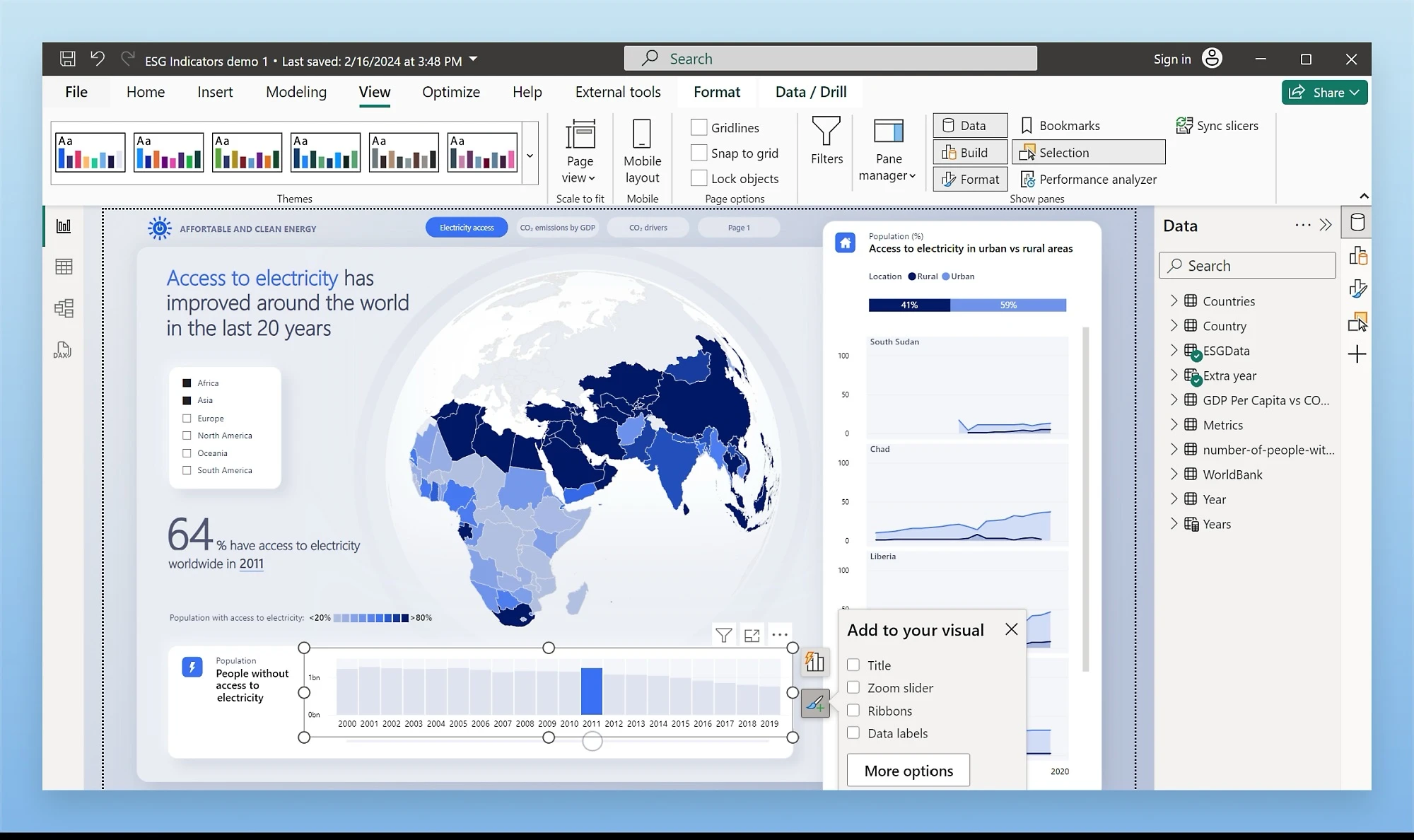
Microsoft Power BI Desktop serves as a widely utilized data analysis application and visual editor that transforms disconnected spreadsheets, local databases, and cloud services into interactive analytical dashboards. By providing a centralized environment to connect, modify, and visualize complex business intelligence, this application helps analysts make informed decisions faster. Whether a financial controller needs to generate weekly performance reports from multiple SQL databases or a warehouse manager wants to design a real-time inventory tracking dashboard, the software simplifies the entire data transformation workflow without requiring advanced programming knowledge.
The desktop client provides direct access to local processing hardware, separating it from lightweight browser-based alternatives. Analysts frequently work with massive files that would cause standard web applications to freeze or crash entirely. By utilizing the desktop installation, users can connect directly to local infrastructure, parse gigabytes of structured text files, and run complex mathematical models entirely offline. The native Windows interface guarantees that users maintain full control over their data architecture before ever publishing a single chart to an external server.
The interface is divided into logical workspaces to manage the entire data lifecycle. The left-hand navigation pane switches between the Report View for designing the canvas, the Data View for inspecting raw tables, and the Model View for managing relational links. Along the top ribbon, the Home tab houses the critical Get Data menu and the Transform Data button, which launches the Power Query Editor in a separate window. This layout mirrors familiar office productivity applications, reducing the learning curve for analysts accustomed to standard spreadsheet software. Once the data enters the environment, users deploy an array of visualization options from the dedicated right-hand pane. Standard bar charts, line graphs, and matrix tables cover basic reporting needs, while custom scatter plots and decomposition trees allow for deep root-cause analysis. It serves as the definitive starting point for any serious reporting project.
Key Features
- Power Query Editor: This dedicated data transformation interface allows users to clean and reshape incoming information before it enters the main data model. By recording every action as an applied step, the editor lets users split columns, merge tables, change data types, and filter rows without writing a single line of SQL or Python. The interface automatically documents the transformation history, allowing analysts to trace exactly how the raw data changed.
- Extensive Data Connectors: The "Get Data" menu provides native hooks into dozens of different storage formats and platforms. Users can import local comma-separated values, connect to an on-premises PostgreSQL database, or pull directly from an active OData feed, consolidating all these distinct sources into one unified relational model. The connection settings save automatically, ensuring that future data refreshes pull from the exact same file paths.
- Data Analysis Expressions (DAX): To generate custom calculations, the application utilizes the DAX formula language. Analysts use this functional syntax to create calculated columns for new categorizations or build complex measures that aggregate sales totals using specific functions like CALCULATE and SUMX. These custom metrics dynamically recalculate whenever a viewer interacts with the dashboard, ensuring accurate results across any filtered context.
- Interactive Visualizations Pane: The right-hand interface panel houses a drag-and-drop canvas for building dynamic charts and graphs. Users simply check boxes next to their data fields, and the application generates the appropriate visual. When a viewer clicks a specific data point on a bar chart, all other visuals on the current page automatically cross-filter to reflect that specific selection, instantly revealing hidden correlations without requiring manual filter configurations.
- DirectQuery Processing: Instead of forcing users to import massive, multi-gigabyte datasets into their local computer's memory, the application supports live database querying. DirectQuery mode translates interface interactions into native database queries on the fly, ensuring that the dashboard always displays the most current information without overwhelming the local machine.
- Relationship Management: The Model View canvas provides a visual blueprint of how different data tables interact. Users can drag lines between primary and foreign keys to establish one-to-many or many-to-many relationships, dictating exactly how filters flow through the data architecture during complex calculations.
- Data View Inspection: Before building charts, analysts must often verify the integrity of their imported records. The Data View provides a spreadsheet-like grid where users can scroll through millions of rows, sort specific columns alphabetically or numerically, and isolate blank values. This native inspection tool makes it easy to spot formatting errors or missing information without having to export the table back into an external spreadsheet program.
How to Install Power BI Desktop on Windows
- Verify that your Windows machine meets the minimum display resolution requirements, as smaller screens may cut off essential dialog boxes during the workflow.
- Download the official Windows installer package from the provider's server to a local directory.
- Launch the setup wizard and accept the end-user license agreement to proceed with the installation process.
- Choose the destination folder for the application files or accept the default local disk path provided by the wizard.
- Allow the installer to automatically download and configure Microsoft Edge WebView2, which the application requires to render specific modern interface components.
- Select whether to create a desktop shortcut for easier access, then click the install button to begin writing files to the disk.
- Wait for the progress bar to complete, finish the setup process, and launch the application for the first time.
- Close the initial welcome screen to start using the tool offline immediately, or enter your corporate credentials to connect your account to the cloud service.
Power BI Desktop Free vs. Paid
Power BI Desktop is completely free to download and use for individual report creation and local data modeling. A solo analyst can install the application, connect to as many data sources as necessary, build complex analytical models, and export the finished dashboards to static PDF files at no cost. The free tier contains the exact same authoring tools, connectors, and DAX engine as the paid versions, making it an excellent environment for learning and local prototyping.
Costs only apply when users need to distribute their interactive reports or schedule automated updates through the cloud. To publish a dashboard to the online service and share it with colleagues, organizations must purchase Power BI Pro licenses, which cost ten dollars per user per month. This tier allows teams to collaborate in shared workspaces, view interactive dashboards in a web browser, and configure the cloud service to automatically refresh the data up to eight times a day.
For enterprise environments handling massive datasets, Microsoft offers Power BI Premium Per User at twenty dollars per month. This advanced tier unlocks higher storage limits, increases the maximum model size to one hundred gigabytes, and provides access to advanced artificial intelligence processing tools. Premium environments also allow up to forty-eight automated data refreshes per day, ensuring that critical dashboards remain highly accurate during business hours.
For massive enterprise deployments, Microsoft provides capacity-based licensing that charges a flat monthly rate rather than billing per individual user. This structure often integrates with the broader Fabric platform, allowing thousands of viewers to consume dashboards without requiring individual Pro licenses. If the dashboard is purely for personal analysis on a local machine, however, the unpaid desktop application remains fully functional indefinitely.
Power BI Desktop vs. Tableau Desktop vs. Qlik Sense
Tableau Desktop focuses heavily on pixel-perfect visual exploration and highly customized graphics. It allows data scientists to build intricate, highly specific charts that might be difficult to replicate elsewhere, offering granular control over every single pixel on the dashboard. However, it often carries a steeper learning curve and a higher entry price for individual creators who just need standard business reporting without complex graphical manipulation.
Qlik Sense takes a different approach by utilizing a unique associative engine that automatically highlights relationships across all data points without requiring strict manual modeling. When a user selects a value, the engine colors associated data in white and unrelated data in gray. This makes it excellent for discovering unexpected trends in messy datasets, though its interface and scripting language can feel unfamiliar to analysts who are accustomed to standard spreadsheet formulas.
Power BI Desktop is the better fit for organizations already entrenched in the Microsoft ecosystem and analysts who have prior experience with Excel formulas. Because it shares the exact same Power Query and DAX engines as Excel, the transition for finance and operations teams happens quickly and naturally. Furthermore, the fact that the desktop authoring application is entirely free removes the financial barrier to entry, allowing users to build and test their architecture before committing to a paid cloud subscription.
Common Issues and Fixes
- Memory allocation errors. If the application attempts to process a massive dataset and runs out of available RAM, it will display a memory failure notification. To fix this, open the Power Query Editor to filter out unnecessary columns and rows before loading, or switch the connection method from Import to DirectQuery to push the processing back to the database.
- Authentication failures during data refresh. When database passwords change, the application will fail to pull new data and return a credentials error. Navigate to the File menu, select Options and settings, open Data source settings, locate the specific database under Global permissions, and click Edit Permissions to input the updated password.
- Version compatibility warnings. Because the file format receives frequent updates, attempting to open a dashboard file created in a newer release will result in an error on an older installation. The only fix is to download and run the latest Windows installer to ensure your local application matches the software version used to create the file.
- Blank custom visuals. Sometimes a third-party chart imported from the marketplace fails to render and displays a blank square on the canvas. Resolve this by verifying your organization's security policies allow external visual components, or delete the broken visual from the pane and import the most recent iteration from the marketplace menu.
- Missing WebView2 runtime. If the interface fails to load specific login screens or modern visual elements, the Windows system might be missing a core infrastructure component. To fix this, manually download and run the Microsoft Edge WebView2 installer from the official provider, then restart the desktop application to restore interface functionality.
Version 2.151.1182.0 — February 2026
- Added the new Input Slicer (now Generally Available) to replace the standard text slicer, letting users dynamically filter report data using free-form text search conditions like "contains" or exact matches.
- Introduced a bulk-paste feature that allows users to copy a list of values from external tools (such as Excel or a text editor) and paste them directly into any report slicer for instant multi-item selection.
- Enhanced the new Card visual to display up to 10 default callouts, support multi-category KPI designs, and interactively cross-filter other visuals on the report page.
- Added two new DAX functions,
NAMEOFandTABLEOF, which help developers write more adaptable, dynamic formulas that automatically respond to renamed objects. - Expanded the AI Copilot text prompt capacity from 500 to 10,000 characters, enabling users to submit much longer, more complex queries across all Power BI Copilot surfaces.
- Enabled persistent filtering for Organizational Apps so that custom slicer choices and data view tweaks remain saved as users navigate between different pages or sessions.
- Improved the rendering speed and performance of Azure Maps visuals, particularly when loading pie charts, alongside adding new server endpoints for Brazil and Korea.
- Fixed a bug that caused native queries to fail when attempting to write data to an output destination during query exports.
- Fixed a visual glitch where selected marker fill colors were failing to apply correctly within Azure Maps.