Adobe InCopy serves as a dedicated professional word processor designed specifically to integrate with Adobe InDesign, solving the historical friction between editorial and layout departments. In a traditional publishing workflow, writers draft text in a generic text editor, and designers pour that text into a layout. When the text is too long or too short, the back-and-forth cycle of PDF proofs, email chains, and manual corrections begins. This application eliminates that exact bottleneck by allowing copywriters, editors, and proofreaders to type, edit, and format text directly into the actual layout files without ever having the ability to accidentally move an image, alter a master page, or break the grid. It acts as a highly controlled window into the designer's workspace.
Choosing a heavy desktop client over a lightweight browser-based word processor is necessary here because the software relies on the exact same typography and text rendering engine as the main layout application. When an editor adjusts tracking, kerning, or paragraph styles in this application, the text wraps and hyphenates identically to how it will print on the physical page or export to a digital publication. Browser tools simply cannot replicate this localized rendering fidelity. The desktop architecture also allows the application to handle complex, multi-gigabyte publication files locally, checking out only the specific text frames assigned to the writer while leaving the rest of the layout locked and protected from accidental modifications.
This tool is primarily utilized by magazine publishers, newspaper editorial teams, corporate communication departments, and any agency where strict copyfitting is a daily requirement. It shifts the burden of making the text fit the design from the graphic designer directly to the writer, dramatically accelerating the final production phases of print and digital media. Instead of guessing how many words are needed to fill a column, the writer sees the column visually and writes exactly to the required length.
Key Features
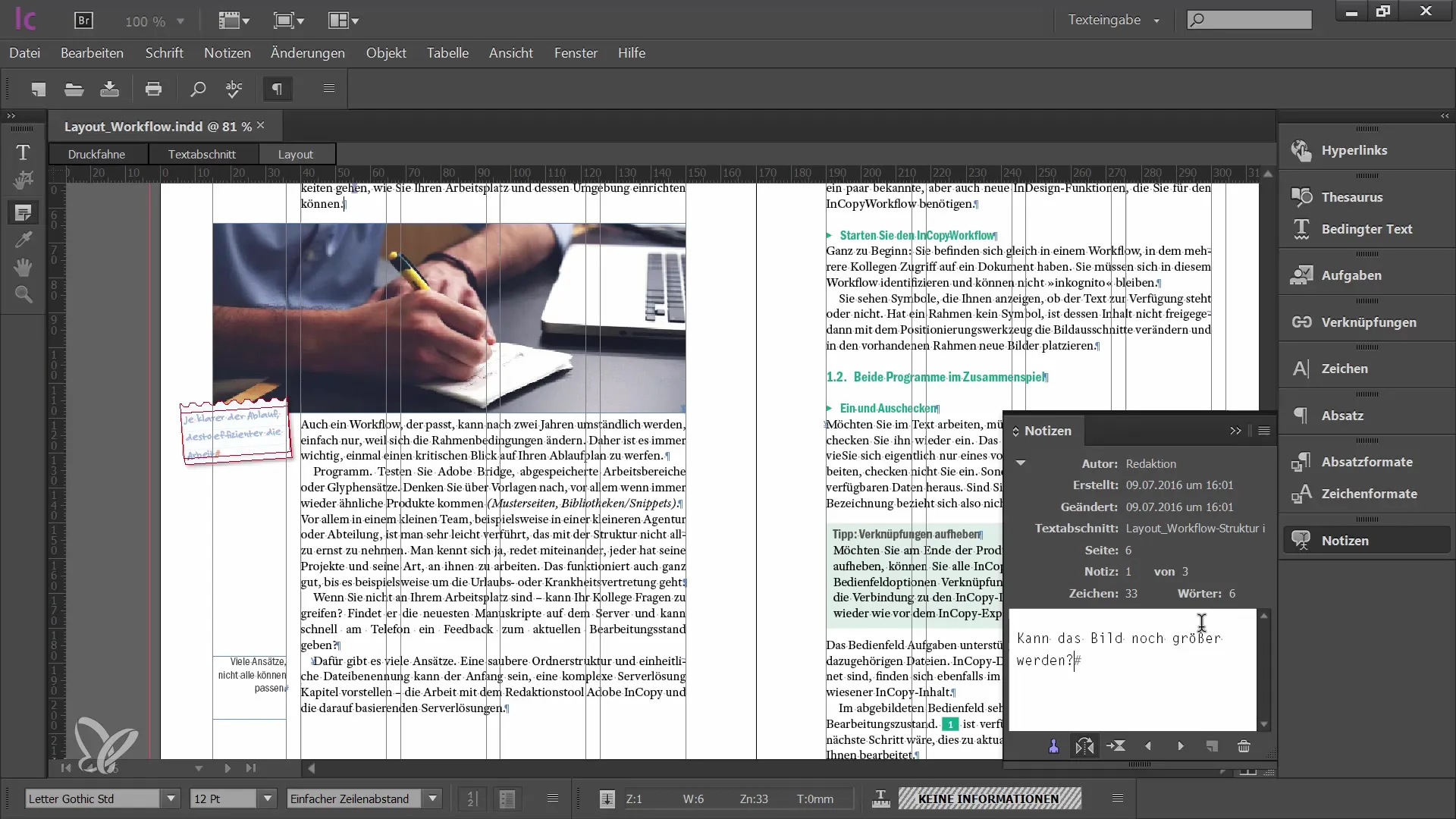
- Feature Name: Three Distinct Viewing Modes. Users can switch between Galley, Story, and Layout views depending on their immediate task. Galley View displays text with line numbers and precise line breaks matching the layout, making it easy to track column depth. Story View offers a continuous, word-processor-like interface for drafting without visual distractions or pagination interruptions. Layout View renders the full document exactly as it appears in the final layout, complete with graphics, formatting, bleeds, and pagination.
- Feature Name: Precise Copyfitting Controls. The interface provides real-time visual feedback on whether a story fits the allocated frame space on the page. If a writer exceeds the frame limit, an Overset Text warning appears, accompanied by a precise indicator showing exactly how many lines, words, or characters need to be cut to fit the box. This prevents designers from having to manually shrink text, alter leading, or redesign page structures to accommodate verbose copy.
- Feature Name: Editorial Check-Out System. To prevent version control conflicts across a network, the software utilizes an Assignment workflow where specific text blocks are checked out to an editor. Once checked out, a lock icon appears for the designer and other writers, preventing anyone else from editing that specific frame simultaneously. When the editor finishes and checks the file back in, the layout updates instantly across the local network or shared cloud folder, ensuring everyone looks at the current version.
- Feature Name: Advanced Typographic Engine. Because it shares a core text engine with the primary layout software, writers have access to professional-grade typographic tools rarely found in standard text editors. Users can apply complex Paragraph and Character styles, adjust glyph scaling, manage optical margin alignment, and control specific hyphenation dictionaries. This ensures that the writer's formatting choices translate perfectly to the final design without manual correction by the art director or pre-press technician.
- Feature Name: Track Changes and Editorial Notes. The application includes detailed revision tracking tailored for multi-author publications and strict editorial hierarchies. Editors can strike through text, add additions, and leave color-coded inline notes that are visible to both the writing team and the design team. The designer can even view these editorial notes directly within their own workspace, ensuring clear communication regarding layout adjustments or image placement requests.
- Feature Name: ICML File Architecture. The software operates using the InCopy Markup Language (ICML) format, which isolates text data from the structural layout data contained in the INDD file. This decoupled architecture means writers can begin drafting text in an ICML file before the designer has even built the initial wireframe or layout. Once the layout is ready, the designer simply places the ICML file, linking the written content to the design structure permanently while maintaining the live editing bridge.
How to Install Adobe InCopy on Windows
- Navigate to the official vendor website and download the Creative Cloud desktop application installer to your local machine.
- Run the downloaded executable and approve the Windows User Account Control prompt to allow the setup tool to write to your system drive.
- Sign in to the Creative Cloud launcher using an Adobe ID tied to an active subscription that explicitly includes this specific application or the broader suite.
- Once the launcher interface loads, navigate to the "All apps" section on the left sidebar and scroll to locate the application, or use the top search bar.
- Click the "Install" button next to the application name, which will initiate the background download and automatically extract the package to your default C:Program FilesAdobe directory.
- Wait for the progress bar to complete; the system requires a stable internet connection during this phase as the application relies on cloud-delivered components and an initial license entitlement check.
- Open the Windows Start menu, locate the newly added software shortcut, and launch the application for the first time.
- Review the initial setup screens, configure your workspace layout preference (such as Typography or Advanced), and verify that your assigned fonts are actively syncing to prevent missing typography warnings.
Adobe InCopy Free vs. Paid
This software does not offer a free tier. It is strictly available through a paid subscription model, reflecting its position as a specialized enterprise and professional publishing tool. The most affordable way to access the software is through the Single App plan, which costs approximately $4.99 per month when billed annually. This tier provides full access to the application itself, alongside 100 GB of cloud storage, portfolio hosting, and full access to the vendor's massive font library.
For users who also need to create layouts, edit photos, produce vector graphics, or handle PDF pre-press duties, the software is fully included in the broader All Apps plan. This expansive bundle costs significantly more, typically around $59.99 per month for individuals, but provides access to the entire suite of vendor applications. Business and enterprise tiers are also available for larger publication houses, offering centralized license management and advanced assignment server support.
There are no perpetual licenses available under any circumstances, meaning you cannot pay a one-time fee to own the software permanently. If the subscription lapses or payment fails, the application will lock and prevent further editing, though your locally saved text and layout files will remain intact on your hard drive. New users or freelance editors joining a team temporarily can generally test the application via a 7-day free trial, which offers unrestricted access to all tools to ensure it fits their specific editorial workflow.
Adobe InCopy vs. QuarkCopyDesk vs. Microsoft Word
QuarkCopyDesk serves as the direct historical equivalent to this application, built specifically to integrate with QuarkXPress layouts. It offers a nearly identical workflow, complete with strict text checkout protocols, precise copyfitting visual indicators, and multiple layout views. The primary difference lies entirely in the software ecosystem: QuarkCopyDesk is exclusively for publishers who build their magazines or newspapers in QuarkXPress. If your design department utilizes Quark, QuarkCopyDesk is the mandatory choice, whereas Adobe's text editor is technically incompatible and entirely useless outside of its own specific design ecosystem.
Microsoft Word remains the global standard for general document creation and early-stage drafting, but it lacks any live connection to professional page layout software. While designers can easily import Word documents into a layout using standard placement commands, the connection is typically one-way; if the editor updates the Word file later, the designer must carefully re-import the text or manually copy the changes, risking formatting errors and lost local styling. Microsoft Word is the better choice for general office documentation, early manuscript drafting, or teams that do not require exact line-length fitting or live design synchronization.
Ultimately, Adobe InCopy is the superior tool when a publication operates on tight deadlines and requires simultaneous work across departments. It is not meant to replace general word processors for writing letters or essays, but rather to act as a precision instrument for editorial teams whose final output is a strictly formatted, multi-page layout document that is actively being designed.
Common Issues and Fixes
- Problem description: Assignments are locked or cannot be checked out. This usually occurs when editorial teams attempt to sync assignment files using unsupported third-party cloud drives like Google Drive, which can cause severe lag in file status updates. The fix is to migrate the workflow to a local network server, official cloud storage, or a fully supported syncing protocol like Dropbox, ensuring all users see the available status in real-time.
- Problem description: Overset text warnings block the final layout. When an editor writes more characters than the designated text frame can physically hold, a red plus icon appears, and the excess text visually disappears below the frame boundary. To fix this, the editor must switch to Story View to see the hidden overset text and edit the word count down, or request that the designer physically expand the frame within the master layout file.
- Problem description: Gray boxes appear instead of photographs. Editors opening an assignment file may see gray placeholders instead of high-resolution photographs or vector graphics. This happens because the editor's local machine does not have access to the heavy image links stored on the designer's hard drive or local network; the fix is to have the designer package all linked assets onto a shared server accessible to both parties, or simply rely on the embedded low-resolution proxy images for context if high fidelity is not required for the text edit.
- Problem description: Missing fonts error upon application launch. Because the application relies on the exact typography of the layout to calculate accurate line breaks, opening an assignment without the correct fonts installed will break the copyfitting system. The user should resolve this by enabling background font syncing within their desktop launcher, or by manually installing the specific OpenType or TrueType font files provided directly by the art department before opening the document.
Version 21.0 — October 2025
Added:
- Adobe Firefly AI integration for text generation and rewriting.
- Native support for placing and editing MathML equations.
- Contextual Task Bar for quicker access to font and paragraph styles.
- Support for 'Share for Text Editing' web-based workflows.
Improved:
- Enhanced performance for opening and saving cloud documents.
- Better handling of variable fonts and RTL (Right-to-Left) languages.
- Updated UI components for better accessibility and contrast.
Fixed:
- Resolved issues with broken tags in PDF/UA exports.
- Fixed freezing when connected to certain Enterprise VPN environments.
- Corrected specific bugs related to note visibility in the editor.
Security:
- Routine security patches and library updates for 2025.