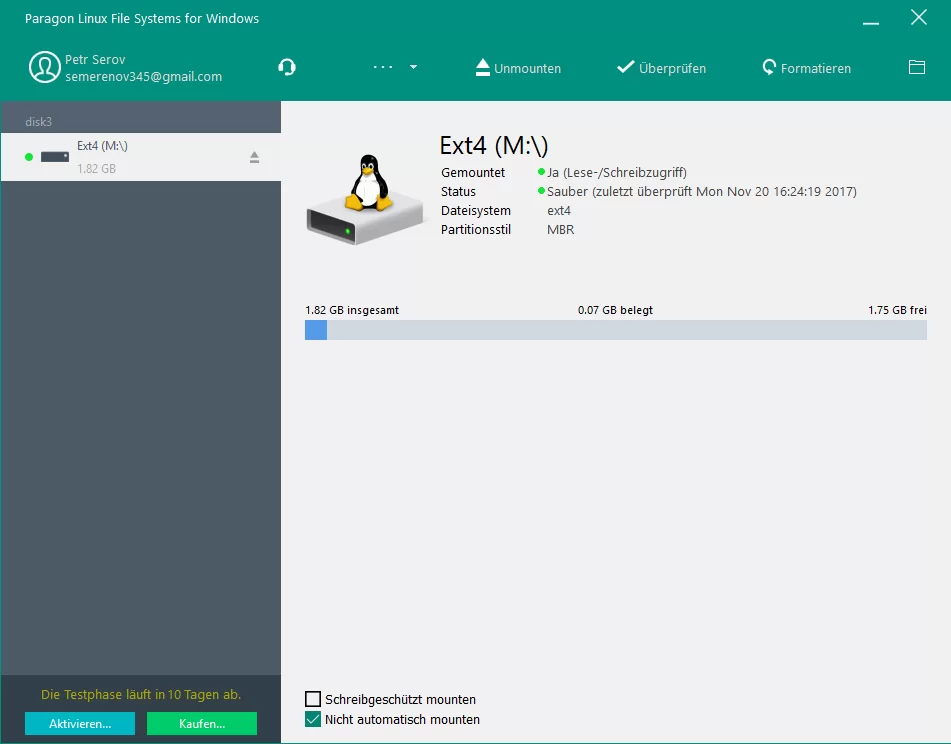
Plugging an external hard drive, network-attached storage disk, or a dual-boot storage volume formatted with ext2, ext3, or ext4 into a Windows PC usually results in a frustrating error message. Natively, Microsoft operating systems only understand formats like NTFS, FAT32, and exFAT. When an ext-formatted drive is connected, the operating system fails to recognize the partition structure, labels the volume as RAW, and prompts the user to format the disk. Agreeing to this prompt destroys all existing data on the drive. Paragon extFS serves as a low-level file system driver that bridges this compatibility gap. It translates the ext-formatted storage architecture in real-time, allowing the desktop environment to read, write, and modify the contents exactly as if the drive were formatted natively.
The utility is built for IT administrators, software developers, network-attached storage owners, and single-board computer hobbyists who frequently physically move storage media between different environments. Instead of relying on slow local network transfers or extracting files through clunky third-party archive readers, users can map the storage directly into the desktop file manager. Because the application utilizes the Dokan library to handle file system operations in userspace rather than risking kernel panics, it maintains high stability even during massive data transfers.
This native mounting approach changes how users interact with external media. By mounting the drive with a standard drive letter, the application eliminates the friction of copying large files back and forth across different local disks. Users can point their media players directly at video files stored on a NAS drive connected via a SATA-to-USB dock, or they can use their preferred local code editors to modify configuration files on a single-board computer's SD card. The software handles the underlying permissions, journaling, and data allocation without requiring manual command-line intervention.
Key Features
- Native Explorer Mounting: Once the drive connects to the computer, the software automatically assigns it a standard drive letter. The storage behaves exactly like a local NTFS disk, allowing users to drag and drop files, open media directly in a video player, or edit text documents using standard desktop applications without copying the data locally first.
- Full Read and Write Capabilities: Unlike basic extraction utilities that only allow users to view or copy files out of an external drive, this driver provides complete modification rights for ext2, ext3, and ext4 partitions. Users can delete old backups, create new directory trees, or write heavy video files directly to the target disk.
- LVM Volume Support: Complex network-attached storage enclosures often utilize Logical Volume Management to pool multiple physical hard drives together into a single logical block. The driver correctly identifies and reads these logical volumes, ensuring that data stripped across a multi-drive enclosure remains accessible when a single physical drive is connected directly to the PC.
- Automount Configuration: By default, the utility detects supported file systems and mounts them the moment the operating system boots or the USB drive connects. This behavior is managed through the system tray application, where users can disable automount to prevent accidental modifications or enforce strict read-only access for forensic recovery tasks.
- Disk Formatting and Repair: The software is not just for reading existing disks; it includes maintenance tools accessible through its main interface. Users can format raw partitions into ext2, ext3, or ext4 formats directly from their desktop, and they can run integrity checks to repair corrupted volumes that were improperly disconnected from their host hardware.
- Command-Line Interface Management: System administrators can bypass the graphical interface entirely. The utility accepts commands via the Command Prompt, enabling automated scripts to mount specific partitions, run integrity checks, or format drives without requiring manual clicks in the graphical user interface.
- Dedicated Safe Eject Tool: Because delayed write caching can cause severe data corruption if a drive is abruptly disconnected, the utility includes a dedicated unmount function in its system tray menu. This specific unmount command ensures all background write operations conclude properly before the physical USB connection is severed.
How to Install Paragon extFS on Windows
- Download the Windows installer package from the official vendor portal and run the executable file with administrator privileges.
- Accept the end-user license agreement and specify the local directory path where the application files will reside.
- Allow the setup wizard to install the necessary Dokan library components, which act as the required userspace bridge allowing external file systems to function natively.
- Finish the installation wizard and reboot the computer; this step is strictly required to ensure the low-level drivers integrate fully with the operating system before any drives are connected.
- Upon reboot, launch the configuration interface from the desktop shortcut or locate the new icon residing in the system tray.
- Enter your purchased license code in the activation menu, or click the prompt to begin the 10-day evaluation period.
- Connect an ext-formatted drive via a USB enclosure or internal SATA connection; the software will automatically assign it a drive letter and open it in the file manager.
Paragon extFS Free vs. Paid
Paragon extFS operates strictly under a commercial licensing model, though it offers a fully functional 10-day trial for evaluation. During this initial trial period, users experience unrestricted read and write access, allowing them to test large file transfers, verify partition recognition, and confirm that their specific hard drive enclosure works correctly with the driver. No features are locked behind a paywall during the trial, and there are no file size limits or artificial capacity caps while the evaluation remains active.
Once the 10-day period expires, the software does not lock the user out entirely or hold data hostage, but it enforces a severe transfer speed restriction. Read and write speeds drop to a fraction of their normal hardware limits, making the transfer of heavy media files or large system backups completely impractical. To restore full read and write speeds, users must purchase a perpetual commercial license from the vendor's website. The standard license is priced around $19.95 for a single computer, though the exact cost fluctuates depending on regional currency.
Upon purchasing the license, users receive an activation code via email. This code is entered directly into the activation menu within the application's graphical interface, requiring a brief internet connection to validate the credentials against the vendor's activation servers. For enterprise environments, air-gapped workstations, or computers without internet access, the vendor provides a manual offline activation workflow. This involves exporting a license file from the offline machine, uploading it to the vendor portal from a secondary connected device, and transferring the validated credential file back to the workstation.
Paragon extFS vs. Ext2Fsd vs. Ext2Read
Ext2Fsd is a free, open-source file system driver that mounts ext2 and ext3 partitions directly into the file manager. While it costs nothing to download and use, active development stalled several years ago. Users attempting to write data to newer ext4 partitions using Ext2Fsd often report file corruption, broken journal entries, or critical system crashes on modern desktop operating systems.
Ext2Read is another free alternative, but it functions strictly as an extraction utility rather than a true file system driver. It opens a separate graphical window where users can browse the external partition and copy files out to their local desktop, but it is entirely read-only and does not assign a standard drive letter. You cannot edit a document or play a media file directly on the drive using local desktop applications; the file must be extracted to an NTFS drive first.
Paragon extFS is the superior choice when a workflow demands direct, write-enabled access to external storage. If a user only needs to rescue a single text file from an old hard drive once a year, a free extraction tool is sufficient. However, for professionals regularly formatting SD cards for single-board computers, recovering heavy video archives from network-attached storage, or modifying files on external drives without copying them locally, the native integration and write stability of Paragon extFS make the commercial license a practical requirement.
Common Issues and Fixes
- The external drive triggers a format warning upon connection. If the operating system asks to format the drive immediately upon plug-in, the driver has not automatically mounted the volume. Close the format prompt immediately to avoid permanent data loss, open the Paragon extFS tray application, and manually click the "Mount" button next to the recognized partition.
- File transfer speeds drop to an abnormally slow rate. If copying files suddenly takes hours instead of minutes, the 10-day trial period has expired. Open the application's activation menu, select the option to activate the product, and input a valid commercial license code to restore normal hardware transfer rates.
- The drive mounts as read-only and blocks file modification. This happens when the drive was improperly disconnected from its original host hardware, leaving the file system marked as dirty. To fix this, open the utility's interface, select the specific partition, and run the built-in Check function to repair the file system errors and restore write permissions.
- The installer fails with an error stating another version is already installed. When upgrading from an older build, the installer may halt if old driver files or registry keys remain active. Cancel the setup wizard, uninstall the existing application completely through the Windows Control Panel, reboot the computer to clear locked files, and run the new installer package again.
- Cannot format a new drive as Btrfs or XFS. While the software can read Btrfs and XFS partitions, its formatting tool only supports creating ext2, ext3, or ext4 file systems. If a different open-source file system format is required, the disk must be formatted natively on the target hardware before connecting it back to the PC.
Version 14 — 2025
- Added full compatibility with macOS 15 Sequoia, ensuring seamless read and write access to extFS volumes on the latest operating system.
- Improved stability and performance on Apple Silicon (M1, M2, and M3) devices for native execution.
- Enhanced support for modern ext4 file system features, including 64-bit geometry and directory indexing (dir_index).
- Fixed minor visual glitches in the menu bar utility when using Dark Mode.
- Optimized auto-mounting behavior for faster volume recognition upon system startup.