Every time a computer is used to browse the internet, open a document, or run an application, it records a hidden trail of activity. This digital footprint consists of browser caches, tracking cookies, temporary internet files, search autocomplete histories, and system logs. For individuals handling sensitive data, sharing a workstation, or working in privacy-conscious environments, simply clicking the standard delete button is insufficient. When the operating system deletes a file normally, it merely marks the sector as available in the master file table. The actual zeroes and ones comprising the image, text document, or database remain readable to anyone with basic undelete software. Wipe Professional addresses this vulnerability by actively overwriting the targeted data, ensuring that daily system usage remains confidential and unrecoverable.
Unlike basic system optimizers that prioritize raw disk space recovery, this application focuses strictly on digital sanitation. It systematically scans the entire local storage environment to locate obscure tracking logs, index.dat files, orphaned registry caches, and clipboard history that native operating system tools leave behind. Because these caches are often locked by active system processes, a dedicated desktop application is required to bypass standard file restrictions and execute deep-level erasure. Browser extensions or lightweight web-based cleaners operate within a restricted sandbox, meaning they cannot reach internal operating system logs. A dedicated local utility has the necessary system privileges to close active tracking threads and permanently scrub the underlying sectors.
By permanently destroying residual traces, the software serves a dual purpose: it secures personal activity from offline forensic analysis and reclaims storage capacity consumed by hidden garbage files. Whether clearing out gigabytes of accumulated thumbnail caches or targeting specific autofill databases from a particular web browser, the tool provides a rigid, transparent workflow. Users can see exactly which files are queued for destruction and choose the exact mathematical algorithm used to overwrite them, maintaining complete control over their local privacy environment.
Key Features
- Secure Overwrite Algorithms: The software employs military-grade erasure protocols to destroy data beyond recovery. Users can select the US DoD 5220.22-M standard or the intensive 35-pass Gutmann method, which mathematically overwrites targeted sectors multiple times to prevent forensic hardware from reading residual magnetic or solid-state traces.
- Pre-Deletion File Renaming: Before any targeted item is overwritten and removed, the application actively alters the file name to a string of random characters. This secondary security measure ensures that even if an advanced recovery attempt manages to read the file allocation table, the original file name and its associated metadata remain obscured.
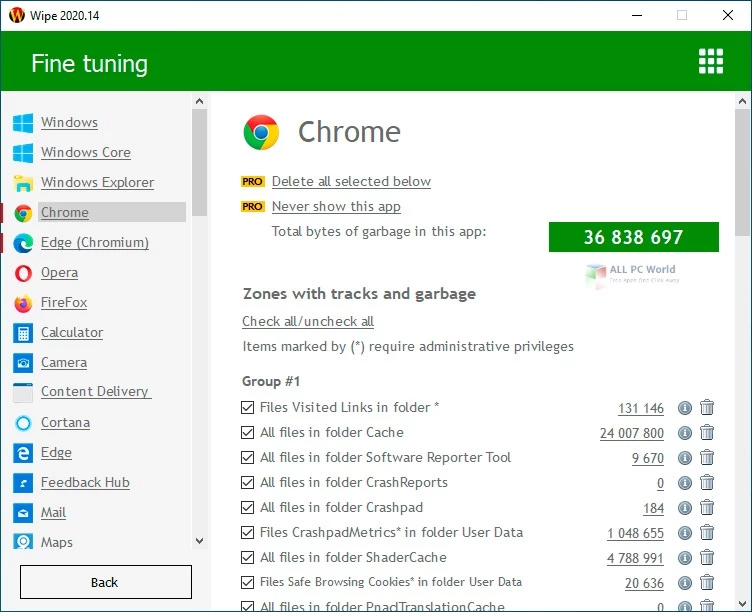
- Deep Browser Sanitation: The scanning engine targets specific directories within Google Chrome, Mozilla Firefox, Microsoft Edge, and Opera to extract hidden tracking mechanisms. It clears session data, cached media, offline site storage, and autocomplete form history, going far beyond the superficial clearing offered by native browser settings.
- System Trace Eradication: The utility seeks out internal operating system logs that passively record user behavior. It eliminates recent document lists, registry caches, Windows Explorer search histories, and hidden index.dat files, ensuring that no local administrator or secondary user can audit past application usage.
- Granular Scan Previews: After completing the initial system scan, the interface generates a detailed, categorized list of all identified junk files and privacy threats. Users can expand each category to view the exact file paths and file sizes, allowing them to selectively uncheck specific cookies or temporary files they prefer to retain.
- Custom Target Lists: For obscure third-party applications or portable tools that do not register in the default database, users can manually define specific folders and files for inclusion in the daily cleaning queue. This ensures that unique workflow tools or specialized design software caches are destroyed alongside standard browser data.
- Automated Tray Operations: The application includes a background garbage tracker that monitors the accumulation of temporary files during active sessions. A dedicated system tray icon allows users to initiate a silent background wipe without opening the main interface, keeping the local environment clean without interrupting active tasks.
How to Install Wipe Professional on Windows
- Download the official executable installer package from the vendor's primary website to ensure you receive the unmodified application.
- Launch the downloaded setup file and grant the necessary administrator permissions when prompted by the User Account Control dialog.
- Review and accept the End User License Agreement to proceed through the installation wizard.
- Select your preferred installation directory, though leaving the default local drive path is recommended to ensure proper system access for trace removal.
- Choose whether to generate a desktop shortcut and whether the application should automatically run the background garbage tracker upon system startup.
- Click the install button to extract the required program files into the destination folder and wait for the status bar to reach completion.
- Finish the setup wizard and launch the application for the first time.
- Upon the initial run, allow the application a few moments to scan the local storage, identify installed browsers, and populate the detailed trace preview list before executing your first wipe.
Wipe Professional Free vs. Paid
The developer provides a basic free tier simply called Wipe, which grants access to standard trace removal and cache clearing functions. This free edition includes the primary scanning engine, multi-threading support for faster file processing, and the background garbage tracker. However, it restricts access to the more advanced security protocols, defaulting to standard file deletion rather than military-grade overwrite algorithms. Furthermore, the free tier actively displays promotional prompts within the interface and lacks support for custom file lists. It serves as an adequate tool for users who primarily want to reclaim disk space and clear basic internet history without requiring strict forensic-level data destruction.
Wipe Professional operates under a paid licensing model, typically costing around $19.90 for an annual subscription per computer, with volume discounts often available for adding supplementary devices. Upgrading to the Professional tier unlocks the military-grade overwrite algorithms, including the Gutmann and DoD 5220.22-M methods, which are essential for true data sanitation. The paid license also activates the pre-deletion file renaming feature, hiding the original file names from the master file table.
Additionally, the Professional edition enables custom cleaning list management, allowing users to define their own specific files and directories for secure erasure. Paid users also receive priority technical support and the ability to disable automatic update notifications and in-app advertisements. This tier is built specifically for individuals and organizations that handle sensitive documentation and require verifiable, unrecoverable data deletion.
Wipe Professional vs. CCleaner vs. PrivaZer
CCleaner is heavily focused on general system optimization and daily maintenance. It excels at quickly freeing up disk space, managing startup items, and cleaning the registry with rapid execution speed. The interface is built around convenience, offering immediate one-click maintenance sweeps. However, it is primarily an optimization tool rather than a strict privacy application; its secure deletion options are basic compared to specialized wiping tools, and it pushes active background monitoring. Users who want a fast, all-in-one maintenance utility to keep their computer running smoothly usually prefer CCleaner over dedicated erasure programs.
PrivaZer takes a rigorous, forensic approach to privacy protection. It scans the entire storage drive, including the master file table, free space, and external USB drives, to permanently destroy magnetic traces of old files. It is capable of recognizing remnants of previous Windows installations and shadow copies. The interface is dense and the scanning process can take a significant amount of time, making it ideal for advanced users who demand the absolute highest level of drive sanitation. However, its complex configuration menus can be overwhelming for those who just want a quick daily cleanup.
Wipe Professional positions itself as a specialized middle ground between these two approaches. It focuses entirely on privacy and secure trace removal without bundling unrelated registry fixers or startup managers, keeping the interface straightforward. By offering advanced algorithms like the 35-pass Gutmann method alongside a structured itemized preview, it allows users to execute deep, unrecoverable data destruction without navigating the heavy complexity of forensic tools. It suits users who specifically need secure data erasure in a fast, targeted desktop interface.
Common Issues and Fixes
- Problem description: The secure wiping process takes an unusually long time to complete. Overwriting thousands of temporary files using the 35-pass Gutmann algorithm demands heavy disk read and write operations. To reduce the processing time, open the security settings and switch to the standard 1-pass method or the faster DoD 5220.22-M algorithm.
- Problem description: Active website logins are constantly being logged out after a scan. The default cleaning profile targets all browser cookies, including active session tokens used for authentication. To keep your logins active, review the detailed scan preview before executing the wipe, and uncheck the specific cookie databases associated with your primary browser.
- Problem description: Custom folders are remaining on the drive after the cleaning cycle. If manually added directories are not being deleted, the application likely lacks the required file permissions to override system locks. Close the application completely, right-click the desktop shortcut, and select the option to run it as an administrator.
- Problem description: The garbage tracker icon does not appear in the system tray. The background monitoring tool may have been disabled during an update or by a third-party startup manager. Open the software preferences menu and verify that the option to launch the tracker with the operating system is actively enabled.
Version 2025.15 — December 2025
- Revamped the main user interface with a redesigned button layout for a cleaner and more intuitive experience.
- Updated essential backend libraries and core dependencies, specifically improving the parsing and management of track metadata in JSON files.
- Enhanced compatibility with third-party security and antivirus software to reduce potential system conflicts.
- Fixed a critical stability issue that could cause the application to crash if a USB device was connected during the cleanup process.