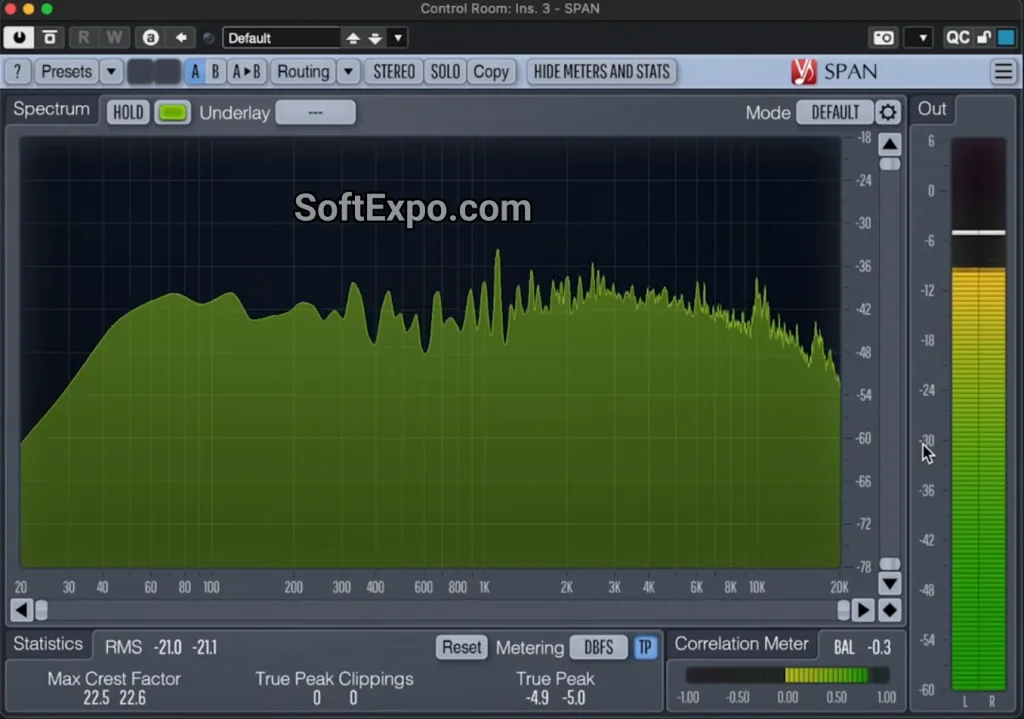
Voxengo SPAN is a professional-grade, free FFT (Fast Fourier Transform) spectrum analyzer plugin that visualizes audio frequencies in real-time. For Adobe Audition users, it serves as an essential diagnostic tool, allowing you to see exactly what is happening in your mix beyond what standard volume meters display. By revealing frequency clashes, low-end rumble, and phase issues, SPAN helps you make precise adjustments to your audio tracks.
Key Features
- Fast Fourier Transform (FFT) Analysis: Provides a detailed visual graph of your audio spectrum, helping you identify problematic frequencies.
- Adjustable Metering: Includes RMS, True Peak, and clipping detectors to ensure your levels adhere to broadcast or streaming standards.
- Correlation Meter: Displays phase issues between left and right channels, which is critical for ensuring mono compatibility.
- Mid-Side Analysis: Allows you to analyze the stereo image by viewing mid (center) and side (width) information separately.
- K-System Metering: Supports Bob Katz's K-System metering for calibrating monitor levels and dynamic range.
- Customizable Interface: The user interface is resizable and offers various color schemes to match your workflow preferences.
Installation and Setup
Installing Voxengo SPAN on a Windows system for Adobe Audition involves a standard VST plugin workflow. Follow these steps:
- Download the Plugin: Visit the official Voxengo website and download the Windows installer (setup executable) for SPAN.
- Run the Installer: Execute the downloaded file. During installation, ensure you select the VST3 format, as this is the modern standard supported by Adobe Audition. Note the installation path if you choose a custom folder.
- Scan in Adobe Audition: Open Adobe Audition and navigate to Effects > Audio Plug-in Manager.
- Add Plugin Folder: If you installed to a custom location, click "Add" to include that folder. Otherwise, standard system folders are usually detected automatically.
- Scan for Plug-ins: Click the "Scan for Plug-ins" button. Audition will locate SPAN and list it. Ensure the box next to "Voxengo SPAN" is checked and click OK.
How to Use Voxengo SPAN
Once installed, SPAN is best used on your Master Track to analyze the overall mix, though it can be placed on individual tracks for specific frequency checking.
- Insert the Plugin: Go to the Effects Rack. Click the arrow to add an effect, then select VST3 > Restoration > Voxengo > SPAN (category names may vary slightly based on your folder structure, look for the VST3 or VST category).
- Reading the Graph: Play your audio. The main graph displays frequency amplitude. Hover your mouse over any peak in the graph to see the exact frequency (Hz) and corresponding musical note.
- Checking Phase: Observe the correlation meter in the bottom corner. If the meter frequently dips into the red (negative values), your mix may have phase cancellation issues that could sound hollow when played in mono.
- Customizing the View: Click the "Edit" button within the plugin window to change the "Slope" or "Block Size" settings. A higher block size provides better frequency resolution for low-end bass analysis, while a lower block size offers faster visual response.
Compatibility
Voxengo SPAN is designed to function with modern Windows audio environments. It is compatible with Windows 10 and Windows 11. The plugin supports 64-bit architecture, which matches the requirements of current Adobe Audition CC releases. It works via VST and VST3 protocols, ensuring stability within the Audition effects ecosystem.