iMobie DroidKit operates as a centralized disaster salvage application designed to rescue mobile devices that are locked, crashed, or experiencing severe data loss. Installed directly on a Windows PC, this software bridges the gap between a broken handset and a desktop environment, allowing users to push commands, flash firmware, and extract files when the mobile interface is completely inaccessible. It primarily targets hardware that is stuck in boot loops, displaying constant black screens, locked behind forgotten passcodes, or trapped in factory recovery modes after a failed over-the-air update. By moving the heavy processing to a computer, the software bypasses the restrictions of the device's native operating system.
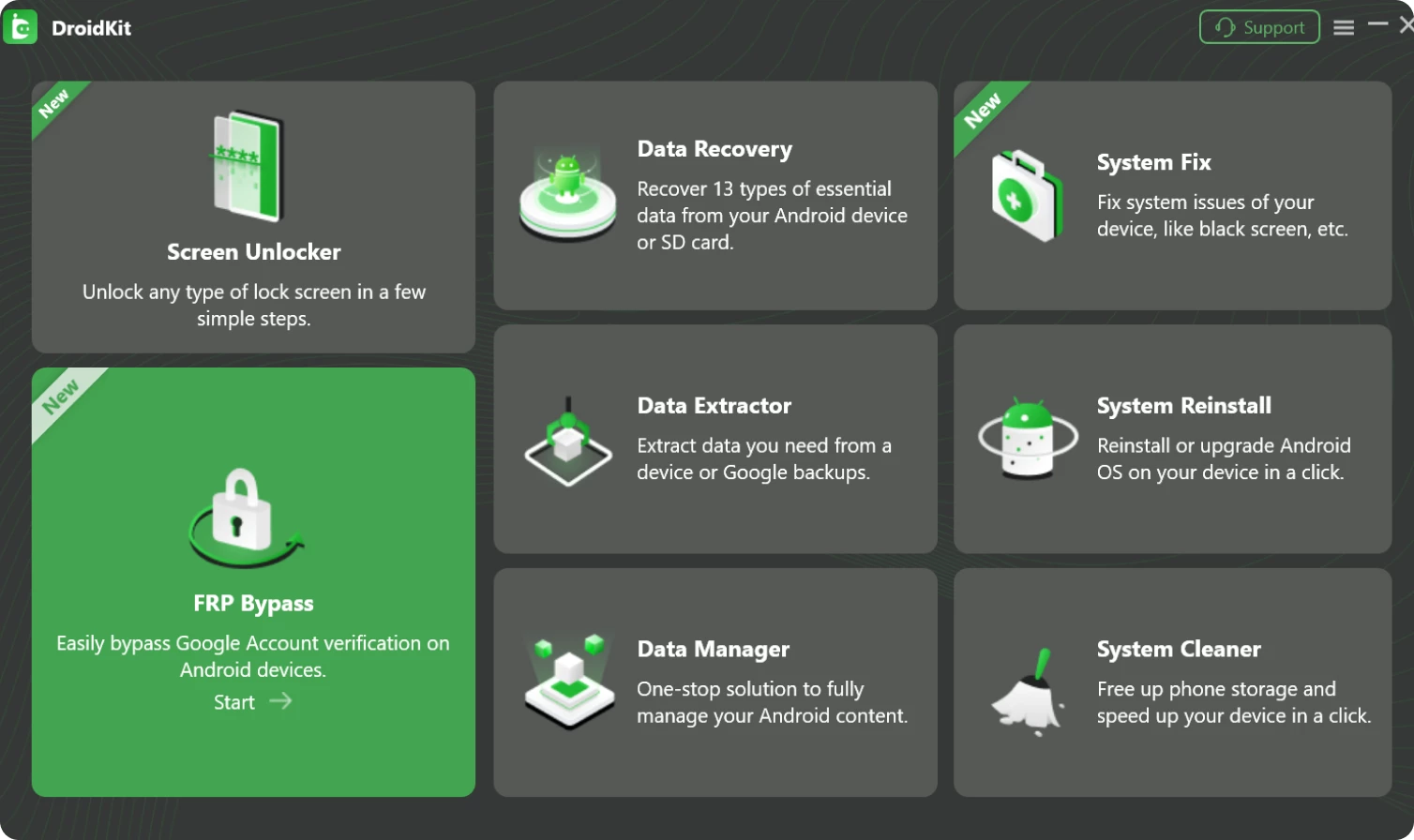
Rather than relying on generic mobile applications that inherently cannot access deep system partitions, this desktop utility downloads official ROM packages to overwrite corrupted system files and force devices back to a working state. It serves as a practical diagnostic and repair dashboard for users who need to recover deleted chat logs, bypass factory reset protection locks, or pull family photos out of a handset with a completely shattered display. The main interface relies on a distinct tile-based layout, ensuring that users in stressful data-loss scenarios do not have to navigate complex drop-down menus. Each tile represents an isolated workflow, guiding the user step-by-step through specific recovery or unlock protocols without requiring advanced command-line knowledge.
For technicians, family IT helpers, or individual users, this application removes the need to juggle multiple specialized flashing tools, rooting scripts, and driver packages. Instead of searching forums for exact firmware files or learning how to operate complex bootloader unlocking utilities, the software automates the device identification and file retrieval process. It reads the connected device's specific model number and PDA code, fetches the exact matching repair components from official vendor servers, and pushes them directly over a USB connection.
Key Features
- Feature Name: Screen Unlocker. Removes forgotten lock screen patterns, PINs, alphanumeric passwords, and biometric fingerprint locks to restore hardware access. The module automatically identifies the connected brand and applies the correct bypass method. Note that bypassing the screen lock generally requires formatting the local storage, wiping personal files to reset the security credentials.
- Feature Name: FRP Bypass. Strips away Factory Reset Protection barriers on supported smartphone brands, allowing users to configure a wiped handset with a completely new Google account. This process uses advanced routing to bypass the mandatory setup screen that appears after an untrusted factory reset, making second-hand or locked devices functional again.
- Feature Name: System Repair. Downloads official firmware packages to fix boot loops, black screens, and devices stuck in fastboot mode without relying on external flashing utilities. It automatically matches your device's exact PDA code, fetches the correct official ROM, and flashes the system partition to repair corrupted operating system files without deleting user data.
- Feature Name: Tiered Data Recovery. Offers a Quick Recovery mode for surface-level file extraction and a Deep Recovery mode that requires administrative root access to retrieve buried messages, photos, and call logs from internal storage. The interface displays recoverable files in categorized preview windows, allowing users to selectively export only the documents or media they actually need.
- Feature Name: Broken Device Extraction. Pulls media, documents, and contacts directly from system-crashed phones with unresponsive touchscreens, or exports data straight from connected cloud storage accounts. This is highly effective for recovering two-factor authentication codes or critical contacts when the physical handset display is shattered and touch input is impossible.
- Feature Name: System Cleaner & Manager. Scans the connected handset for system cache, redundant background files, and obsolete APK installers, allowing users to free up internal storage space directly from the PC interface. It also functions as a desktop file manager, letting users mass-transfer photos, videos, and music between the computer and the mobile handset via simple drag-and-drop operations.
How to Install iMobie DroidKit on Windows
- Navigate to the official vendor website and download the primary executable installer package to your local Windows drive. Ensure you have administrative privileges on your computer, as the software needs to install low-level USB drivers.
- Double-click the downloaded setup file to launch the installation wizard. You will be greeted by a standard welcome screen detailing the end-user license agreement.
- Review the terms and select your preferred installation directory, or simply leave the default local program path intact for standard deployment.
- Click the Install button to initiate the setup sequence. The installer will unpack the core application files and create necessary start menu shortcuts.
- Wait while the setup process automatically connects to the vendor servers to download any required background components, framework dependencies, or updated device communication drivers necessary for hardware detection.
- Click Finish to exit the wizard and launch the program. On the first run, the software opens to its main tile-based dashboard, prompting you to connect your mobile handset using a high-quality data transfer USB cable.
- Before initiating any module, you may be prompted to manually enable USB Debugging on your mobile handset. The desktop interface will display visual instructions tailored to your specific phone brand on how to activate this hidden developer setting.
iMobie DroidKit Free vs. Paid
The application operates heavily on a freemium model, where the initial software installation, device connection, and diagnostic scanning features cost absolutely nothing. This free tier serves as a critical verification step; users can connect their corrupted or wiped handset, initiate a deep scan on the internal storage partitions, and browse preview thumbnails of the exact photos, messages, or documents the software has located. This transparent approach prevents users from spending money prematurely if their specific data has already been permanently overwritten or if their hardware model proves incompatible with the recovery engine.
To execute the final file extraction, complete a system repair, or finalize a lock screen removal, a paid license must be activated. iMobie utilizes a modular pricing structure, which is highly beneficial for users who only have one specific problem to solve. Instead of buying the entire software suite, users can purchase individual tools—such as only the Screen Unlocker module or solely the System Fix utility. These individual module licenses carry a lower entry price, typically ranging between $15.99 and $35.99 depending on the complexity of the specific task.
For advanced users, repair technicians, or families dealing with multiple distinct handset failures across different brands, a Full Toolkit subscription is available. This bundles all available modules—recovery, unlocking, bypassing, and repairing—into a single complete license. The complete package generally costs around $79.99 per year and permits usage across up to five different mobile devices connected to a single PC. All purchases are handled through the official website and typically include a 60-day money-back guarantee, providing a safety net if a complex firmware repair fails to resolve the hardware issue.
iMobie DroidKit vs. Wondershare Dr.Fone vs. Tenorshare UltData
Wondershare Dr.Fone operates as a massive, multi-platform ecosystem utility that covers both major smartphone operating systems under one unified dashboard. It is an excellent choice for repair shops or mixed-device households that need to manage a wide variety of mobile hardware, offering tools for data transfer, system repair, and screen unlocking across the board. However, this broad scope means the complete Dr.Fone toolkit is significantly more expensive than a targeted, single-ecosystem utility, and the interface can feel overwhelming if you only need to fix one specific phone.
Tenorshare UltData focuses almost exclusively on deep file restoration and message extraction, placing less emphasis on firmware flashing or lock screen removal. If your handset is functioning perfectly but you need the highest possible success rate for retrieving deleted local files, lost contacts, or wiped chat histories, UltData provides a highly specialized and aggressive scanning engine built specifically for that exact task. It is the better option when data retrieval is the absolute only priority and the operating system itself is stable.
iMobie DroidKit proves to be the strongest option for users who want a deeply focused, modular troubleshooting toolkit tailored specifically for a single mobile ecosystem. Its major advantage lies in its flexible pricing model; because it allows purchasing individual utilities like a dedicated FRP bypass or a system repair flasher, users do not have to pay for a sprawling suite of cross-platform tools they will never use. The highly visual, tile-based interface also makes it much easier for non-technical users to jump straight into a specific repair workflow without getting lost in complicated menus.
Common Issues and Fixes
- Problem description. The desktop software fails to recognize the connected mobile device. To fix this, ensure that USB Debugging is manually enabled in the hidden developer settings on your handset. Additionally, check the physical USB cable connection to ensure it supports data transfer, and verify that the correct OEM communication drivers are installed on the PC.
- Problem description. The Deep Recovery mode fails to initiate or gets stuck during the scan. This specific scanning mode requires low-level root access to read raw internal storage partitions. If the application's automated rooting process fails, you must switch back to the standard Quick Recovery mode or root the handset manually using a dedicated third-party tool before trying again.
- Problem description. The system repair firmware download stalls or fails repeatedly. The tool downloads large ROM files directly from official vendor servers. If the transfer drops, pause and resume the download within the interface. Ensure your PC maintains a stable, unrestricted internet connection and temporarily disable aggressive firewall software that might block the server connection.
- Problem description. The FRP Bypass process is unsuccessful or claims the device is unsupported. Bypassing factory locks depends entirely on the specific smartphone brand, exact firmware build, and the recency of installed security patches. Verify that you have selected the exact PDA code and model number in the software, and note that extremely recent security updates may block the bypass entirely until the vendor releases an update.
Version 2.3.7.20251125 — November 2025
- Introduced full compatibility with the latest Android 15 and iOS 18 operating systems for seamless data management and transfer.
- Added a new One-Click solution for bypassing Samsung Factory Reset Protection (FRP) locks, simplifying the process for users.
- Expanded Screen Unlocker support to include Samsung Qualcomm devices, such as the Galaxy S23 and S24 series, across all Android versions.
- Optimized the screen unlocking algorithms specifically for Xiaomi devices to deliver a higher success rate.
- Enhanced the scanning engine for WhatsApp Recovery, improving the retrieval of deleted messages and chat attachments.
- Improved the performance and stability of Google Drive backup extraction and management features.
- Fixed various known bugs to ensure a smoother and more reliable user experience.