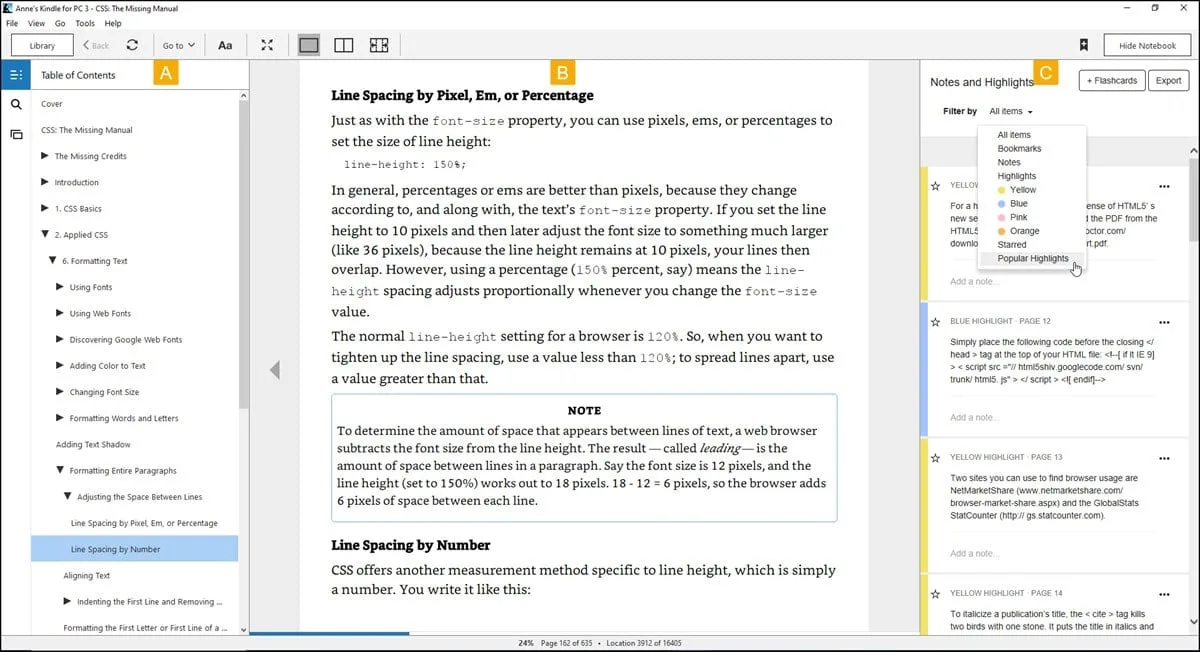
Amazon's official desktop reading client brings the massive digital storefront directly to your Windows desktop environment. While e-ink devices are ideal for reading narrative fiction on the couch or during a commute, they often fall short when handling complex reference materials, academic textbooks, and heavily illustrated non-fiction. This desktop application bridges that gap, allowing students, researchers, and professionals to utilize the full resolution and physical space of their computer monitors. By running a dedicated local application rather than relying entirely on a web browser tab, users gain the ability to cache large files locally for offline viewing, ensuring that high-resolution images, detailed charts, and complex page layouts load instantaneously without waiting for a network connection to buffer.
The utility of a desktop reading application becomes obvious in a multi-tasking workflow. When writing a research paper or compiling a report, having the digital text open on a secondary monitor while maintaining a word processor on the primary screen is a practical arrangement. The software allows users to select paragraphs with their mouse and copy the text directly to their clipboard, automatically appending a citation to the copied snippet. This feature respects publisher-defined copying limits while saving time compared to manual transcription. Furthermore, the application renders multi-column layouts dynamically based on the width of the application window, preventing lines of text from stretching too far across ultra-wide displays and causing eye strain.
Beyond immediate local reading, the application serves as a central hub for your entire purchased library. It utilizes the WhisperSync technology framework to constantly communicate with Amazon's servers, ensuring that your current reading position, highlights, and margin notes are perfectly synchronized across all your hardware. If you stop reading on your mobile phone during a lunch break, the desktop application will automatically jump to that exact sentence when you open the book on your computer later that evening. This eliminates the tedious process of searching for your lost page and allows for a continuous, uninterrupted reading habit across completely different form factors.
Key Features
- Typography and Layout Controls: The interface provides granular control over how the text renders on your specific monitor. By clicking the "Aa" button in the top toolbar, users can change the default typeface to Amazon's custom Bookerly font, or select alternatives like Ember, Helvetica, or Caecilia. The menu includes dedicated sliders to adjust the core font size, increase or decrease line spacing, and change page margins to suit your reading distance. On wider desktop monitors, the application automatically supports multi-column layouts to prevent lines of text from becoming too long and difficult to track visually.
- Annotation and Note Management: Highlighting critical text is accomplished by simply clicking and dragging your mouse cursor over the desired sentence. A context menu immediately appears, allowing you to assign distinct highlight colors—such as yellow, blue, pink, or orange—to differentiate between primary arguments and secondary references. You can also type text notes attached to these highlights. By opening the dedicated notebook sidebar on the left side of the screen, you can view all your annotations in a single scrolling list, making it exceptionally easy to review study materials or export notes for an essay.
- X-Ray and Built-in Reference: When reading dense fiction with dozens of characters or academic texts with specialized vocabulary, users can highlight a single word to instantly bring up dictionary definitions or Wikipedia summaries directly inside the reading window. For supported titles, the X-Ray feature analyzes the entire text to provide character biographies, location descriptions, and a timeline of where specific terms appear throughout the chapters. This eliminates the need to open a web browser to look up unfamiliar concepts.
- Text-to-Speech (TTS) Engine: For users who prefer auditory learning or require accessibility support, the software includes a built-in narration tool. By pressing the shortcut key combination Ctrl + T or navigating to the Tools menu and selecting the TTS option, the application will begin reading the current page aloud using the default Windows voice synthesizer. You can easily pause and resume the narration using the spacebar, allowing for a flexible hybrid workflow where you can read manually and then switch to listening when your eyes need a break.
- Display Themes and Full-Screen Mode: Recognizing that staring at a bright white application window for hours causes severe eye fatigue, the interface includes multiple environmental color profiles. You can switch between a standard white background, a dark mode profile for low-light environments, or a sepia tone that mimics the color of physical paper. Pressing the F11 key toggles a dedicated full-screen mode, which entirely hides the Windows taskbar, system clock, and application menus to keep your focus locked entirely on the document.
- Offline Library Management: The software acts as a persistent local cache for your digital purchases. You can sort your entire library into custom folders called Collections, filter the grid view by read or unread status, and permanently download massive files to your local disk for use without an internet connection. For users with DRM-free files acquired outside the official ecosystem, you can manually copy MOBI or AZW3 formats into the local My DocumentsMy Kindle Content directory, and the software will index them alongside your store purchases.
How to Install Kindle for PC on Windows
- Navigate to the official Amazon website or a verified software directory to download the correct Windows installer package for the desktop application.
- Open your default Windows Downloads folder and double-click the executable setup file to initiate the installation process.
- Allow the automated installer to extract the necessary files; the setup process is typically silent and will automatically copy the core application data to your primary system drive without requiring you to manually define an installation path.
- Locate the newly created application shortcut on your Windows desktop or search for it inside the Start menu, then click the icon to launch the program for the first time.
- When the initial authentication window appears, enter the email address and password associated with your active Amazon account.
- Complete any mandatory secondary verification steps, which may include solving a security captcha challenge or entering a two-factor authentication code sent to your mobile phone or email address.
- Once authenticated, click the circular sync icon located in the upper toolbar to force the application to index your account history and populate your local library grid with your previously purchased titles.
- Double-click any book cover in the library interface to initiate the download process, which will cache the file directly to your local hard drive for immediate offline reading.
Kindle for PC Free vs. Paid
The application itself is completely free to download, install, and utilize on your computer. There are no premium software tiers, no commercial "pro" licenses, and no artificial trial periods built into the desktop client. The developer does not charge a standalone subscription fee for access to the reader interface, nor does the software impose artificial reading limits, place watermarks on your document pages, or restrict the number of local files you can store on your hard drive. The core business model relies entirely on users acquiring reading material through the official ecosystem.
While the desktop client costs nothing, the reading material falls into a variety of different pricing structures. You can access thousands of free public domain classics directly from the storefront, or you can manually sideload DRM-free files acquired from third-party sources at no cost. For commercial novels, academic textbooks, and modern non-fiction, users must purchase individual perpetual licenses through the web storefront. Once a transaction is completed in the browser, the digital license is immediately applied to your account, and the book becomes available to download in the PC application.
The software also fully integrates with the developer's broader subscription models, specifically Kindle Unlimited and Prime Reading. If you pay the monthly fee for Kindle Unlimited, you can borrow titles from a rotating catalog up to your account's maximum allowed limit, reading them through the PC application exactly like a purchased title. Prime Reading functions similarly but is bundled at no extra cost for existing Prime members, offering a smaller, curated selection of rotating books. If either subscription lapses, or if you return a borrowed title to free up space, the local cache is automatically wiped and the file is removed from your desktop library, though your highlights and bookmarks are saved in the cloud.
Kindle for PC vs. Calibre vs. Adobe Digital Editions
Calibre is a heavily utilized open-source library management tool designed for readers who demand absolute control over their local files. It excels at converting document formats, editing metadata, and managing massive archives built from dozens of different storefronts. However, Calibre does not natively sync your reading progress or highlights to a central cloud server, and it requires significant manual configuration to organize effectively. It is built primarily for file conversion, DRM-free archiving, and transferring files to external devices over a USB cable, rather than providing a unified ecosystem reading experience.
Adobe Digital Editions serves as the strict industry standard for opening EPUB and PDF files locked behind Adobe's ACSM digital rights management system. This makes it an absolute requirement for students checking out digital textbooks from university portals or users borrowing digital books from local public library networks via OverDrive. While it handles rigid PDF pagination adequately, the interface is famously utilitarian and lacks access to Amazon's proprietary storefront formats, custom typography engines, and specialized formatting tools like the X-Ray reference system.
Users should deploy Calibre when they need to convert DRM-free file formats or maintain a massive offline archive, and they should install Adobe Digital Editions if their school or public library mandates it for restricted borrowed files. However, Kindle for PC remains the optimal choice for users who heavily purchase content from the Amazon storefront and require automatic, immediate synchronization of their reading position, annotations, and bookmarks across multiple computers and mobile devices without touching cables or manually converting file types.
Common Issues and Fixes
- Login redirect loop preventing authentication. Users occasionally find that entering their password opens a blank browser window or repeatedly asks for a captcha without ever logging the application in. This happens when the default Windows web browser fails to pass the authentication token back to the software. To fix this, temporarily change your default Windows browser to a different program in the OS settings, complete the login process, and then revert your browser preference.
- Books displaying blank pages or refusing to open. A corrupted local download can result in a book opening to entirely blank pages, skipping chapters, or crashing the application upon launch. To resolve this, right-click the specific book cover in your library grid and select the option to remove it from the device. Then, navigate to the local content folder in your documents directory, delete any remaining folder fragments associated with that title, and double-click the cover again to force a clean download.
- Text-to-Speech narration starts from the wrong location. The built-in audio engine sometimes defaults to reading from the very top of the page rather than your current reading position. To correct this behavior, pause the active narration by pressing the spacebar, use your mouse to highlight the specific word or sentence where you want the audio to begin, and press the relevant shortcut to restart the speech synthesizer directly from that anchor point.
- High CPU usage during background synchronization. If you maintain a massive library containing thousands of digital purchases, the application might attempt to index all metadata simultaneously upon launch, causing noticeable system slowdowns. To mitigate this background drain, open the application preferences, disable the automatic background synchronization option, and manually click the sync button only when you have actively purchased a new book.
Version 2.8.0 — 2025
- Enhanced Typography & Spacing: Added new accessibility options allowing users to adjust spacing between paragraphs, words, and characters, along with improved font settings for a more customizable reading experience.
- Expanded Format Support: Updated compatibility for the latest Kindle eBook formats (KFX) and digital rights management (DRM) standards to ensure seamless downloading of newly released titles.
- Stability Improvements: Implemented automatic crash reporting to better identify performance bottlenecks and resolved specific "item not available" download errors for certain content types.
- General Fixes: Addressed various minor bugs and optimized application performance for smoother library synchronization on Windows 11.