Aiseesoft iPhone Unlocker is a desktop utility built to regain access to locked Apple mobile devices. When users forget their screen passcode, acquire a locked second-hand device from an online marketplace, or face a disabled screen after too many incorrect PIN attempts, this tool executes a factory reset or bypass protocol to clear the lockout. It handles standard four-digit and six-digit alphanumeric codes, Face ID, Touch ID, and account-level restrictions that prevent standard operation.
Because cloud-based recovery methods require the locked hardware to be online and connected to a known, accessible account, heavily restricted or disabled devices cannot be fixed remotely. A desktop application bridges this gap by communicating directly with the connected hardware via a USB cable. By placing the device into its native recovery state, the software flashes fresh firmware, clears forgotten Screen Time limits, and removes Mobile Device Management profiles directly from the local storage disk.
The software is aimed specifically at device owners who are locked out of their own hardware and need a direct, offline entry point to wipe the security barriers. While it restores access to the home screen, it strictly follows the hardware's fundamental security rules. This means that wiping a locked passcode will inherently erase local data unless a previous backup is securely stored elsewhere. The tool focuses heavily on restoring device usability rather than retrieving lost data from an encrypted volume.
Key Features
- Wipe Screen Passcode: Removes forgotten 4-digit PINs, 6-digit codes, Face ID, and Touch ID barriers. The utility achieves this by prompting the user to download the correct device firmware package and flashing it over a wired connection, resetting the lock state entirely and returning the hardware to its setup phase.
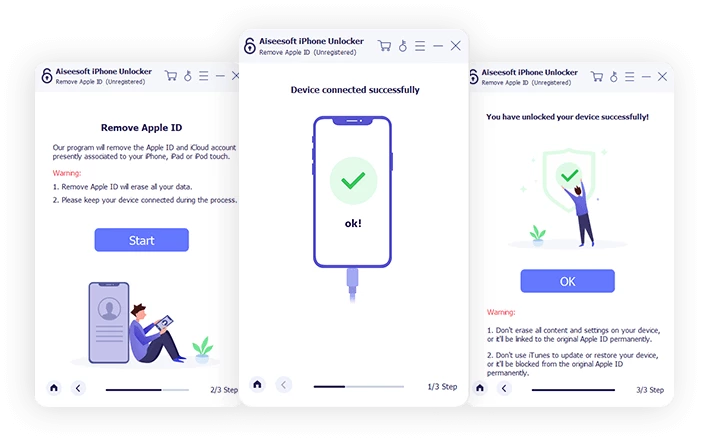
- Apple ID Removal: Deletes the existing account profile from an activated device. This allows the current owner to sign in with a completely new account, access App Store downloads, synchronize new local data, and prevent the previous account from tracking the hardware remotely or issuing a remote wipe command.
- Screen Time Restriction Recovery: Reads or disables local screen time limits without causing any data loss. The tool extracts the restriction data directly from the local device file structure, lifting app limits, communication limits, and usage timers while keeping all personal media and applications completely intact.
- MDM Profile Bypass: Strips Mobile Device Management configurations imposed by corporate offices or educational administrators. Bypassing this profile restores full local administration rights, stops remote supervision, and prevents the organization from pushing unwanted applications or configuration payloads to the hardware.
- iTunes Backup Decryption: Clears local backup encryption settings stored on the hardware. When the old encryption password is lost, this function removes the encryption flag on the device, enabling users to create fresh, unencrypted local backups on their computer without needing the original security key.
- Activation Lock Bypass: Navigates past the initial setup screen on second-hand hardware that remains locked to a previous owner's account. This grants immediate access to the main menu and local applications without requiring the original credentials, making second-hand purchases usable again.
- Carrier and SIM Lock Bypass: Resolves specific device restrictions by clearing local carrier locks. This function helps users switch to a different cellular provider network when the original contract is finished or when migrating a locked phone to a new region entirely.
How to Install Aiseesoft iPhone Unlocker on Windows
- Navigate to the official Aiseesoft website and download the Windows 10 or Windows 11 compatible installer executable to your local disk.
- Launch the downloaded setup file to initiate the installation wizard. Windows User Account Control may prompt you to grant administrator permissions to proceed.
- Review the End User License Agreement carefully, accept the terms, and define the destination folder on your primary drive.
- Click the install button and allow the wizard to extract the necessary application files into the designated directory.
- Finish the setup process and let the application launch for the first time. The interface will open and present the main grid of unlocking modules.
- Ensure that official Apple device drivers are installed on your Windows 10 or Windows 11 computer. If you do not have them, installing the official desktop sync application from the Microsoft Store will automatically configure the necessary background services required to detect connected mobile hardware.
- Connect the locked iPhone or iPad to the computer using a certified data cable.
- Follow the on-screen animated prompts within the application to place your connected hardware into Recovery mode or Device Firmware Update mode, which is required before the unlocking procedure can begin.
Aiseesoft iPhone Unlocker Free vs. Paid
Aiseesoft operates on a standard premium licensing model designed to prevent accidental purchases by letting users test hardware compatibility first. The application offers a free trial tier, but its capabilities are strictly limited to device scanning and firmware preparation. Users can install the software, connect their locked hardware, and verify that the program correctly identifies the device model, lock type, and required system files. The trial will also allow the user to download the heavy firmware packages directly from the official servers, but executing the final bypass, decryption, or wipe action requires purchasing a valid license key.
The paid tiers are split into time-based subscriptions and perpetual purchase options. A Monthly Plan costs approximately $32 and covers unlocking functions for up to six devices on a single computer. For longer-term needs, an Annual Plan is available for around $50, while a Lifetime Plan provides permanent access and continuous updates for roughly $60. The Monthly and Annual plans default to an auto-renewal billing cycle unless canceled by the user through the payment portal. Aiseesoft also backs these consumer licenses with a 30-day money-back guarantee if the software fails to resolve the lock issue due to technical faults.
Business environments, enterprise IT departments, or repair shops handling high volumes of locked hardware can opt for specialized commercial licenses. These higher-tier packages extend the device limits significantly and allow the software to be installed on multiple computers simultaneously. For standard users opting for the perpetual license, there are no hidden fees, pay-per-unlock charges, or mandatory cloud subscriptions required to maintain the software's functionality.
Aiseesoft iPhone Unlocker vs. Tenorshare 4uKey vs. TunesKit iPhone Unlocker
Tenorshare 4uKey provides a highly polished interface and sits within a massive ecosystem of mobile repair utilities. It is well-suited for professional repair technicians who require extensive diagnostic logs and supplementary fixing modes to handle severely corrupted system files. However, Tenorshare's perpetual licenses often carry a higher price tag, and the sheer number of bundled options can feel slightly complicated for a standard home user who simply needs a one-time passcode fix for their personal hardware.
TunesKit iPhone Unlocker takes a minimalist, stripped-down approach that focuses purely on getting past the lock screen with minimal menu navigation. It is a highly effective choice for absolute beginners who might feel overwhelmed by advanced recovery modes or technical terminology. While it handles basic 4-digit and 6-digit unlocking perfectly, it lacks some of the deeper backup decryption and specialized profile removal settings found in competing desktop tools.
Aiseesoft iPhone Unlocker serves as a practical middle ground for users seeking both affordability and deep technical capability. It bundles extra modules like local backup decryption, Screen Time limit bypass, and corporate MDM profile removal into its standard lifetime license without attaching a heavy premium. This makes it a highly efficient desktop utility for individuals needing complete administrative control over their locked hardware without paying for enterprise-tier diagnostic suites.
Common Issues and Fixes
- Device not recognized by the software. Ensure that official Apple drivers are properly installed and running in the background on the Windows 10 or Windows 11 PC. Use a certified data cable and connect it directly to the motherboard's rear USB port rather than an external hub or a keyboard pass-through port.
- Firmware download fails or stalls at a specific percentage. This typically happens when network firewalls or third-party security software block the connection to the firmware servers. Pause the download, temporarily disable any active VPN, and ensure the computer has a stable, wired ethernet connection.
- Local data is missing after wiping the screen passcode. Bypassing a locked screen inherently forces a factory reset due to the built-in security architecture of the hardware. To recover your files, photographs, and messages, you must restore them from a previous cloud backup or a local network backup during the device's initial setup phase.
- Apple ID removal stops before completion. The removal protocol cannot proceed if the hardware tracking feature remains active on newer device system builds. You must physically disable this tracking setting in the device menus if you have partial access, or use the specific Activation Lock bypass mode instead of the standard account removal tool.
- Accessory Not Supported error blocks the connection. If the device screen displays a warning that the USB accessory requires unlocking, the data connection is being blocked by the hardware's internal security policy. Place the device into Recovery mode using the specific physical button combinations for your model before connecting the cable to the computer, forcing the hardware to accept the data link.
Version Latest — 2025
- Added a new functionality to bypass the iCloud Activation Lock screen, allowing access without the original Apple ID or password.
- Introduced a dedicated "Unlock SIM Card" mode to remove carrier restrictions and support SIM cards from any network.
- Enhanced the MDM (Mobile Device Management) removal feature to effectively handle abnormal or disabled devices.
- Optimized the main interface layout for smoother navigation and improved user experience.
- Fixed known bugs and improved the success rate of the unlocking processes.