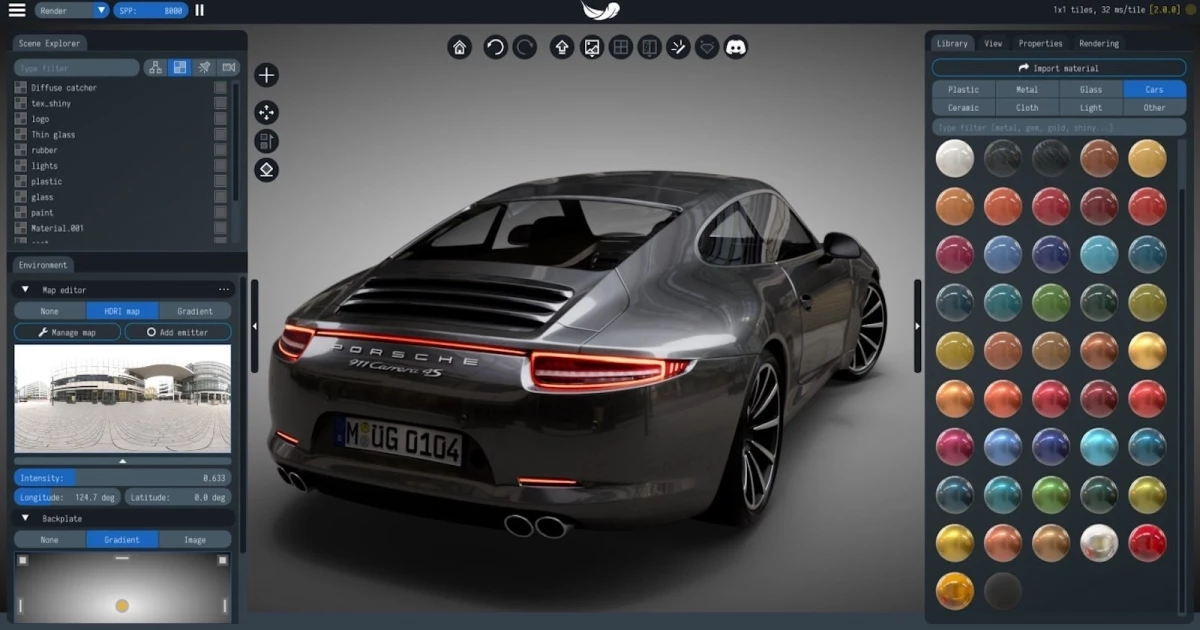
Light Tracer Render is a physically-based ray tracing engine built to convert raw 3D models into photorealistic product visuals. Designed primarily for product designers, jewelry makers, and 3D artists, the software bypasses the technical overhead associated with complex digital content creation suites. Instead of wrestling with node graphs and dense render settings, users can import engineering files or polygonal models, apply physical materials, and immediately see accurate lighting calculations in a real-time viewport. The application functions as a virtual photography studio where artists can set up gradient backplates, adjust image-based lighting rotation, define camera exposure, and place props for final marketing shots.
While a browser-based version exists for basic tasks, the standalone desktop application handles heavy production workloads. Local installation allows the software to directly interface with dedicated graphics hardware, bypassing browser memory limits. This means users can load massive CAD assemblies, process millions of polygons, and run high-resolution HDR environments without crashing. By relying on local GPU hardware cores, the desktop software delivers instant visual feedback. This immediate response makes it possible to adjust lighting, swap materials, and dial in camera settings without waiting for slow bucket renders to finish.
In commercial workflows, the concrete job this software solves is turning an untextured polygon mesh or STEP file into a client-ready image. Whether simulating the light dispersion in a faceted diamond or the exact clearcoat reflections on a car body, the engine calculates the physical behavior of light interacting with surfaces. Because it relies on actual path tracing rather than rasterized approximations, shadows, refractions, and indirect bounces behave exactly as they would in the physical world, eliminating the need to fake lighting setups with artificial fill lights.
Key Features
- Hardware Ray Tracing and AI Denoising: The rendering core directly addresses NVIDIA and AMD hardware ray tracing cores to speed up light calculation. Users can toggle between Software RT and Hardware RT in the backend settings. The engine pairs this hardware acceleration with Intel OID artificial intelligence denoising to rapidly clear noisy pixel samples in the viewport, saving hours of processing time per image.
- PBR Material Cloud Library: The Library tab provides direct access to over 1,700 physically based materials, ranging from textured plastics to rough glass. Users can search for specific presets using the tags popup and download textures in resolutions ranging from 1K to 8K directly into their local storage. All downloaded assets are governed by a CC0 license.
- Rendering Layers for Compositing: Users can separate complex scenes into distinct visual groups, allowing a gemstone to receive high-contrast lighting while the metal band receives soft studio lighting. These layers merge directly using built-in composite math. The default Disjoint-over blending operation calculates a clean graphical edge between overlapping foreground and background elements.
- Broad CAD and 3D Format Import: The import pipeline handles standard polygonal formats like OBJ, FBX, glTF, and PLY alongside native Rhino 3DM files and raw STEP or IGES engineering assemblies. When importing CAD data, users can adjust the target tessellation precision to balance geometry detail against hardware memory limits. It also reads vertex color data from imported PLY files.
- Interactive Physics Tool: A built-in collision engine allows users to drop objects into a scene naturally rather than placing them by coordinate manipulation. By simulating gravity and physical interactions, scattered items reach realistic resting positions. The updated physics engine also supports recording physical trajectories for simple animation rendering.
- Jewelry and Gemstone Controls: The camera toolkit includes Academy Color Encoding System (ACES) color management, preventing color clipping in bright highlights. It also includes cinematic depth of field and customizable bloom effects that generate accurate optical glare and fire in faceted stones, which is crucial for high-end jewelry visualization.
- Advanced Lighting and Environment Animation: The Animation tab allows users to animate the environment mapping by tracking the pivot positions of light sources over time. Users can construct a continuous path for the lights to move, shift temperatures, or change size. A gradient environment mode also helps artists create custom studio lighting setups by adjusting color at the top and bottom of the map.
How to Install Light Tracer Render on Windows
- Download the Windows installer package directly from the vendor's official release page to ensure you receive the correct architecture build.
- Locate the downloaded executable file in your system downloads folder and double-click it to initiate the setup wizard.
- Review the end-user license agreement and select a destination folder with sufficient disk space for the core program files and local texture caches.
- Allow the setup process to unpack the ray tracing engine binaries, material definitions, and user interface elements onto your local storage drive.
- Review the optional installation tasks, such as creating a desktop shortcut or pinning the application to your taskbar for faster access.
- Click Finish to exit the installer and automatically launch the rendering environment for the first time.
- Upon the initial launch, navigate to the startup screen and enter a valid email address to begin the 14-day trial, allowing the software to authenticate your machine.
- Sign in using your registered credentials to establish a connection with the cloud material library, enabling on-demand downloads of high-resolution textures.
Light Tracer Render Free vs. Paid
Light Tracer Render operates on a tiered model that caters to casual users and dedicated professionals. A basic, browser-based version of the engine is available entirely for free, allowing users to upload small models and render them without installing any local software. This web tool relies on WebGL and handles simple lighting setups, though it lacks the memory capacity and direct hardware access of the native desktop application.
For local production, the desktop application requires a paid license after a trial period. Users can test the complete software via a 14-day trial that requires no credit card and imposes no watermarks or export restrictions. During this testing window, all local rendering features, physics simulations, and material library downloads are fully unlocked, providing a clear picture of the rendering performance on your specific graphics card.
Once the trial expires, users must purchase a license to continue using the desktop engine. The vendor offers an accessible perpetual license, typically priced around $99, which grants permanent offline access to the installed tier. This permanent licensing structure appeals to users operating outside of enterprise budgets. Alternatively, users can opt for a low-cost monthly subscription to keep the software active only during active project phases. There are no hidden fees for the cloud material library, as the downloadable textures operate under a CC0 license.
Light Tracer Render vs. KeyShot vs. Marmoset Toolbag
KeyShot is the enterprise standard for industrial design rendering, offering deep, native plugins for major engineering software and an extensive material graph. It handles raw NURBS data exceptionally well without requiring upfront tessellation. However, KeyShot has transitioned to a strict annual subscription model costing over a thousand dollars per year. For corporate engineering departments, this cost makes sense due to the direct CAD integration, but for independent creators, the pricing creates a significant barrier to entry.
Marmoset Toolbag is designed specifically for game development, focusing on real-time rasterization, texture baking, and character asset presentation. It excels at preparing models for game engines and offers a highly responsive viewport. Toolbag struggles, however, with the exact optical physics required for fine jewelry, accurate glass refraction, and multi-layered automotive paints because it prioritizes game-ready approximations over unbiased path tracing.
Light Tracer Render provides a stronger workflow for independent product designers and jewelry makers who require photorealistic ray tracing and CAD import without KeyShot's massive subscription fees. It offers the exact optical behaviors—like isolated geometry for prongs and multi-layered ACES compositing—that product designers need, bypassing the game-centric texture baking workflows of Toolbag.
Common Issues and Fixes
- Diamonds refracting incorrectly due to intersecting metal prongs. When metal geometry overlaps a glass object in a 3D model, the light calculation breaks. In the Properties widget, open the advanced material settings and activate Isolated mode for the gemstone. This instructs refracted rays to ignore the intersecting metal, restoring accurate internal reflections without requiring geometry modifications.
- Visible graphical artifacts appearing around transparent object labels. This occurs when the transparency mask fails to blend correctly with the underlying material noise. Ensure you are running the most recent engine build and apply the label using the Disjoint-over blend mode in the layer settings to calculate a clean graphical edge.
- Identical diamond cuts failing to exhibit distinct sparkle patterns. If multiple stones share an identical material name, the rendering engine may group their lighting properties. Return to your 3D modeling program and assign unique material identifiers to each cut type before importing the file into the rendering workspace.
- Rendering calculations slowing down heavily when the application window loses focus. Earlier builds paused background rendering to conserve system resources. Open the application preferences and toggle the background rendering state to active, allowing the engine to calculate pixel samples even while the window is minimized.
- High-resolution cloud materials causing GPU memory exhaustion. Downloading 8K textures for background objects consumes VRAM quickly, which can slow down the path tracer. Right-click the downloaded material in the Library tab and select a lower resolution variant, such as 2K or 4K, to free up hardware memory for the actual ray tracing process.
Version 3.2.1 — November 2025
- Enhanced undo and redo functionality for improved workflow control
- Improved overall stability and reliability of the rendering engine
- Refined user interface ergonomics for smoother daily operations
- Resolved multiple minor workflow issues for better user experience
- General bug fixes and performance optimizations