Occipital Skanect serves as a practical bridge between physical environments and digital workspaces, transforming widely available depth sensors into fully capable 3D scanning hardware. Rather than relying on highly expensive specialized laser scanning equipment, this application takes the infrared depth data from consumer devices like the Microsoft Kinect 360 or Asus Xtion Pro Live and translates it into dense 3D meshes. By projecting an array of infrared dots onto a subject and reading the distortion, the software calculates depth and geometry, rendering a digital replica on the computer screen. This approach provides an accessible entry point for users who need to digitize real-world items without mastering complex CAD modeling from scratch.
The core demographic for this tool includes 3D printing enthusiasts, independent game developers, and practical effects artists who require rapid digitization of props, people, or environments. For example, a cosplay fabricator can scan a person's arm to design custom-fitted armor pieces, or an indie game designer can scan a clay sculpt to use as a base mesh within a game engine. While modern smartphones sometimes include small depth sensors, utilizing a dedicated Windows desktop application offers significant advantages. A desktop computer provides the necessary thermal headroom and graphical processing capability to calculate complex spatial data, allowing users to watch the mesh formulate on a large monitor. This instant visual confirmation ensures that all angles of the object are captured before concluding the scanning session.
Operating as a dedicated desktop client also means users avoid the friction of uploading raw, massive point cloud data to a remote server for processing. All geometric calculations, hole filling, and texture mapping occur locally on the machine. This local workflow is crucial for maintaining privacy when scanning individuals and ensures that users can continue working without an active internet connection. By focusing purely on the translation of raw sensor data into optimized, print-ready or game-ready polygons, the application solves the specific hardware-to-software gap that historically kept home users out of the digital capture ecosystem.
Key Features
- Feature Name: Real-Time Mesh Generation and Feedback: During the scanning process, the application renders the developing 3D model directly in the main viewport. Users can select low, medium, or high-quality feedback depending on their computer's processing capabilities. This live view uses a color-coded system to indicate the distance between the sensor and the subject, alerting the operator if they are too close or too far away.
- Feature Name: Pre-Defined Recording Scenarios: To simplify the calibration process, the interface includes a dropdown menu with specific bounding box presets labeled as Body, Object, and Room. Selecting the Object preset shrinks the virtual scanning volume to focus entirely on a tabletop item, increasing the density of the capture within that localized space.
- Feature Name: Hardware-Accelerated Offline Reconstruction: Once the raw recording finishes, the initial real-time mesh is often rough. The software includes an offline reconstruction tool that recalculates the captured frames at the maximum possible fidelity. By utilizing a CUDA-compatible NVIDIA graphics card, the program accelerates this complex math, turning millions of data points into a smooth surface.
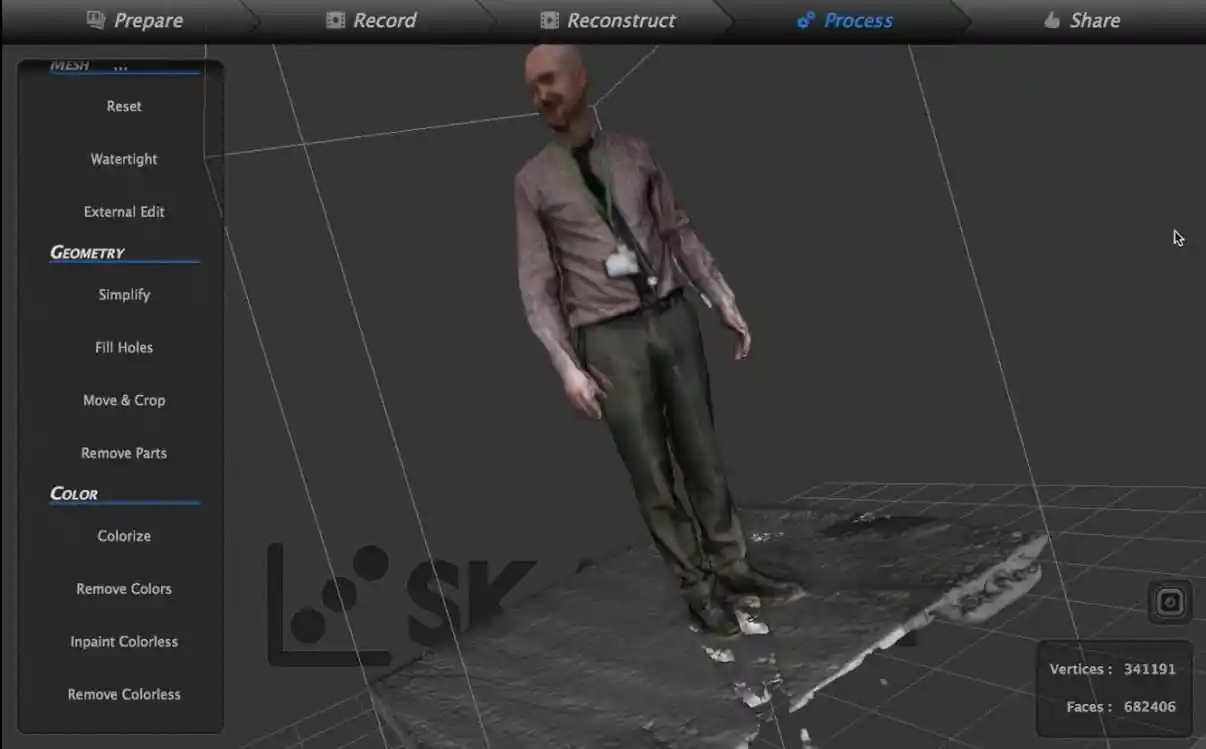
- Feature Name: Watertight Geometry Repair: Raw 3D scans frequently contain holes where the sensor could not see, such as the top of a person's head or the underside of an object. The Processing tab contains a dedicated Watertight function that analyzes the perimeter of these gaps and automatically generates new polygons to seal them, preparing the model for 3D printing.
- Feature Name: Plane Cropping and Model Simplification: Before exporting, users must often remove unwanted environmental data, such as the table an object was resting on. The application provides intuitive cropping sliders that slice through the bounding box along the X, Y, and Z axes, deleting any polygons outside the designated area. The simplification tool also allows users to reduce the overall polygon count through decimation.
- Feature Name: Universal File Export Options: To ensure compatibility with external digital content creation tools, the software supports multiple industry-standard file formats. Users can export their final models as OBJ or PLY files, which retain the captured vertex colors and external texture maps necessary for game engines. The STL export option provides a pure geometry file without color data, which is required by desktop 3D printer slicing applications.
How to Install Occipital Skanect on Windows
- Download the Occipital Skanect installer archive from our website directly to your local storage drive, ensuring you have enough space for the application and future scan data.
- Extract the contents of the downloaded archive using a file archiver tool into a new, dedicated folder on your Windows desktop.
- Open the readme.txt file located inside the extracted folder to verify the specific hardware driver prerequisites, as depth sensors require the correct SDK drivers to communicate with Windows.
- Run the main setup executable file from the extracted directory to launch the installation wizard and initiate the deployment process.
- Accept the end-user license agreement and specify your preferred installation directory path, such as the default Program Files location on your primary system drive.
- Choose whether to create desktop shortcuts for quick access, then allow the installer to copy the core application files and libraries to your computer.
- Complete the installation process and launch the software. Upon the first launch, the program will automatically scan your USB ports to detect any connected depth sensors and check your system for a CUDA-compatible graphics card.
Occipital Skanect Free vs. Paid
The pricing structure for Occipital Skanect is divided into a strictly limited free tier and a single paid premium tier. The free version of the software provides unrestricted access to the complete scanning workflow, including all recording presets, real-time feedback, and post-processing tools. Users can scan objects, reconstruct the mesh, fill holes, and apply color textures without any time limits or watermarks on the screen. However, the critical limitation of the free tier applies during the final export phase. When saving a 3D model to a local drive, the free version restricts the output file to a maximum of 5,000 faces, or polygons. For complex objects or human faces, a 5,000-polygon limit results in a highly degraded, blocky mesh that loses nearly all fine detail, making it unsuitable for detailed 3D printing or high-resolution animation.
To bypass this export restriction, users must purchase the Occipital Skanect Pro license, which costs $129 as a one-time payment. Purchasing the Pro license unlocks unlimited polygon exports, allowing users to save their 3D models at the exact resolution captured by the hardware. A high-quality scan can easily contain hundreds of thousands or even millions of polygons, and the Pro license ensures every captured detail is retained in the final OBJ or STL file. Furthermore, the paid tier grants the right to use the software for commercial purposes, which is required for freelance 3D artists, medical professionals, or game development studios generating assets for profit.
Upgrading from the free version to the Pro version does not require downloading a separate, heavier installer. Instead, users simply purchase the license and input the provided code directly into the settings menu of their existing installation. This instantly unlocks the export capabilities. For casual hobbyists who only want to experiment with depth sensors, learn the basics of digital capture, or create low-poly artistic renderings for video games, the free version serves as an excellent learning environment without requiring a financial commitment. For anyone intending to send accurate models to a 3D printer, machine physical parts, or import realistic props into a digital engine, the one-time cost of the Pro license is required to achieve practical, high-fidelity results that accurately represent the scanned subject.
Occipital Skanect vs. ReconstructMe vs. Meshroom
ReconstructMe operates as a direct alternative in the depth-sensor scanning category, utilizing the same infrared camera hardware to generate real-time 3D models. It also provides live mesh building and has the distinct advantage of being completely free without polygon export restrictions, following the end of its commercial development. Users who want a fully unrestricted scanning application at zero financial cost should choose ReconstructMe. However, Occipital Skanect offers a significantly more refined user interface, better built-in mesh healing tools for closing complex holes, and more reliable color texture mapping, making it the better choice for users who prioritize a smooth workflow over a completely free, discontinued application.
Meshroom approaches 3D scanning from an entirely different technological angle, using photogrammetry rather than active depth sensors. Instead of projecting infrared dots into a physical space, Meshroom analyzes dozens or hundreds of standard digital photographs taken from multiple angles to calculate geometric depth. This process results in extreme sub-millimeter accuracy and incredibly high-resolution texture maps that look photorealistic. Users who need archival-quality 3D assets for high-end film production and own a high-quality DSLR camera should choose Meshroom. Conversely, Occipital Skanect is the better option when speed, simplicity, and a lightweight file size are required; while photogrammetry can take hours of intensive background computation to render a single object on a desktop computer, depth sensor scanning provides a finished, workable mesh in under two minutes.
Ultimately, Occipital Skanect is the better fit for individuals who already own hardware like the Kinect 360 and want immediate, tangible results for 3D printing or rapid prototyping. It bypasses the strict lighting requirements and lengthy processing times associated with photogrammetry. While it cannot match the extreme visual fidelity of photo-based scanning, its real-time tracking, intuitive bounding box controls, and automated watertight repair functions create a highly efficient pipeline for hobbyists and practical effects artists who value quick turnaround times.
Common Issues and Fixes
- Problem description: The software displays a "GPU unavailable" warning upon launch. This warning appears when the computer does not contain an NVIDIA graphics card, or when the installed NVIDIA drivers lack the necessary CUDA toolkit support for hardware acceleration. To fix this, update your graphics drivers directly from the NVIDIA website, or navigate to the software's settings menu and switch the processing mode from GPU to CPU, keeping in mind that CPU reconstruction will take significantly longer.
- Problem description: The sensor connection status remains stuck on "Waiting for uplink". This is almost always caused by an incorrect or conflicting USB driver, particularly if other scanning applications were previously installed on the system. The fix involves completely uninstalling the current sensor drivers from the Windows Device Manager, restarting the computer, and cleanly installing the official SDK 1.8 drivers to restore communication.
- Problem description: Exported 3D models appear severely blocky and lack surface detail. This occurs when users attempt to export a complex model using the free tier of the application, which artificially caps the file output at 5,000 polygons. The only fix to retrieve the dense, high-resolution geometry stored in the program's memory is to purchase and activate the Pro license, which removes the export cap entirely.
- Problem description: The real-time scan breaks and the screen flashes red due to tracking loss. Depth sensors align geometry by recognizing distinct physical shapes; if an object is too symmetrical, too smooth, or moved too quickly, the software loses its spatial orientation. To fix this, place the target object on a turntable, scatter random geometric items like small boxes or rocks around the base to act as tracking anchors, and rotate the table very slowly.
Version 1.11.0 — June 2024
- Enhanced compatibility with Structure Core sensors for improved depth scanning accuracy
- Optimized GPU reconstruction performance with updated CUDA support for modern graphics cards
- Refined user interface for streamlined 3D scanning workflow
- Improved real-time mesh generation with enhanced tracking algorithms
- Updated support for Structure Sensor, Microsoft Kinect, and Asus Xtion depth cameras
- Enhanced color capture capabilities for more accurate texture mapping
- Stability improvements for Windows 64-bit platform