Capture One Pro is a professional-grade raw image converter and photo editing environment designed for studio photographers, commercial shooters, and serious hobbyists. It focuses on rendering highly accurate colors directly from the camera sensor, providing detailed local adjustments, and managing large volumes of high-resolution files. Instead of functioning as a basic filter application, it acts as a complete workspace where users ingest, organize, cull, edit, and export their photography. The interface is built around customizability, allowing users to move tools, rearrange panels, and configure dual-monitor setups that match their specific daily workflows.
For studio and location shoots, the software relies heavily on a tethered capture system. Photographers connect their cameras directly to a computer via USB, bypassing memory cards to save files straight to the local hard drive. This immediate transfer allows art directors, clients, and the photographer to review high-resolution images on a large monitor just seconds after the shutter clicks. By keeping operations localized to the desktop application, users maintain total control over their file storage without waiting for mandatory cloud syncs or dealing with slow internet connections during a demanding session.
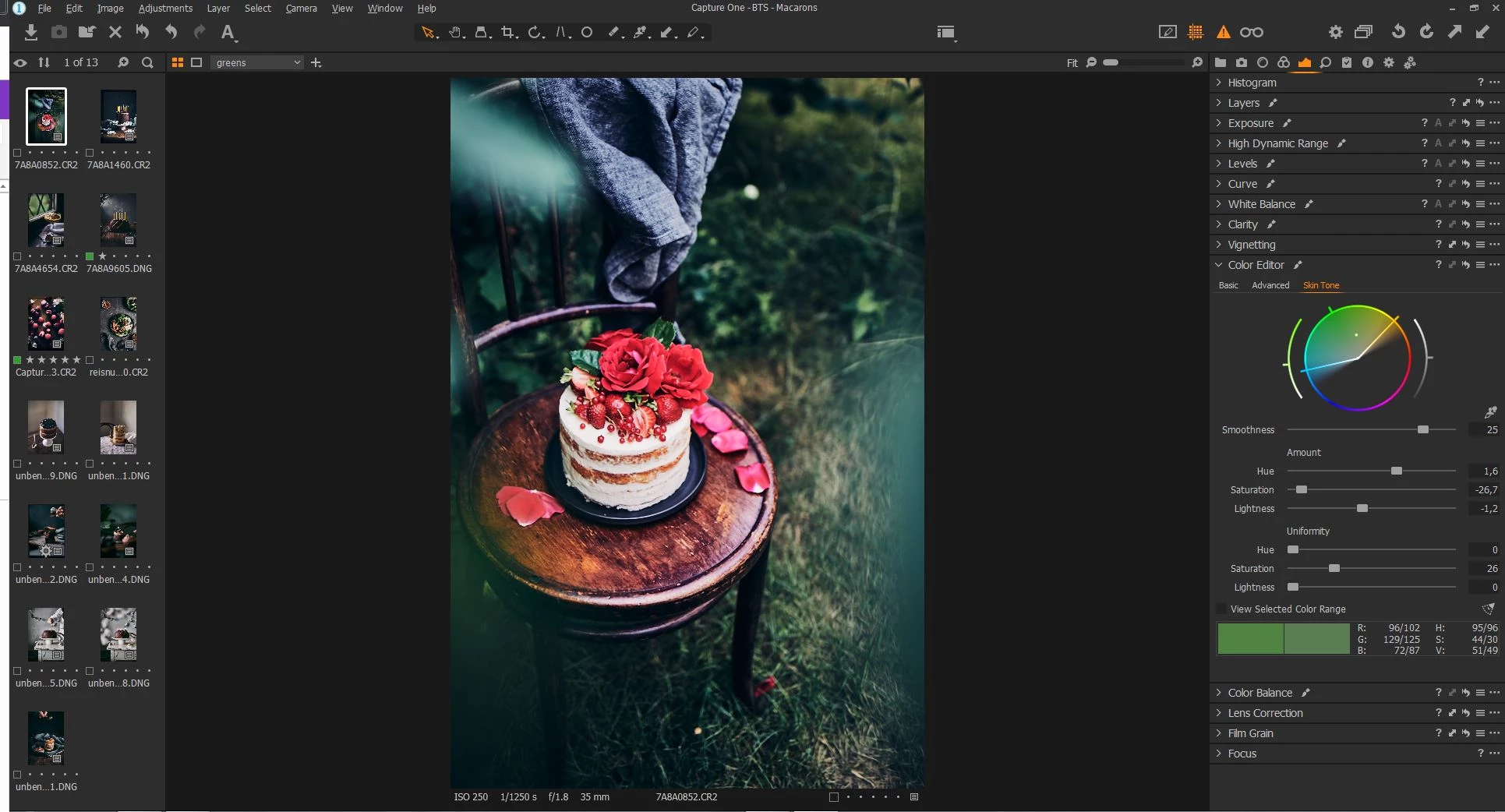
Beyond studio environments, the application provides an extensive set of manual editing controls paired with targeted automation. The layer-based editing system allows users to apply adjustments to specific parts of an image without altering the global exposure. Tools like the advanced color editor isolate specific hues for modification, making it possible to change the color of a garment or adjust skin tones while leaving the background untouched. File organization is another area where the software adapts to different working styles. Users can choose between building a centralized database known as a Catalog, or using directory-based structures called Sessions, which keep all raw files, settings, and output folders safely contained within a single portable directory for a specific client job.
Key Features
- Advanced Tethered Capture: Connect your camera directly to your computer to send images straight to your hard drive as you shoot. The tethering module includes a Live View mode for real-time composition framing, Snap to Eye focus controls for precise sharpness checks, and immediate automatic backup to secondary local drives. It also supports remote triggering and camera setting adjustments directly from the desktop interface.
- Layer-Based Editing: Apply localized adjustments using a non-destructive layer system similar to dedicated pixel editors. You can stack multiple layers, adjust the opacity of each specific edit, and use specialized tools like Luma Range to restrict adjustments to specific brightness levels. This is highly useful for recovering blown-out skies without darkening the foreground subject.
- Advanced Color Editor: Isolate and manipulate specific color ranges using a dedicated eyedropper tool and a detailed color wheel. You can alter the hue, saturation, and luminance of a single element—such as changing the color of a car or a dress—without affecting similar tones in the surrounding environment. A dedicated Skin Tone tab ensures portrait subjects maintain natural complexions across an entire batch of photos.
- Customizable Workspaces: Rearrange the entire user interface to fit your specific editing habits and monitor configuration. Every adjustment panel operates as a floating tool, meaning you can detach histograms, color balances, and exposure sliders to place them exactly where you want, or spread the interface across multiple displays. You can save these layouts as custom presets for different types of work, such as tethering versus post-processing.
- Speed Edit Keyboard Controls: Work exceptionally fast without moving your cursor to individual sliders. By holding down specific, customizable hotkeys, you can scroll your mouse wheel or use trackpad gestures to instantly adjust parameters like exposure, contrast, and saturation. This allows you to keep your eyes entirely on the image while making rapid adjustments across multiple photos.
- Process Recipes: Export a single image into multiple formats, sizes, and color spaces simultaneously with one click. By configuring specific recipes, you can generate a full-resolution TIFF for professional printing, a compressed sRGB JPEG for web delivery, and a watermarked proxy file for client review all at the same time. Each recipe can route its output to a specific sub-folder automatically.
How to Install Capture One Pro on Windows
- Navigate to the official Capture One website and locate the Windows installer package from your account dashboard or the trial download section.
- Double-click the downloaded executable file to launch the setup wizard on your Windows 10 or Windows 11 machine.
- Review the end-user license agreement, accept the terms, and click next to proceed to the destination folder selection screen.
- Choose the installation path on your primary storage drive, or leave the default directory location, and click install to begin copying the application files.
- Wait for the setup process to extract the required dependencies, install any necessary visual C++ redistributables, and place the shortcut on your desktop.
- Launch the application from the Start menu and enter your account credentials to authenticate your active license or to initiate the 30-day trial period.
- Allow the software a few moments during its first run to optimize its OpenCL hardware acceleration settings for your installed graphics card, ensuring smoother visual performance.
Capture One Pro Free vs. Paid
Capture One Pro does not offer a free tier or a restricted lightweight version. The software operates entirely as a premium, paid application aimed at professional users, studio environments, and dedicated enthusiasts. New users can download a fully functional 30-day trial to evaluate the tools, test tethering compatibility with their specific camera bodies, and explore the raw processing engine. Once the trial period concludes, the software requires a paid license to continue editing, exporting, and capturing images.
The primary purchasing model is a subscription plan, available on a monthly or annual billing cycle. An annual subscription typically costs between $179 and $231 depending on regional pricing and promotional discounts. Subscribing provides continuous access to the application, including all feature updates, new camera profile additions, and new lens correction data as long as the subscription remains active. If the subscription is canceled, the software eventually reverts to a restricted state, preventing new edits or tethered captures.
For those who prefer to avoid recurring fees, a perpetual license is available for a one-time payment of approximately $299 to $369. This outright purchase grants permanent access to the specific software release available at the time of purchase, including minor bug-fix updates for that immediate cycle. However, perpetual license holders do not receive major future tool updates or support for newly released cameras unless they pay for an entirely new upgrade license.
The vendor also runs a loyalty program designed to bridge the gap between subscription and perpetual models. Under this system, long-term subscribers who maintain their active status for an extended period can eventually secure a perpetual license for their current build at a significantly reduced rate. This provides an exit strategy for professionals who eventually wish to stop paying monthly fees but want to keep a working copy of their primary editing environment.
Capture One Pro vs. Lightroom vs. DxO PhotoLab
Lightroom represents Adobe’s standard for raw processing and photo management. It relies heavily on a unified ecosystem, syncing edits across desktop, mobile, and web applications through proprietary cloud storage. Users typically choose Lightroom for its highly effective AI generative removal tools, its vast library of community presets, and its inclusion in the Creative Cloud photography plan, which bundles Photoshop for extensive pixel manipulation. However, Lightroom enforces a mandatory subscription model with no perpetual alternative, and its tethering capabilities are generally considered slower and less reliable in fast-paced studio environments compared to dedicated software.
DxO PhotoLab focuses heavily on optical corrections and extreme noise reduction. Its DeepPRIME processing engine uses advanced machine learning to clean up high-ISO raw files with remarkable detail retention and minimal artifacting. Photographers who shoot wildlife, sports, or documentary events in low light often prefer DxO for its pure image quality and exact lens profiling. It is also available as a perpetual license, appealing strongly to those avoiding subscriptions. However, PhotoLab lacks the extensive cataloging tools, advanced multi-layer editing, and specialized tethered shooting features required for managing complex commercial or portrait workflows.
Capture One Pro remains the better fit for commercial studio photographers, portrait artists, and product shooters who require extreme control over color and immediate feedback. While it carries a higher premium price tag than its competitors, its extreme interface customizability, superior color grading tools, and fast, stable tethering engine make it highly efficient for demanding sessions. When immediate client review, precise skin tone adjustments without Photoshop, and localized layer controls are the priority, this desktop application delivers a highly specialized environment that generic editors struggle to match.
Common Issues and Fixes
- Hardware acceleration causes crashes or masking errors. Users sometimes experience visual glitches or application hangs when generating complex AI masks or exporting large batches. Go to Preferences, select the General tab, and change the Hardware Acceleration (OpenCL) setting from Auto to CPU or Never. This forces the software to use the main processor instead of the graphics card, ensuring high stability during export.
- Tethered connection drops randomly during a shoot. The camera may disconnect from the computer if the data transfer is interrupted or underpowered. Ensure you are using a high-quality, powered data cable and verify that your camera's USB connection mode is set to PC Remote or Tethering. Avoid using passive extension cables that degrade the signal over long distances.
- Catalog or Session performance slows down noticeably. As databases grow to hold thousands of raw files, browsing and loading times can increase significantly. Navigate to the File menu and select Verify Catalog or Session. This process checks the internal database for corruption and repairs minor structural errors, which often restores normal browsing and loading speeds.
- Colors appear incorrect or overly saturated upon import. Sometimes the software applies an automated curve that may not match your intended look or standard camera output. Check the Base Characteristics tool panel to ensure the correct ICC profile and curve are applied to your specific camera model. Switching the curve to a more neutral linear response can provide a better starting point for heavy color grading.
- Import renaming creates duplicate suffixes on JPEG files. If you are syncing star ratings between raw files and JPEGs using Sidecar XMP data, batch renaming can sometimes append a numerical suffix to the JPEG file, breaking the sync. Temporarily disable XMP sync in the application preferences before executing bulk renaming operations to avoid file name mismatches, then re-enable it afterward.
Version 16.7.2 — December 2025
- Added new ability to export layer masks directly as alpha channels when saving to PSD and PSB formats, streamlining compositing workflows.
- Introduced visual thumbnails for masks within the Layers and Masks Tool to easily identify specific masked areas at a glance.
- Enhanced Combine Masks functionality, now allowing the use of the Magic Brush on submasks and the ability to rename submasks for better organization.
- Improved performance of AI-powered tools (including AI Crop, Culling, and Face Skin Retouching) on Windows devices via Snapdragon NPU acceleration.
- Extended Capture One Live capabilities to retain Star Ratings and Color Tags for a longer duration after sessions expire.
- Added native support for new camera models, including the Canon EOS R6 Mark III, Leica Q3 Monochrom, and Sony FX2.
- Fixed issue where specific tethering configurations could cause instability with certain Sony camera models.