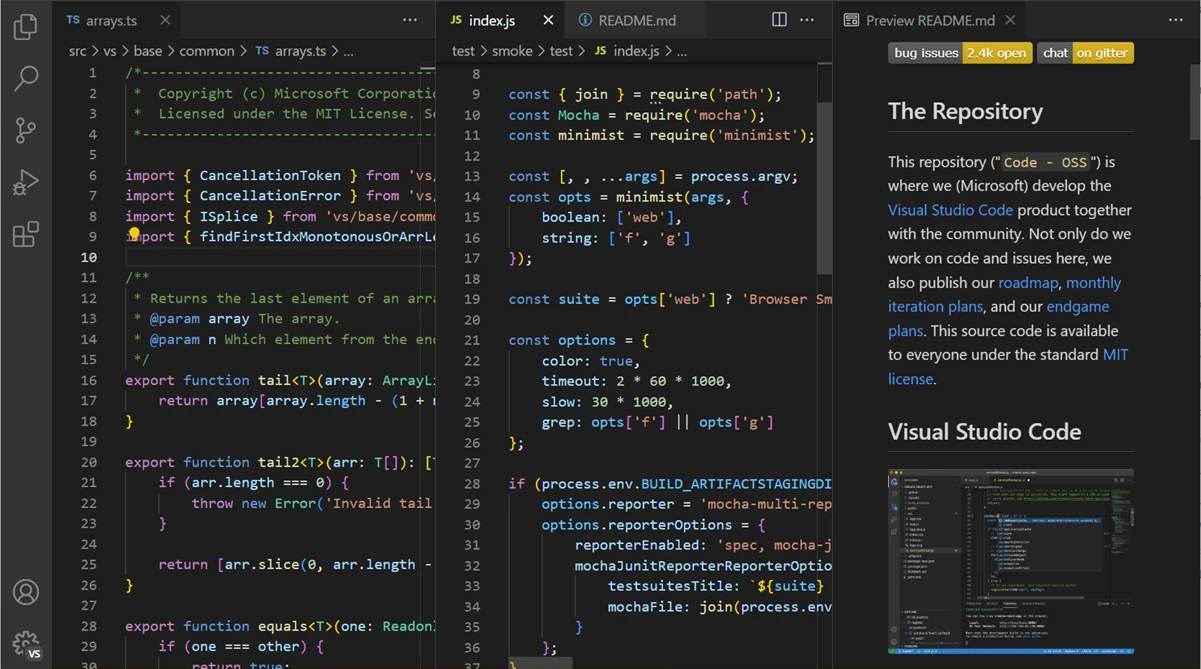
Visual Studio Code operates as a specialized text editor that transforms standard script writing into an active programming environment. By offering deep integration with background AI agents and an extensive extension marketplace, this software development tool helps programmers write, debug, and test projects with strict control over their workflow. Rather than functioning as a bulky, pre-configured IDE, the core application remains lightweight. Developers install exactly the language parsers, remote debuggers, and chat customizations they require for their specific tasks without loading unnecessary background processes.
The editor handles multiple programming languages simultaneously, relying on an active engine to provide smart completions based on variable types, function definitions, and imported modules. Programmers interact with their codebase through an integrated terminal, a Git-backed source control panel, and a highly customizable workspace layout divided into distinct activity bars, side panels, and editor groups. Recent updates prioritize multi-agent AI workflows, adding dedicated interfaces for session memory management and agentic browser tools. These tools test code changes in active web applications directly from the editor, reducing the need to switch windows constantly during development.
Running the desktop application provides distinct advantages over browser-only coding environments. Local installation offers direct access to the local file system, complete integration with Windows command-line tools like PowerShell, and full hardware utilization for compiling heavy applications locally. Users working in complex enterprise repositories or localized machine learning environments rely on local execution to manage dependencies, modify system variables, and format syntax accurately across large directories. You can press a single keyboard shortcut to bring up the Command Palette, giving you immediate access to every configured command, active extension, and background task without clicking through dense menu trees.
Key Features
- Agent Plugins: Developers can securely install prepackaged bundles of chat customizations, analytical tools, and workflow hooks directly from the Extensions view to expand their coding assistant's capabilities. These add-ons connect directly to the editor's command palette and sidebars to execute complex refactoring tasks, generate boilerplate code based on project-specific rules, or review error logs.
- Agentic Browser Tools: This integrated utility allows the background AI assistant to drive a web browser automatically, interacting with your active application to test features and verify its own code changes without manual oversight. The tool bridges the gap between text editing and active debugging by directly manipulating document object model elements and reporting rendering errors back to the integrated terminal.
- Session Memory and Context Compaction: The editor persists complex project plans and architectural guidance across multiple conversation turns while allowing manual compression of chat history. This mechanism frees up context window space during long debugging sessions, preventing token limits from stalling the background AI when analyzing large codebases.
- Agent Debug Panel: Programmers gain real-time visibility into background events, remote tool calls, and loaded custom instructions to precisely track how their multi-agent AI workflows operate behind the scenes. This panel surfaces the exact prompts sent to external models and the raw JSON responses, allowing users to troubleshoot failing agent commands quickly.
- Kitty Graphics Protocol Integration: Users can render high-fidelity images directly within the integrated terminal without requiring external image viewers or browser pop-ups. This support proves particularly useful for data scientists and frontend developers who need to review plot outputs, UI component generation, or raw asset updates in real time directly from their command-line scripts.
- Integrated Source Control: The application provides a dedicated view for tracking file modifications, staging commits, and resolving merge conflicts directly from the side panel. Rather than switching to an external command-line interface, users can click line-by-line diffs to review changes, push code to remote repositories, and manage branches using visual dropdown menus.
- IntelliSense Autocomplete: The editor provides code completion, parameter info, and quick info tooltips powered by language-specific servers running in the background. Instead of matching raw text strings, the engine reads variable types and imported modules to suggest syntactically correct inputs as you type, significantly reducing manual documentation lookups.
How to Install Visual Studio Code on Windows
- Download the designated Windows User Installer package from the official Microsoft source, ensuring you have standard user privileges, which avoids prompting administrator credentials during a standard local install.
- Execute the setup file and review the standard End User License Agreement before proceeding to the installation directory selection screen.
- Keep the default installation directory within your local AppData folder to maintain user-level isolation, or specify a custom path on your local drive if organizational policies dictate specific software locations.
- Review the optional tasks during the setup wizard, making sure to check the boxes for "Add to PATH" and adding the "Open with Code" actions to the Windows Explorer file and directory context menus for faster file access.
- Click the install button and allow the unpacker to extract the necessary core binaries and dependencies onto your local storage.
- Launch the application to trigger the initial setup tab, where you can select a dark or light color theme, sync user settings using a connected Microsoft or GitHub account, and open the Extensions tab to begin downloading language support packages.
- Restart any active command prompt or PowerShell windows to ensure your environment recognizes the new system PATH variables, allowing you to type "code ." in any folder to open the editor immediately.
Visual Studio Code Free vs. Paid
Visual Studio Code operates as a completely free application for both private and commercial use. Microsoft distributes the compiled binaries under a proprietary license, but the underlying source code is maintained openly under the MIT License. You do not need a subscription, a one-time purchase, or a mandatory license key to access the core editor, the integrated terminal, or the debugging tools. Small independent developers and large enterprise teams use the exact same application binary without encountering artificial watermarks, line-count limits, or blocked export functionalities.
While the editor itself costs nothing, the surrounding ecosystem frequently involves paid services depending on your workflow. Many of the most popular extensions, particularly background AI agents and remote development environments, require active subscriptions to third-party providers. For example, utilizing advanced conversational coding assistants directly within the side panel often requires linking an active GitHub Copilot subscription or purchasing API credits from external AI model hosts.
Cloud integration and remote hosting functions also carry separate costs outside of the application. Developers using the interface to connect to remote containers, virtual machines, or specific enterprise deployment services must pay for the computing resources consumed on those external platforms. The desktop editor merely acts as the free client connecting to those billed remote environments. Microsoft also includes free telemetry collection by default to gather usage data, though users can disable this tracking entirely within the settings menu.
Visual Studio Code vs. IntelliJ IDEA vs. Sublime Text
IntelliJ IDEA requires significant memory and storage resources to run effectively, operating as a heavy Integrated Development Environment. It indexes entire project directories heavily upon startup to provide deep Java-focused refactoring, strict structural analysis, and out-of-the-box database integration. Developers working exclusively in massive Java enterprise frameworks often prefer IntelliJ IDEA because it bundles almost every required build tool, server configuration, and framework analyzer natively without relying on a scattered marketplace of third-party plugins.
Sublime Text prioritizes raw speed, minimal memory consumption, and immediate startup times above heavy modularity. The application opens large text files almost instantly and handles massive log files without stuttering, utilizing a very clean, distraction-free interface built in C++. Programmers who primarily need to quickly edit configuration files, parse massive raw text dumps, or write plain scripts without waiting for background language servers to initialize frequently reach for Sublime Text as their primary text manipulation utility.
Visual Studio Code provides the best balance for developers who want the structural assistance of an IDE without the initial system drain, particularly when working across multiple languages like Python, TypeScript, and Rust in the same session. It wins directly on its modularity, allowing users to bolt on heavy AI capabilities, agentic browser tools, and remote debugging extensions only when their specific project demands it. You should choose Visual Studio Code if you rely heavily on an active extension ecosystem, frequent Git integration, and direct terminal access within a highly customizable interface.
Common Issues and Fixes
- High CPU and memory usage during idle. Background language servers or conflicting extensions often loop through large workspace directories, consuming processing power. You can isolate the problem by opening the built-in Process Explorer from the Help menu to identify the exact extension consuming resources, then disable it or restrict your active workspace to a smaller specific folder.
- Integrated terminal fails to load. The editor occasionally fails to initialize the default command-line profile, often due to a corrupted shell path configuration in the user settings. Navigate to the settings file and verify that the `terminal.integrated.defaultProfile.windows` property points correctly to your local executable for Command Prompt or PowerShell.
- Extensions refuse to install or update. Strict firewall rules or network proxies can block the application from reaching the extension marketplace servers. You can bypass this restriction by manually downloading the extension as a VSIX file from the web marketplace and using the "Install from VSIX" command within the Extensions view dropdown menu.
- Git source control panel remains empty. The application relies on the system-level Git installation to track repository changes, and it will show an empty panel if Git is missing from the Windows environment variables. Reinstall Git for Windows and ensure you check the option to add Git to your system PATH during the installation process, then restart the editor.
- Auto-formatting applies incorrect spacing. Conflicting formatter extensions, such as having multiple Python or JavaScript formatters active simultaneously, can cause the editor to apply incorrect indentation upon saving. Open your settings JSON file and explicitly define the default formatter for each specific language using the `editor.defaultFormatter` property to resolve the conflict.
Version 1.110.0 — March 2026
- Introduced Agent Plugins, allowing users to easily discover and install pre-packaged bundles of AI skills, tools, and chat customizations directly from the Extensions view.
- Added experimental Native Browser Control for AI agents, enabling them to autonomously navigate web apps, capture visual screenshots, and analyze real-time console errors without relying on external dependencies.
- Enhanced AI session memory to ensure development plans, custom instructions, and project context persist reliably across multiple conversation turns.
- Implemented Context Compaction, giving users the ability to automatically or manually summarize long AI chat histories to free up context window space.
- Added Session Forking via the
/forkcommand, which lets developers branch an existing AI chat into a new, independent thread while inheriting all previous conversation history. - Debuted a new Agent Debug Panel in preview, providing real-time visibility into AI background events, tool executions, and system prompts for easier troubleshooting.
- Upgraded the integrated terminal with support for the Kitty graphics protocol, making it possible to render high-fidelity images directly within the command line interface.
- Improved the management of Background Agents, allowing developers to offload complex, long-running tasks to the Copilot CLI while actively monitoring their progress within the editor.