BandLab Cakewalk operates as a dedicated digital audio workstation for Windows, providing the precise architecture required to record, edit, mix, and master multi-track audio projects. Originally known as SONAR, this desktop environment caters to musicians, audio engineers, and beatmakers who need a localized setup to handle low-latency ASIO tracking and complex third-party VST plugin loads. While browser-based alternatives handle lightweight loop arrangements, a dedicated desktop application remains strictly necessary for tracking live bands, managing hardware synthesizers, and executing dense vocal comping without network delays. The application acts as the central hub for the modern studio, bridging physical recording equipment with digital processing tools.
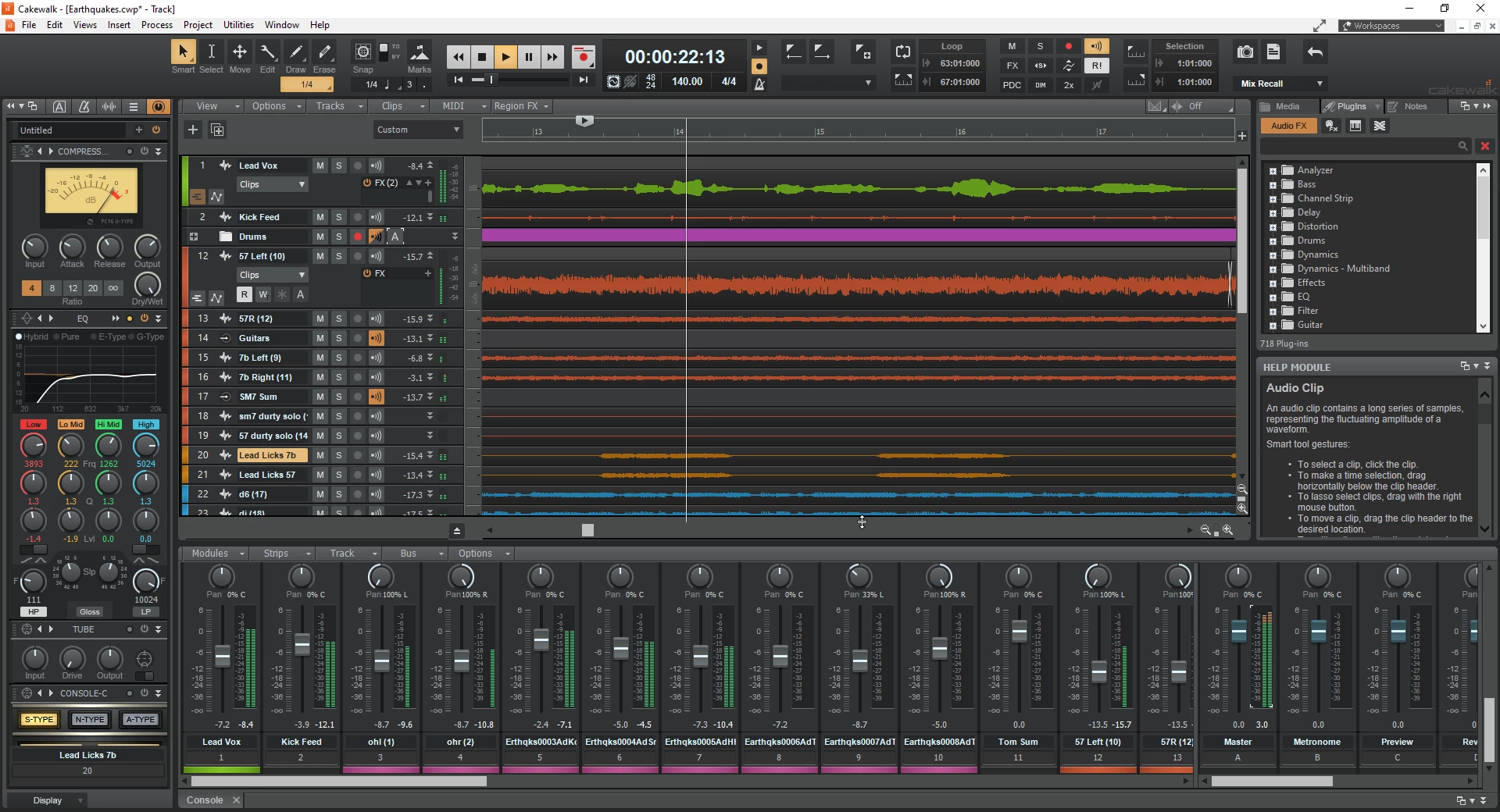
The software addresses the heavy technical demands of a traditional recording facility by centralizing the mixing console, timeline arrangement, and piano roll into a single dockable workspace. Users rely on this platform to route multiple microphone inputs simultaneously, apply console-style equalization, and quantize MIDI performances down to individual ticks. Instead of buying individual compressor and tape emulation plugins, engineers utilize the native channel strip to shape drum busses and vocal tracks directly on the mixer. Because it natively supports complex internal audio routing and advanced pitch correction directly on the timeline, producers select this workstation when they need strict control over their entire signal chain from initial acoustic capture to the final stereo export.
By executing all processing locally on the user's hardware, the application avoids the compression artifacts and latency inherent in cloud-based DAWs. Producers can record a guitarist playing through high-gain amplifier simulations while maintaining the low buffer sizes necessary for real-time monitoring. The software organizes takes into track lanes, allowing editors to splice the best parts of multiple performances into one master take using crossfades. Automation lanes allow for precise control over volume, panning, and effect parameters over time, ensuring that mixes remain dynamic. This focus on concrete, offline studio tasks makes it a primary tool for users who prioritize deep editing capabilities, strict timing accuracy, and vast track counts over simplified beat-making applications.
Key Features
- ProChannel Console Strip: Every audio and MIDI track includes a built-in modular channel strip located in the Inspector view. This allows engineers to apply the PC76 U-Type compressor, SSL 4000-style equalization, and tube saturation directly to the signal without loading external third-party plugins. Users can drag and drop these modules to change the signal flow order instantly, allowing for aggressive compression before or after equalization.
- Skylight User Interface: The workspace uses a dockable panel system tailored for high-DPI displays and multiple monitors. Users can snap the Piano Roll, Step Sequencer, and Console View into the MultiDock at the bottom of the screen, keeping arrangement and mixing tools visible simultaneously. Panels can be collapsed with keyboard shortcuts to maximize timeline visibility during editing. The Inspector panel on the left dynamically updates to show the properties of the currently selected track or clip.
- Integrated ARA2 Support: The timeline allows direct integration with compatible pitch and timing correction tools like Melodyne and VocalSync. Producers can edit vocal pitch directly inside the audio clip without recording the signal into a separate plugin window in real time, saving significant administrative time during vocal production. The timing of individual notes within a polyphonic chord can also be adjusted directly on the arrangement view.
- Matrix View: This cell-based interface lets users load audio loops, one-shots, and MIDI patterns into a grid format. Producers can trigger these cells using an external MIDI controller in sync with the project tempo to arrange songs on the fly. This provides a non-linear method to test different beat combinations before committing them to the linear timeline.
- 64-Bit Mix Engine: The internal audio engine calculates math at 64-bit precision, providing vast headroom for the mix bus and individual channels. This prevents internal digital clipping when summing dozens of heavily processed tracks, ensuring the final stereo output maintains the exact original signal clarity of the individual stems. The engine allows for extreme gain staging without degrading audio fidelity.
- Smart Tool Cluster: The default mouse cursor automatically changes function based on where it hovers over an audio clip. Hovering near the top edge applies a volume fade, the bottom edge allows razor slicing, and the center handles clip movement. This design reduces the need to manually switch tools via menu clicks during complex podcast or multi-track drum editing.
- Step Sequencer: Designed specifically for programming drum machines and synthesized basslines, this tool provides a grid for placing rhythmic hits. Users can adjust velocity, swing, and flam settings for individual steps, fine-tuning the groove of a high-hat or snare pattern. The resulting pattern exports directly to the timeline as a standard MIDI clip for further arrangement and orchestration.
How to Install BandLab Cakewalk on Windows
- Download the installer archive from our website and extract it to a local, easily accessible folder on your computer.
- Open the extracted folder and double-click the
readme.txtfile to review any last-minute system configuration notes or required Windows dependencies. - Run the primary setup executable file from the extracted folder as an administrator to initiate the installation wizard.
- Select your preferred installation directory, typically leaving it at the default
C:Program FilesCakewalkpath, and define the destination folder for your VST plugin library. - Choose which optional components to install, such as studio instruments, drum kits, and demo projects. Allow the wizard to extract and copy the necessary application files to your local drive.
- Launch the software from the newly created desktop shortcut once the setup sequence finishes.
- On the initial launch screen, log into your free BandLab account when prompted to authorize the local license and access the main workspace.
- Navigate to Edit > Preferences > Audio to select your hardware ASIO driver, configure your physical inputs, and adjust the buffer size for low-latency recording.
BandLab Cakewalk Free vs. Paid
BandLab structures this digital audio workstation with a highly capable free tier alongside an optional premium membership. The core desktop application operates on a free perpetual license, granting users full access to unlimited audio tracks, MIDI sequencing, the 64-bit mix engine, and the ProChannel effects strip. This base tier covers all necessary tools for traditional offline tracking, editing, and mixing without requiring a payment method. Users can save, export, and manage their projects locally without encountering forced watermarks or track count limits.
The paid tier functions as an overarching BandLab Membership, which costs approximately $14.95 monthly or between $149 and $179 annually. Subscribing to this service unlocks cloud-centric additions that integrate into the desktop software, such as unlimited track stem separation, direct access to royalty-free samples from the browser, plugin oversampling capabilities, and commercial distribution services. Membership also provides tools for the company's mobile and web-based platforms.
For home studio owners and independent engineers who rely on their own local sample libraries and third-party VSTs, the free tier delivers the complete studio experience. The premium membership primarily serves producers who want integrated cloud distribution, continuous access to BandLab's online audio assets, and advanced computational features like stem splitting directly within the DAW environment.
BandLab Cakewalk vs. Reaper vs. Studio One
Reaper offers a highly efficient processing engine that runs smoothly on older hardware and excels at custom macro programming, costing $60 for a discounted personal license. Users should choose Reaper if they need deep script customization, highly unusual routing where any track can act as a folder, or a minimal CPU footprint. However, Reaper opens as a completely blank slate. BandLab Cakewalk provides a stronger workflow for users who want immediate access to built-in analog console emulations and a structured mixing environment without spending hours configuring menus.
PreSonus Studio One provides a highly visual, drag-and-drop production environment with excellent integration for external hardware controllers and digital mixers. It is the better choice for producers who prioritize a modern beat-making workflow using the dedicated Scratch Pad feature or tight integration with PreSonus interfaces. However, accessing its advanced capabilities requires purchasing a high-tier perpetual license. BandLab Cakewalk offers a stronger workflow for producers on a budget, delivering advanced tools like ARA2 integration and a 64-bit mix engine without the high financial barrier.
BandLab Cakewalk fits best for Windows users who want a traditional, large-format studio console experience immediately after installation at no base cost. It provides a more cohesive out-of-the-box mixing workflow than Reaper due to the pre-configured ProChannel strip, and it bypasses the strict paywalls of Studio One's top tiers. It strikes a practical middle ground, delivering ready-to-use professional tools within a structured, dockable interface for traditional tracking and mixing.
Common Issues and Fixes
- Audio dropouts or crackling during playback. This occurs when the computer processor struggles to calculate all active effect plugins in real time. Fix this by navigating to Edit > Preferences > Audio and increasing the ASIO buffer size to 512 or 1024 samples to give the CPU more processing time.
- Exported WAV or MP3 files are missing audio. This happens if a specific track is routed to the wrong output bus or if the timeline selection is too short. Fix it by confirming all track outputs are assigned to the Master Bus, then press Ctrl+A to highlight the entire project length before clicking File > Export.
- Legacy SONAR projects crash on load. Old project files containing discontinued 32-bit plugins, such as the TTS-1 synthesizer, can cause the modern engine to close unexpectedly. Fix this by holding the Shift key while opening the project file to launch Safe Mode, which allows you to manually skip loading the problematic legacy instruments.
- Third-party VST plugins do not appear in the browser. The application will not display external effects if it is not scanning the correct directory. Fix this by opening Preferences > VST Settings, clicking "Add" to select the exact folder path where your .dll or .vst3 files live, and clicking the "Scan" button.
- MIDI keyboard inputs are not triggering sound. This happens when the hardware controller is recognized by the operating system but not enabled inside the software. Fix this by going to Preferences > MIDI > Devices, checking the box next to your keyboard model in the Inputs list, and ensuring the active virtual instrument track has its Input set to your specific keyboard.
Version 2025.11 — November 2025
- Added Cakewalk Assist: Introduced a new unified command palette (default shortcut Ctrl+/) that allows users to instantly search for and execute commands, navigate to specific views, and access settings or help documentation without browsing menus.
- Updated TH-U Cakewalk Edition: Refreshed the plugin with a photorealistic user interface, added multi-line chain routing capabilities, and introduced a MIDI-controllable Polyphonic Transpose feature.
- Improved Playback Performance: Optimized the audio engine to eliminate sluggishness when slip-editing clips or using lasso selection while playback is active.
- Fixed ASIO Driver Hang: Resolved a stability issue where the application could hang indefinitely if the selected ASIO driver was simultaneously engaged by another program at a different sample rate.
- Fixed Project Save Error: Addressed a rare bug that caused project saves to fail with an incorrect "Cannot write file - disk may be full" error message.
- Fixed System Idle Crashes: Implemented better handling of hardware and control surface suspension to prevent crashes when the computer enters sleep or idle modes.
- Fixed Arranger Track Sync: Corrected an issue where toggling Arrangement Loop Enable/Disable failed to visually update the Arranger Inspector interface.
- Added File Management Option: Included a new "Open File Location" command in the context menu for Associated Audio Files, allowing for quicker access to source assets in Windows Explorer.