GitHub Desktop provides a graphical interface that simplifies version control and repository management, allowing developers to track code changes without relying on command-line terminal prompts. By transforming abstract repository histories into a highly readable visual dashboard, this Git client helps programmers focus entirely on creating and refining their software projects. The application streamlines the daily development experience, making it practical to coordinate collaborative coding efforts, synchronize remote updates, and manage local files through straightforward menus rather than memorized syntax.
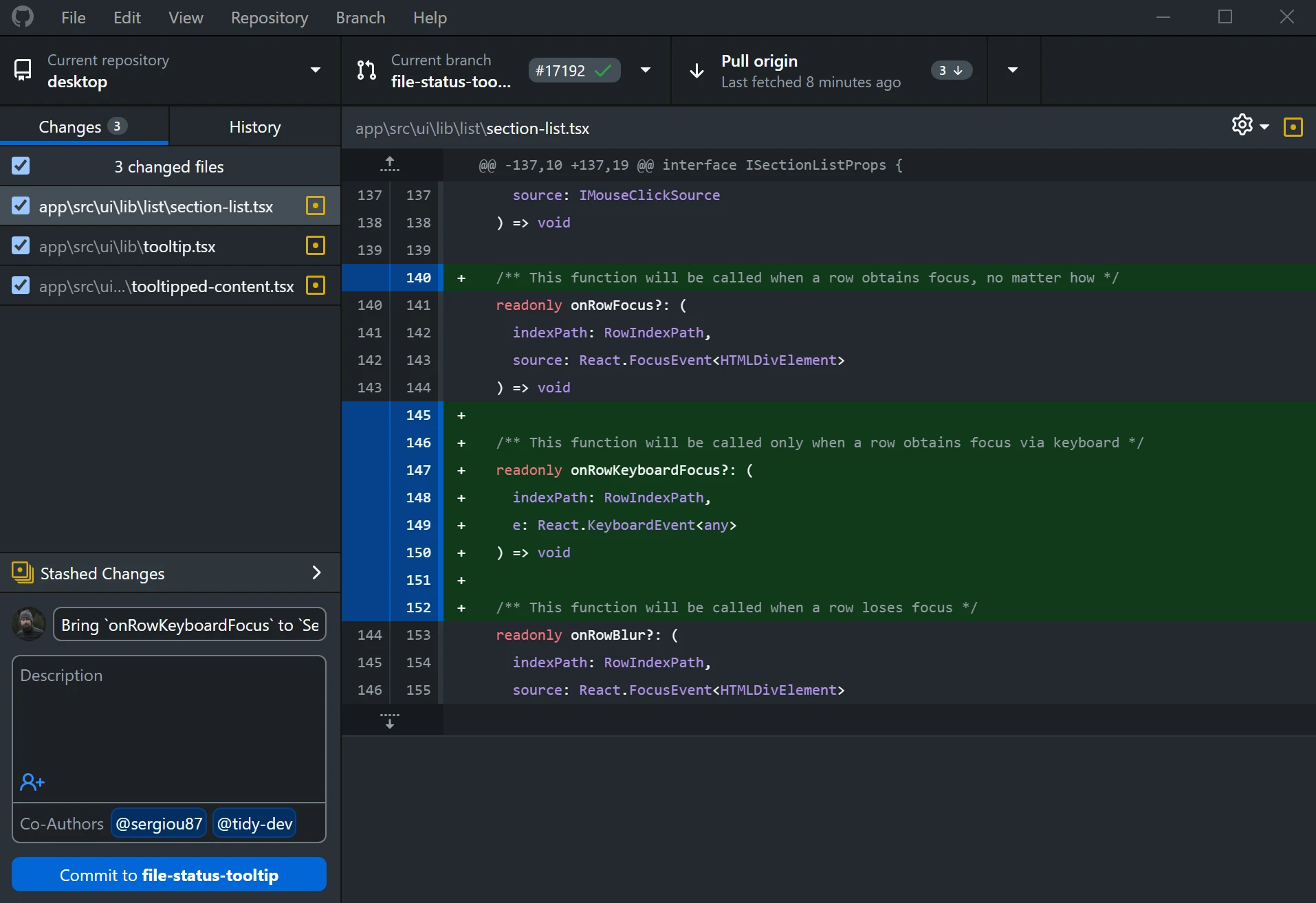
Designed primarily for individuals and teams hosting their work on remote servers, the software handles the heavy lifting of staging, committing, pushing, and pulling files. When developers write scripts or build applications, tracking exactly what changed between daily saves becomes critical. Instead of forcing users to guess which files were modified, the application reads the local directory and instantly highlights added or deleted lines. This visual confirmation ensures that developers only upload the specific edits they intend to share with their team, keeping project histories organized and accurate.
While terminal commands remain the traditional method for managing repositories, a dedicated desktop application reduces friction during complex operations like resolving conflicts or reverting mistakes. Users who prefer to stay out of the console can handle their entire daily workflow from cloning a new project to submitting a final pull request directly through the visual dashboard. This approach accelerates onboarding for newer developers while giving experienced engineers a faster way to review large, multi-file code diffs before pushing them to production.
Key Features
- Feature Name: Visual Branch Management. Instead of typing checkout commands to isolate new code, developers can use the branch dropdown menu to create, switch, or publish branches to a remote server. The interface clearly displays which branch is currently active, preventing accidental commits to the main production line. If you need to bring in changes from another branch, the application provides a dedicated menu option that previews the incoming commits before you finalize the merge.
- Feature Name: Integrated Conflict Resolution. When multiple team members modify the exact same lines of code, the software catches the overlapping edits and prevents a broken merge. The interface displays a warning marker and provides a direct button to open your preferred text editor, allowing you to choose whether to keep your local modifications or accept the remote changes before completing the sync.
- Feature Name: Stashing and Rebasing. If you need to switch contexts abruptly to fix an urgent bug, you can temporarily store uncommitted modifications using the stashing tool. Once the bug is fixed, you can pop the stashed changes back into your working directory. Additionally, the rebasing feature allows you to rewrite your local commit history so it stacks cleanly on top of the main branch, maintaining a linear project timeline.
- Feature Name: Granular Commit Controls. The application provides a split-view or unified diff layout that shows exactly which characters were added in green and which were removed in red. You can create partial commits by simply checking or unchecking the boxes next to specific files or individual lines of code, ensuring that your commit only contains relevant updates.
- Feature Name: Expanded Editor Integration. You can launch your preferred programming environment straight from the repository interface with a single click. The software automatically detects popular editors like Visual Studio Code, Sublime Text, or Notepad++ installed on your machine, bridging the gap between writing scripts and versioning them without manually navigating file directories.
- Feature Name: Pull Request Previews. Before merging a branch, you can monitor automated checks and continuous integration statuses directly inside the desktop client. The interface connects to your repository hosting service to display whether your current code passes or fails required validation tests, reducing the need to constantly refresh a web browser during the review process.
How to Install GitHub Desktop on Windows
- Begin by downloading the Windows installer package from the official vendor website. Ensure you are running a 64-bit version of Windows 10 or Windows 11, as 32-bit architectures are not supported.
- Launch the downloaded executable file. The setup process is entirely automated and installs the application directly to your local user directory without requiring administrator privileges or custom folder routing.
- Wait for the installation to complete, at which point the application will automatically launch and present the welcome screen.
- Click the sign-in button to connect your hosting account. This will open your default web browser and ask you to authorize the application via a standard secure login flow.
- Return to the application once authorized to configure your global Git author details. You must enter the name and email address that will be publicly attached to all your future commits.
- Select a default local directory path where the application will store all cloned repositories. It is recommended to choose a dedicated folder on your primary drive to keep your projects organized.
- Click finish to complete the setup. You can now begin cloning existing remote projects or creating brand new local repositories from the main dashboard.
GitHub Desktop Free vs. Paid
GitHub Desktop is an open-source project and is distributed entirely without charge. There are no paid tiers, premium feature unlocks, or subscription requirements to use the desktop application itself. Developers can install the software on as many Windows workstations as they need without managing license seats, worrying about trial expiration dates, or dealing with export watermarks.
Because the application acts as a client for remote Git repositories, the only pricing variables involve the hosting platforms you connect it to. If you sync your local project with an online hosting account, your account on that platform dictates storage limits, action minutes, and private repository collaboration rules. However, the desktop client imposes no artificial limits on how many local repositories you can manage, how many commits you make, or how many branches you configure offline.
Teams looking for enterprise-grade security or specialized compliance tools will find those features tied to corporate hosting subscriptions. The desktop application integrates directly with these enterprise environments, offering specialized sign-in routes for single sign-on deployments, but the client executable remains the exact same free tool used by independent developers.
GitHub Desktop vs. Sourcetree vs. GitKraken
Sourcetree is a graphical client maintained by Atlassian that offers deep control over complex repository operations. It provides extensive visual aids for branching and merging, along with advanced tools like interactive rebase drag-and-drop, commit templates, and detailed submodule management. However, its interface is significantly denser, presenting a steeper learning curve for beginners, and users often report performance slowdowns when attempting to fetch or pull data from massive repositories.
GitKraken is a highly visual alternative that displays a colorful, interactive commit graph in the center of the screen, making it incredibly easy to visualize parallel development timelines. It includes a built-in terminal, predictive merge conflict alerts, and dedicated issue tracking panels. The main drawback is its licensing model; while it offers a free version for public projects, using GitKraken to manage private repositories requires purchasing a commercial Pro license, which can be a barrier for independent developers on a budget.
GitHub Desktop is the better fit for pure simplicity and rapid onboarding without financial restrictions. It strips away the visual clutter found in Sourcetree and avoids the paywalls associated with GitKraken. If your primary goal is to fetch, commit, and push code reliably while reviewing clear diffs, this application delivers exactly what is needed without overwhelming you with advanced topological graphs or complex configuration menus.
Common Issues and Fixes
- Problem description: Authentication fails with a bad credentials error. This typically happens when the saved access token expires or becomes corrupted. To fix this, navigate to File > Options > Accounts, click Sign Out, and then sign back in. If the issue persists, open the Windows Credential Manager and delete the saved Git entries before authenticating again.
- Problem description: Merge conflicts prevent the repository from syncing. When overlapping edits occur, Git halts the merge process to prevent data loss. To resolve this, click the warning prompt in the desktop application to open the affected file in your configured text editor. Manually delete the conflict markers, save the file, and return to the application to finalize the merge commit.
- Problem description: Large file commits block the push process. Git natively struggles with massive binary files, audio assets, or large compiled executables. Fix this by opening the command prompt and initializing Git Large File Storage (LFS) globally. Afterward, go to the Repository menu in the desktop client, select Repository Settings, and specify the exact file extensions you want LFS to track.
- Problem description: SSH key permission denied errors interrupt remote connections. If your local machine lacks a properly configured SSH key, the remote server will reject your push attempts. The simplest fix is to navigate to the Repository Settings menu and change the remote URL format from SSH to HTTPS. This allows the application to handle authentication through its built-in token system instead of relying on local SSH certificates.
Version 3.5.5 — February 2026
- Added comprehensive support for Git hooks, enabling them to inherit shell environment variables, output real-time colored terminal text, and allowing users to skip or bypass failed commit hooks.
- Added integration support for the Warp terminal on Windows environments.
- Added a new right-click context menu action to quickly open and view any branch directly on the GitHub website.
- Added the ability to temporarily launch a repository in an alternate code editor without modifying the global default editor settings.
- Improved commit visibility by prominently displaying the official Copilot avatar next to commits authored by GitHub Copilot.
- Improved underlying systems by updating the embedded Git engine to version 2.53.0 and the Git Credential Manager to version 2.7.0.
- Fixed application crashes that could occur when Git terminal output contained emojis or multibyte characters.
- Fixed repository state errors that triggered when navigating between branches that contained submodules.
- Fixed an IDE detection failure for development environments installed via the JetBrains Toolbox.