Image Line FL Studio is a professional digital audio workstation built specifically for electronic music producers, beatmakers, and audio engineers. Rather than relying on basic browser-based loop editors that struggle with high track counts and heavy virtual instrument processing, this desktop application provides a dedicated, low-latency environment for composing, arranging, mixing, and mastering audio. By running natively on Windows systems, the software grants producers direct access to CPU multithreading and custom ASIO audio drivers. This direct hardware access is strictly required to handle complex synthesizer rendering, live MIDI keyboard tracking, and real-time audio effects without system crashes.
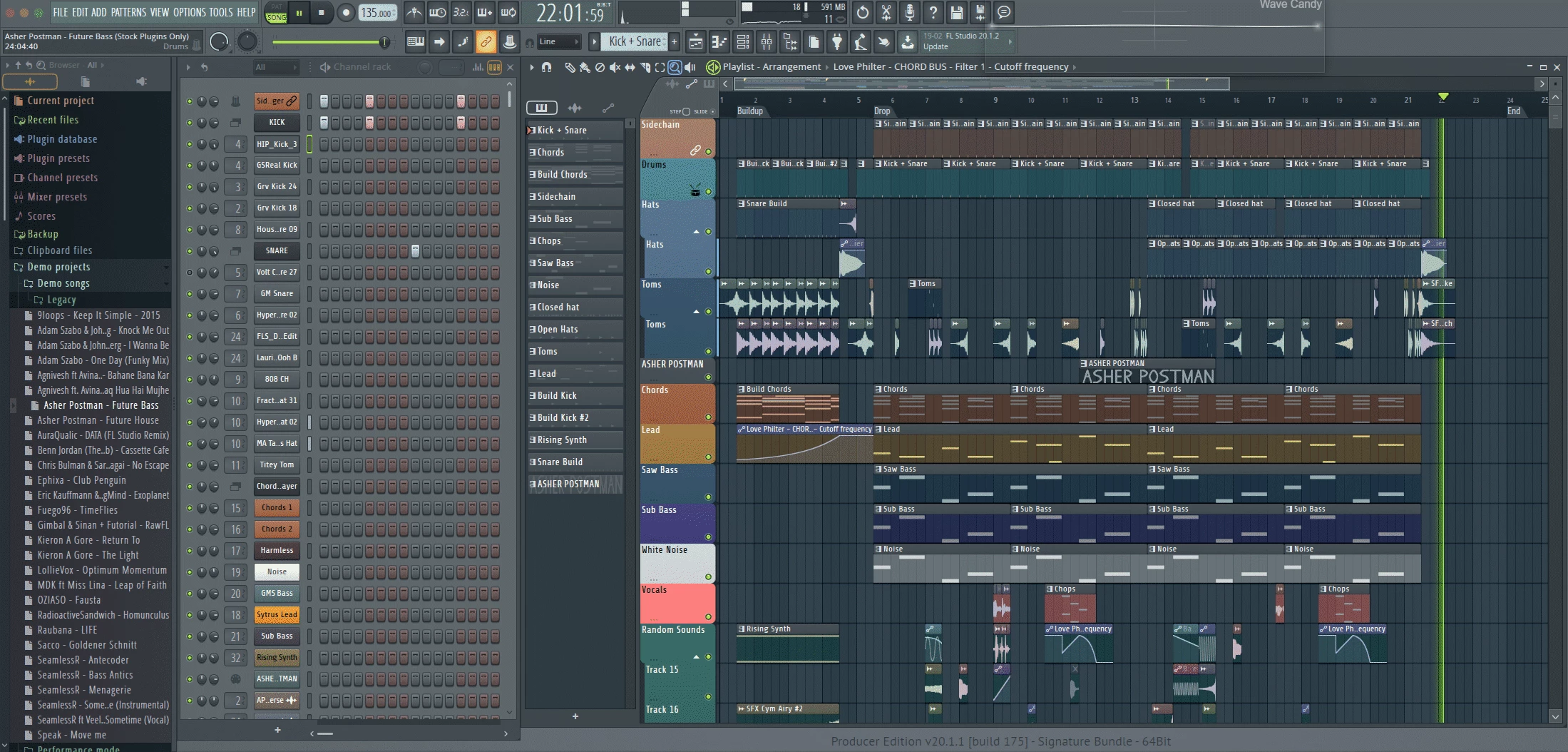
The software operates fundamentally around a unique pattern-based workflow. It allows users to build drum sequences, basslines, and melodies independently in small blocks before painting those blocks onto a master playlist timeline. This modular approach caters heavily to hip-hop, trap, and electronic dance music creators who construct tracks by building and layering repetitive sections. Users rely on the platform to host third-party VST instruments, route multiple audio signals through complex mixer channels, and apply digital signal processing tools like equalization, compression, and reverb in real time.
Compared to lighter alternatives, the application efficiently handles massive project files containing dozens of layered software synthesizer instances and high-fidelity vocal takes. It provides the specific architectural depth needed for professional mixing, including mid-side equalization, multiband compression, and peak limiting. These precise mastering tools ensure exported tracks meet the strict loudness and clarity standards required by modern streaming platforms. The desktop environment provides keyboard shortcut mastery and window docking customization that web-based tools simply cannot replicate.
Key Features
- Dynamic Mixer System: The mixing console allows users to route any audio or instrument track to any of the 125 available mixer inserts. It supports complex sidechain control for pumping effects, customizable effects chains, and advanced automation curves for track volume and panning.
- Gopher AI Assistant: This intelligent workflow tool helps generate musical ideas and suggests structural improvements directly within the piano roll interface. It assists producers in breaking through creative blocks by offering context-aware chord progressions and melody generation based on the active scale.
- Clip-Level Audio Editing: Audio samples placed on the Playlist timeline feature unique clip controls for non-destructive manipulation. Users can adjust fade-in and fade-out curves, apply crossfades between overlapping audio clips, and tweak volume envelopes directly on the waveform without opening a separate destructive audio editor.
- Loop Starter and FL Cloud: The integrated browser provides drag-and-drop access to an extensive, continually updated library of royalty-free samples, loops, and vocal chops. It operates natively inside the main interface, syncing downloaded tempo-matched loops instantly to the project grid without requiring users to hunt for files in external folders.
- Transporter Plugin: This integrated creative tool manipulates audio sections for live performance and complex track transitions. It acts as a specialized loop effect that buffers and rearranges the audio output, creating unique beat-juggling, stuttering, and time-stretching effects on the fly.
- Stem Separation: Powered by an internal machine-learning algorithm, this utility extracts specific instruments from mixed stereo files. Users can isolate standalone vocal acapellas, drum breaks, or basslines from a single track and automatically route them to individual mixer channels for sample-based remixing.
- Iconic Step Sequencer: The default channel rack provides a grid-based drum programming interface that remains central to the application's beat-making process. It allows the rapid input of kick, snare, and hi-hat patterns with precise, per-step control over note velocity, pitch manipulation, and stereo panning.
How to Install Image Line FL Studio on Windows
- Download the installer archive directly from our website and locate the compressed file in your default downloads directory.
- Extract the downloaded archive into a new, empty folder on your desktop using a standard Windows extraction utility to ensure no files are corrupted during setup.
- Open the included readme.txt file within the extracted folder to review any specific pre-installation notes, system configuration warnings, or required runtime libraries.
- Run the main setup executable from the extracted folder to launch the installation wizard and click through the initial welcome screen.
- Accept the software license agreement and carefully choose your installation components; be sure to select the FL Studio ASIO driver during this step if you do not plan to use a dedicated external audio interface.
- Choose the destination paths for both the application and your VST plugins. Leaving the default C:Program FilesImage-LineFL Studio directory is highly recommended to prevent future plugin scanning and folder permission errors.
- Complete the installation process, launch the application from the newly created desktop shortcut, and navigate to the Help menu to sign in to your Image-Line account, which unlocks your specific purchased license tier.
Image Line FL Studio Free vs. Paid
Image Line FL Studio operates on a tiered, one-time purchase business model that grants users lifetime free updates. This specific policy means anyone who buys a license receives all future software updates, interface overhauls, and core feature additions without ever paying upgrade fees. The entry-level Fruity Edition, priced at approximately $99, targets absolute beginners. It provides full access to the step sequencer, piano roll, and basic pattern arrangement tools. However, it strictly restricts the ability to record external microphone audio or drop audio clips directly onto the master playlist, making it unsuitable for recording vocalists.
The Producer Edition, typically costing $199, serves as the standard tier for most bedroom producers and professional beatmakers. It unlocks full audio recording capabilities, stem separation features, and advanced clip manipulation directly on the timeline. It also includes the Edison audio editor for precise sample slicing. This tier is widely considered the mandatory baseline for users who need to track live instruments, record vocals, or work extensively with downloaded sample loops.
For advanced sound designers and mixing engineers, the Signature Bundle at $299 adds specialized plugins like the NewTone pitch-correction tool, the Gross Beat time-manipulation effect, and the Pitcher real-time harmonization tool. The highest tier, the All Plugins Edition, costs roughly $499 and includes every native synthesizer and effect developed by the company. Additionally, the software offers a subscription add-on called FL Cloud. This optional service provides AI mastering tools and access to a vast, royalty-free sample library, structured under Free, Plus, and Pro tiers depending on the user's monthly download needs.
Image Line FL Studio vs. Ableton Live vs. PreSonus Studio One
Ableton Live excels in live performance, looping, and improvisational electronic music creation. Its unique Session View allows artists to trigger audio clips and MIDI loops non-linearly, making it the preferred choice for on-the-fly DJ sets and live hardware synthesizer integration. Users who treat their computer as a live instrument often favor Ableton Live for its fast MIDI mapping capabilities and specialized audio warping algorithms that keep disparate audio files perfectly quantized in real time. However, its piano roll and MIDI editing tools are often considered less fluid than its competitors for complex melody writing.
PreSonus Studio One focuses heavily on traditional linear recording, vocal comping, and mixing workflows. It mimics the layout of a classic analog studio console, making it highly effective for engineers tracking live bands, managing large orchestral arrangements, or editing multitrack drum recordings. The platform includes deep integration with external mixing hardware and provides dedicated mastering project pages. It caters primarily to users who need a standard left-to-right timeline approach and advanced audio routing rather than a loop-based beatmaking workflow.
Image Line FL Studio remains the better fit for producers strictly focused on pattern-based beatmaking, fast MIDI sequencing, and heavy software synthesizer use. The central channel rack and piano roll offer the fastest environment for programming complex drum grooves, trap hi-hat rolls, and intricate piano chords. Furthermore, the lifetime free update model provides significantly better long-term financial value for bedroom producers who want a permanent software license without worrying about future paid upgrade cycles.
Common Issues and Fixes
- Audio crackling and popping during playback. This occurs when the computer processor cannot handle the audio buffer fast enough to output continuous sound. To fix it, navigate to the Options menu, open Audio Settings, and increase the Buffer Length to 512 or 1024 samples, or switch the active audio device to the FL Studio ASIO driver.
- Third-party VST plugins failing to show up in the browser. The application might be searching the wrong Windows folder paths for the downloaded instruments. Open the Plugin Manager from the Options menu, add the exact folder path where your .dll or .vst3 files are installed, and run a new scan with the "Verify plugins" option checked to force the database to update.
- High CPU load causing the application to freeze or stutter. Complex virtual synthesizers and dense reverb effects can drain processor resources rapidly. Go to the Tools menu, select Macros, and click "Switch smart disable for all plugins" to turn off effects and instruments automatically when they are not actively producing sound on the timeline.
- MIDI keyboard pressing keys but producing no sound. The controller might be disconnected internally or routed to an empty MIDI channel. Open the MIDI Settings, select your connected keyboard from the Input list, click the "Enable" button, and ensure you have an active synthesizer selected and highlighted in the Channel Rack.
- Exported audio sounding significantly quieter than project playback. The master channel often runs through a default limiter that masks clipping, or the export settings are incorrect. To fix this, check the Master channel on the mixer to ensure the volume fader is not clipping above zero decibels, and verify that the export menu has the "Enable master effects" option toggled on.
Version Latest — 2025
- Added "Loop Starter" tool to instantly generate synchronized, genre-specific loop stacks directly in the Channel Rack.
- Introduced "Dynamic Mixer Tracks," allowing users to add or remove insert tracks on the fly with support for up to 500 channels.
- Added "Gopher," an integrated AI assistant for real-time help and workflow guidance within the DAW.
- Added the "Transporter" plugin, a real-time relooping effect for creative transient processing.
- Improved Audio Clip workflow with new controls to stretch, pitch-shift, and reverse audio directly from the Clip Properties.
- Improved Piano Roll and Playlist with "Global Ghost Notes" to view notes from other patterns simultaneously.
- Added "Emphasis," a transparent multi-stage mastering limiter plugin (All Plugins Edition).
- Fixed various issues with mixer latency compensation and added a bypass option.