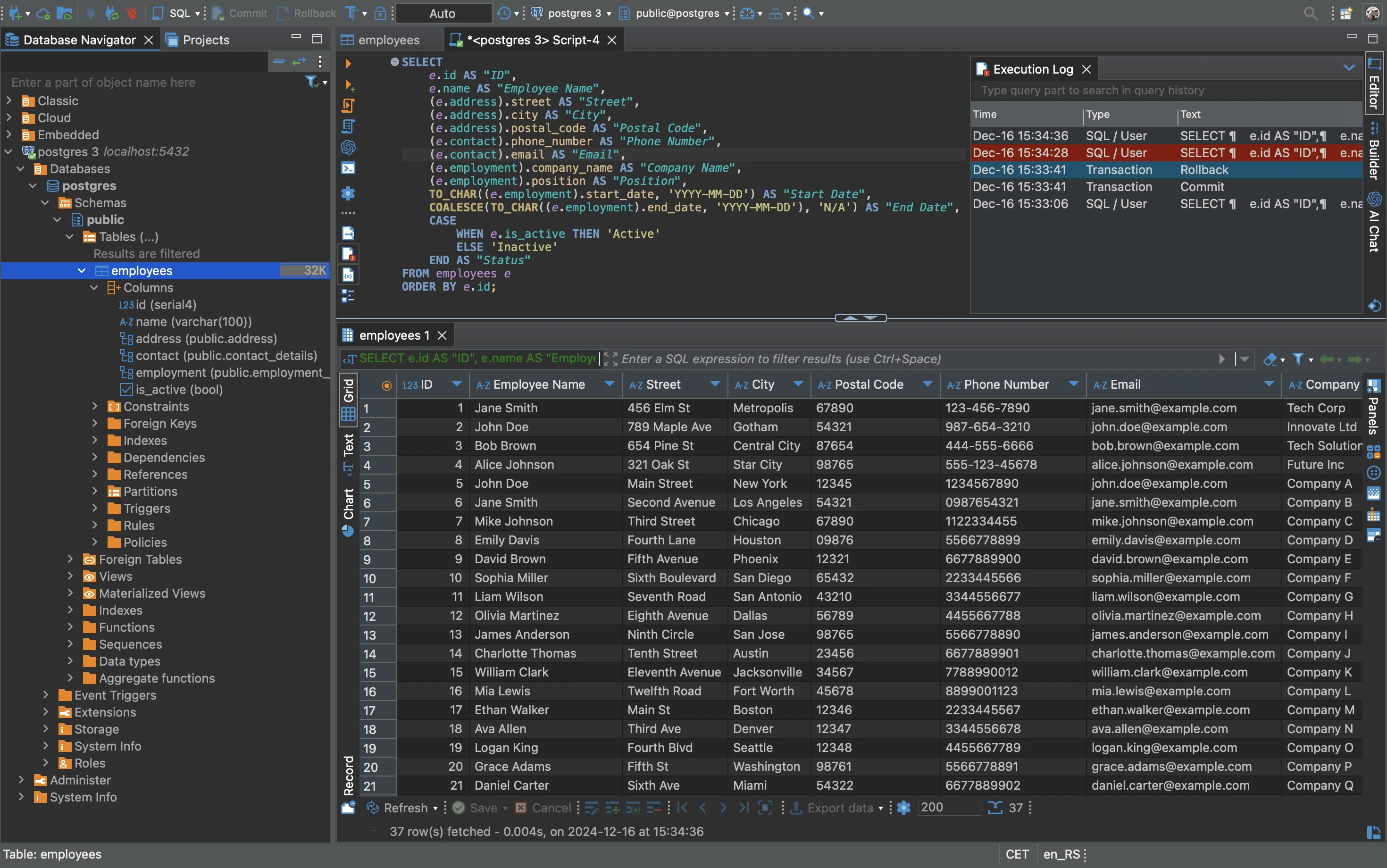
DBeaver functions as a universal database management client designed for database administrators, data analysts, and backend developers who need to interact with multiple database engines from a single interface. Rather than installing isolated, native clients for PostgreSQL, MySQL, SQL Server, and Oracle, users can consolidate all their connections into one unified desktop application. By relying on a Java Database Connectivity (JDBC) framework, the software translates standard queries into the exact dialects required by individual relational engines, while also supporting various NoSQL architectures in its commercial tiers. This approach removes the friction of constantly switching windows and recalling distinct administrative layouts when managing complex, mixed-database environments.
For daily workflow tasks, the desktop application directly addresses the physical demands of large-scale data manipulation. Web-based administration panels frequently struggle with high-latency network drops and heavy memory consumption during multi-gigabyte data exports. In contrast, running a dedicated local client guarantees stability when filtering million-row tables, executing multi-join scripts, or generating extensive Entity-Relationship Diagrams (ERD). The interface provides a familiar workspace where database objects appear in a centralized navigator tree, allowing analysts to drag tables into a visual query builder, modify live data within a grid layout, and instantly commit changes back to the production or staging servers.
Beyond basic query execution, the application serves as a strict workspace for script management and schema inspection. Developers can trace foreign key relationships, generate Data Definition Language (DDL) scripts from existing views, and analyze query execution plans to identify performance bottlenecks. Because it operates as a heavy desktop client built on the Eclipse Rich Client Platform, it utilizes the host machine's processing capabilities to render data models and process background fetch operations, keeping the user interface responsive even while massive result sets stream from remote cloud instances or local network servers.
Key Features
- Universal Database Navigator: Organizes all connected database objects in a hierarchical tree layout, allowing users to expand schemas, inspect tables, view stored procedures, and check index definitions without writing manual inspection scripts.
- Advanced SQL Editor: Delivers a highly responsive scripting environment that includes auto-completion for table aliases and column names, syntax highlighting tailored to specific SQL dialects, and a dedicated execution log to track script performance.
- Visual Data Editor: Permits users to modify database records directly through a familiar spreadsheet-like grid, ensuring you can quickly filter result sets, update foreign keys, view large JSON objects in a side panel, and save modifications in batch commits.
- Entity-Relationship Diagramming: Generates visual maps of database schemas automatically by analyzing foreign key constraints, displaying table relationships using standard Crow's foot notation, and allowing exports to PNG or GraphML formats.
- Visual Query Builder: Enables data analysts to construct complex database queries visually by dragging and dropping tables onto a canvas, drawing join lines between matching columns, and selecting checkboxes to formulate the SELECT clause without writing code.
- Data Export and Migration: Facilitates the transfer of table data into standard formats such as CSV, XML, JSON, and Excel, while also offering a direct table-to-table migration wizard to move data across completely different database vendors.
- Execution Plan Analyzer: Reads and visualizes the EXPLAIN output from the database engine, highlighting high-cost operations such as sequential scans in red to help database administrators identify missing indexes or poorly optimized queries.
How to Install DBeaver on Windows
- Download the Windows installer package from the official vendor website, choosing the executable that bundles the OpenJDK runtime so you do not need to install Java independently.
- Launch the setup wizard and grant administrative privileges when prompted by Windows to allow the application to register itself in the system directories.
- Select your preferred installation directory, noting that the bundled Java environment will remain strictly contained within this target folder to prevent conflicts with other development tools.
- Review the component selection screen and check the option to associate
.sqlfiles with the application, ensuring your script files open directly within the client when double-clicked. - Finish the installation process and launch the application for the first time, waiting briefly as the internal Eclipse-based plugins initialize.
- Accept the prompt to create a local SQLite sample database on your first launch, which provides a safe playground to test the interface without connecting to a live production server.
- Click the "New Database Connection" icon, select your target database engine, enter your host credentials, and allow the client to download the required JDBC driver files from public repositories.
DBeaver Free vs. Paid
The product ecosystem is split into an open-source Community Edition (CE) and commercial PRO variants, including Enterprise and Team editions. The Community Edition is entirely free for both personal and commercial use, supporting all relational databases that utilize standard JDBC drivers. This free tier imposes no restrictions on the number of connections, the size of data exports, or query frequency, making it a fully capable daily driver for traditional SQL development and administration.
The Enterprise Edition introduces native support for NoSQL databases, including MongoDB, Cassandra, Redis, and Couchbase, which require specialized viewers and proprietary connectors not present in the free edition. It also adds enterprise security integrations, such as Single Sign-On (AWS SSO, GCP SSO, Okta), Kerberos authentication, and an S3 file browser to interact directly with cloud storage. Furthermore, the paid tiers include an AI assistant module that integrates language models to convert natural language prompts directly into SQL scripts.
Pricing for the commercial tiers is structured on a per-user, per-year subscription basis. The Enterprise Edition is currently priced around $250 annually per user, while the collaborative Team Edition scales from $80 to $800 depending on the deployment size and specific feature requirements. To accommodate testing, the vendor offers a 14-day free trial for the Enterprise Edition, allowing database administrators to evaluate the NoSQL connectors and schema comparison tools before committing to a license.
DBeaver vs. DataGrip vs. HeidiSQL
DataGrip is a commercial IDE developed by JetBrains, built explicitly for database professionals who require deep code-inspection tools. Because it aggressively indexes the entire database schema upon connection, DataGrip offers incredibly fast and accurate auto-completion for complex stored procedures. However, it requires a continuous paid subscription and consumes significant local storage for its indexes, whereas DBeaver provides a highly capable open-source tier that manages standard relational workloads without mandatory licensing fees.
HeidiSQL operates as a remarkably lightweight, Windows-native application focused tightly on MySQL, MariaDB, and SQL Server. Built in Delphi, it launches almost instantly and consumes very little memory compared to Java-based applications, making it highly effective for quick data edits. Despite its speed, HeidiSQL lacks the vast library of JDBC drivers needed for Oracle or DB2, and it omits the advanced visual diagramming features required for mapping out large enterprise architectures.
DBeaver serves as the optimal middle ground for administrators who manage a chaotic mix of database vendors. By prioritizing a universal connection manager, detailed ERD generation, and vast driver support over pure startup speed or strict code indexing, it consolidates administrative tasks that would otherwise require juggling multiple specialized applications, making it the most practical choice for cross-environment data management.
Common Issues and Fixes
- Java OutOfMemoryError during large exports. When processing massive data sets, the application might exceed its default heap space allocation. To fix this, locate the
dbeaver.inifile in the Windows installation directory, open it in a text editor, and increase the-Xmxvalue (for example, change it to-Xmx4096mto allow 4GB of RAM allocation), then restart the program. - Missing JDBC drivers upon first connection. The Community Edition does not bundle proprietary database drivers in the installer to keep the download size small and comply with licensing. When you attempt to connect to a new engine, click the "Download" button in the driver configuration window to fetch the required
.jarfiles from public Maven repositories. - Network connection timeouts over secure tunnels. If your database connection drops frequently while using an SSH tunnel, navigate to the connection properties, select the SSH tab, and enable the "Keep-Alive" interval setting. Configure it to ping the server every 30 seconds to prevent intermediate firewalls from terminating the idle socket.
- Read-only data grids blocking edits. Users often find that they cannot modify cell values in the results grid. This occurs when the query does not include the table's primary key, or the table lacks a primary key entirely, preventing the client from formulating a safe UPDATE statement. Ensure your SELECT query explicitly includes the primary key column to enable grid editing.
Version 26.0.0 — March 2026
- AI Assistant: Introduced the capability to filter specific database objects within the AI scope preferences.
- Data Editor: Resolved a glitch in record mode where attempting to add a fresh row mistakenly duplicated an existing one, corrected DDL generation for keyless tables, and patched a column visibility bug.
- ER Diagrams: Fixed a bug that caused table names to be cut off when exporting diagrams as PNG images.
- Task Management: Restored the functionality for executing tasks that include linked scripts.
- Connectivity: Addressed issues with jump host modifications so hostname changes apply instantly, and repaired the "Test tunnel configuration" tool for custom network setups.
- Database Drivers & Support: Upgraded the Athena driver to version 3.27.0, implemented currency data type support for Salesforce, and ensured SingleStore correctly applies native database encoding when adding new tables or rows.
- Database Fixes: Solved an issue with ER diagram generation for MySQL/MariaDB tables with foreign keys, corrected the PostgreSQL table policy view to accurately display all assigned roles, and fixed schema-qualified table name autocompletion for Microsoft Fabric and Azure SQL Server.