Citra Emulator operates as a specialized translation layer that allows modern desktop computers to run software originally designed for the Nintendo 3DS handheld console. By intercepting the original hardware instructions and translating them so a desktop processor can execute them, the application enables players to experience legally dumped game cartridges directly on a PC monitor. The software caters to game preservationists, enthusiasts looking to replay their library with enhanced visual fidelity, and users who prefer navigating 3D environments with physical analog sticks rather than a handheld interface. Playing these titles on a large display shifts the fundamental mechanics, transforming low-resolution portable environments into sharp desktop sessions.
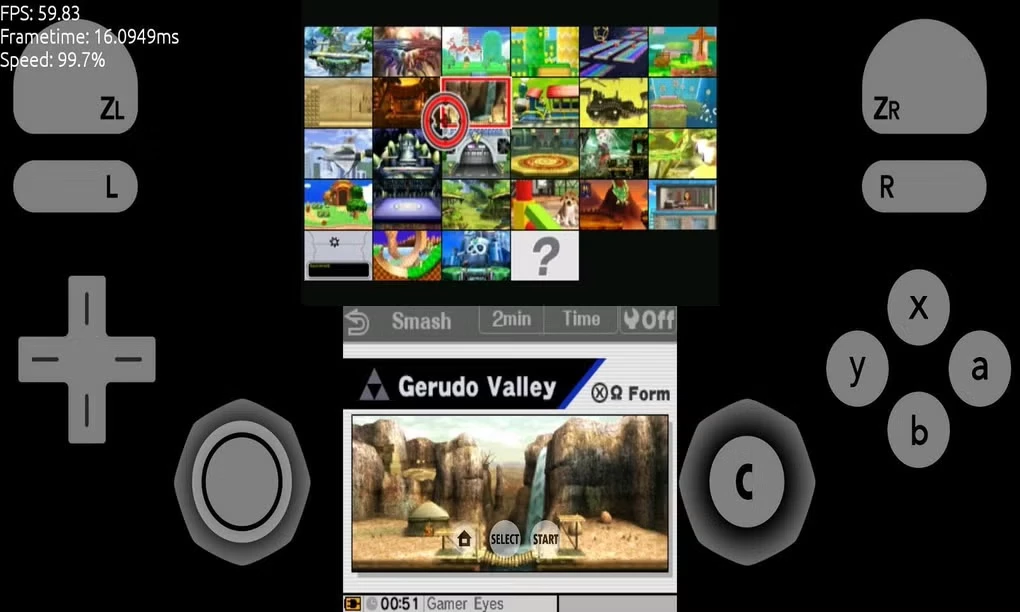
Because emulating complex dual-screen hardware requires intensive processing, relying on a native Windows application is a strict necessity. Browser-based toy emulators lack the direct hardware access needed to handle advanced graphics APIs like OpenGL and Vulkan, which are essential for rendering the catalog at full speed. This desktop program utilizes local CPU threads for core emulation logic while offloading rendering tasks directly to the graphics card. Users depend on this localized environment to manage heavy shader caches, store complex save states, and handle high-resolution texture injection without the latency of cloud streaming. The desktop form factor also solves the inherent dual-screen design of the original hardware by utilizing widescreen monitors to place both the primary view and the secondary touch panel side by side.
Following the discontinuation of the original official project in 2024, the emulation engine's development transitioned to dedicated community developers who maintain the primary codebase. This shift ensured that the underlying architecture did not become obsolete as new Windows graphics drivers were released. Players select this specific build to retain the highest possible compatibility rates while benefiting from workflow upgrades, such as improved Vulkan pipelines and tighter audio synchronization. The focus remains strictly on delivering a highly accurate, performant desktop environment that respects the original game logic while lifting the artificial hardware limitations of the physical console.
Key Features
- Internal Resolution Scaling: The graphics rendering engine permits users to multiply the native display resolution up to ten times, producing a sharp 4K output on compatible monitors. This setting directly applies modern antialiasing and anisotropic texture filtering to the 3D models before they reach the screen, removing jagged edges.
- Customizable Dual-Screen Layouts: To accommodate the original dual-display hardware design on a single desktop monitor, the interface provides extensive layout controls. Users can select a side-by-side view, stack the screens vertically, or prioritize a large main screen with a smaller touch panel in the corner.
- Hardware Shader Compilation: By shifting intense graphics calculations from the processor to the dedicated graphics card, the application drastically reduces stuttering during heavy visual moments. Enabling the asynchronous shader compilation and disk shader cache options ensures that rendered visual effects are saved locally to prevent future frame drops.
- Advanced Input Mapping: The controller configuration menu natively recognizes standard DirectInput and XInput gamepads, allowing users to bind original face buttons and triggers to modern controllers. The bottom touch screen functionality can be operated via the mouse cursor or mapped directly to a secondary analog stick.
- Local Multiplayer Networking: The software actively simulates the original local wireless communication protocols over a standard internet connection. Users can navigate the built-in multiplayer interface to join public or private lobbies, making it possible to trade in-game items or participate in multiplayer matches with other desktop players.
- Custom Texture Injection Support: The core emulation environment supports the loading of external image files to replace low-resolution in-game assets. By placing correctly formatted image files into the designated custom textures directory, the rendering pipeline automatically intercepts the original textures and swaps them with high-definition alternatives.
- State-Based Save System: In addition to reading the standard in-game save files, the application features an independent save state manager. This allows users to capture the exact current state of the emulator's memory and write it to a local file, making it possible to freeze and resume gameplay at any precise moment.
How to Install Citra Emulator on Windows
- Download the official Windows installer package or the standalone compressed archive directly from the designated developer repository to ensure you receive an unaltered build.
- If using the installer executable, launch the setup file and approve the standard Windows User Account Control prompt. If using the archive, extract the contents into a dedicated folder on your local drive.
- Select the installation directory during the setup process, ensuring that the chosen local drive offers fast read speeds, as the application relies heavily on rapid disk access for loading shader caches.
- Choose the preferred shortcut options to create a desktop icon and register the program to automatically open recognized game file extensions, then finish the wizard.
- Launch the primary application executable to initialize the background directory structure, which automatically generates the necessary configuration files inside your local AppData folder.
- Double-click the empty main window interface to bring up the directory selection prompt, then navigate to the specific local folder where your decrypted game files are stored.
- Open the Configuration panel under the Emulation menu tab to select your graphics rendering backend, explicitly choosing Vulkan for modern hardware to maximize performance, or OpenGL for older graphics cards.
- Navigate to the Input tab to map your physical controller buttons to the virtual layout, ensuring you save your custom control profile before booting your first title.
Citra Emulator Free vs. Paid
Citra Emulator is distributed entirely as free, open-source software under the strict guidelines of the GPL license. The development team does not charge any upfront purchase price for the application, nor do they lock specific features behind premium tiers or mandatory commercial subscriptions. All advanced functionality, including high-resolution rendering scaling, custom texture injection capabilities, and multiplayer lobbying tools, is fully integrated into the standard public release at no cost to the end user.
The project maintains a completely non-commercial business model that relies on collaborative code maintenance rather than traditional software monetization. Users are never required to create digital accounts, register for periodic licenses, or input payment information to execute their legally dumped game files. There are no hidden trial periods, and the software does not place artificial limitations on how many save states you can create or restrict the duration of your emulation sessions.
Players must exercise caution regarding third-party websites or repackagers attempting to sell the software or demanding payment for access to customized builds. The official application never places invasive watermarks on the video output or restricts rendering resolution to enforce a purchase. If a downloaded build demands a financial transaction or a registration code, it is an unofficial distribution that directly violates the open-source licensing agreement.
Citra Emulator vs. Lemonade vs. MelonDS
Lemonade emerged as an alternative direct continuation of the 3DS emulation ecosystem following the original project's discontinuation. The development strategy for Lemonade focuses heavily on rapid experimental updates, restructuring the core user interface, and integrating alternative code additions at a fast pace. Users might install Lemonade if they are specifically interested in testing bleeding-edge graphics modifications or experimental audio synchronization tools that have not yet stabilized. However, this aggressive update cycle can occasionally introduce unexpected interface regressions or temporary rendering bugs, requiring users to frequently reconfigure their graphical preferences.
MelonDS targets the architecture of the older, standard dual-screen handheld console rather than the more complex 3DS hardware. It provides highly accurate emulation specifically for that earlier generation, focusing intensely on precise processor timing and accurate local network connectivity replication. Players should select MelonDS when their primary objective is revisiting older standard DS cartridges, as it handles the legacy architecture with fewer visual glitches, lighter hardware demands, and greater accuracy than trying to force backward compatibility through a newer hardware emulation environment.
Citra Emulator remains the most practical choice for running the modern software catalog on a Windows machine due to the maintainers' focus on foundational stability and steady hardware optimization. It effectively balances high-resolution texture rendering with a highly reliable Vulkan backend, significantly reducing the constant visual stuttering often found in more experimental forks. For users who require a highly dependable daily environment with extensive controller support and consistent layout management, this application provides the most predictable and functional gameplay experience.
Common Issues and Fixes
- Stuttering and lag during initial gameplay sessions. This performance drop occurs because the emulator must actively compile shaders for new visual effects on the fly. Fix this by navigating to the advanced graphics settings and enabling both the asynchronous shader compilation and disk shader cache options, which saves the compiled effects locally.
- Audio distortion, crackling, or desynchronized sound effects. Sound synchronization issues typically happen when the core emulator fails to maintain a consistent full frame rate. To resolve this, lower the internal resolution scaling multiplier to reduce the computational load on the graphics card, or switch the audio output engine directly to the Cubeb interface.
- The secondary touch screen appears too small on a high-resolution monitor. The default layout stacks the dual screens proportionally, which can waste available monitor space and make text hard to read. Navigate to the View menu, select the Custom Screen Layout option, and manually drag the bottom touch window to a more readable corner while independently scaling its exact display size.
- Game files fail to load and immediately display an encryption error. The standard emulator executable cannot read encrypted cartridge dumps directly out of the box due to missing hardware keys. Ensure that your specific game files are fully decrypted using the proper hardware dumping tools from a modified console before attempting to add them to the application directory.
- Analog sticks drift or register ghost inputs during gameplay. This happens when the deadzone settings in the input configuration are set too low for a sensitive or aging physical controller. Open the Input settings menu, select your active controller profile, and manually increase the deadzone percentage slider for both analog sticks until the resting position no longer triggers unwanted movement.
Version 2123.3 — December 2024
Added:
- Secondary display support for dual-screen Android devices
- Native support for Android devices with 16kb memory pages
- macOS binaries built with Xcode 16
Improved:
- Secondary display handling on Android devices
- Platform support for modern systems
- Vulkan renderer stability with external displays
Fixed:
- Issue where disconnected secondary screens caused emulation problems
- Games not closing properly when switching between titles
- Compilation failures with newer Clang versions
- Qt widget corruption on newer macOS versions