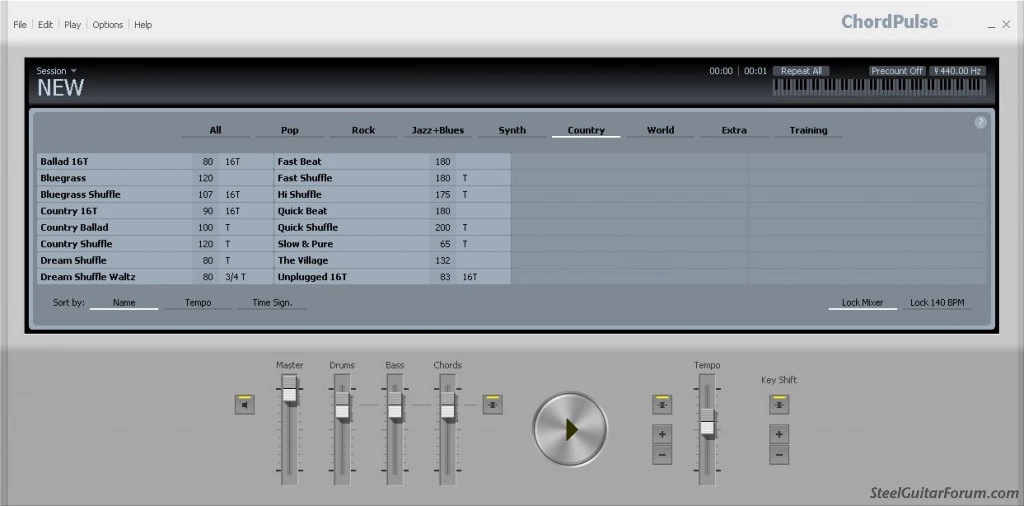
ChordPulse serves as an interactive virtual backing band, acting as a practical tool for musicians to practice, improvise, and compose music on their desktop computers. Instead of forcing players to practice over static MP3 audio files or manually program individual drum and bass notes in a digital audio workstation, this utility generates dynamic rhythm sections based purely on user-defined chord progressions. You simply select a key, type in standard chord names or click them on the visual grid, and pick a musical style. The application instantly interprets these instructions to synthesize a full accompaniment featuring percussion, a bassline, and rhythmic chordal instruments.
Vocalists, guitarists, brass players, and music educators use this tool to quickly sketch out song structures, test harmonic ideas, and create endless practice loops. Educators frequently project the interface onto a screen to visually demonstrate the difference between major, minor, and dominant tonalities in real time. Because the software operates exclusively as a local Windows application, it avoids the latency issues, mandatory internet connections, and browser resource constraints associated with cloud-based composition tools. Every change to the tempo, key signature, or musical genre processes instantly through the system's local MIDI synthesizer. This immediate feedback loop allows musicians to experiment with completely different genres for the exact same progression in real time, reducing the friction between a musical concept and a hearable draft.
The desktop environment ensures that users can rely on the software during offline rehearsals, private lessons, or stage performances without worrying about network stability. While massive recording suites demand significant hardware resources to load large sample libraries, this program requires minimal disk space and runs efficiently on older hardware. It bridges the gap between a clicking metronome and a fully produced backing track, giving instrumentalists a tireless backing band that strictly follows their harmonic directions. The predictable nature of the MIDI engine means users can rely on consistent timing, which is required when mastering difficult rhythmic subdivisions or exploring syncopated phrasing.
Key Features
- Instant Backing Generation: The software eliminates manual sequencing by automatically generating a full rhythm section the moment you populate the main grid with chord names. Users click on a measure, select a root note, and apply modifiers like minor, augmented, or dominant seventh to build a progression. The engine instantly recalculates the bass patterns and accompaniment rhythms to match the new harmonic structure without any playback hesitation.
- Extensive Style Library: The built-in library includes dozens of distinct musical styles covering rock, blues, country, pop, jazz, Latin, and dance genres. Selecting a different style completely alters the drum groove, changes the bassline behavior, and switches the comping pattern of the chordal instruments. This allows a songwriter to hear how a simple acoustic ballad progression sounds when arranged as an upbeat shuffle or a reggae track with a single mouse click.
- Independent Track Mixing: The bottom panel features a dedicated mixer where users can independently control the volume levels of the drums, bass, and chords. This functionality supports specific practice routines; a bass player can mute the generated bassline to practice locking in with the drums and chords, while a drummer can isolate the bass and accompaniment to work on rhythmic pocket playing.
- Standard MIDI File Export: Once a progression is finished, the session can be exported directly as a standard MIDI file through the main file menu. This workflow allows composers to use the software as a rapid prototyping tool before dragging the resulting MIDI data into a digital audio workstation to assign third-party virtual instruments to the generated notes.
- Interactive Chord Audition: The dedicated chord audition tool allows musicians to preview specific voicings and root notes before adding them to the timeline. By clicking the audition buttons, users can hear how complex slash chords or inversions sound in isolation, ensuring the correct harmonic choice is made even when the main sequencer is stopped.
- Visual Note Mapping: A split keyboard visualization mode displays the actual notes being played by the backing instruments in real time. This serves as a practical educational resource, helping students visually connect the written chord symbols on the grid to the physical piano keys making up the arpeggios and rhythmic strikes.
- Flexible Looping and Tempo Controls: The interface includes a dedicated loop region selector and a precise BPM slider. Musicians can highlight a difficult four-bar turnaround, reduce the tempo to half speed without altering the pitch, and set the section to loop indefinitely, creating a controlled environment for drilling fast scales or complex solos.
How to Install ChordPulse on Windows
- Navigate to the official Flextron Bt. website and download the standalone Windows installer executable for the desktop application.
- Locate the downloaded setup file in your local downloads folder and double-click it to initiate the installation wizard.
- Accept the prompt from the Windows User Account Control to permit the installer to make necessary file changes to your system.
- Read and accept the standard end-user license agreement presented by the developer on the first screen of the wizard.
- Select the destination directory for the application files, which defaults to the standard Program Files folder on your primary system drive.
- Choose whether to create a desktop shortcut and a Start menu folder for the program, which is recommended for quick access during daily music practice sessions.
- Click the install button to extract the core application files; the software is compact, so this local extraction process typically finishes in a few seconds.
- Launch the program from the new desktop shortcut; the application defaults to using the Microsoft GS Wavetable Synth, so ensure your system audio is unmuted to hear the accompaniment on the first run.
ChordPulse Free vs. Paid
The developer provides a straightforward commercial model that begins with an unrestricted 14-day free trial. During this trial window, users have full access to the entire library of musical styles, all advanced chord types, and the complete MIDI export functionality. This ensures that musicians can test the software within their actual daily practice routines and verify compatibility with their external audio workstations before spending any money.
After the trial period concludes, the software requires the purchase of a perpetual license to continue operating. This one-time fee of $29.95 eliminates the need for ongoing subscriptions or recurring billing. Upon completing the purchase through the official vendor portal, users receive a registration code via email. Entering this code into the trial application unlocks it permanently for offline use. Furthermore, the vendor policy explicitly permits a single user to install and activate the software on both a primary desktop and a secondary laptop computer simultaneously.
For individuals who only need the most basic accompaniment features, the developer offers a separate, permanently free application called ChordPulse Lite. The Lite edition restricts the user to 24 basic music styles and only 5 primary chord types, stripping away the complex slash chords and extended inversions found in the premium version. While this freeware build lacks the depth needed for advanced jazz or progressive rock composition, it serves as an effective, zero-cost metronome and basic backing band for beginners learning foundational major and minor scales.
ChordPulse vs. Band-in-a-Box vs. JJazzLab
Band-in-a-Box by PG Music is the historical giant of the automatic accompaniment category, generating tracks using thousands of actual studio audio recordings called RealTracks. This approach produces realistic, studio-quality backing tracks that sound like human session players. However, this realism comes at a very high financial cost, requires massive hard drive space to store the audio libraries, and involves navigating a dense, menu-heavy interface. Users who simply want a fast, lightweight practice tool often find the sheer scale, hardware requirements, and complexity of Band-in-a-Box to be a heavy distraction from actual playing.
JJazzLab is a free, open-source backing track generator that, similar to ChordPulse, relies on MIDI data rather than raw audio files. It is heavily geared toward jazz musicians and offers deep manipulation of rhythm generation, song structure, and phrasing. The main drawback to JJazzLab is its setup friction; because it relies on external soundfonts or connected MIDI synthesizers to produce any sound, beginners often struggle to configure the audio output. It demands a higher level of technical troubleshooting before the user can hear their first generated song.
ChordPulse provides the best middle ground for musicians prioritizing speed, simplicity, and immediate results. It bypasses the large file sizes and high price tags of Band-in-a-Box, while outperforming JJazzLab in out-of-the-box usability by automatically linking to the native Windows synthesizer. Instrumentalists who want to open an application, type four chords, and immediately start practicing their solos will find this software to be the most practical and frictionless option among the three.
Common Issues and Fixes
- No audio output during playback. Because the software generates MIDI data rather than audio waveforms, it relies on a system synthesizer to produce sound. If you press play and hear nothing, open the application options and ensure the output device is set to the Microsoft GS Wavetable Synth, and verify your master Windows volume is turned up.
- Exported MIDI files merge onto a single track. When importing a generated backing track into a digital audio workstation, some programs default to placing the drums, bass, and chords onto one piano roll. Fix this by checking the import settings in your DAW and selecting the option to split by channel or explode to multiple tracks.
- Cannot load VST audio plugins directly. The application is designed strictly as a MIDI generator and does not feature a plugin host for virtual studio technology instruments. To use modern sampled pianos or drum libraries, you must export your progression as a MIDI file and load it into a dedicated recording suite.
- Chords sound muddy in lower octaves. If you write a progression using dense chord extensions and assign a low root note, the generated harmony instruments may clash with the bassline frequencies. Resolve this by modifying the chord to use a different inversion, or access the arrangement settings to shift the chordal accompaniment up by one octave.
Version 2.6 — September 2020
- Added chord preview feature allowing users to hear chords and bass notes even when playback is stopped, with selectable arpeggio modes and instrument options
- Introduced optional chord note display within the chord selection interface
- Implemented "Split Keyboard" visualization along with additional enhancements to the musical note visualizer
- Enhanced arrangement point indicators to show modifications applied to drum, bass, and chord sections
- Included five new accompaniment styles across Pop, Rock, and Extra categories: Fast Pop, Pop Pad, Steady Beat, Funk Base D, and Heavy
- Expanded and improved documentation including help file and integrated program assistance
- Redesigned Options menu structure for better usability
- Added customizable bar number display frequency settings
- Enabled double-click functionality to quickly close style, tempo, and key selection dialogs
- Configured Escape key to dismiss various selector windows, with optional Escape-to-quit program setting
- Refined undo/redo functionality with more comprehensive chord and arrangement point editing history
- Applied multiple minor enhancements and performance optimizations throughout the application
- Resolved various software bugs to improve stability