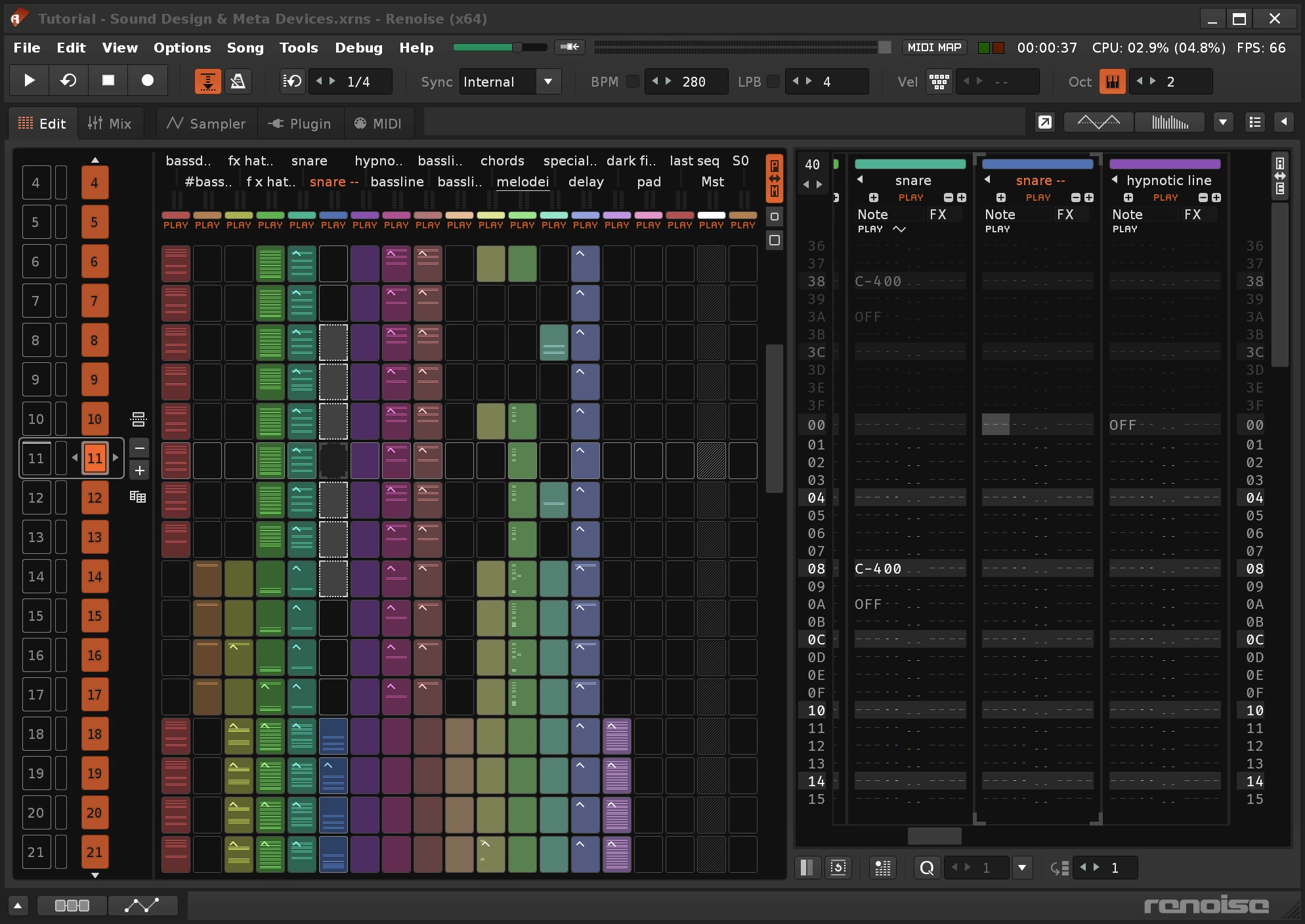
Renoise operates as a digital audio workstation that rejects the standard horizontal timeline found in conventional music software, replacing it with a vertical tracker interface. Instead of drawing rectangular blocks on a piano roll using a mouse, producers construct sequences by typing alphanumeric characters and hexadecimal values into a scrolling top-down grid. This interface design caters directly to electronic musicians, chiptune artists, and breakcore producers who prioritize high-speed editing, tight rhythmic programming, and extreme sample manipulation over live audio recording. Because the layout exposes every parameter—from note pitch and volume to panning and effect triggers—as text data, the application demands a highly technical, keyboard-driven approach to composition.
The software functions primarily as an advanced sample sequencing environment rather than a multi-track tape recorder. Users load audio files into the built-in instrument engine, slice them into individual drum hits or vocal chops, and trigger them with exact rhythmic timing across the timeline. The tracker format allows for micro-edits that require tedious automation lane drawing in other applications; for example, a producer can trigger a snare, reverse it, pitch it down, and apply a specific delay effect within a single line of text on the pattern grid. While it hosts external virtual instruments, the internal architecture encourages resampling and granular audio destruction.
Choosing this application requires a willingness to learn its specific shortcut economy and structural logic. Producers who rely on visual comping, dragging audio clips, or standard MIDI piano rolls often experience a steep learning curve. For those who adapt to its structure, the program delivers a highly efficient sequencing workflow. By keeping hands on the QWERTY keyboard and navigating rows with arrow keys, users can block out full tracks, program complex drum patterns, and route modulation without breaking focus to click through nested menus.
Key Features
- Feature Name: Vertical Tracker Interface. The primary sequencing environment relies on a scrolling, top-down alphanumeric grid where time moves vertically. Users input notes, volume levels, panning positions, and exact hexadecimal effect commands directly into rows, allowing for surgical edits without opening separate automation lanes. For instance, typing specific hex codes triggers sample offsets or note retriggers without altering the underlying audio file.
- Feature Name: Advanced Sampler Engine. The internal instrument architecture allows users to map, slice, and modulate audio files directly within the project. A waveform editor includes automatic transient detection for chopping drum loops, instantly mapping the resulting slices to different keyboard keys. Each sample can pass through its own AHDSR envelopes, modulation matrices, and internal effects chains before even reaching the main mixing console.
- Feature Name: Plugin Hosting and Grabbing. The application loads external VST and VST3 instruments and effects, bridging modern synthesizer technology with the classic tracker sequencing method. A built-in "Render to Instrument" tool allows users to freeze CPU-heavy synthesizers into multisampled offline patches. This captures the plugin's output across multiple octaves and velocity layers, turning it into a lightweight internal sample instrument.
- Feature Name: Pattern Matrix Arrangement. To organize complex compositions, the software divides the vertical timeline into distinct blocks within a dedicated matrix view. This bird's-eye grid allows producers to clone, mute, rearrange, and loop specific sections of the track. It acts as the primary structural tool, compensating for the lack of a traditional horizontal arrangement window.
- Feature Name: Meta Devices and Routing. The effect architecture includes specialized routing tools that map audio or MIDI data to parameters across different channels. Producers can use a Signal Follower to duck the volume of a bassline based on the kick drum's output, or map an LFO to a filter cutoff on an entirely separate track. This modular routing creates dynamic, interconnected mixes without requiring manual automation drawing.
- Feature Name: Keyboard-Centric Workflow. The interface minimizes mouse dependency by assigning deep shortcuts to almost every editing action. Producers can copy blocks of sequence data, transpose octaves, navigate between tracks, and trigger patterns using only the computer keyboard. This economy of movement drastically accelerates the programming process for users who commit the shortcut map to memory.
- Feature Name: Lua Scripting Architecture. An open API allows users to write custom tools and extensions using the Lua programming language. The community has built hundreds of add-ons that introduce generative algorithmic sequencing, custom MIDI hardware mappings, and advanced phrase programming. This scripting layer ensures that the software can adapt to highly specific technical requirements beyond the factory feature set.
How to Install Renoise on Windows
- Navigate to the official vendor website and download the Windows installer executable from the public download section or the private Backstage portal.
- Launch the downloaded setup file and approve the Windows User Account Control prompt to allow the installer to make system changes.
- Review the end-user license agreement and select your desired installation path; the installer defaults to the standard Program Files directory on your primary system drive.
- Choose whether to associate the application with legacy tracker file formats, such as .mod, .xm, and .it, so they open automatically when double-clicked in Windows Explorer.
- Complete the installation wizard and launch the application directly from the desktop shortcut or Start menu.
- Upon first launch, open the Preferences menu and navigate to the Audio tab to select an ASIO driver, which is strictly necessary for low-latency playback and recording on Windows.
- Navigate to the Plugins section in Preferences to define the folder paths for your external VST files, then click the rescan button to populate your effects and instrument lists.
- If you own a paid license, log into the vendor's Backstage portal via your web browser, download your personalized key file, and drag it directly into the running application window to remove all demo restrictions.
Renoise Free vs. Paid
The developer offers a free demo version that functions indefinitely without a hard expiration date, allowing users to test the sequencing environment at their own pace. This free tier includes the complete feature set for composing, saving, and loading projects, but it enforces strict output limitations. Specifically, the demo disables the ability to render the final composition to a WAV audio file, blocks ASIO support on certain configurations, limits ReWire routing, and displays occasional nag screens that remind the user to purchase a license.
To remove these limitations, users must purchase a perpetual software license directly from the vendor's site. The current pricing structure typically sits around $88 (excluding regional VAT), which unlocks the application fully and removes all export restrictions. This license is tied to a downloadable key file rather than an online subscription server, meaning the software operates entirely offline without requiring a continuous internet connection, cloud activation checks, or recurring monthly fees.
A standard license purchase includes the current version of the software along with access to a full major version cycle of future updates. For example, buying the software grants access to subsequent point releases until the next major version threshold is reached. Additionally, the vendor sells a separate plugin called Redux—which packages the internal sampler and phrase editor into a VST format for use in other hosts—and offers percentage-based crossgrade discounts for users who already own one of the two products.
Renoise vs. OpenMPT vs. FL Studio
OpenMPT serves as a strictly traditional, open-source tracker that closely mimics the classic module editors of the 1990s. It provides an excellent, entirely free environment for authoring legacy .mod, .xm, and .it files using standard Windows copy-paste conventions. However, OpenMPT lacks a modern pattern matrix, deep native audio routing, and the advanced VST3 handling required for heavy modern production. Renoise offers a significantly more advanced internal sampler, native meta-devices, and a polished interface, making it a complete modern audio workstation rather than a nostalgic format editor.
FL Studio relies on a horizontal timeline, a visual playlist, and a highly detailed piano roll that depends heavily on mouse interaction. This design makes FL Studio exceptional for visual chord programming, recording live instrument takes, and dragging audio clips across a standard timeline. Renoise discards the piano roll and horizontal timeline entirely in favor of an alphanumeric vertical grid. This fundamental difference means FL Studio is generally better suited for standard pop, trap, and live recording, whereas Renoise forces a rigid, mathematical approach to sequencing.
Ultimately, OpenMPT is the correct choice for producers who need a free application to write authentic retro module files for older hardware or demoscene projects. FL Studio is the better option for musicians who prefer to draw MIDI notes visually and record external hardware synths or vocals into audio tracks. Renoise stands as the superior choice for breakcore, jungle, and IDM producers who want the fastest possible keyboard-driven workflow for chopping drum breaks and manipulating sample data at a granular level.
Common Issues and Fixes
- Problem description. Tiny interface elements on high-resolution monitors. When running the application on a 4K display, the text and grid rows can appear unreadable. Open the Preferences menu, navigate to the GUI tab, and manually increase the UI scaling percentage, though users should note that pushing the scaling too high may result in slightly blurry text depending on Windows display scaling settings.
- Problem description. Audio playback crackling and high latency. Using the default DirectSound or WASAPI drivers in Windows often results in stuttering audio and delayed input response. Navigate to the Audio Preferences and switch the device type to ASIO; if you do not have an external audio interface with dedicated drivers, installing and selecting ASIO4ALL will bypass the standard Windows mixer and resolve the latency.
- Problem description. Third-party plugin crashes closing the application. Certain poorly coded or older 32-bit bridged VST plugins can crash the entire software during playback. To prevent this, go to the Plugins/Misc settings and enable plugin sandboxing, which forces third-party instruments to run in a separate background process, ensuring a plugin failure does not destroy unsaved project data.
- Problem description. Inability to route audio to previous mixer tracks. Users attempting to send a signal from a track on the right side of the mixer to a track on the left will find the action blocked. The audio engine processes signals linearly from left to right; to fix this, physically click and drag the destination track in the mixer so it sits to the right of the sending track, preventing infinite feedback loops.
- Problem description. Software freezing during initial VST scan. The application may hang on the startup screen if it encounters a corrupted plugin file during its directory scan. To resolve this, navigate to your hidden AppData/Roaming folder in Windows, locate the application's log file to identify which specific DLL is causing the freeze, remove that file from your VST directory, and restart the software.
Version 3.5.4 — November 2025
- Resolved an issue on Linux where audio processing threads for multicore systems were not utilizing appropriate real-time priority settings
- Enhanced Lua API functionality to enable setting the "Renoise OSC Device" as a MIDI input option for instrument configurations